Laravel-medialibrary: Google Cloud Storage
Laravel 5.4
I'm trying to upload media to a GCS bucket but it's throwing some errors, not sure if it's related to my code or the package.
I'm using laravel-google-cloud-storage which works perfectly for basic uploads not using media library.
In config/filesystems.php I have a disk named media with this:
'driver' => 'gcs',
'project_id' => env('GOOGLE_CLOUD_PROJECT_ID', 'your-project-id'),
'key_file' => base_path('gcs.json'),
'bucket' => env('GOOGLE_CLOUD_STORAGE_BUCKET', 'your-bucket'),
'path_prefix' => env('GOOGLE_CLOUD_STORAGE_PATH_PREFIX', null),
'storage_api_uri' => env('GOOGLE_CLOUD_STORAGE_API_URI', null),
'root' => '/media'
It's the same config I used for the other GCS bucket that I know works, so I'm certain it's not the GCS package/config that is the issue.
In config/laravel-medialibrary.php I have the default config, just with an increased upload size and the disk is media.
This is the code that fails:
$mission
    ->addMedia($request->file)
    ->withCustomProperties(['user_id' => auth()->user()->id])
    ->toCollection('images');
Conversion Method in Mission
public function registerMediaConversions()
{
    $this->addMediaConversion('thumb')
        ->setManipulations(['w' => 384, 'h' => 384, 'fit' => 'crop'])
        ->performOnCollections('images');
}
It uploads the file fine, albeit to the wrong destination. I'm expecting it to upload to {bucket-name}/media but instead it uploads to just {bucket-name} so you get a bunch of numbered folders in the root dir of the bucket.
The response of that upload request I get this:
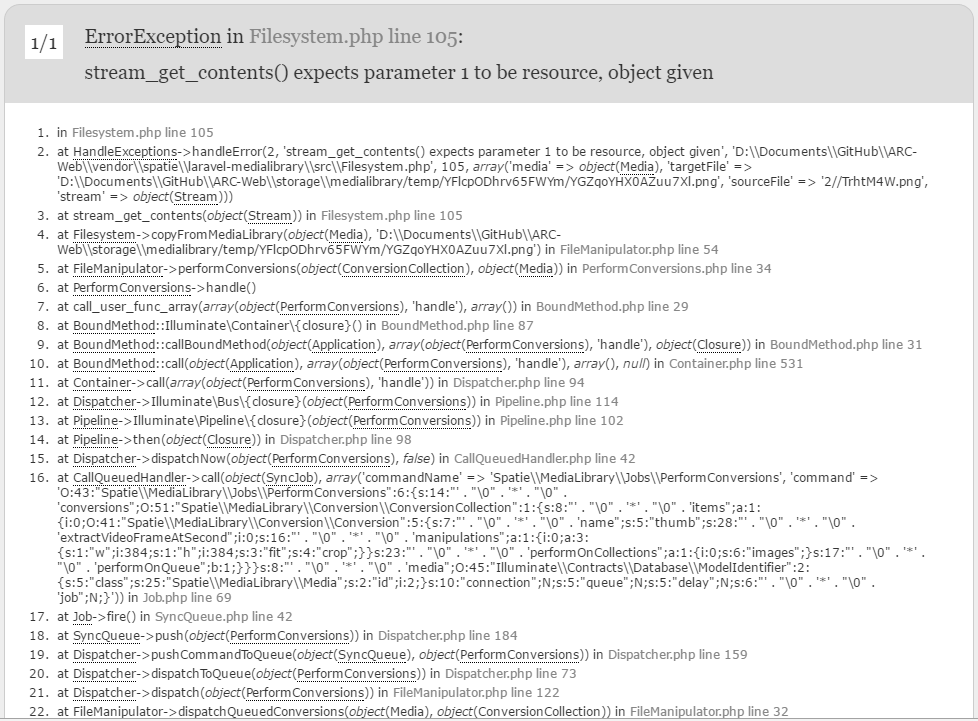
So in conclusion, there are two issues:
- Doesn't upload to the correct directory
- Fails to create conversions
 jameslkingsley
All 6 comments
Are you getting this error with the latest version of the package?
 freekmurze
on 29 Mar 2017
freekmurze
on 29 Mar 2017
Yes, 4.13.5.
jameslkingsley
on 29 Mar 2017
Hi @jameslkingsley
I've just checked the Superbalist/flysystem-google-cloud-storage package that's being used and one of their latest commits is a fix for your problem! It's tagged as 5.0.0 but the Superbalist/laravel-google-cloud-storage package still uses ^4.0...
I'd suggest you open a new issue there so they can update their dependencies (or just implement the adapter yourself, it's just one provider).
Good luck!
 AlexVanderbist
on 7 Apr 2017
AlexVanderbist
on 7 Apr 2017
@jameslkingsley any advice on how to handle deleting files from GCS? They dont seem be deleted automatically when deleting media using this library?
 AlexECP
on 21 Dec 2017
AlexECP
on 21 Dec 2017
@AlexECP I'm having a similar issue. I've managed to get the package to work with my GCS bucket as far as creating a media record in my database and uploading the image to my bucket.
Have you been able to actually display an image on your frontend using something like $model->media->first()->getUrl()?
Also, I think I'm having permission issues with my bucket as it may not be publicly accessible.
Reading the Laravel documentation at https://laravel.com/docs/5.7/filesystem#storing-files, if I were using the standard Storage driver for laravel I should be able to do something like this:
The putFile and putFileAs methods also accept an argument to specify the "visibility" of the stored file. This is particularly useful if you are storing the file on a cloud disk such as S3 and would like the file to be publicly accessible:

Storage::putFile('photos', new File('/path/to/photo'), 'public');
What kind of success did you have using this package with GCS? We're you able to display your images? Did you figure out how to delete from GCS when the model is deleted?
 LarryBarker
on 25 Sep 2018
LarryBarker
on 25 Sep 2018
@jameslkingsley any advice on how to handle deleting files from GCS? They dont seem be deleted automatically when deleting media using this library?
I have the same issue, deletion doesn't work. No errors messages at all.
 beerwin
on 1 Feb 2019
beerwin
on 1 Feb 2019
Related issues
 Krato
·
4Comments
Krato
·
4Comments
 mohammad6006
·
4Comments
mohammad6006
·
4Comments
 Radiergummi
·
4Comments
Radiergummi
·
4Comments
 eichgi
·
3Comments
eichgi
·
3Comments
 kickthemooon
·
4Comments
kickthemooon
·
4Comments