Laravel-filemanager: Invalid Upload Request (but exif enabled, debug all ok)
- Operating system : ubuntu16.04
- Laravel version : v5.6.9
- Package version : v1.8.4
I read all the related issues here which includes "filemanager invalid upload request".
The summed up proposals were:
- enable exif
- check if imagick is install
- reinstall php-gd
I did all this but still i get the error "invalid upload request" when trying to upload pictures.
Dont know what do now. Can you help me please?

Edit: on my localhost development environment it works! but it doesnt work on my online server.
 dajoeberlei
All 11 comments
I changed my online system from Oneclick MySql Digitalocean droplet
to
forge/envoyer/digitalocean deployment system. Its the same code still but on my new system i dont have the issue anymore. So it is fine for now, since now somehow i skipped the problem, but still bugs me that i dont know how to fix it ;) Seemed to be a missing server config or something. (btw old one was apache2, new one is nginx)
dajoeberlei
on 16 Mar 2018
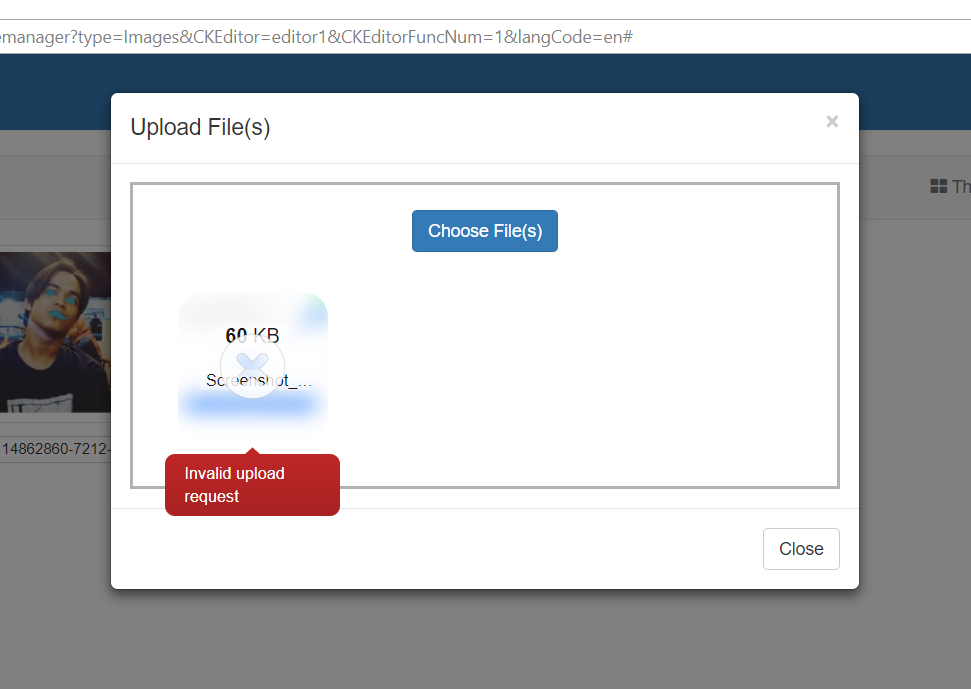
i have same problem here, php-gd installed, php-imagick installed, exif is enabled, but file get error like this, in my local is fine
 cacing69
on 25 Mar 2018
cacing69
on 25 Mar 2018
Same here. Ubuntu 16.04, PHP 7.2.3, GD enabled, Exif enabled. Haven't tried installing php-imagick yet, but will try that next.
Edit: Still not working, even with php-imagick installed. Dropzone seems to be the issue here...
 tsawler
on 28 Mar 2018
tsawler
on 28 Mar 2018
Same here in Centos, but in Ubuntu for Windows works fine, I did the same in both...
 pmirandaarias
on 9 May 2018
pmirandaarias
on 9 May 2018
i had the same problem. I solved the problem by giving 777 permission for 'photos' folder in public directory.
 shoeseat
on 31 May 2018
shoeseat
on 31 May 2018
Got the same problem
 yonask
on 26 Jun 2018
yonask
on 26 Jun 2018
I could get rid of the same issue with the @shoeseat solution for a development server but I want to ask for a real, more secure solution for a production server.
Thanks in advance, and besides of this, I really appreciate the great job done with this package 👍
 aabraham88
on 6 Jul 2018
aabraham88
on 6 Jul 2018
This is fixed in v2.0.0-alph6. If "Invalid upload request" still occurs, please open a new issue or leave comments here and I will repoen this issue.
 streamtw
on 5 Dec 2018
streamtw
on 5 Dec 2018
I still have that problem in version 2.0.0-alpha7 both locally and in production and with all the extensions that the plugin requires
 thexcats
on 22 Aug 2019
thexcats
on 22 Aug 2019
I solved problem by giving 777 permission for uploads folder in public directory
 Giiorgii
on 6 Sep 2019
Giiorgii
on 6 Sep 2019
I also face this problem. I think all shared hosting occur this problem. But no one gives a specific solution.
 faysal-web
on 11 Jul 2020
faysal-web
on 11 Jul 2020
Related issues
 t67132
·
3Comments
t67132
·
3Comments
 lukaszevo
·
4Comments
lukaszevo
·
4Comments
 farshidahmadianpin
·
3Comments
farshidahmadianpin
·
3Comments
 ikkosatrio
·
4Comments
ikkosatrio
·
4Comments
 kfulk14
·
3Comments
kfulk14
·
3Comments
Most helpful comment
i had the same problem. I solved the problem by giving 777 permission for 'photos' folder in public directory.