Laravel-filemanager: Token mismatch error while uploading BIG video files
Hi guys. When I'm trying to upload about 20MB video file, it return a Token Mismatch error, but when I upload 17MB or below, it works fine. Why is that?
 jonjie0317
All 20 comments
Hi @jonjie0317. I believe this has something to do with PHP. If your post_max_size property in your php ini file is exceeded, the $_FILEs and $_POST superglobals will not be filled. Because of this the CSRF token wil also not be posted.
Can you set post_max_size a little higher and see if that helps?
If you want to catch this error you could consider to update the max_image_size and max_file_size options in lfm.php to a value that is lower than the setting in your .ini file. (I didn't test if this works yet, but sounds plausible)
 gwleuverink
on 18 Sep 2017
gwleuverink
on 18 Sep 2017
@gwleuverink Hi, I'll try it later. Thank you for your reply.
jonjie0317
on 20 Sep 2017
Hello. Any update about this issue? After I updated this, I'm now getting the File is too big error message. Why is that? I'm just uploading 55MB. Thanks!
@gwleuverink
@g0110280
jonjie0317
on 22 May 2018
@jonjie0317 have you adjusted settings in Apache or NginX?
 streamtw
on 22 May 2018
streamtw
on 22 May 2018
May I ask what setting is that?
jonjie0317
on 22 May 2018
Please check this comment https://github.com/UniSharp/laravel-filemanager/issues/592#issuecomment-387636533.
streamtw
on 22 May 2018
I've already changed it.
upload_max_filesize: 256MB
post_max_size: 256MB
jonjie0317
on 22 May 2018
Still getting the same error. Any updates?
jonjie0317
on 23 May 2018
Can you post the exact error trace using the network tab inside chrome after a failed upload?
gwleuverink
on 23 May 2018
Hi @gwleuverink . Got no error and this is the only response:
{"html":"<p>Folder is empty.<\/p>\n","working_dir":"\/3\/Vids\/Myself"}
jonjie0317
on 23 May 2018
@gwleuverink What's do I have to do next?
jonjie0317
on 24 May 2018
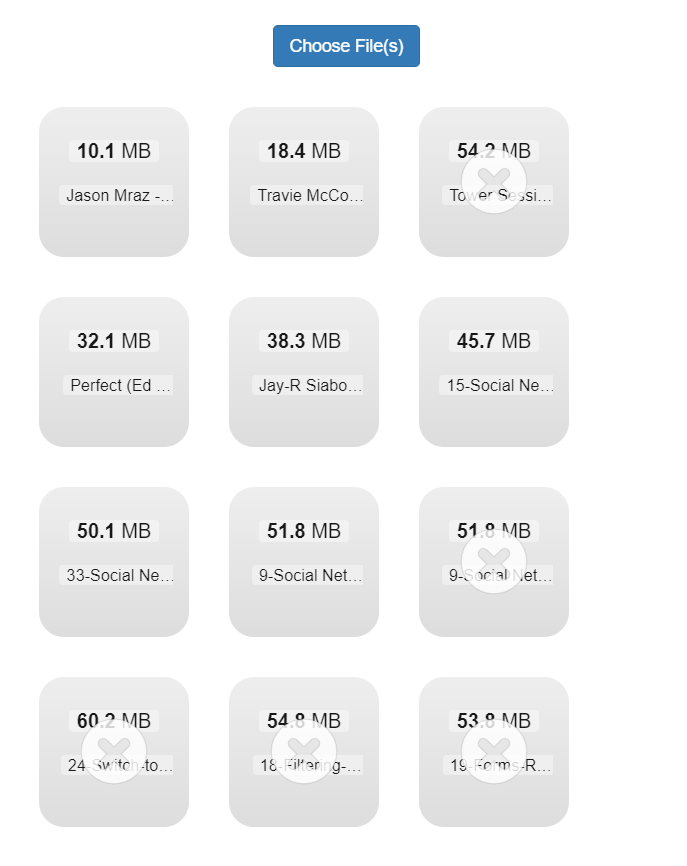
I can upload up to 51.9MB. And not greater than that. It shows an error File is too big. Please see the image below:
jonjie0317
on 24 May 2018
Check this comment https://github.com/UniSharp/laravel-filemanager/issues/592#issuecomment-388404299. See if changing memory_limit config helps.
streamtw
on 24 May 2018
I tried to changed it in lfm.php and in php.ini but still getting the same message.
jonjie0317
on 24 May 2018
I see the File is too big message in dropzone.min.js file. But I don't know what its checking. Uhm really confusing.
jonjie0317
on 24 May 2018
You might also need to change max_file_size and max_image_size in config/lfm.php.
streamtw
on 24 May 2018
It's working now!! Should I also change 'should_validate_size' => false to 'should_validate_size' => true ?
jonjie0317
on 24 May 2018
I currently have this setup. Is it fine to setup like this:

jonjie0317
on 24 May 2018
We only pass max_file_size and max_image_size to dropzone. Setting should_validate_size won't matter in this case.
streamtw
on 24 May 2018
Great! It works now. Thanks a lot @g0110280 .
jonjie0317
on 24 May 2018
Related issues
 rlrlaa123
·
3Comments
rlrlaa123
·
3Comments
 Dzhangar1980
·
4Comments
Dzhangar1980
·
4Comments
 lscavelli
·
4Comments
lscavelli
·
4Comments
 intergalactisch
·
5Comments
intergalactisch
·
5Comments
 kfulk14
·
3Comments
kfulk14
·
3Comments
Most helpful comment
We only pass
max_file_sizeandmax_image_sizeto dropzone. Settingshould_validate_sizewon't matter in this case.