Laravel-filemanager: Invalid Upload request
http://localhost:8000/photos/1/Invalid upload request I tried your Demo file and I got that error..
 flashery
All 17 comments
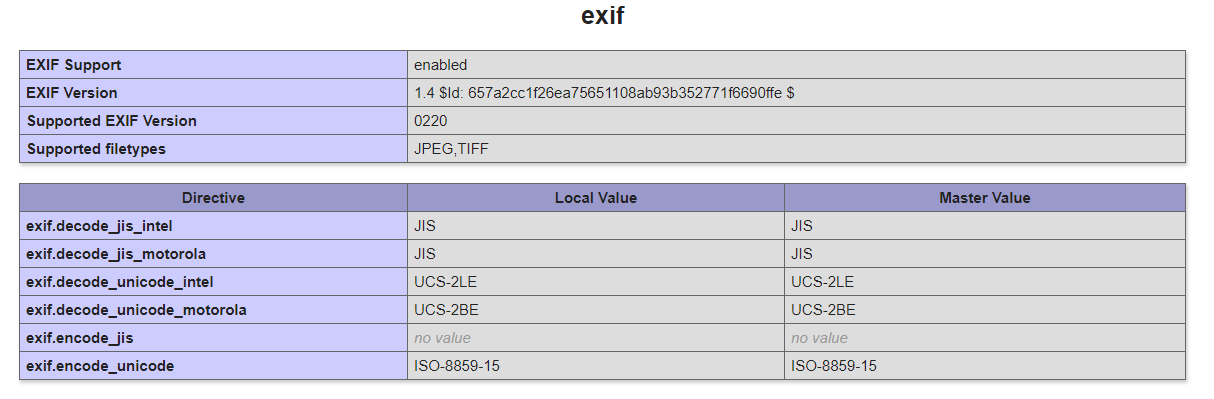
Enable the exif extension in your php config
 danrovito
on 22 Aug 2017
danrovito
on 22 Aug 2017
Thanks man
flashery
on 22 Aug 2017
@danrovito Hi. I'm facing this problem now. How can I edit exif? I found them in php.ini but what should I do with this? Is there a value I should change? And what is the effect when I change it? Thanks a lot.
 jonjie0317
on 6 Mar 2018
jonjie0317
on 6 Mar 2018
In you php.ini. It is commented by default, just uncomment it. Then restart you web server
flashery
on 6 Mar 2018
@flashery There are many exif options there, which one should I uncomment?
jonjie0317
on 7 Mar 2018
extension=php_mbstring.dll
extension=php_exif.dll
 pranayaryal
on 7 Mar 2018
pranayaryal
on 7 Mar 2018
@pranayaryal These two options are already enabled.
jonjie0317
on 8 Mar 2018
Then restart your webserver
flashery
on 8 Mar 2018
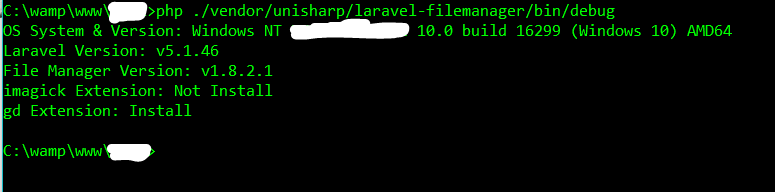
What is the output of running php ./vendor/unisharp/laravel-filemanager/bin/debug in your project directory.
I also had to do brew install php70-magick
Then restart server
See this link also https://github.com/UniSharp/laravel-filemanager/issues/475
pranayaryal
on 8 Mar 2018
I have already restart my server. Exif is now enabled but still getting the same error. Please see the image below
jonjie0317
on 8 Mar 2018
@jonjie0317 Have you tried @pranayaryal instruction? Run thisphp ./vendor/unisharp/laravel-filemanager/bin/debug and paste the output here so we can help.
flashery
on 9 Mar 2018
Hi @pranayaryal @flashery Please see the output below: (Thanks)
jonjie0317
on 13 Mar 2018
So looks like imagick php extension is not installed.
You can do a google search and install it for windows. I am not sure what to do for windows. I installed on mac.
pranayaryal
on 13 Mar 2018
@pranayaryal Hi. May I ask one more question? What is imagick php extension for?
jonjie0317
on 28 Mar 2018
enable php_fileinfo, imagick,
 dickyeka
on 11 Apr 2018
dickyeka
on 11 Apr 2018
I have the same problem in Centos:
[root@XXX]# php ./vendor/unisharp/laravel-filemanager/bin/debug
OS System & Version: Linux desa72.adevcom.cl 3.10.0-693.21.1.el7.x86_64 #1 SMP Wed Mar 7 19:03:37 UTC 2018 x86_64
Laravel Version: v5.6.20
File Manager Version: v1.8.4
imagick Extension: Install
gd Extension: Install
And with php -m:
[root@XXX]# php -m
[PHP Modules]
bz2
calendar
Core
ctype
curl
date
dom
exif
fileinfo
filter
ftp
gd
gettext
hash
iconv
imagick
intl
json
libxml
mbstring
mcrypt
mysqli
mysqlnd
odbc
openssl
pcntl
pcre
PDO
pdo_dblib
pdo_mysql
PDO_ODBC
pdo_pgsql
pdo_sqlite
pgsql
Phar
posix
readline
Reflection
session
shmop
SimpleXML
soap
sockets
SPL
sqlite3
standard
sysvmsg
sysvsem
sysvshm
tokenizer
wddx
xml
xmlreader
xmlwriter
xsl
zip
zlib
So what happen?
 pmirandaarias
on 11 May 2018
pmirandaarias
on 11 May 2018
same problem here, I have Ubuntu 16.04. PHP 7.2 with exif, imagick and fileinfo enabled.
This is the current output of the filemanager debug:
OS System & Version: Linux localhost 4.4.0-124-generic #148-Ubuntu SMP Wed May 2 13:00:18 UTC 2018 x86_64
Laravel Version: v5.5.40
File Manager Version: v1.9.2
imagick Extension: Install
gd Extension: Install
Please, I appreciate your help with this.
 aabraham88
on 6 Jul 2018
aabraham88
on 6 Jul 2018
Related issues
 lscavelli
·
4Comments
lscavelli
·
4Comments
 sanvu88
·
3Comments
sanvu88
·
3Comments
 Dzhangar1980
·
4Comments
Dzhangar1980
·
4Comments
 DaxtonChen
·
4Comments
DaxtonChen
·
4Comments
 sajjad-talebi
·
3Comments
sajjad-talebi
·
3Comments
Most helpful comment
Enable the exif extension in your php config