Laravel-filemanager: 404 Not Found
Hi,
After following the instructions for installation, when I try to open localhost/laravel-filemanager in browser, I get three 404 errors:

BUT, when I copy the entire contents of vendor/unisharp/laravel-filemanager/src/routes.php to my routes.php (located in app/Http/routes.php) - everything is working fine, there are no errors.
My question is - do we need to do this in order to make the _fliemanager_ working, or maybe I am missing something?
 FilipQL
All 12 comments
LaravelFilemanagerServiceProvider.php will load the routes of this package.
Maybe this doc can help you?
 streamtw
on 2 Aug 2016
streamtw
on 2 Aug 2016
have you put the Unisharp\Laravelfilemanager\LaravelFilemanagerServiceProvider::class above the App\Providers\RouteServiceProvider::class in your providers?
 jayked
on 2 Aug 2016
jayked
on 2 Aug 2016
@jayked No, these are my service providers:
/*
* Application Service Providers...
*/
App\Providers\AppServiceProvider::class,
App\Providers\AuthServiceProvider::class,
App\Providers\EventServiceProvider::class,
App\Providers\RouteServiceProvider::class,
Barryvdh\LaravelIdeHelper\IdeHelperServiceProvider::class,
Collective\Html\HtmlServiceProvider::class,
Intervention\Image\ImageServiceProvider::class,
Unisharp\Ckeditor\ServiceProvider::class,
Unisharp\Laravelfilemanager\LaravelFilemanagerServiceProvider::class,
Also, I followed your instructions:
- Installed unisharp/laravel-filemanager (v, 1.5.2)
- Added service providers (I've already had _Intervention Image_ installed)
- Published the package's config and assets:
php artisan vendor:publish --tag=lfm_config
php artisan vendor:publish --tag=lfm_public
- Since I am using Laravel 5.2, I set:
'middlewares' => ['web', 'auth'],
But I also need to copy the entire contents of vendor/unisharp/laravel-filemanager/src/routes.php to my routes.php or I will get 404 errors (see my first comment here, above... ).
FilipQL
on 2 Aug 2016
@FilipQL Try to put the Unisharp\Laravelfilemanager\LaravelFilemanagerServiceProvider::class above the App\Providers\RouteServiceProvider::class :
        /*
         * Application Service Providers...
         */
        Unisharp\Laravelfilemanager\LaravelFilemanagerServiceProvider::class,

        App\Providers\AppServiceProvider::class,
        App\Providers\AuthServiceProvider::class,
        App\Providers\EventServiceProvider::class,
        App\Providers\RouteServiceProvider::class,
        Barryvdh\LaravelIdeHelper\IdeHelperServiceProvider::class,
        Collective\Html\HtmlServiceProvider::class,

        Intervention\Image\ImageServiceProvider::class,
        Unisharp\Ckeditor\ServiceProvider::class,
This way, on a request, it will first check the routes from the filemanager and if there is no hit it will go to your routes.php. Now it will go through your routes.php and if it has a catchall route (to catch remaining request that do not have an absolute path or do not match any of your routes) it will end up in the cathcall route en won't be able to even reach the routes of the filemanager.
jayked
on 2 Aug 2016
Yes, that was the problem. Now it works fine. Thank you.
FilipQL
on 2 Aug 2016
Hi
I have put the Unisharp\Laravelfilemanager\LaravelFilemanagerServiceProvider::class above the App\Providers\RouteServiceProvider::class : And I have copied the entire contents of vendor/unisharp/laravel-filemanager/src/routes.php to my routes.php
But nothing works: I get an error 404
regards
 kintela
on 23 Jan 2017
kintela
on 23 Jan 2017
What worked for me for combination of Laravel 5.4 & FileManager 1.7 was to set 'auth' & 'web' middlewares in config/lfm.php. Without 'auth' FileManager is public, but without 'web' it yields 404 even with routes present in artisan route:list.
 michalskinder
on 18 Jun 2017
michalskinder
on 18 Jun 2017
Hi,
I installed Laravel file manager with step by step.
When I was loading URL http://localhost/%7bfilemanager%7d/public/laravel-filemanager it works fine but when I put TinyMCE code in home.blade.php, I receive correct UI like
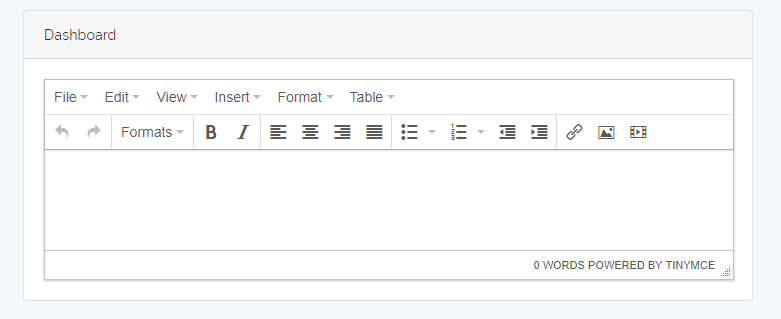
but when I'm trying to upload an image then I'm getting this error.
 .
.
Can someone please Help me How to solve this error ??
 vk001k
on 21 Apr 2018
vk001k
on 21 Apr 2018
@vk001k You should check if the url of laravel-filemanager of your TinyMCE configuration matches http://localhost/%7bfilemanager%7d/public/laravel-filemanager (url you pasted).
streamtw
on 23 Apr 2018
the problem are de public, you public dont have de archiv , look in your public
yo tenia el mismo problema, es el public, yo lo cambie por otro nombre, y por lo tanto no estaba los archivos que necesita este complemento, busca en tu carpeta public/vendor/ y encontraras los archivos, yo ya lo repare asi. suerte
 wcadena
on 8 May 2018
wcadena
on 8 May 2018
I Have Same problem while Uploading Image in file manager. It will return 404 Not found

my page url is this
http://localhost/laravel/blogbook/admin/post/create
many times i pasted this url in my TinyMCE configuration but i will everytime return same error.
Can someone help me to solve this error..?
 Maulik-Vamja
on 19 Mar 2020
Maulik-Vamja
on 19 Mar 2020
I Have Same problem while Uploading Image in file manager. It will return 404 Not found
my page url is this
http://localhost/laravel/blogbook/admin/post/createmany times i pasted this url in my TinyMCE configuration but i will everytime return same error.
Can someone help me to solve this error..?
Please edit .env
APP_URL=http://localhost:8000 or your port
 dinhvanit92
on 30 Jun 2020
dinhvanit92
on 30 Jun 2020
Related issues
 fahadhowlader
·
5Comments
fahadhowlader
·
5Comments
 farshidrezaei
·
4Comments
farshidrezaei
·
4Comments
 asimshazad
·
4Comments
asimshazad
·
4Comments
 lscavelli
·
4Comments
lscavelli
·
4Comments
 sanvu88
·
3Comments
sanvu88
·
3Comments
Most helpful comment
@FilipQL Try to put the
Unisharp\Laravelfilemanager\LaravelFilemanagerServiceProvider::classabove theApp\Providers\RouteServiceProvider::class:This way, on a request, it will first check the routes from the filemanager and if there is no hit it will go to your
routes.php. Now it will go through yourroutes.phpand if it has a catchall route (to catch remaining request that do not have an absolute path or do not match any of your routes) it will end up in the cathcall route en won't be able to even reach the routes of the filemanager.