Laravel-excel: [QUESTION] Export data via axios
Prerequisites
- [x] Have read and understood: https://github.com/Maatwebsite/Laravel-Excel/blob/3.1/.github/SUPPORT.md
- [x] Checked if your Laravel Excel version is still supported: https://docs.laravel-excel.com/3.1/getting-started/support.html#supported-versions
- [x] Checked that your question isn't already asked before.
- [x] Filled in the entire issue template
Versions
- PHP version: 7.4.3
- Laravel version: ^7.0
- Package version: ^3.1
Description
I need to export file via vue axios request but it doesn't give me the data.
Samples
- simple export
    public function export(Request $request)
    {
        return new ProductsExport();
    }
result
Show in console but not give download file.

- export + JS file download
    public function export(Request $request)
    {
        $data = new ProductsExport();
        return response()->json([
            'data' => $data,
            'message' => 'Products are successfully exported.'
        ], 200);
    }
result
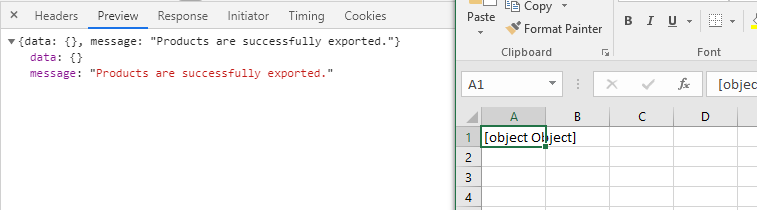
Additional Information
Export class
<?php

namespace App\Exports;

use App\Product;
use Maatwebsite\Excel\Excel;
use Illuminate\Contracts\Support\Responsable;
use Maatwebsite\Excel\Concerns\FromCollection;
use Maatwebsite\Excel\Concerns\Exportable;


class ProductsExport implements FromCollection, Responsable
{
    use Exportable;

    private $fileName = 'Products.csv';

    /**
    * Optional Writer Type
    */
    private $writerType = Excel::CSV;

    /**
    * Optional headers
    */
    private $headers = [
        'Content-Type' => 'text/csv',
    ];

    /**
    * @return \Illuminate\Support\Collection
    */
    public function collection()
    {
        return Product::all();
    }
}
 robertnicjoo
All 7 comments
You have to store the file on the server (either temporary or on a disk) and send the url to the file to the frontend. Then just trigger a normal download via javascript.
 patrickbrouwers
on 1 May 2020
patrickbrouwers
on 1 May 2020
You have to store the file on the server (either temporary or on a disk) and send the url to the file to the frontend. Then just trigger a normal download via javascript.
Thank you that's what i just did right now 😄
public function export(Request $request)
{
    $filename = Carbon::now()->format('Ymdhms').'-Products.xlsx';
    Excel::store(new ProductsExport, $filename);
    $fullPath = Storage::disk('local')->path($filename);

    return response()->json([
        'data' => $fullPath,
        'message' => 'Products are successfully exported.'
    ], 200);
}
result
data: "C;\.........\public\exports\20200501020551-Products.xlsx"
message: "Products are successfully exported."
Now i have direct link of my file like res.data.data
now would you tell me how can I download it automatically from my axios success?
robertnicjoo
on 1 May 2020
@robertnicjoo I would suggest you ask these kind of questions on forums like Laracasts or Stackoverflow, they will be more than happy to help you. Your question is not in scope of this package's issuetracker.
patrickbrouwers
on 1 May 2020
Thank you.
robertnicjoo
on 1 May 2020
@robertnicjoo I think this code can help you
https://codepen.io/nigamshirish/pen/ZMpvRa
 DoVanDuyHedspi
on 1 May 2020
DoVanDuyHedspi
on 1 May 2020
I will suggest you convert your excel to base 64
public function export($id){
    $filename = $id.'-Payroll.xlsx';
     Excel::store(new ProcessPayrollExport($id), $filename);

      $file = Storage::get($filename);
      if ($file) {
         $fileLink = 'data:application/vnd.ms-excel;base64,' . base64_encode($file);
         @chmod(Storage::disk('local')->path($filename), 0755);
         @unlink(Storage::disk('local')->path($filename));
         }

      return response()->json([
          'success'=> true,
          'data' => $fileLink,
          'message' => 'Payroll are successfully exported.'
      ], 200);


}
 richarddanquah
on 18 Jan 2021
richarddanquah
on 18 Jan 2021
And you grab the file from your vue frontend using this function/method
ExcellPayroll(){
this.isLoading = true;
generateAllExcelPayroll(this.date)
.then(res => {
this.isLoading = false;
console.log('csv excel res',res);
const anchor = document.createElement("a");
const filename = this.date+"payroll.xlsx";
anchor.setAttribute("download", filename);
anchor.setAttribute("href", res);
document.body.appendChild(anchor);
anchor.click();
document.body.removeChild(anchor);
})
.catch(err => {
this.isLoading = false;
});
},
Related issues
 pamekar
·
3Comments
pamekar
·
3Comments
 kertul
·
3Comments
kertul
·
3Comments
 disto
·
3Comments
disto
·
3Comments
 gamevnlc
·
3Comments
gamevnlc
·
3Comments
 daraghoshea
·
3Comments
daraghoshea
·
3Comments
Most helpful comment
And you grab the file from your vue frontend using this function/method
ExcellPayroll(){
this.isLoading = true;
generateAllExcelPayroll(this.date)
.then(res => {
this.isLoading = false;
console.log('csv excel res',res);
const anchor = document.createElement("a");
const filename = this.date+"payroll.xlsx";
anchor.setAttribute("download", filename);
anchor.setAttribute("href", res);
document.body.appendChild(anchor);
anchor.click();
document.body.removeChild(anchor);
})
.catch(err => {
this.isLoading = false;
});