Laravel-excel: Using "withValidation" it stops insertion if any validation error occurs. I want it just ignore this validation and jumps to the next iteration
Prerequisites
Versions
- PHP version:
- Laravel version:
- Package version:
Description
Additional Information
Any additional information, configuration or data that might be necessary to reproduce the issue.
 Yousaf3339
All 24 comments
My code
controller function:
public function import(Request $request)
    {
        try {
            Excel::import(new UsersImport,request()->file('sheet_to_upload'));

            return redirect()->back()->with('success', 'Users Created Successfully!');
        } catch (\Maatwebsite\Excel\Validators\ValidationException $e) {
            $import = new UsersImport();
            $import->import(request()->file('sheet_to_upload'));

            foreach ($import->failures() as $failure) {
                 $failure->row(); // row that went wrong
                 $failure->attribute(); // either heading key (if using heading row concern) or column index
                 $failure->errors(); // Actual error messages from Laravel validator
                 $failure->values(); // The values of the row that has failed.
            }
        }
    }
Import class:
class UsersImport implements ToModel, WithValidation,WithHeadingRow
{
    use Importable;

    public function model(array $row)
    {
            $subscription = SubscriptionTypes::select('id')->where('name',$row['subscription_plan'])->first();
            $client_type = ClientTypes::select('id')->where('name',$row['user_type'])->first();


            if($subscription != null && $client_type != null){
                $user = Users::create([
                    'is_admin'              => 0,
                    'client_type_id'        => $client_type->id,
                    'subscription_id'       => $subscription->id,
                    'user_name'             => $row['user_name'],
                    'email'                 => $row['user_e_mail'],
                    'is_blocked'            => 0,
                    'password'              => Hash::make($row['password']),
                    'first_name'            => $row['user_first_name'],
                    'last_name'             => $row['user_last_name'],
                    'phone'                 => $row['phone'],
                    'notes'                 => $row['notes_for_internal_use'],
                    'created_by'            => Auth::user()->id,
                    'updated_by'            => Auth::user()->id,
                    'created_at'            => '',
                    'updated_at'            => '',
                    'license'               => $row['licenseorganization'],
                    'owg_invoice'           => $row['owg_invoice'],
                    'self_notification'     => $row['multi_site_initiative'] == 'Yes' ? 1 : 0,
                    'is_group_admin'        => 0,
                    'renewal_notification'  => 0

                ]);

                $country = Countries::select('id')->where('name',$row['country'])->first();
                if($country != null){
                    Addresses::create([
                        'user_id'           => $user->id,
                        'country'           => $country->name,
                        'city'              => $row['city'],
                        'state'             => $row['state'],
                        'street'            => $row['street_address'],
                        'zip'               => $row['zipcode'],
                        'organization_name' => $row['schoolcenterorg_name']

                    ]);
                }


                GroupAdmins::create([
                    'first_name'   => $row['admincooridnator_first_name'],
                    'last_name'    => $row['admincooridnator_last_name'],
                    'phone_number' => $row['admincooridnator_phone'],
                    'email'        => $row['admincooridnator_e_mail_address']
                ]);

                Subscriptions::create([
                    'user_id'              => $user->id,
                    'subscription_type_id' => $subscription->id
                ]);

                return $user;
            }
    }

    public function rules(): array
    {
        $packages = SubscriptionTypes::pluck('name');
        return [
            '*.license'     => 'numeric',
            '*.user_name'  => 'required|unique:users',
            '*.user_e_mail' => 'required|email|unique:users,email',
            '*.phone' => 'numeric',
            '*.subscription_plan' => Rule::in($packages)
        ];
    }

    public function customValidationMessages()
    {
        return [
            'subscription_plan.in' => 'this subscription plan does not exist',
        ];
    }
See the documentation about skipping failures: https://docs.laravel-excel.com/3.1/imports/validation.html#skipping-failures . You need to add the SkipsOnFailure concern.
 patrickbrouwers
on 4 Mar 2019
patrickbrouwers
on 4 Mar 2019
@patrickbrouwers Thanks !!!
Now what if I want to export these validation errors
Yousaf3339
on 4 Mar 2019
See the SkipsFailures trait example in on the same page
patrickbrouwers
on 4 Mar 2019
 public function onFailure(Failure ...$failures)
    {
        $this->failures = array_merge($this->failures, $failures);
        dd($this->failures);

    }
it only gives me the first row errors
Yousaf3339
on 4 Mar 2019
onFailure gets called on each failure. You have to gather them yourself or by using the SkipsFailures trait. Then you can collect them in your controller.
patrickbrouwers
on 4 Mar 2019
onFailuregets called on each failure. You have to gather them yourself or by using theSkipsFailurestrait. Then you can collect them in your controller.
got this. Now want to export this failures array
Yousaf3339
on 4 Mar 2019
Refer to the export documentation. It's basic functionality to export an array of rows.
patrickbrouwers
on 4 Mar 2019
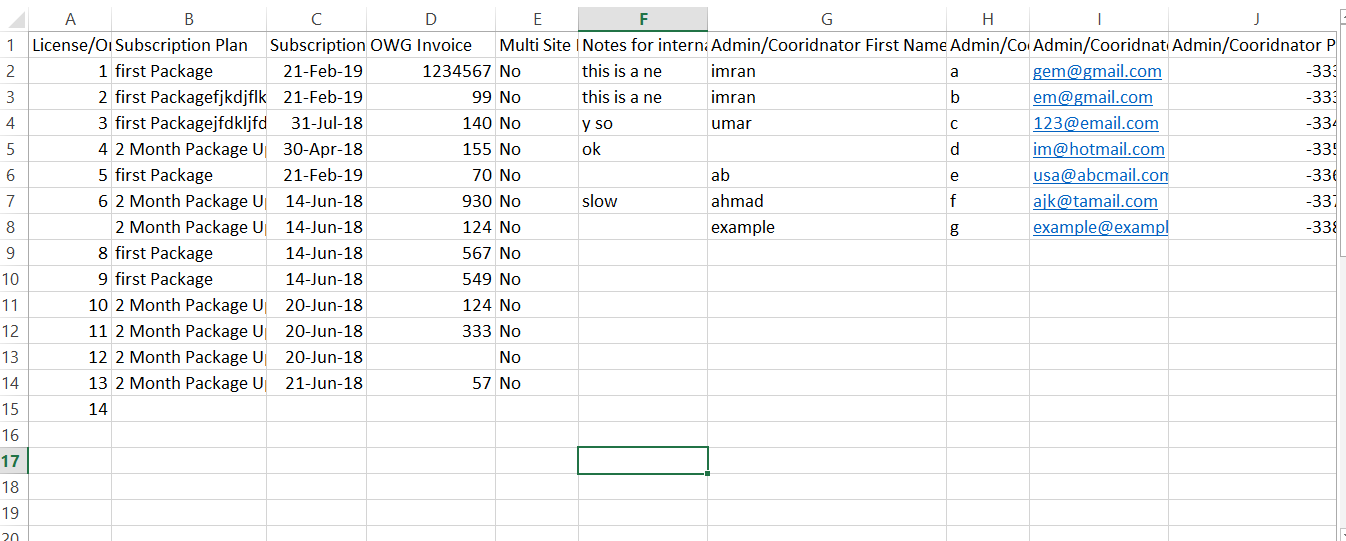
as seen in the picture Ihave only 15 records but whenever I import this file it gives me 40 rows why?
Yousaf3339
on 4 Mar 2019
Most likely because your file has empty rows
patrickbrouwers
on 4 Mar 2019
onFailuregets called on each failure. You have to gather them yourself or by using theSkipsFailurestrait. Then you can collect them in your controller.got this. Now want to export this failures array
Can i do something like "Excel::download(new UsersExport, 'users.csv',$array)"
Yousaf3339
on 6 Mar 2019
What is $array ?
patrickbrouwers
on 6 Mar 2019
What is
$array?
failures array
Yousaf3339
on 8 Mar 2019
Excel::download(new FailuresExport($array), 'failures.csv')
patrickbrouwers
on 8 Mar 2019
Excel::download(new FailuresExport($array), 'failures.csv')
then how to acces in $array in "FailuresExport".
Yousaf3339
on 12 Mar 2019
Excel::download(new FailuresExport($array), 'failures.csv')then how to acces in $array in "FailuresExport".
got it . Thanks alot for your help
Yousaf3339
on 12 Mar 2019
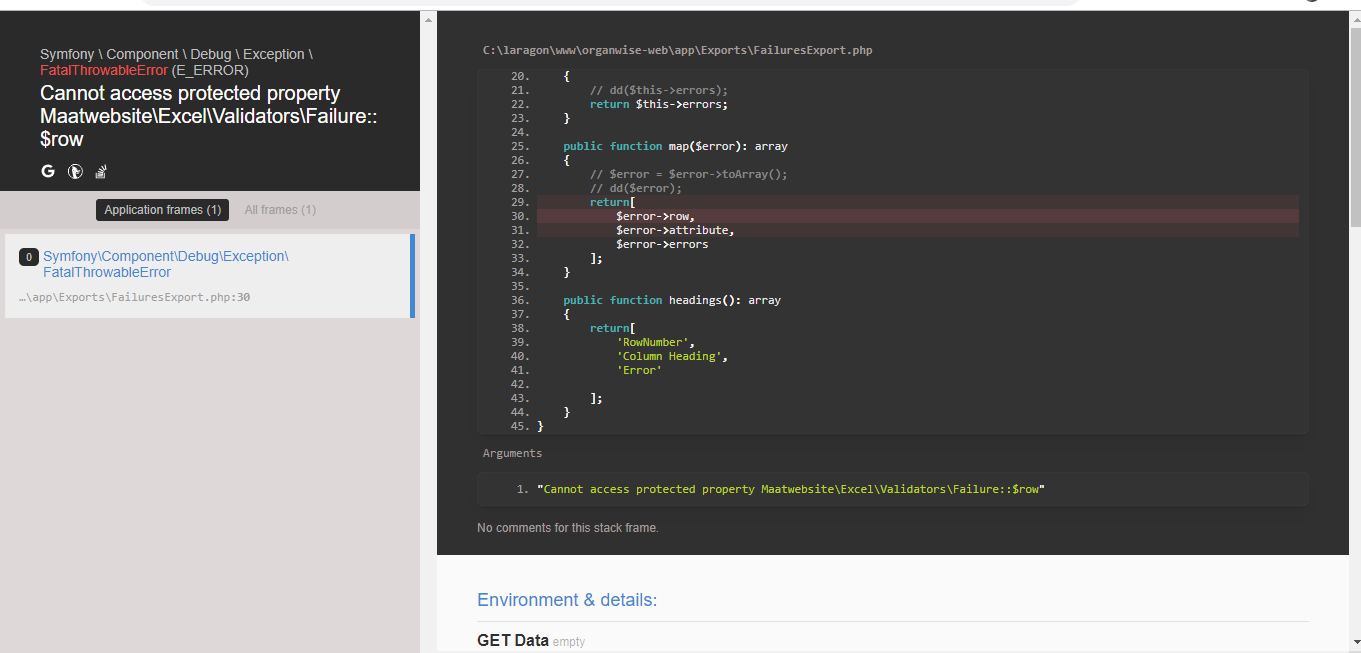
Why I am getting this
Yousaf3339
on 12 Mar 2019
Why I am getting this
Please try with $error->row(). Looks like you're missing the ()
 GlennM
on 12 Mar 2019
GlennM
on 12 Mar 2019
Thanks @patrickbrouwers @GlennM . I have achieved everything what i needed from this package !!!
but only last thing I'm not able to figure out is. on exporting the failure array after import it always gives me extra 40 rows . for example I have only one row in my sheet which I imported "users(1).xlsx
" then in the failures file "failures.xlsx" it gave me errors upto 41 rows.
users (1).xlsx
failures.xlsx
Yousaf3339
on 13 Mar 2019
Thanks @patrickbrouwers @GlennM . I have achieved everything what i needed from this package !!!
but only last thing I'm not able to figure out is. on exporting the failure array after import it always gives me extra 40 rows . for example I have only one row in my sheet which I imported "users(1).xlsx
" then in the failures file "failures.xlsx" it gave me errors upto 41 rows.
users (1).xlsx
failures.xlsx
There may be some invisible content into those rows, which causes the rows to be parsed.
Could you try copy/pasting the first 2 rows into a new XLSX file, use that file and try again to see what failures are returned?
GlennM
on 13 Mar 2019
Thanks @patrickbrouwers @GlennM . I have achieved everything what i needed from this package !!!
but only last thing I'm not able to figure out is. on exporting the failure array after import it always gives me extra 40 rows . for example I have only one row in my sheet which I imported "users(1).xlsx
" then in the failures file "failures.xlsx" it gave me errors upto 41 rows.
users (1).xlsx
failures.xlsxThere may be some invisible content into those rows, which causes the rows to be parsed.
Could you try copy/pasting the first 2 rows into a new XLSX file, use that file and try again to see what failures are returned?
Thanks Alot Its working Now!!!! I think there were some invisible rows.
Yousaf3339
on 13 Mar 2019
how to know if the imported file is empty or have no data?
Yousaf3339
on 3 Apr 2019
Hi, i've follow all steps on the docs from validation, and I have an error when I make a first-load with validation.
If I comment the validation rules, I can make the import, then if I uncomment the rules after make the 1st import, I can handle the validation errors.
Now, my problem is, if I left uncommented the validation rules and make a first import on my app, it doesn't work, I can import for first time on my app ONLY commenting the rules, ¿How can I solve this?
I put the "skipsError", 'skipsFailure' etc etc etc and doesn't work.
 mrojas6996
on 30 Mar 2020
mrojas6996
on 30 Mar 2020
@Yousaf3339 can you please share your code with us? It would be very helpful for people that are trying to achieve the same thing as you did. Thanks.
 danielrwsr
on 11 Nov 2020
danielrwsr
on 11 Nov 2020
Related issues
 disto
·
3Comments
disto
·
3Comments
 dr3ads
·
3Comments
dr3ads
·
3Comments
 contifico
·
3Comments
contifico
·
3Comments
 ellej16
·
3Comments
ellej16
·
3Comments
 wwendorf
·
3Comments
wwendorf
·
3Comments