Laravel-excel: version 3.0 how to control column width
- PHP version: 7.0.0
- Laravel version: 5.5
- Package version: 3.0
Description
I want to control column width , but I just found "Auto size" in document , it can't fit what I want . Is there a method like "setWidth" to control column width ?
Steps to Reproduce
No description.
Expected behavior:
A way to set column width .
Actual behavior:
I can't find any method to do that. Sorry
Additional Information
No additional information
 xlkit456852
All 6 comments
Thanks for submitting the ticket. Unfortunately the information you provided is incomplete. We need to know which version you use and how to reproduce it. Please include code examples. Before we can pick it up, please check (https://github.com/Maatwebsite/Laravel-Excel/blob/3.0/.github/ISSUE_TEMPLATE.md) and add the missing information. To make processing of this ticket a lot easier, please make sure to check (https://laravel-excel.maatwebsite.nl/docs/3.0/getting-started/contributing) and double-check if you have filled in the issue template correctly. This will allow us to pick up your ticket more efficiently. Issues that follow the guidelines correctly will get priority over other issues.
![issue-check[bot] picture](https://avatars.githubusercontent.com/u/8315038?v=4&s=40) issue-check[bot]
on 4 Sep 2018
issue-check[bot]
on 4 Sep 2018
What is this column you're talking about? Is it a table column, modified css column or any other things?
You suggest you to add some of your codes to help us identify the issue.
 raylucker
on 4 Sep 2018
raylucker
on 4 Sep 2018
Sorry to make you confused . I just want to modify the excel(after I export some data to excel) sheet column width . I remember there is a setWidth method in version 2 like this:
Excel::create('abc', function($excel) {
    $excel->sheet('统计信息', function($sheet){
        $sheet->setWidth(array(
                    'A'     => 10,
                    'B'     =>  30,
                    'C'     =>  15,
                    'D'     =>  15,
                    'E'     =>  15,
                    'F'     =>  15,
                ));
                $sheet->rows($rows);
    });
})
I want to do the same thing ,thanks
xlkit456852
on 5 Sep 2018
You'll have to use PhpSpreadsheet native methods in a AfterSheet event. https://phpspreadsheet.readthedocs.io/en/develop/topics/recipes/#setting-a-columns-width
 patrickbrouwers
on 8 Sep 2018
patrickbrouwers
on 8 Sep 2018
The link above is broken. You can try this:
https://laravel-news.com/five-hidden-features-of-the-laravel-excel-package
https://phpspreadsheet.readthedocs.io/en/latest/topics/recipes/#setting-a-columns-width
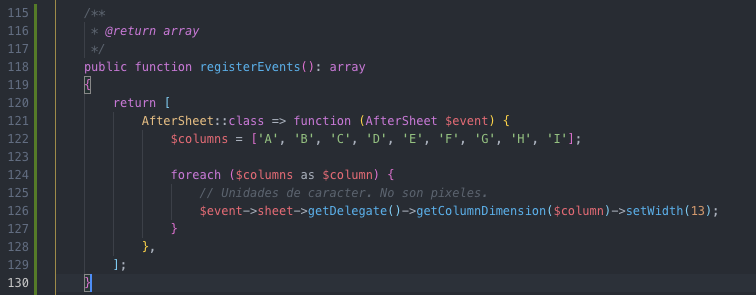
I did this:
 andreshg112
on 8 May 2019
andreshg112
on 8 May 2019
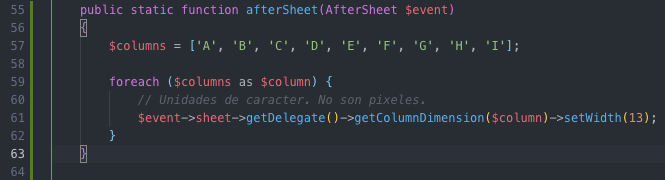
This also works. Remember to implement WithEvents concern and use the RegistersEventListeners trait.
andreshg112
on 8 May 2019
Related issues
 rossjcooper
·
3Comments
rossjcooper
·
3Comments
 octoxan
·
3Comments
octoxan
·
3Comments
 muhghazaliakbar
·
3Comments
muhghazaliakbar
·
3Comments
 contifico
·
3Comments
contifico
·
3Comments
 dr3ads
·
3Comments
dr3ads
·
3Comments
Most helpful comment
The link above is broken. You can try this:
https://laravel-news.com/five-hidden-features-of-the-laravel-excel-package
https://phpspreadsheet.readthedocs.io/en/latest/topics/recipes/#setting-a-columns-width
I did this:
