Laravel-excel: [BUG] Cells with '0' value are imported as 'null'
Package version, Laravel version
Package 2.1.6, Laravel 5.1.*
Expected behaviour
Cells with zero should be imported as 0
Actual behaviour
They are imported as null(empty cells)
Steps to reproduce the behaviour
Just put some data to cells with zeros, it will export as empty cells. We are talking about integer not string.
 bzbislawski
All 9 comments
PHPExcel makes assumptions during import based on the column formatting defined in the file. If you want full control over those choices, you'd have to implement a custom value binder: http://www.maatwebsite.nl/laravel-excel/docs/import#formatting
 patrickbrouwers
on 25 Sep 2016
patrickbrouwers
on 25 Sep 2016
@patrickbrouwers that does not seem to work - if you check the below simple example, the bindValue() function doesn't even get called with the 0 value!
class MyValueBinder extends PHPExcel_Cell_DefaultValueBinder implements PHPExcel_Cell_IValueBinder
{
    public function bindValue(PHPExcel_Cell $cell, $value = null)
    {
        if (is_numeric($value))
        {
            $cell->setValueExplicit($value, PHPExcel_Cell_DataType::TYPE_NUMERIC);

            return true;
        }

        // else return default behavior
        return parent::bindValue($cell, $value);
    }
}

PHPExcel_Cell::setValueBinder(new MyValueBinder);

Excel::create('Filename', function($excel) {

$excel->sheet('Sheetname', function($sheet) {

        $sheet->fromArray(array(
            [0, 1, 2, 3],
        ));

    });

})->download();

 garygreen
on 18 Aug 2017
garygreen
on 18 Aug 2017
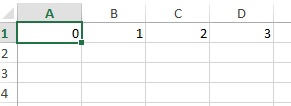
If you do it directly with PHP excel, it outputs correctly. Something inside Larvel-Excel must be overriding it.
$objPHPExcel = new PHPExcel();

$objPHPExcel->setActiveSheetIndex(0);
$objPHPExcel->getActiveSheet()->setCellValue('A1', 0);
$objPHPExcel->getActiveSheet()->setCellValue('B1', 1);
$objPHPExcel->getActiveSheet()->setCellValue('C1', 2);
$objPHPExcel->getActiveSheet()->setCellValue('D1', 3);

$objWriter = new PHPExcel_Writer_Excel2007($objPHPExcel);
$objWriter->save(base_path('test.xlsx'));
garygreen
on 18 Aug 2017
Seems you just need to pass true to the strict option - works now.
            $sheet->fromArray(array(
                [0, 1, 2, 3],
            ), null, 'A1', true);
This should be re-opened since null vs '' is one thing but ignoring a 0 is completely different. It actually needs an extra check in Worksheet:
if ($cellValue != $nullValue && $cellValue !== 0) {
...
}
If you really need to ignore 0 then it should be a separate interface.
 TivoSoho
on 24 Jan 2019
TivoSoho
on 24 Jan 2019
This should be re-opened since null vs '' is one thing but ignoring a 0 is completely different. It actually needs an extra check in Worksheet:
if ($cellValue != $nullValue && $cellValue !== 0) {
...
}
If you really need to ignore 0 then it should be a separate interface.
Please do note that you'r replying to a very old issue about a version which is no longer supported.
 GlennM
on 24 Jan 2019
GlennM
on 24 Jan 2019
I know that very well. I am replying since I was googling and it is still very much relevant. You do have WithStrictNullComparison but that just circumvents the bug, but does not actually fix it. Basically there are three scenarios:
- WithStrictNullComparison - compare against NULL (strict), everything else gets written
- No WithStrictNullComparison - compares against NULL (not strict) and that it is not 0 (strict)
- If for some reason you compare against NULL (not strict) and nothing else - then that would be the current "feature"
But that is just me because I see no reason for no 3 to exist and have loss of data. I am still very much surprised this is allowed by default and not specifically set with an interface like WithStrictNullComparison is, which is my point.
TivoSoho
on 24 Jan 2019
@TivoSoho honestly I would personally just use PHP Excel directly. From projects that I've worked from in the past, it's made things a lot easier and more consistent. It's a bit more verbose working with the library directly, but it's worth it to cut out the wrapper.
My own personal view is that "Laravel Excel" really shouldn't be a thing, IMO - Excel has nothing to do with Laravel and it's just an unnecessary wrapper around something that should be framework agnostic.
garygreen
on 24 Jan 2019
From Version 3.0 just need to implement interface
Maatwebsite\Excel\Concerns\WithStrictNullComparison
in your export model.
 hoangmanh09it
on 1 Aug 2019
hoangmanh09it
on 1 Aug 2019
Related issues
 thearabbit
·
3Comments
thearabbit
·
3Comments
 alejandri
·
3Comments
alejandri
·
3Comments
 amine8ghandi8amine
·
3Comments
amine8ghandi8amine
·
3Comments
 disto
·
3Comments
disto
·
3Comments
 contifico
·
3Comments
contifico
·
3Comments
Most helpful comment
From Version 3.0 just need to implement interface
Maatwebsite\Excel\Concerns\WithStrictNullComparisonin your export model.