Laravel-debugbar: Only enable for 1 logged in user?
Not an issue, but could you point me in the direction to enable this in Production for 1 logged in user, based on user ID? I want to enable in Production for an Admin user but nobody else...I'm not sure where to best do this sort of over-ride from the app/config/app.php debug setting. Any ideas?
 jasondavis
All 12 comments
Create an Ap::before() filter, and check the username/id. Then run \Debugbar::enable();
 barryvdh
on 31 Jan 2014
barryvdh
on 31 Jan 2014
Awesome thanks for the info
jasondavis
on 4 Feb 2014
How about with Laravel 5?
 antoniopaisfernandes
on 24 Mar 2016
antoniopaisfernandes
on 24 Mar 2016
@antoniopaisfernandes I might be a bit late to the party, but I've just used a middleware for this as the old method mentioned above will no longer be appropriate.
If you fire up a new middleware (i.e php artisan make:middleware DebugBarMiddleware) then inside that file add the below to the handle function (the auth related lines, leave in place the return $next line: (obviously replace 1 with your chosen user id)
    public function handle($request, Closure $next)
    {
        if(!\Auth::check() || \Auth::user()->id !== 1) {
            \Debugbar::disable();
        }
        return $next($request);
    }
Then in your App\Http\Kernel file use \App\Http\Middleware\DebugBarMiddleware::class inside your web middleware you can get it going. (I placed mine at the end of the web middleware list)
What the above will do is actually disable it if it doesn't match, rather than _enable_ - I found this works a lot nicer.
 andyunleashed
on 1 Apr 2017
andyunleashed
on 1 Apr 2017
In laravel 5.5, the new middleware mentioned above worked for me when, in the App\Http\Kernel file, i added the DebugBarMiddleware::class to $routeMiddleware instead of web with a key debugbar and then in RouteServiceProvider.php, passed it to the Route::middleware in the mapWebRoute() along with web as array,
mapWebRoutes()
{
    Route::middleware(['web', 'debugbar'])
       ->namespace(....
       ->group(.....
}
without this Auth::check and Auth::user inside the DebugBarMiddleware were returning false and null for each request for some reason that am not able to figure out so far. I guess it has something to do with the changes they made to system of middleware, im not sure.
 connectkushal
on 31 Oct 2017
connectkushal
on 31 Oct 2017
Jumping in to comment that @andyunleashed 's method worked perfectly for me (Laravel 5.4.36). I adjusted it slightly to check permissions from spatie/laravel-permission (could also use any other similar permissions engine). Also implements a config option for allowing the debug bar to be always enabled for debugging.
Placed the following code in my middleware.
        // Ensures that users who are not logged in or
        // do not have debugbar permission will not see it
        if(
          ! config('debugbar.enable-for-all-users') &&
          (
            ! \Auth::check() ||
            ! \Auth::user()->hasPermissionTo('admin.view.debugbar')
          )
        ) {
            \Debugbar::disable();
        }
 benyanke
on 29 Dec 2017
benyanke
on 29 Dec 2017
Just to note that the middleware method still works in Laravel 5.6.
@barryvdh might is be possible to add an option to the config to allow a user id, or perhaps an array of IDs that debugbar can show for?
The main reasoning is for production environments where you don't want regular users seeing the info but you want to profile the real site and it's data.
andyunleashed
on 29 Jun 2018
@barryvdh
This doesn't work for me.
 alighasemzadeh
on 12 Mar 2019
alighasemzadeh
on 12 Mar 2019
Can anyone confirm this still works, I cannot get the class \DebugBar and I am tying to load the service provider dynamically but that also doesn't work
 Sammaye
on 5 Apr 2019
Sammaye
on 5 Apr 2019
Can anyone confirm this still works, I cannot get the class
\DebugBarand I am tying to load the service provider dynamically but that also doesn't work
You need to use \Debugbar, not \DebugBar.
 MrMage
on 26 Jul 2019
MrMage
on 26 Jul 2019
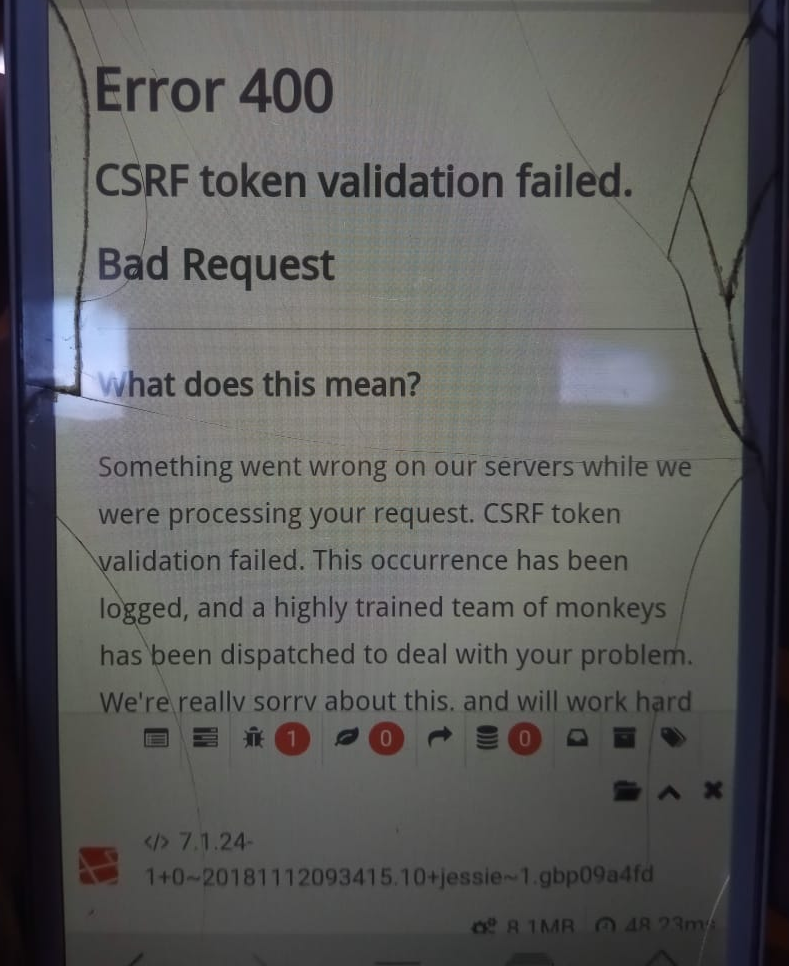
This is bad idea to enable Debugbar on each request and disable it later for some reason. For example, on "Bad CSRF-token" error Debugbar data will be shown to any user:
 sngrl
on 17 Jan 2020
sngrl
on 17 Jan 2020
You would disable by default and then enable if the user is admin, pages like that would slip through the net but then normally that kind of error is one you could replicate on a staging server
Sammaye
on 17 Jan 2020
Related issues
 MRZ2017
·
3Comments
MRZ2017
·
3Comments
 hussein-elhussein
·
3Comments
hussein-elhussein
·
3Comments
 Megachill
·
3Comments
Megachill
·
3Comments
 lozadaOmr
·
6Comments
lozadaOmr
·
6Comments
 knvpk
·
5Comments
knvpk
·
5Comments
Most helpful comment
@antoniopaisfernandes I might be a bit late to the party, but I've just used a middleware for this as the old method mentioned above will no longer be appropriate.
If you fire up a new middleware (i.e
php artisan make:middleware DebugBarMiddleware) then inside that file add the below to the handle function (the auth related lines, leave in place the return $next line: (obviously replace 1 with your chosen user id)Then in your App\Http\Kernel file use
\App\Http\Middleware\DebugBarMiddleware::classinside your web middleware you can get it going. (I placed mine at the end of the web middleware list)What the above will do is actually disable it if it doesn't match, rather than _enable_ - I found this works a lot nicer.