Laravel-debugbar: Order queries based on duration?
Is there a way to display the db queries ordered by duration on the "Queries" tab in Debugbar, for example from slowest to fastest?
 viktorivanov
All 8 comments
Not yet.
 barryvdh
on 14 Jun 2017
barryvdh
on 14 Jun 2017
Would be useful.
And possibility for hide queries by given time threshold.
 decadence
on 14 Jun 2017
decadence
on 14 Jun 2017
it would be usefull too to see which query is executed how often.
For Example:
735 statements were executed, 580 of which were duplicated, 155 unique
=> I would like to see which of the duplicated statements was executed the most
 Phillip85
on 7 Aug 2017
Phillip85
on 7 Aug 2017
If two of you like me I can send a pull request #701
 webmailcontatos
on 21 Aug 2017
webmailcontatos
on 21 Aug 2017
For anyone who needs a quick fix to see longest running queries first:
edit DataCollector/QueryCollector.php#390 to something like this:
$statements = [];
        $statements_tmp = [];
        foreach ($queries as $query) {
            $totalTime += $query['time'];

            $statements_tmp[$query['time'].'.'.$totalTime] = [
                'sql' => $this->getDataFormatter()->formatSql($query['query']),
                'type' => $query['type'],
                'params' => [],
                'bindings' => $query['bindings'],
                'hints' => $query['hints'],
                'backtrace' => array_values($query['source']),
                'duration' => $query['time'],
                'duration_str' => ($query['type'] == 'transaction') ? '' : $this->formatDuration($query['time']),
                'stmt_id' => $this->getDataFormatter()->formatSource(reset($query['source'])),
                'connection' => $query['connection'],
            ];

            //Add the results from the explain as new rows
            foreach($query['explain'] as $explain){
                $statements_tmp[] = [
                    'sql' => ' - EXPLAIN #' . $explain->id . ': `' . $explain->table . '` (' . $explain->select_type . ')',
                    'type' => 'explain',
                    'params' => $explain,
                    'row_count' => $explain->rows,
                    'stmt_id' => $explain->id,
                ];
            }
        }
        krsort($statements_tmp);
        foreach($statements_tmp as $statement)
            $statements[] = $statement;
 tobiasvielmetter
on 6 May 2018
tobiasvielmetter
on 6 May 2018
for a quick solution. run this code on chrome inspect and you will get a nice sort button on query tabs 😉
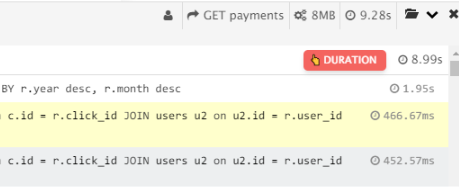
(function() {

    if ($('.sort-queries-by-time').length == 0) {
        $('.phpdebugbar-widgets-sqlqueries .phpdebugbar-widgets-status')
        .append('<a class="sort-queries-by-time" style="padding: 2px 11px 2px 7px;margin-right: 5px;margin-top: -1px;border-radius: 5px;text-transform: uppercase;font-weight: bold;color: #ffffff;font-size: 11px;background: #f4645f;box-shadow: 0 4px 6px -1px rgba(0, 0, 0, 0.1), 0 2px 4px -1px rgba(0, 0, 0, 0.06);float: right;line-height: 1.8em;">✌ Duration</a>');
    }

    function parseToMicroSeconds(time) {

        var format = time.replace(/[0-9]/g, '').replace('.', '');
        time = parseFloat(time)

        switch (format) {
        case 's':
            return time * 1000000
            break;
        case 'ms':
            return time * 1000
            break;
        case 'μs':
            return time
            break;
        }

        return null;
    }

    var type = null;
    $(".sort-queries-by-time").off('click');

    $(".sort-queries-by-time").click(function() {
        var $this = $(this);

        if (!type) {
            $this.text('👆 Duration');
            type = 'desc'
        }

        if (type == 'desc') {
             $this.text('👇 Duration');
            type = 'asc'
        } else {
             $this.text('👆 Duration');
            type = 'desc'
        }

        var items = $this.parent().parent().find('.phpdebugbar-widgets-list li').get();

        items.sort(function(a, b) {
            var valueA = parseToMicroSeconds($(a).find("span.phpdebugbar-widgets-duration").text());
            var valueB = parseToMicroSeconds($(b).find("span.phpdebugbar-widgets-duration").text());

            if (type == 'desc') {
                if (valueA < valueB)
                    return 1;
                if (valueA > valueB)
                    return -1;
            }

            if (type == 'asc') {
                if (valueA < valueB)
                    return -1;
                if (valueA > valueB)
                    return 1;
            }
            return 0;
        });
        // clear the list and re-add sorted items on button click
        $this.parent().parent().find(".phpdebugbar-widgets-list").empty().append(items);
    });

}
)()
 shakee93
on 27 Aug 2019
shakee93
on 27 Aug 2019
Easier:
    $statements = [];

    $queries = collect($queries)->sortBy('time')->reverse()->toArray();

    foreach ($queries as $query) {
 cthiele-mogic
on 7 Oct 2019
cthiele-mogic
on 7 Oct 2019
This issue has been automatically marked as stale because it has not had recent activity. It will be closed if no further activity occurs.
If this issue is still present on the latest version of this library on supported Laravel versions, please let us know by replying to this issue so we can investigate further.
Thank you for your contribution! Apologies for any delayed response on our side.
![stale[bot] picture](https://avatars.githubusercontent.com/in/1724?v=4&s=40) stale[bot]
on 29 Jul 2020
stale[bot]
on 29 Jul 2020
Related issues
 beneverard
·
6Comments
beneverard
·
6Comments
 truongthaison
·
4Comments
truongthaison
·
4Comments
 kjhatis
·
5Comments
kjhatis
·
5Comments
 njbarrett
·
5Comments
njbarrett
·
5Comments
 thomthom
·
5Comments
thomthom
·
5Comments
Most helpful comment
If two of you like me I can send a pull request #701