Laravel-datatables: columns with html shows code
Summary of problem or feature request
I use addColumn to show a button but now is returning html code, it works before 7.9 version
Code snippet of problem
->addColumn('status', function ($model) {
return "id]) ."' class='btn btn-sm btn-icon icon-left'> Activate";
})
 carlituxman
All 10 comments
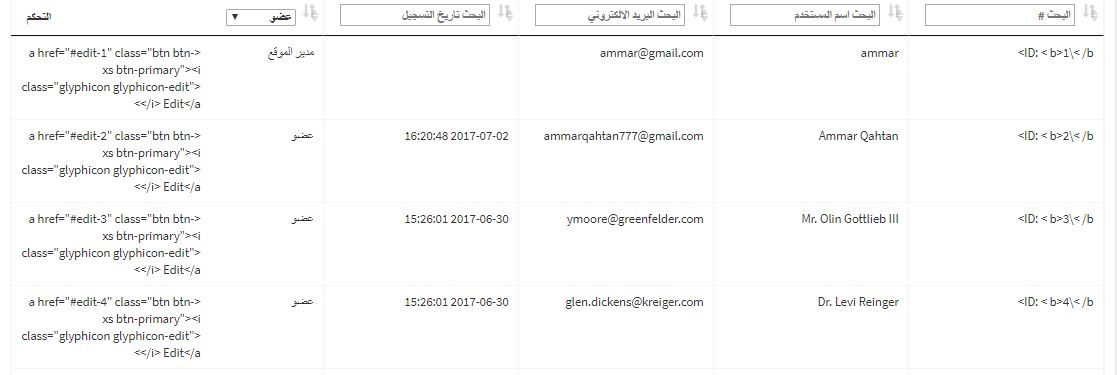
 Ammar777
on 4 Jul 2017
Ammar777
on 4 Jul 2017
i have the same problem >_<
Ammar777
on 4 Jul 2017
Same here! Back to 7.8.1 for now..
 ReckeDJ
on 4 Jul 2017
ReckeDJ
on 4 Jul 2017
Thanks for reporting, I think this was fixed on 7.9.1. Please update to the latest version.
-- edit --
Double checking. I think I already fix this issue but maybe have done it on the master.
 yajra
on 5 Jul 2017
yajra
on 5 Jul 2017
Did you use rawColumns(['status']) on your code? See doc for ref.
yajra
on 5 Jul 2017
@yajra Thanks! rawColumns did the trick.
ReckeDJ
on 5 Jul 2017
@yajra thanks for you ,,
can you send an example !
Ammar777
on 5 Jul 2017
Just a help to anyone:
When use ->addColumn() and ->editColumn with html content, you need set ->rawColumns(['addcolum','editcolum']) to avoid addColumn return html and editColumn return data.
Example:
->addColumn('action', function ($dtt) {
                return '<a href="'.route('routename).'" class="btn btn-xs btn-primary""><i class="glyphicon glyphicon-edit"></i> '.trans('btn.edit').'</a>';
            })
->editColumn('status', function($dtt) {
            if($dtt->status == TRUE){
               return '<span class="label label-success">'.trans('admin.status.active').'</span>';
            }else{
                return '<span class="label label-danger">'.trans('admin.status.inactive').'</span>';
            }
        })
        ->rawColumns(['status','action'])
        ->make(true);
 rubensrocha
on 22 Jul 2017
rubensrocha
on 22 Jul 2017
@rubensrocha thanks! the only solution I found was to change the version of yajra to 6.6, but with this clarification, I can continue with version 8.0 of yajra
 diebian
on 9 Jan 2018
diebian
on 9 Jan 2018
Just a help to anyone:
When use ->addColumn() and ->editColumn with html content, you need set ->rawColumns(['addcolum','editcolum']) to avoid addColumn return html and editColumn return data.
Example:
->addColumn('action', function ($dtt) {
                return '<a href="'.route('routename).'" class="btn btn-xs btn-primary""><i class="glyphicon glyphicon-edit"></i> '.trans('btn.edit').'</a>';
            })
->editColumn('status', function($dtt) {
            if($dtt->status == TRUE){
               return '<span class="label label-success">'.trans('admin.status.active').'</span>';
            }else{
                return '<span class="label label-danger">'.trans('admin.status.inactive').'</span>';
            }
        })
        ->rawColumns(['status','action'])
        ->make(true);
QUESTION : is better render HTML TAGS on client side?
'.trans('admin.status.active').'
 alejandri
on 31 Oct 2018
alejandri
on 31 Oct 2018
Related issues
 hohuuhau
·
3Comments
hohuuhau
·
3Comments
 t0n1zz
·
3Comments
alejandri
·
3Comments
t0n1zz
·
3Comments
alejandri
·
3Comments
 josiahke
·
3Comments
josiahke
·
3Comments
 techguydev
·
3Comments
techguydev
·
3Comments
Most helpful comment
Did you use
rawColumns(['status'])on your code? See doc for ref.