Laravel-backup: Out of space error
Hey,
Im currently scratching my head over this error. Everything was working fine, and then one day while on holiday I started getting failed emails.
Exception message: The dump process failed with exitcode 2 : Misuse of shell builtins : sh: 1: Out of space
Ive had a look at past issues with the shell reported here, but none have helped. The server has about 400mb of free memory and about 16gig of space.
Weirdly, this error is only produced when backing the database up. Doing a mysqldump from the command line to my backups folder works fine.
Could really do with one of you intelligent people helping a stressed guy out :)
 smartsyncio
All 8 comments
Can you post some info about your configuration (versions / config etc)?
What is the size of your mysql data dir? Partitions? Also check if you are about to reach the limit of inodes (df -i).
 vdbelt
on 23 Jul 2019
vdbelt
on 23 Jul 2019
Hey,
The server is just a few months old for a project that's still under development
Laravel 5.8
PHP 7.3
MYSQL 8.0.15
inodes are at 1%
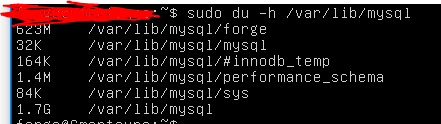
Thanks for your help :)
smartsyncio
on 23 Jul 2019
What is the output of df -h?
vdbelt
on 24 Jul 2019
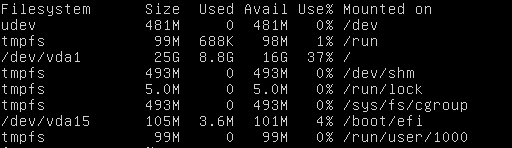
smartsyncio
on 24 Jul 2019
I'm not sure if it matters but I had to sudo the mysql data dir because it was moaning about permissions, on my local homestead machine, I didn't need to do this and the backups work ok
smartsyncio
on 24 Jul 2019
Hey,
After a lot of testing, I have worked out the code that is causing the error. Another thread on here with a separate problem suggested deleting and restoring the default config. When I did everything worked.
A lot of messing about with it led me to this line in 'MY config which is causing the problem
'database_dump_compressor' => SpatieDbDumperCompressorsGzipCompressor::class,
changing it to the default solves the issue
'database_dump_compressor' => null
So guess I now have to look for a new compressor to use :/
smartsyncio
on 30 Jul 2019
That is valuable information.
Im thinking your issue is related to https://github.com/spatie/db-dumper/issues/109.
Could you confirm this, by downgrading db-dumper to version 2.14.0, and let me know if gzipping works?
(Add "spatie/db-dumper": "2.14.0" to composer.json and run composer update)
vdbelt
on 30 Jul 2019
You, sir, are a genius.
Downgraded the dumper and the server can do full backups with no issues now :)
smartsyncio
on 30 Jul 2019
Related issues
 itzikbenh
·
3Comments
itzikbenh
·
3Comments
 sherwinmartin
·
5Comments
sherwinmartin
·
5Comments
 rylxes
·
5Comments
rylxes
·
5Comments
 hedii
·
5Comments
hedii
·
5Comments
 shez1983
·
3Comments
shez1983
·
3Comments
Most helpful comment
Hey,
After a lot of testing, I have worked out the code that is causing the error. Another thread on here with a separate problem suggested deleting and restoring the default config. When I did everything worked.
A lot of messing about with it led me to this line in 'MY config which is causing the problem
'database_dump_compressor' => SpatieDbDumperCompressorsGzipCompressor::class,
changing it to the default solves the issue
'database_dump_compressor' => null
So guess I now have to look for a new compressor to use :/