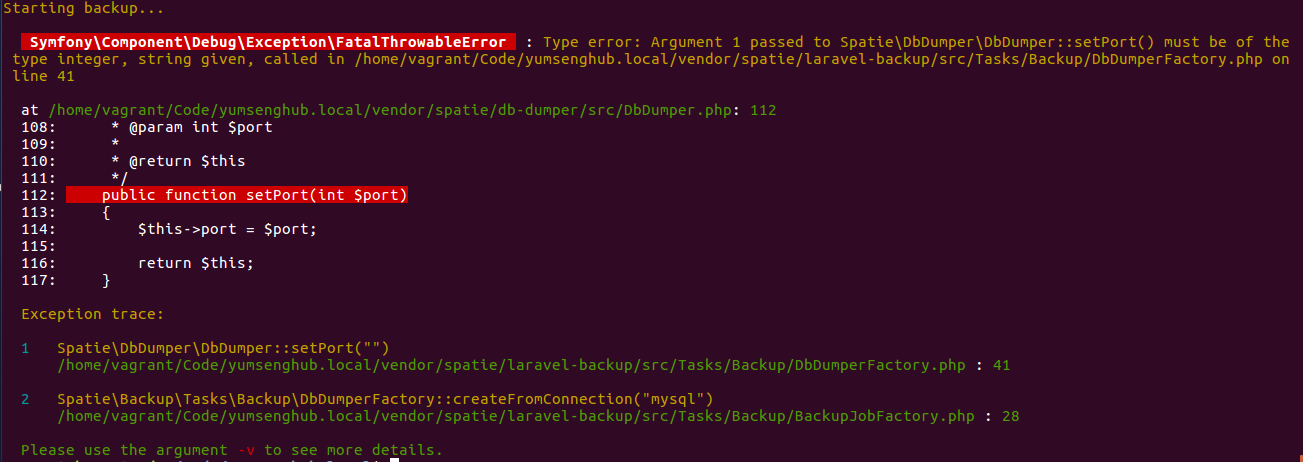
Laravel-backup: Type error: Argument 1 passed to Spatie\DbDumper\DbDumper::setPort() must be of the type integer, string given
I am getting the following error while trying to run _php artisan backup:run_
What may be the cause?
 gauravmak
All 9 comments
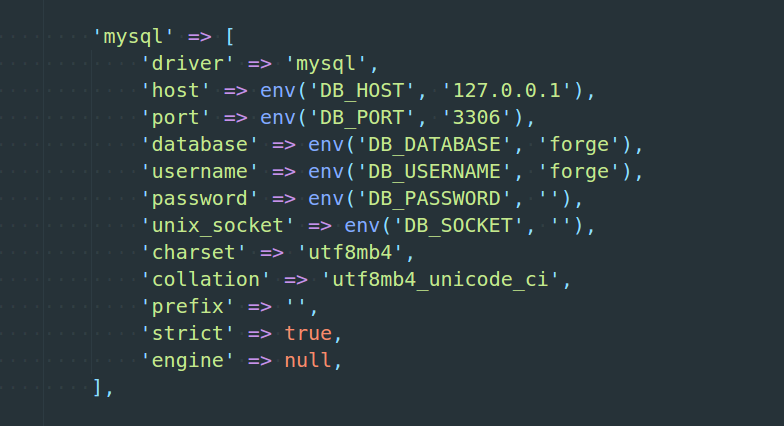
What does you database config look like?
 freekmurze
on 10 Feb 2018
freekmurze
on 10 Feb 2018
It works with a fresh Laravel installation. So, there's something specific to this project only.
gauravmak
on 10 Feb 2018
Could you try setting to value of port to 3306 instead of '3306'?
freekmurze
on 10 Feb 2018
No luck with that. New installation also has a string port number and it works.
Knowing that this has to do something with my project, I won't take more of your time; it's very valuable. I will try my best to troubleshoot myself first and update here.
Thank, Freek. You're awesome. Looking forward to seeing you in person at Laravellive this year.
gauravmak
on 11 Feb 2018
The issue was with my .env file. DB_PORT was set to be blank. Not sure when I did it. Sorry, for that. Thanks.
gauravmak
on 12 Feb 2018
I'm seeing this error, but my .env file and config/database.php file both look fine.
.env
DB_PORT=3306
config/database.php
'mysql' => [
            'driver' => 'mysql',
            'host' => env('DB_HOST', '127.0.0.1'),
            'port' => env('DB_PORT', '3306'),
            'unix_socket' => env('DB_SOCKET', ''),
            'database' => env('DB_DATABASE', 'killfood'),
            'username' => env('DB_USERNAME', 'homestead'),
            'password' => env('DB_PASSWORD', 'secret'),
            'charset' => 'utf8mb4',
            'collation' => 'utf8mb4_unicode_ci',
            'prefix' => '',
            'strict' => true,
            'engine' => null,
            'modes'  => [
                'ONLY_FULL_GROUP_BY',
                'STRICT_TRANS_TABLES',
                'NO_ZERO_IN_DATE',
                'NO_ZERO_DATE',
                'ERROR_FOR_DIVISION_BY_ZERO',
                'NO_ENGINE_SUBSTITUTION',
            ],
        ],
I've tried that database.php file with 'port' => env('DB_PORT', '3306'), and 'port' => env('DB_PORT', 3306), and neither work. (Unsurprising since the .env file should be used over this)
 shazaman23
on 8 Aug 2020
shazaman23
on 8 Aug 2020
For further context, I run my site on a docker cluster. The database connections work for normal app operation so this doesn't feel like a configuration issue on my end. The only database interaction that fails with this error is the attempt to take backups.
shazaman23
on 8 Aug 2020
Did some more digging on this. Found that I could use php artisan tinker to take a look at what config values were being set. When I did so, I found that the port being set for mysql was '127.0.0.1:3306' instead of just 3306. I resolved my issues by changing this port section as such in my config file:
'mysql' => [
            'driver' => 'mysql',
            'host' => env('DB_HOST', '127.0.0.1'),
            'port' => 3306,
...
@shazaman23 thanks for that, same issue (and fix) here.
 peterjaap
on 9 Feb 2021
peterjaap
on 9 Feb 2021
Related issues
 rob1121
·
5Comments
rob1121
·
5Comments
 shez1983
·
3Comments
shez1983
·
3Comments
 andaril
·
3Comments
andaril
·
3Comments
 eelcol
·
7Comments
eelcol
·
7Comments
 rylxes
·
5Comments
rylxes
·
5Comments
Most helpful comment
The issue was with my .env file. DB_PORT was set to be blank. Not sure when I did it. Sorry, for that. Thanks.