Laravel-backup: Empty Zip file created
I currently installed laravel-backup v4 on my Laravel project. I went through the setup process, made sure the mysqldump was in my path, and ran the backup:run artisan command. It went off without any errors, saying it backed up 730 files. Then when I went to the backup to view what it backedup, it was an empty Zip file with around 7mb file size.
Heres the console output:
C:\MAMP\htdocs\Bihrle-HUD>php artisan backup:run --only-files
Starting backup...
Determining files to backup...
Zipping 730 files...
Created zip containing 730 files. Size is 6.23 MB
Copying zip to disk named local...
Successfully copied zip to disk named local.
Backup completed!
And here is a screenshot of the backup zip (after unzipping):
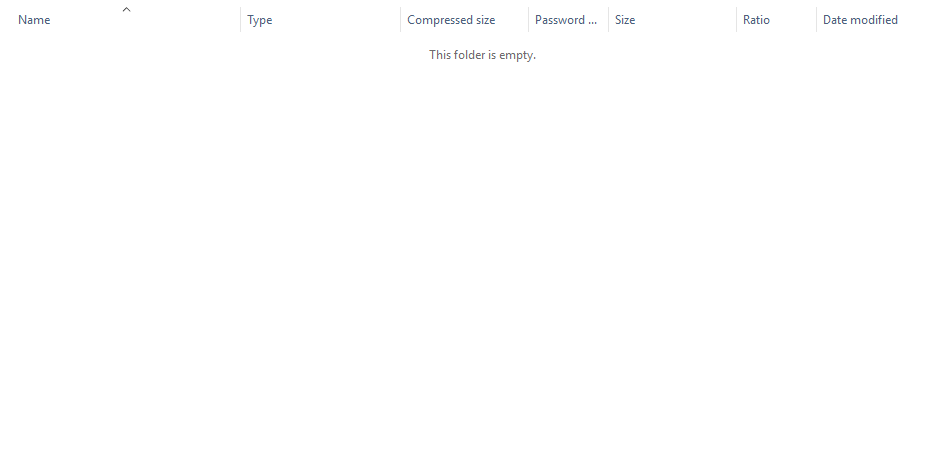
Theres nothing being placed in the log, and I don't think it is a permissions issue, but if so what permissions are needed on the folder?
 hightekjonathan
All 10 comments
The server is running on MAMP on Windows 10. Does the laravel backup not work at all on a WIndows OS? or just not on IIS?
hightekjonathan
on 6 Oct 2017
@hightekjonathan Hi :) just tried this on my ubuntu machine, works fine for me. This is weird, can you try the same setup on different OS if possible
 introwit
on 6 Oct 2017
introwit
on 6 Oct 2017
@introwit I am currently installing an Ubuntu based LAMP stack to try it on.
hightekjonathan
on 6 Oct 2017
So the error is due to Windows not processing the archive. It works properly in Ubuntu using php 7.1 and current modules.
hightekjonathan
on 6 Oct 2017
I have the same error on Windows 10 with Laragon.
Zip: 4038Ko
Content: Only db-dumps with 4Ko.
The content of the site is not visible in the archive.
 WinXaito
on 10 Jan 2018
WinXaito
on 10 Jan 2018
@WinXaito it seems to be a bug somewhere in either a PHP module, or something, because it runs fine in any Unix based OS.
hightekjonathan
on 10 Jan 2018
Just tested this on the following:
Run backup from CL on Ubuntu server.
Backs up to S3 bucket (~170MBs)
Copy archive to my windows 10 machine
Open archive and I can only see the SQL file.
I don't have another OS running just now but I'll test it later when I have access.
 chrisjohnstone
on 15 Feb 2018
chrisjohnstone
on 15 Feb 2018
@chrisjohnstone Open the backed up ZIP archive in 7-Zip, or another ZIP tool. It seems when you open it via the Windows File Explorer, it shows it as empty. I'm using Laragon on Windows 10.
In 7-Zip, it displays all the backed up directories fine.
 stevebauman
on 8 Feb 2019
stevebauman
on 8 Feb 2019
Hello! I have the same problem on windows 10. After running backup I get a 65,000 kb zip file, but windows explorer shows only db-dumps folder inside of it with the single db dump file with less than 500 kb in it. That is, unless it´s opened with a zip utility like https://www.files2zip.com/.
 archmaster01
on 17 Jul 2019
archmaster01
on 17 Jul 2019
@chrisjohnstone Open the backed up ZIP archive in 7-Zip, or another ZIP tool. It seems when you open it via the Windows File Explorer, it shows it as empty. I'm using Laragon on Windows 10.
In 7-Zip, it displays all the backed up directories fine.
Holy smokes. Thank you so much for this. I was really scratching my head trying to figure this out. Cheers!
 dvanderweele
on 24 Jul 2019
dvanderweele
on 24 Jul 2019
Related issues
 laurencei
·
4Comments
laurencei
·
4Comments
 chris-faulkner
·
3Comments
chris-faulkner
·
3Comments
 holymp2006
·
4Comments
holymp2006
·
4Comments
 sherwinmartin
·
5Comments
sherwinmartin
·
5Comments
 shez1983
·
3Comments
shez1983
·
3Comments
Most helpful comment
@chrisjohnstone Open the backed up ZIP archive in 7-Zip, or another ZIP tool. It seems when you open it via the Windows File Explorer, it shows it as empty. I'm using Laragon on Windows 10.
In 7-Zip, it displays all the backed up directories fine.