Laradock: Docker Trojan Horse in Redis Container
Info:
- Docker version (
$ docker --version): - Laradock commit (
$ git rev-parse HEAD): - System info (Mac, PC, Linux):
- System info disto/version:
Issue:
I recently found that after a rebuild, the redis container would shut down after exactly 24 hr. After looking through the log, I found that after 24hr, redis would run the following command:
redis_1 | sh: 1: killall: not found
redis_1 | ./xmrig-notls: unrecognized option '--max-cpu-usage'
Expected behavior:
Expected it to work
Reproduce:
That's the tricky part. I didn't have this kind of issue until last week. Maybe the horse is from official docker redis container (possibly not) or maybe an intrusion into my system, but I only found xmrig under overlay2:
/var/lib/docker/overlay2/f0d664c7954a158354876e11b8c89bd3c323d49ddc59c5531750b5ac639f9c6e/merged/tmp/xmrig-2.99.0-beta/xmrig
/var/lib/docker/overlay2/f0d664c7954a158354876e11b8c89bd3c323d49ddc59c5531750b5ac639f9c6e/diff/tmp/xmrig-2.99.0-beta/xmrig
So it's more likely a container problem.
Relevant Code:
// place a code sample here
 zimo-xiao
All 31 comments
Update: I recommend building images from https://hub.docker.com/r/bitnami/redis/ as they have a REDIS_PASSWORD env variable available.
--
@zimo-xiao This happened because you didn't secure your Redis container (even though you think you did!) I know because this exact situation happened to me before :o)
If your docker-compose.yml file contains this redis configuration:
services:
  redis:
    ..
    ports:
      - 6379:6379
.. then Docker will override your iptables. This doesn't show in ufw status because it wasn't configured there.
This situation is explained in more detail here.
The solution is to either remove 6379:6379 or change it to 127.0.0.1:6379:6379 if you need host access, then create a secure password for Redis.
 cwilby
on 26 Aug 2019
cwilby
on 26 Aug 2019
Additionally, Laradock doesn't have an env option for setting the redis password, so you will need to run sed on the redis.conf file.
In .env:
REDIS_PASSWORD=supersecret
In ./laradock/redis/redis.conf:
requirepass __REDIS_PASSWORD__
In ./laradock/redis/Dockerfile
FROM redis:latest

ARG REDIS_PASSWORD=secret

RUN mkdir -p /usr/local/etc/redis
COPY redis.conf /usr/local/etc/redis/redis.conf
RUN sed -i "s/__REDIS_PASSWORD__/${REDIS_PASSWORD}/g" /usr/local/etc/redis/redis.conf

VOLUME /data

EXPOSE 6379

CMD ["redis-server", "/usr/local/etc/redis/redis.conf"]
In ./laradock/docker-compose.yml
redis:
  build:
    context: ./redis
    args:
      REDIS_PASSWORD: "${REDIS_PASSWORD}
  ...
Darn cryptojackers.
cwilby
on 26 Aug 2019
Thank you very much cwilby! You instructions were clear and I think you are right about securing ports and setting passwords. I'll wait for another 24hr, and, hopefully, if nothing happen, I would close. I would try to work on a new feature for laradock that allows redis password to be config in env file.
zimo-xiao
on 26 Aug 2019
It's 24hr later, business as usual! Thank you again for your help. I'll close
zimo-xiao
on 28 Aug 2019
I'm having the same issue, after trying to set a password, laravel won't connect to redis no matter what, is there any step missing from what is mentioned above?
 javierrivarola
on 3 Sep 2019
javierrivarola
on 3 Sep 2019
@javierrivarola Couple of things to check:
- Are you able to connect to Redis via redis-cli, type
auth, enter password, and runping?
$ docker-compose exec redis redis-cli
127.0.0.1:6379> auth {{your_password}}
127.0.0.1:6379> ping
pong
Check that you have set your
REDIS_PASSWORDin the .env file used by Laravel.Check
config/database.phpand make sure that the default redis driver includes apasswordfield that pulls fromenv('REDIS_PASSWORD', null).
Failing that, it could be a build-cache issue, where you've set the files but it hasn't updated in the container.
$ docker-compose down && docker-compose up -d --build
Yes i can auth from the redis-cli but no matter what i do, laravel gets "Connection refused [tcp://redis:6379]", already tried to re build workspace container but nothing
javierrivarola
on 3 Sep 2019
I also get that error message when starting my containers for the first time for about 10-30 seconds while Redis is getting started.
After all containers are running, check to see if this works:
$ docker-compose exec workspace bash
$ art tinker
> cache(['foo' => 'bar'], 10);
> cache('foo')
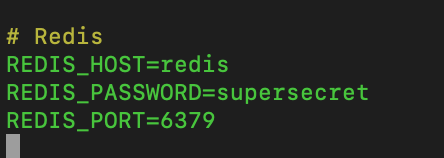
Laravel just won't connect

my .env
javierrivarola
on 3 Sep 2019
Can you post the redis service from your docker-compose.yml file?
cwilby
on 3 Sep 2019
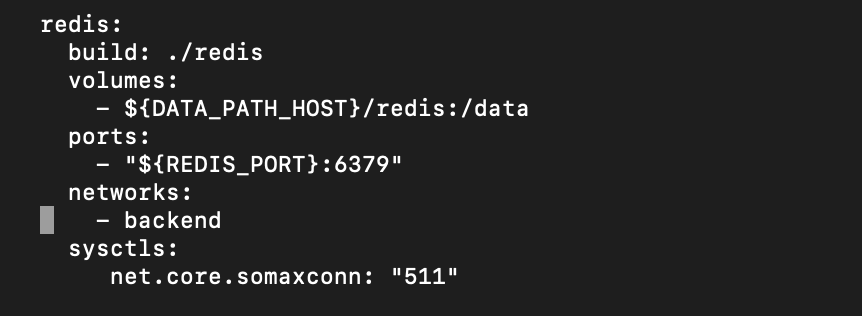
and this is my laradock .env

javierrivarola
on 3 Sep 2019
Thanks @javierrivarola, I've updated my answer above to include adding REDIS_PASSWORD as a build argument in ./laradock/docker-compose.yml, which was missing in your service.
cwilby
on 3 Sep 2019
do i need to rebuild everything? still not working
javierrivarola
on 3 Sep 2019
Yep, need to rebuild so that the argument gets used. You can run docker-compose down then docker-compose up -d --build to trigger a build with only new changes.
cwilby
on 3 Sep 2019
The same issue after rebuilding everything :S
javierrivarola
on 3 Sep 2019
We got this :)
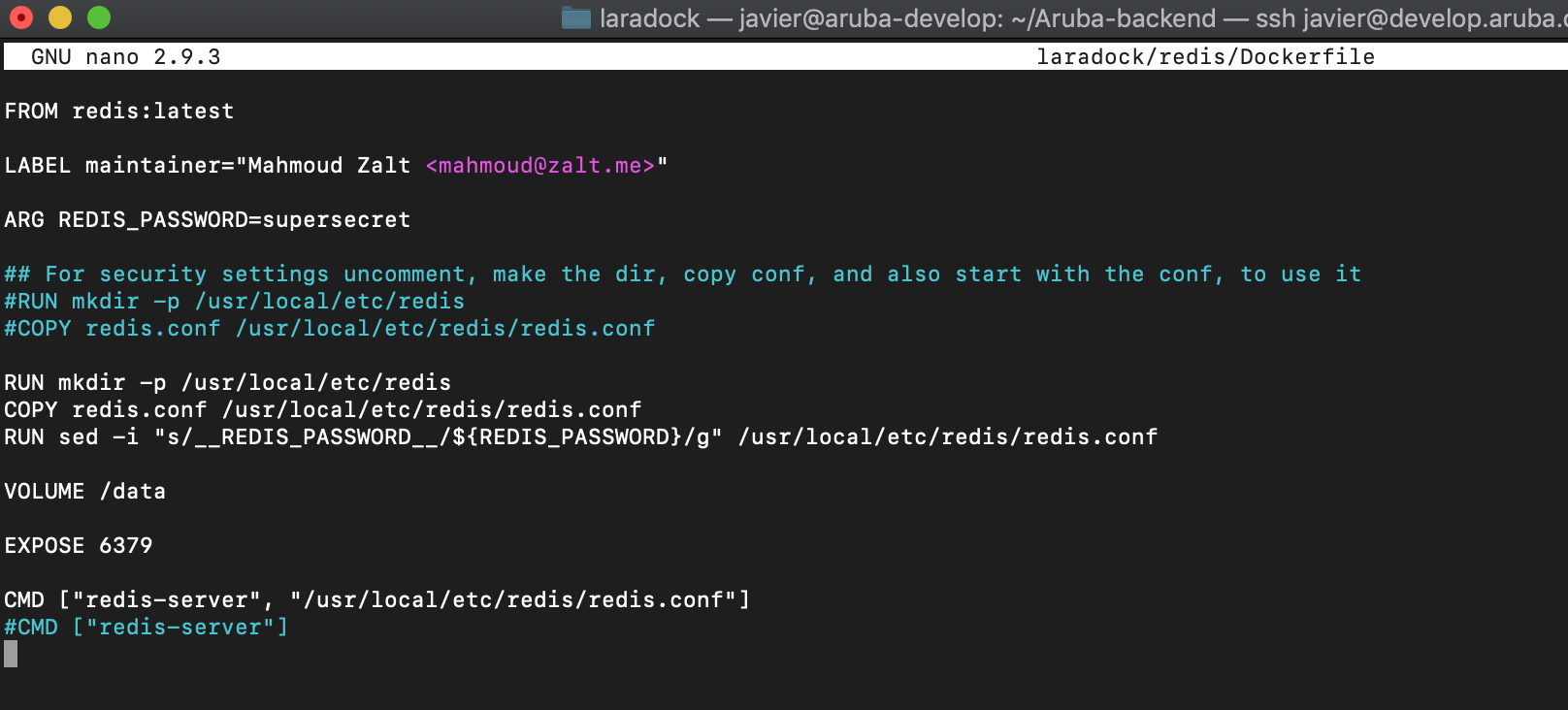
Can you post ./laradock/redis/Dockerfile?
cwilby
on 3 Sep 2019
Thanks for your patience and efforts to help me! this is really driving me nuts
javierrivarola
on 3 Sep 2019
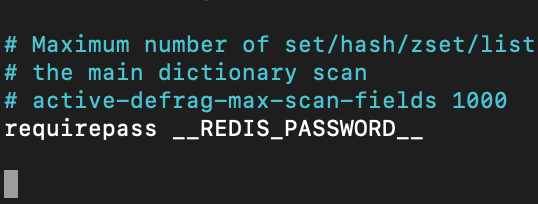
No worries, just one last sanity check - do you have __REDIS_PASSWORD__ in redis.conf?
cwilby
on 3 Sep 2019
yes! if i login into the container i can auth to redis
javierrivarola
on 3 Sep 2019
Ok, so the password is definetely being set :+1:
Are your workspace/php-fpm instances connected to the backend network?
cwilby
on 3 Sep 2019
yeah, if i remove the password everything works
javierrivarola
on 3 Sep 2019
Shout out to @cwilby who helped me resolve this issue!! He is the real MVP guys!
The last step missing for me was removing the bind directive in redis.conf file, and everything worked!
javierrivarola
on 4 Sep 2019
I also found the same problem today, redis is closed, and then xmrig-notls is running. Can I suggest @Mahmoudz to modify redis and mysql ports directly in the env template to default to 127.0.0.1:6379 and 127.0.0.1:3306
Because we are more accustomed to using docker-compose to log in to different docker applications in a development environment, we don't need to use local remote connections directly.
And this is safer for direct deployment to production environments.
@cwilby In addition, I directly closed the redis external port(127.0.0.1:6379->6379), and did not set a password, there will be other risks
 crcms
on 12 Sep 2019
crcms
on 12 Sep 2019
Hi
I want to add up one reason behind "Connection refused to Redis server" is your Laravel app may still caching .env configuration file so it is good to remove all config cache by running php artisan cache:clear and php artisan config:clear to reflect new .env file with REDIS_PASSWORD set :)
 quangvision
on 18 Sep 2019
quangvision
on 18 Sep 2019
When experiencing strange issues with Laravel it is always a good idea to consider clearing caches, especially for config and views.
 bumbummen99
on 18 Sep 2019
bumbummen99
on 18 Sep 2019
Should probably put this somewhere else, but here's my modification of workspace/docker-entrypoint.sh that helps me avoid cache during dev.
#!/bin/bash
set -e

while ! mysqladmin ping -h"${DB_HOST}" -u"root" -p"${ROOT_PASSWORD}" --silent; do
  sleep 1
done

pushd /var/www
  if [ "${APP_ENV}" = "production" ]; then
    sed -i 's|APP_DEBUG=true|APP_DEBUG=false|g' /var/www/.env
    composer install --no-plugins --no-scripts --no-dev
  else
    composer install --no-plugins --no-scripts
  fi

  [ -z "${APP_KEY}" ] && php artisan key:generate --force
  [ -z "${JWT_SECRET}" ] && php artisan jwt:secret --force

  php artisan migrate --force
  php artisan db:seed --force

  if [ "${APP_ENV}" = "production" ]; then
    php artisan clear-compiled
    php artisan cache:clear
    php artisan config:clear
    php artisan clockwork:clean
    php artisan event:clear
    php artisan optimize:clear
    php artisan route:clear
    php artisan view:clear

    php artisan config:cache
    php artisan event:cache
    php artisan route:cache
    php artisan view:cache
  fi
popd

/sbin/my_init
@cwilby That is really helpful, thanks alot! :+1:
bumbummen99
on 20 Sep 2019
Shout out to @cwilby who helped me resolve this issue!! He is the real MVP guys!
The last step missing for me was removing the bind directive in redis.conf file, and everything worked!
This step should be added in the documentation.
Also change protected-mode to no if you don't have a password
 jrbecart
on 24 Oct 2019
jrbecart
on 24 Oct 2019
@dabarto
In redis.conf comment out line 69:
```
bind 127.0.0.1
jrbecart
on 8 Nov 2019
@dabarto make sure:
- [x]
.envhas REDIS_PASSWORD - [ ]
./laradock/redis/redis.confhas linesbind 127.0.0.1andrequirepass __REDIS_PASSWORD__ - [ ]
./laradock/redis/DockerfilehasARG REDIS_PASSWORDandsedinvocation - [ ]
docker-compose.ymlhasREDIS_PASSWORDbuild args
The thread above should have enough to check each step
cwilby
on 8 Nov 2019
in docker-compose you can bind redis to localhost so it can't get accessed from outside
ports:
    - "127.0.0.1:27017:27017"
 moeinrahimi
on 12 Oct 2020
moeinrahimi
on 12 Oct 2020
Related issues
 IgorDePaula
·
3Comments
IgorDePaula
·
3Comments
 dioseltorre
·
3Comments
dioseltorre
·
3Comments
 vocanic-saumini
·
3Comments
vocanic-saumini
·
3Comments
 fuzzyjared
·
3Comments
fuzzyjared
·
3Comments
 sudden-break
·
3Comments
sudden-break
·
3Comments
Most helpful comment
Update: I recommend building images from https://hub.docker.com/r/bitnami/redis/ as they have a
REDIS_PASSWORDenv variable available.--
@zimo-xiao This happened because you didn't secure your Redis container (even though you think you did!) I know because this exact situation happened to me before :o)
If your docker-compose.yml file contains this redis configuration:
.. then Docker will override your iptables. This doesn't show in
ufw statusbecause it wasn't configured there.This situation is explained in more detail here.
The solution is to either remove
6379:6379or change it to127.0.0.1:6379:6379if you need host access, then create a secure password for Redis.