Languageclient-neovim: Error symbol of linter does not disappear when writing code using neosnippet
- Did you upgrade to latest plugin version? yes
- Did you upgrade to/compile latest binary? Run shell command yes
bin/languageclient --versionto get its version number. - (Neovim users only) Did you check output of
:checkhealth LanguageClient? all OK - Did you check [troubleshooting]? yes
Describe the bug
Error symbol of linter does not disappear when writing code using neosnippet. After reopen the file, the symbol disappears.
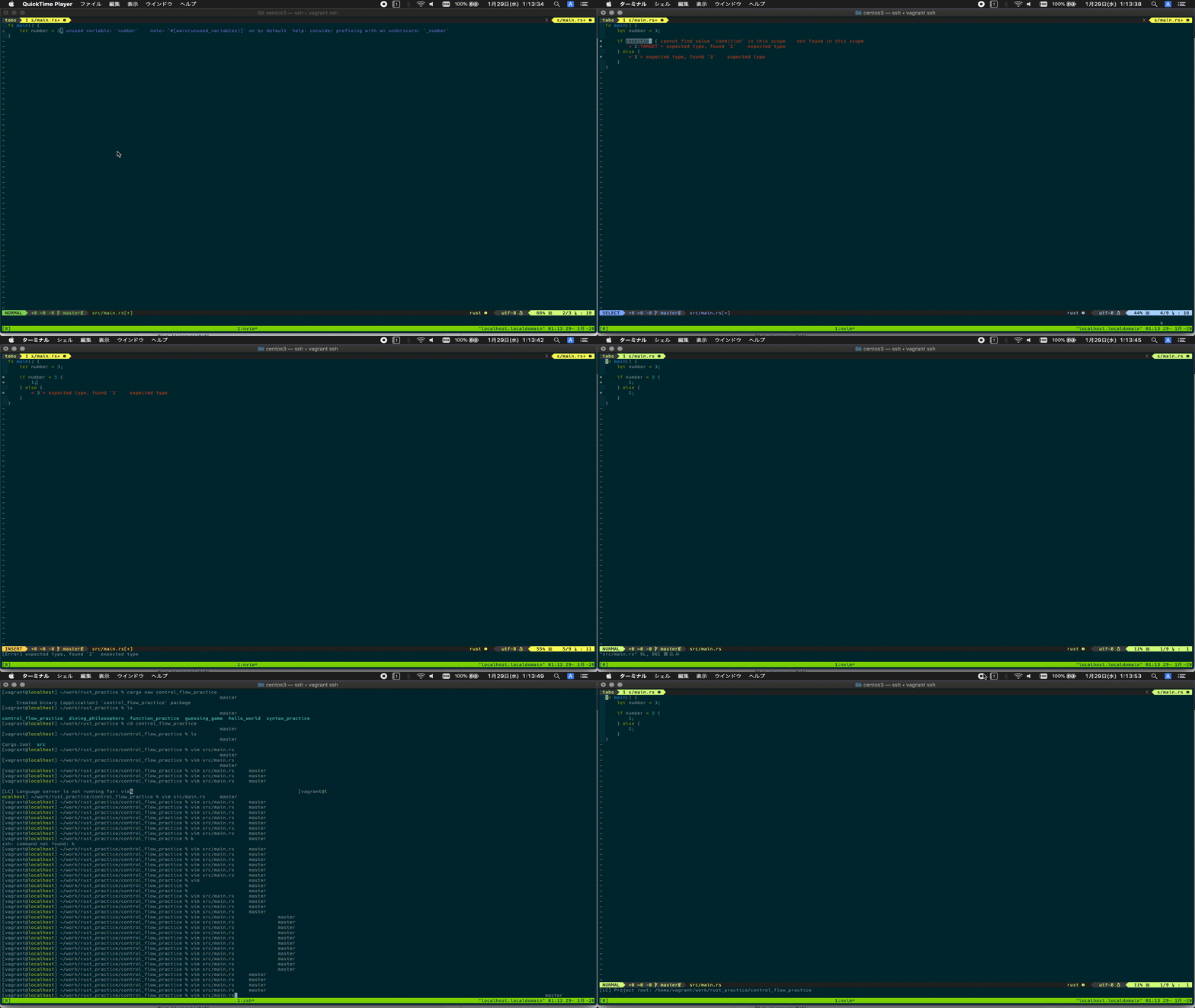
And, when I write the same code without neosnippet, the error symbol disappears soon.
Environment
- neovim/vim version (
nvim --versionorvim --version):
  NVIM v0.4.3
  Build type: RelWithDebInfo
  LuaJIT 2.0.5
- This plugin version (
git rev-parse --short HEAD):51fa22f - This plugin's binary version (
bin/languageclient --version):languageclient 0.1.156 - Minimal vimrc content (A minimal vimrc is the smallest vimrc that could
reproduce the issue. Refer to an example here):
  call plug#begin('~/.local/share/nvim/plugged')

  Plug 'Shougo/deoplete.nvim', { 'do': ':UpdateRemotePlugins' }
  Plug 'Shougo/neosnippet.vim'
  let g:deoplete#enable_at_startup = 1
  Plug 'Shougo/neosnippet-snippets'
  Plug 'autozimu/LanguageClient-neovim', {
                          \ 'branch': 'next',
                          \ 'do': 'bash install.sh',
                          \ }

  call plug#end()

  augroup filetype_rust
      autocmd!
      autocmd BufReadPost *.rs setlocal filetype=rust
  augroup END

  " Always draw sign column. Prevent buffer moving when adding/deleting sign.
   set signcolumn=yes

  let g:LanguageClient_serverCommands = {
      \ 'rust': ['rustup', 'run', 'stable', 'rls'],
      \ }

  imap <space>i     <Plug>(neosnippet_expand_or_jump)
  smap <space>i     <Plug>(neosnippet_expand_or_jump)
  xmap <space>i     <Plug>(neosnippet_expand_target)

  imap <expr><TAB>
                          \ pumvisible() ? "\<C-n>" :
                          \ neosnippet#expandable_or_jumpable() ?
                          \    "\<Plug>(neosnippet_expand_or_jump)" : "\<TAB>"
  smap <expr><TAB> neosnippet#expandable_or_jumpable() ?
                          \ "\<Plug>(neosnippet_expand_or_jump)" : "\<TAB>"
- Language server link and version:
To Reproduce
Steps to reproduce the behavior:
carge new sample && cd sample- Start vim,
nvim src/main.rs - type
if, and selectiflse [ns]andspace + ifor expand target. - (Error symbols appear on each line of expanded code)
- fix the placeholders.
- Error symbol does not disappear
- Reopen
main.rs - Error symbol disappears
Current behavior
Error symbol does not disappear
Expected behavior
Error symbol disappears
Screenshots
Attached on top.
Additional context
 ikneg
ikneg
All 7 comments
I can reproduce this for Rust and for C.
 jounathaen
on 4 Feb 2020
jounathaen
on 4 Feb 2020
I have a very similar issue so I thought I'd mention it here, but I can create a separate issue if needed.
My small vimrc have language client as the only plugin so no completion engine or snippets.
Very often the linter errors in the sign column doesn't disappear. I have linked the highlight group ALEError to the Error group and the highlighting of the errors does not disappear either. But I'm guessing the sign and highlighting issues have the same root cause.
I am using vim 8.2 patch 1-148. Here is my vimrc
if &compatible
    set nocompatible
endif

syntax on
filetype plugin indent on

" Force python 3
if has('python3')
endif

packadd minpac
if exists('*minpac#init')
    call minpac#init()
    call minpac#add('t-takata/minpac', {'type': 'opt'})

    " Language client
    call minpac#add('autozimu/LanguageClient-neovim', {'do': '!bash ./install.sh'})

    " Plugin commands
    command! PackUpdate call minpac#update()
    command! PackClean call minpac#clean()
    command! PackStatus call minpac#status()
endif

set signcolumn=yes
set hidden

hi SignColumn ctermbg=none
hi link ALEError Error
hi Warning term=underline cterm=underline ctermfg=Yellow gui=undercurl guisp=Gold
hi link ALEWarning Warning
hi link ALEInfo SpellCap

let g:LanguageClient_serverCommands = {
    \ 'cpp': ['/usr/bin/clangd', '-compile-commands-dir=build',
        \ '-background-index', '--clang-tidy'
        \],
    \ }
let g:LanguageClient_diagnosticsList = 'Location'
 mmFooD
on 12 Feb 2020
mmFooD
on 12 Feb 2020
I can reproduce with typescript-language-server, and I remember it happening with Rust and JS Flow as well, only way to be sure errors are gone is to move cursor over line and make sure nothing shows up in status bar.
 jeffvandyke
on 17 Feb 2020
jeffvandyke
on 17 Feb 2020
I started from scratch, with only LanguageClient-neovim and vim-polyglot enabled. I used 'typescript-language-server', '--stdio' as my typescript server command, and things definitely work fine. I then added these two lines:
Plug 'Shougo/deoplete.nvim', { 'do': ':UpdateRemotePlugins' }
let g:deoplete#enable_at_startup = 1
And after the PlugInstall and re-opening a typescript file, even a little bit of editing causes the error sign to stick around, though errors are absent after being fixed in the file.
Here's my minimal init.vim file after installing vim-plug and npm i -g typescript-language-server:
let plugPath = "~/.local/share/nvim/plugged"

call plug#begin(plugPath)

Plug 'autozimu/LanguageClient-neovim', {
    \ 'branch': 'next',
    \ 'do': 'bash install.sh',
    \ }

let g:LanguageClient_serverCommands = {
    \ 'javascript': ['typescript-language-server', '--tsserver-log-file', '~/tsserver-log.txt', '--stdio'],
    \ 'javascript.jsx': ['typescript-language-server', '--tsserver-log-file', '~/tsserver-log.txt', '--stdio'],
    \ 'javascriptreact': ['typescript-language-server', '--tsserver-log-file', '~/tsserver-log.txt', '--stdio'],
    \ 'typescript': ['typescript-language-server', '--tsserver-log-file', '~/tsserver-log.txt', '--stdio'],
    \ 'typescript.tsx': ['typescript-language-server', '--tsserver-log-file', '~/tsserver-log.txt', '--stdio'],
    \ 'typescriptreact': ['typescript-language-server', '--tsserver-log-file', '~/tsserver-log.txt', '--stdio'],
    \ }

" Adding these two lines breaks things
" Plug 'Shougo/deoplete.nvim', { 'do': ':UpdateRemotePlugins' }
" let g:deoplete#enable_at_startup = 1

Plug 'sheerun/vim-polyglot'

call plug#end()
Hi, I see a very similar behavior with both CCLS and Python language server, even without neosnippet. It feels like every error mark in the sign column has a non-zero probability of not disappearing after fixing it.
Turning vim signcolumn on/off doesn't help.
Reopening the file does help.
 grwlf
on 26 Aug 2020
grwlf
on 26 Aug 2020
grwlf
on 26 Aug 2020
grwlf
on 26 Aug 2020
Could you provide some more info @grwlf , I'm pretty positive this shouldn't be an issue no more, but it shouldn't have been an issue on the date you posted either I think.
 martskins
on 25 Oct 2020
martskins
on 25 Oct 2020
Related issues
 kristijanhusak
·
6Comments
kristijanhusak
·
6Comments
 allan-simon
·
6Comments
allan-simon
·
6Comments
 mhuttner
·
3Comments
mhuttner
·
3Comments
 htfy96
·
5Comments
htfy96
·
5Comments
 MaskRay
·
3Comments
MaskRay
·
3Comments
Most helpful comment
I can reproduce with typescript-language-server, and I remember it happening with Rust and JS Flow as well, only way to be sure errors are gone is to move cursor over line and make sure nothing shows up in status bar.