Languageclient-neovim: Completion popup not showing up automatically anymore
The completion menu does not popup automatically in any Language. I tried a simple python file
"". # <-- popup should show up but doesn't
NeoVim: 0.2.0
Plugin: Last one that's working 2760b3f340dad4b373658d00153511e0adce6b9b
LanguageServer.log - Only Python Language Server seems to throw an error. Others don't
ERROR - pyls.server - Language server exiting due to uncaught exception
Traceback (most recent call last):
  File "/home/user/.local/lib/python3.6/site-packages/pyls/server.py", line 34, in handle
    data = self._read_message()
  File "/home/user/.local/lib/python3.6/site-packages/pyls/server.py", line 91, in _read_message
    raise EOFError()
EOFError
LanguageClient.log - not verbose.
WARNING [MainThread] Unknown parameter key: rootPath
WARNING [MainThread] Unknown parameter key: settingsPath
WARNING [MainThread] register completion manager source failed. Error: NvimError(b'Error calling function.',)
My .vimrc is just from the README. Deoplete + LanguageClient no special settings.
 schiegl
All 25 comments
I couldn't reproduce with the provided information.
Please provide vimrc and reproduction steps.
 autozimu
on 10 Dec 2017
autozimu
on 10 Dec 2017
I didn't see you had changed the README.
With the new setup the Java LS doesn't work at all. This is the error I get in LanguageServer.log:
Error: Unable to access jarfile ~/.config/nvim/eclipse.jdt.ls/plugins/org.eclipse.equinox.launcher_1.4.0.v20161219-1356.jar
However the python error message in LanguageClient.log disappeared. But the problem is still the same. Completion does not show up automatically.
init.vim
call plug#begin('~/.config/nvim/plugged')

" Language Support
" Plug 'autozimu/LanguageClient-neovim', {'commit': '2760b3f340dad4b373658d00153511e0adce6b9b', 'do': ':UpdateRemotePlugins' }
Plug 'autozimu/LanguageClient-neovim', {
    \ 'branch': 'next',
    \ 'do': './install.sh'
    \ }
Plug 'Shougo/deoplete.nvim', { 'do': ':UpdateRemotePlugins' }

call plug#end()

let g:LanguageClient_serverCommands = {
        \ 'python': ['pyls'],
        \ 'java': ['java',
        \   '-agentlib:jdwp=transport=dt_socket,server=y,suspend=n,address=1044',
        \   '-Declipse.application=org.eclipse.jdt.ls.core.id1',
        \   '-Dosgi.bundles.defaultStartLevel=4',
        \   '-Declipse.product=org.eclipse.jdt.ls.core.product',
        \   '-jar', '~/.config/nvim/eclipse.jdt.ls/plugins/org.eclipse.equinox.launcher_1.4.0.v20161219-1356.jar',
        \   '-configuration', '~/.config/nvim/eclipse.jdt.ls/config_linux',
        \    '-data', '/tmp']
        \  }

let g:LanguageClient_autoStart = 0
set omnifunc=LanguageClient#complete
let g:LanguageClient_diagnosticsEnable = 0

let g:deoplete#enable_at_startup = 1
There are really no reproduction steps. I just opened a .py file. Typed "". and this is where the completion pops up in the last working version but not the latest.
schiegl
on 10 Dec 2017
There are too many issues in the provided setting.
Error: Unable to access jarfile ~/.config/nvim/eclipse.jdt.ls/plugins/org.eclipse.equinox.launcher_1.4.0.v20161219-1356.jar
It is your responsibility to make sure language server could be started with the provided commands. This clearly says there is something wrong with the jar file/path.
let g:LanguageClient_autoStart = 0
If you have this line, language server will not be started automatically when opening a file. Completion won't show up until you start server explicitly with :LanguageClientStart.
Again, with the provided setting and after command :LanguageClientStart, I could see the correct completion list.
You might need to either remove
let g:LanguageClient_autoStart = 0
or run the command explicitly. And you may also need to check your plugin installation, possibly remove and re-install.
There are definitely reproduction steps even in this simple case.
- Install plugins with provided vimrc
nvim -u /tmp/vimrc +PlugInstall - Start with empty file
nvim -u /tmp/vimrc /tmp/sample.py - Start typing
"".
autozimu
on 10 Dec 2017
It is your responsibility to make sure language server could be started with the provided commands. This clearly says there is something wrong with the jar file/path.
But why is there nothing wrong with the path in version: 2760b3f340dad4b373658d00153511e0adce6b9b. This version of the plugin works.
Also I ran :LanguageClientStart explicitely like you suggested in the issue template. Also autostarting does not make a difference.
And you may also need to check your plugin installation, possibly remove and re-install.
Also did that.
schiegl
on 10 Dec 2017
I see. For the java language server, I think the issue is caused by ~ in arguments not expanded. I will push a fix shortly to fix that.
For the python one, I really don't have any idea what's going wrong. Please try at least attach a log here.
autozimu
on 10 Dec 2017
Have your tried deoplete? NCM shows the completion menu but not deoplete.
schiegl
on 11 Dec 2017
Yes, I tested with the provided vimrc, which is using deoplete.
On Mon, Dec 11, 2017 at 01:01 tepf notifications@github.com wrote:
Have your tried deoplete? NCM shows the completion menu but not deoplete.
—
You are receiving this because you modified the open/close state.Reply to this email directly, view it on GitHub
https://github.com/autozimu/LanguageClient-neovim/issues/200#issuecomment-350662022,
or mute the thread
https://github.com/notifications/unsubscribe-auth/ABYt7wYXC_0UlveeDh3neX3FHtsQib9aks5s_O-AgaJpZM4Q8cGU
.
autozimu
on 11 Dec 2017
I have the same issue, i found the reason is this commit https://github.com/autozimu/LanguageClient-neovim/commit/b85ff8e.
Before:
React[.] -> show all completions
After:
React[.] -> nothing
React.[h] -> [h]asOwnProperty
Look like i must type at least 1 character to show the completion.
 nguquen
on 24 Dec 2017
nguquen
on 24 Dec 2017
I have similar problem:
$ cat ~/desktop/test_config.vim
call plug#begin('~/.config/nvim/plugged')
Plug 'autozimu/LanguageClient-neovim', { 'branch': 'next', 'do': 'make release' }
Plug 'Shougo/deoplete.nvim', { 'do': ':UpdateRemotePlugins' }
call plug#end()

set nocompatible
set noswapfile
set hidden

let g:LanguageClient_loggingLevel = 'DEBUG'
let g:LanguageClient_serverCommands = {
    \ 'rust': ['rustup', 'run', 'nightly', 'rls'],
    \ }
```
$ cat src/lib.rs
pub fn foo() {
//
}
open file:
nvim -u ~/desktop/test_config.vim src/lib.rs
and type in the function body:
```rust
String::
nothing happens. /tmp/LanguageClient.log doesn't have any textDocument/completion calls.
However when I press C-X C-O, I see completion results.
 saks
on 31 Dec 2017
saks
on 31 Dec 2017
Same problem with php-language-server. Completion with \ It doesn't matter if I use deoplete or nvim-completion-manager. Neither does it matter if I use MacVim or Terminal Vim. Other completion sources work fine. MacVim 8.0.1420 .vimrc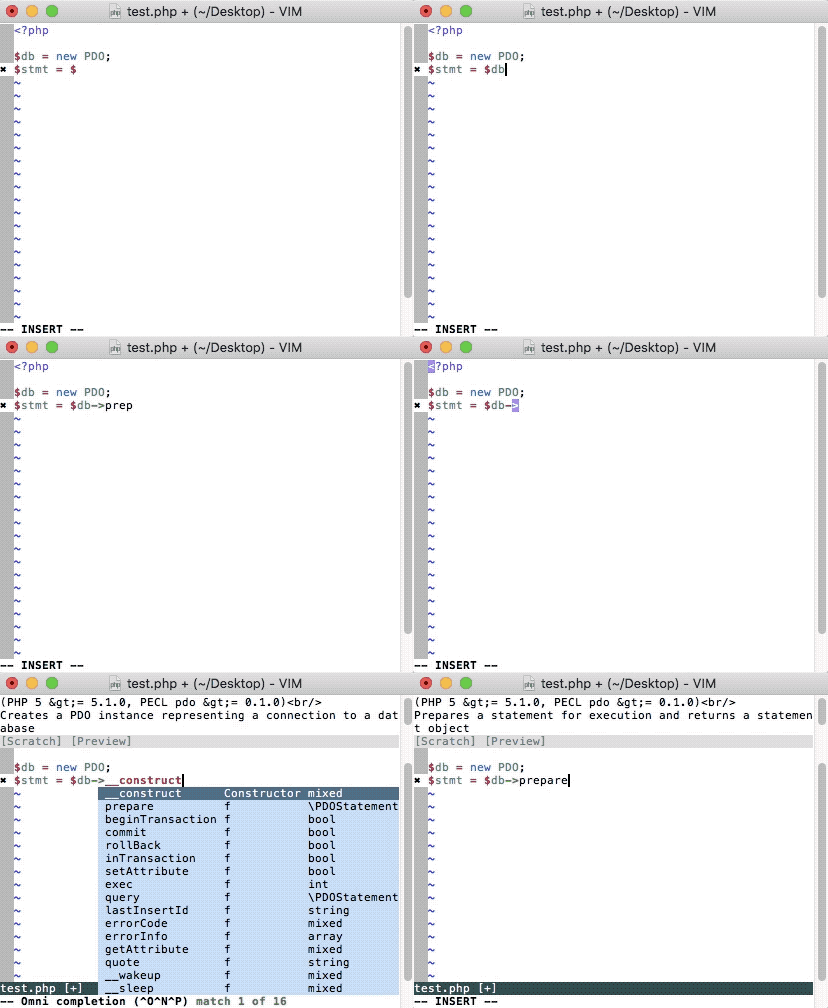
Vim 8.0.642filetype plugin on
set omnifunc=syntaxcomplete#Complete
call plug#begin('~/.vim/plugged')
if has('nvim')
Plug 'Shougo/deoplete.nvim', { 'do': ':UpdateRemotePlugins' }
else
Plug 'Shougo/deoplete.nvim'
Plug 'roxma/nvim-yarp'
Plug 'roxma/vim-hug-neovim-rpc'
endif
Plug 'autozimu/LanguageClient-neovim', {'tag': 'binary-*-x86_64-apple-darwin'}
Plug 'roxma/LanguageServer-php-neovim', {'do': 'composer install && composer run-script parse-stubs'}
call plug#end()
" Use deoplete
let g:deoplete#enable_at_startup = 1
" LanguageClient-neovim
let g:LanguageClient_serverCommands = {
\'python' : ['pyls'],
\'php' : ['php', '~/.vim/plugged/LanguageServer-php-neovim/vendor/bin/php-language-server.php']
\ }
 dschuessler
on 31 Dec 2017
dschuessler
on 31 Dec 2017
Should fix with https://github.com/autozimu/LanguageClient-neovim/commit/a7e940cc9ff2218e694e251438f0c9a87c0b45f7
autozimu
on 31 Dec 2017
Just updated. The problem persists without any difference for me.
dschuessler
on 31 Dec 2017
You need to wait for CI to build binaries and make sure the plugin updated.
On Sun, Dec 31, 2017 at 14:53 Phosphor303 notifications@github.com wrote:
Just updated. The problem persists without any difference for me.
—
You are receiving this because you modified the open/close state.Reply to this email directly, view it on GitHub
https://github.com/autozimu/LanguageClient-neovim/issues/200#issuecomment-354627004,
or mute the thread
https://github.com/notifications/unsubscribe-auth/ABYt7wnSNYxASq_LjAq_1WKP3PXg9Eltks5tGBBjgaJpZM4Q8cGU
.
autozimu
on 31 Dec 2017
Thank you very much!
It fixed problem for me. When I type String:: I get suggestions from deoplete. However when I select particular option, it inserts a template like:
String::from_iter(${1:iter})
Any plans to fix it?
saks
on 31 Dec 2017
That’s code snippet, which is kind of expected. Haven’t got interest to
look into that yet.
On Sun, Dec 31, 2017 at 14:58 Aliaksandr Rahalevich <
[email protected]> wrote:
Thank you very much!
It fixed problem for me. When I type String:: I get suggestions from
deoplete. However when I select particular option, it inserts a template
like:String::from_iter(${1:iter})
Any plans to fix it?
—
You are receiving this because you modified the open/close state.Reply to this email directly, view it on GitHub
https://github.com/autozimu/LanguageClient-neovim/issues/200#issuecomment-354627144,
or mute the thread
https://github.com/notifications/unsubscribe-auth/ABYt72SecPcdz3s-rQJgeyDa9_VJzBgmks5tGBGUgaJpZM4Q8cGU
.
autozimu
on 1 Jan 2018
@autozimu, do you have any ideas about how to address this issue? Should it be done on rust or viml side? I can try to help with this if you like.
saks
on 1 Jan 2018
Basically what needs to be done is to detect if snippet plugin is loaded, if not, indicate that in the
initialize request parameters sent to server.
https://github.com/Microsoft/language-server-protocol/blob/gh-pages/specification.md Search for snippetSupport.
autozimu
on 1 Jan 2018
I waited a day now, used the .vimrc from my original post, deleted ~.vim/plugged/LanguageClient-neovim to make sure the old version of the plugin is wiped, ran :PlugInstall and waited until it was undoubtedly finished. The problem still persits as described above.
I'm happy to help with further troubleshooting.
dschuessler
on 1 Jan 2018
Using LCS 0.1.2.8, and I am having the same issue as described by others here. Pressing <C-x><C-o> shows the completion popup, but it otherwise does not show up automatically. Pressing Enter/Tab does not do what is expected and select a completion. I do not have any snippet plugins installed. Hints?
 bzm3r
on 18 Jan 2018
bzm3r
on 18 Jan 2018
Same here
saks
on 22 Jan 2018
@saks I was able to fix this issue by making sure that Python 3 was properly installed (when you check your :messages in nvim, do you see any helpful messages pointing to this?), and that neovim-completion-manager had the right variables set to ensure auto-popup.
bzm3r
on 23 Jan 2018
@bzm3r, thanks for your suggestion. I've checked:
```
- OK: Latest python2-neovim is installed: 0.2.0
... - OK: Latest python3-neovim is installed: 0.2.0
``Also:messages` is empty. I'm using deoplete and it's used to open popup. I've not changed any configuration.
P.S.
Pressing <C-x><C-o> doesn't give any suggestions too. Does this mean anything?
saks
on 23 Jan 2018
@saks
Pressing
doesn't give any suggestions too. Does this mean anything?
I'm not knowledgeable enough to know :( but, let me share my minimal init.vim with you, and you can check to see if it gives you proper completion? It is here: https://gist.github.com/bzm3r/cdc915b5ff137a4a93df0f991c937668
You might want to tweak some of the language specific settings (e.g. remove the rust stuff) to reflect your use case better, but this minimal set up, I have working popups. (note though that I am using nvim-completion-manager, might be worth trying that out just to make sure its not an LCS issue?)
bzm3r
on 23 Jan 2018
@bzm3r, thanks for sharing. I think I found the issue. I didn't figured out that dropdown preview is provided by fzf. After I've added it - everything works.
Thanks!
saks
on 25 Jan 2018
@saks glad it works for you!
bzm3r
on 25 Jan 2018
Related issues
 mhuttner
·
3Comments
mhuttner
·
3Comments
 kcajf
·
7Comments
kcajf
·
7Comments
 macthecadillac
·
5Comments
macthecadillac
·
5Comments
 languitar
·
7Comments
languitar
·
7Comments
 fortes
·
7Comments
fortes
·
7Comments
Most helpful comment
Using LCS 0.1.2.8, and I am having the same issue as described by others here. Pressing
<C-x><C-o>shows the completion popup, but it otherwise does not show up automatically. Pressing Enter/Tab does not do what is expected and select a completion. I do not have any snippet plugins installed. Hints?