Language-tools: Writes random jumble on save when an error exists
Describe the bug
Sometimes, when saving, the lsp writes seemingly random stuff where there is an error,
The text is written before the lsp recognises that the error is fixed, so it creates and error and writes again.
To Reproduce
Steps to reproduce the behavior:
Have an error, spam save, (works on my end)
            <button class="btn-icon delete">
              <Icon data="{icons.trash}" />
            </button>
turns into
            <button class="btn-icon delete">
              <Icon data="{icons.rashtrrrrrr}" />
            </button>
Expected behavior
Not writing anything and/or waiting to complete analysis before doing so
Screenshots


After a few saves, the example 2 turns into

before saving

after saving

System (please complete the following information):
- OS: Linux (5.11.16-arch1-1)
- IDE: VSCode
- Plugin/Package: "Svelte for VSCode" - v104.10.2
Additional context
The only way to work around this issue is to kill the lsp, write and save before it completly starts, and then it works fine until the bugs appears again.
I don't really understand how this works. With logging to verbose, the extension logs
[Trace - 10:12:53] Sending request 'textDocument/codeAction - (959)'.
Params: {
    "textDocument": {
        "uri": "file:///home/karitham/Projects/STM/Front/src/components/Table/Table.svelte"
    },
    "range": {
        "start": {
            "line": 79,
            "character": 44
        },
        "end": {
            "line": 79,
            "character": 44
        }
    },
    "context": {
        "diagnostics": []
    }
}
for the example 1 (the first picture)
 Karitham
All 9 comments
Could you provide a more complete code snippet that reproduces the error for you? Are you using JS or TS in your project? How big is the project? I can't reproduce this given the info on my end.
 dummdidumm
on 27 Apr 2021
dummdidumm
on 27 Apr 2021
I am using TS on the project, but in other files, not this one.
This project is fairly small
tree
.
├── App.svelte
├── components
│   ├── Auth.svelte
│   ├── Nav.svelte
│   ├── NewItem.svelte
│   └── Table
│       ├── Search.svelte
│       ├── sorting.ts
│       └── Table.svelte
├── config.ts
├── logic
│   ├── auth.ts
│   ├── enums.ts
│   ├── inventory.ts
│   ├── permissions.ts
│   └── user.ts
├── main.ts
└── routes
    ├── CreateItem.svelte
    ├── Login.svelte
    ├── NotFound.svelte
    └── Table.svelte
whole file
<script>
  import Table, { Row, Sort } from "@fabiohvp/svelte-table";
  import Icon from "svelte-awesome";
  import * as icons from "svelte-awesome/icons";
  import { config } from "../../config";
  import { sortString } from "./sorting";
  import Search from "./Search.svelte";
  import { user } from "../../logic/user";
  import { Permission } from "../../logic/permissions";

  export let rows = [];

  let labels = {
    placeholder: "Search",
    title: "",
  };

  function onSortString(event) {
    event.detail.rows = sortString(
      event.detail.rows,
      event.detail.dir,
      event.detail.key
    );
  }
</script>

<div class="container">
  <Table rows="{rows}" pageSize="{50}" let:rows="{rows2}">
    <div slot="top" class="search">
      <Search labels="{labels}" />
    </div>
    <thead slot="head">
      <tr>
        <th class="picture">Picture</th>
        <th>
          Name
          <Sort key="name" on:sort="{onSortString}" />
        </th>
        <th>
          Reference
          <Sort key="reference" on:sort="{onSortString}" />
        </th>
        <th>
          Location
          <Sort key="location" on:sort="{onSortString}" />
        </th>
        <th>
          category
          <Sort key="category" on:sort="{onSortString}" />
        </th>
        <th>Stock</th>
        <th>Total Price</th>
        <th>Action</th>
      </tr>
    </thead>
    <tbody>
      {#each rows2 as row}
        <Row>
          <td class="image">
            <img
              src="{config.API_URL + '/cdn/' + row.picture}"
              alt="{row.picture}" />
          </td>
          <td>{row.name}</td>
          <td>{row.reference}</td>
          <td>{row.location}</td>
          <td>{row.category}</td>
          <td>{row.stock}</td>
          <td>{row.unit_price * row.stock}</td>
          <td id="{row.id}" class="action">
            <button class="btn-icon edit">
              <Icon data="{icons.edit}" />
            </button>
            <button class="btn-icon new-item">
              <Icon data="{icons.signIn}" />
            </button>
            {#if user.has(Permission.DeleteItems)}
              <button class="btn-icon delete">
                <Icon data={icons.trash} />
              </button>
            {/if}
          </td>
        </Row>
      {/each}
    </tbody>
  </Table>
</div>

<style>
  .container {
    margin: auto;
    padding: 0;
  }

  .search {
    width: 70%;
    padding: 1rem 2rem;
  }

  th {
    text-transform: capitalize;
    text-align: center;
    color: #2c3e50;
    font-size: large;
  }

  td {
    text-align: center;
    text-overflow: clip;
  }

  img {
    text-align: center;
    max-width: 5rem;
    max-height: 3rem;
  }

  :global(span.sort > span) {
    color: #2c3e50;
  }
  :global(li > button.active) {
    background-color: #2c3e50 !important;
  }
  :global(li > button) {
    color: #2c3e50;
  }
  :global(li > button:disabled) {
    color: hsla(210, 29%, 24%, 0.7);
  }

  .action {
    display: flex;
    flex-direction: row;
    justify-content: center;
  }

  .btn-icon {
    margin: 0 0.2rem;
    padding: auto;

    color: white;
    height: 2.2rem;
    width: 2.2rem;
  }
  .edit {
    background-color: #8bc34a;
    color: hsl(88, 50%, 5%);
  }

  .delete {
    background-color: #ff5660;
  }

  .new-item {
    background-color: #2c3e50;
  }
</style>
I've had this issue a few times before, but it was a one time thing, now it happens every time I have an error.
The extension also detects errors when they don't exist
like here for example, where I don't have a string at all
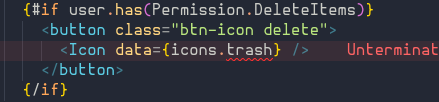
I don't have any issues in the npm dev server either, so it doesn't look like it's a code problem to me
```log
[2021-04-27 11:00:02] waiting for changes...
bundles src/main.ts → public/build/bundle.js...
created public/build/bundle.js in 777ms
[2021-04-27 11:05:09] waiting for changes...
[11:07:48] 200 ─ 4.33ms ─ /
[11:07:48] 200 ─ 1.24ms ─ /assets/css/global.css
[11:07:48] 200 ─ 0.42ms ─ /build/bundle.css
[11:07:48] 200 ─ 2.72ms ─ /build/bundle.js
[11:07:48] 200 ─ 2.00ms ─ /assets/img/logo-white.png
[11:07:48] 200 ─ 2.44ms ─ /
[11:07:48] 200 ─ 0.28ms ─ /assets/css/global.css
[11:07:48] 200 ─ 0.57ms ─ /build/bundle.css
[11:07:48] 200 ─ 3.97ms ─ /build/bundle.js
[11:07:48] 200 ─ 0.66ms ─ /assets/img/logo-white.png
```
Karitham
on 27 Apr 2021
After rebooting my computer again, the language server was completly dead, not providing completion or linting.
I purged it and made a clean install, and it looks like it's working now, I'll report again if I see it acting up.
I've had similar problems every now and then, but this morning (UTC+2 here) I haven't been able to write a single line that the extension didn't mess up.
EDIT:
Nevermind, it's acting up again.
before saving
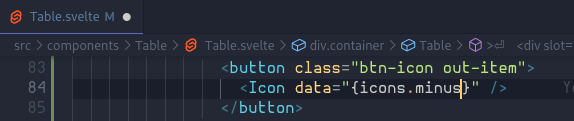
after saving

Karitham
on 27 Apr 2021
Since when do these errors occur? Could try with earlier versions of the extension to try to narrow down if this is a recently introduced bug?
dummdidumm
on 27 Apr 2021
I'd say around a week, maybe less than that.
I'll try with older versions and report back
Karitham
on 27 Apr 2021
I can reproduce this now given your complete file, thanks. I'll investigate.
dummdidumm
on 27 Apr 2021
After using it for around 40~ minute without seeing a single problem, when it was so recurring before, I assume this bug didn't exist in v104.9.1, the extension also seems significantly faster when checking for file changes and linting.
Karitham
on 27 Apr 2021
I released a new version of the VS Code extension. Please let me know if it fixed the issue for you.
dummdidumm
on 27 Apr 2021
Yep, haven't had any issue since installing the new version, thanks a lot for the cybernetically enhanced reactivity
Karitham
on 27 Apr 2021
Related issues
 limitlessloop
·
16Comments
limitlessloop
·
16Comments
 UltraCakeBakery
·
14Comments
limitlessloop
·
22Comments
UltraCakeBakery
·
14Comments
limitlessloop
·
22Comments
 cyberalien
·
20Comments
dummdidumm
·
37Comments
cyberalien
·
20Comments
dummdidumm
·
37Comments
Most helpful comment
I can reproduce this now given your complete file, thanks. I'll investigate.