Language-tools: Auto imports are inconsistent in VSCode
Describe the bug
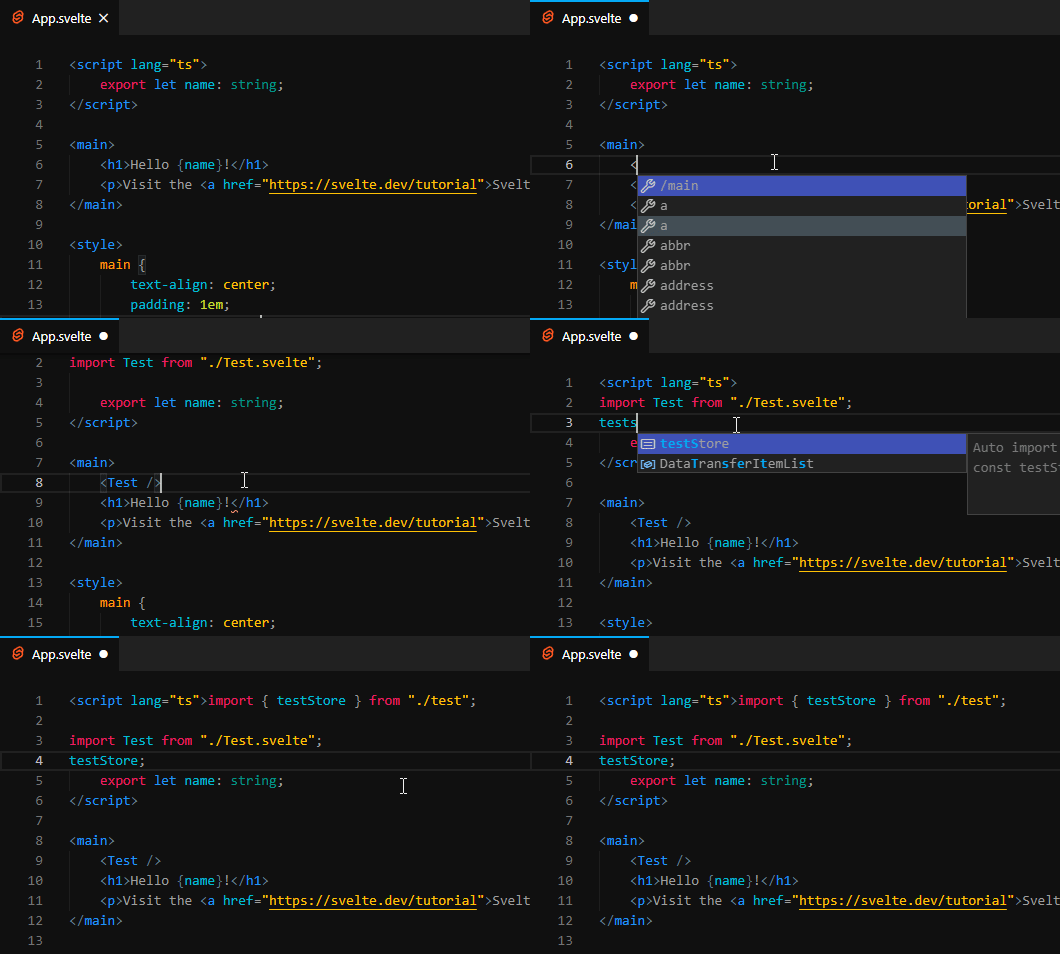
This is purely aesthetic. When automatically importing a file or component in VScode, the new imports aren't added to files properly.
- They are inserted _above_ existing imports.
- They are inserted in different positions for
.tsand.sveltefiles. - They ignore the editor's quoteStyle preferences.
- For example, with
typescript.preferences.quoteStyle: singlein VSCode, imports will still use double quotes.
- For example, with
- They lack indentation.
To Reproduce
Create new project from sveltejs/template, create a blank Test.svelte component, and auto import it into App.svelte. In TypeScript projects, you can also see that imports from .ts files are inserted immediately after the script tag with no newline.
Expected behavior
I expect auto import to work exactly as it would in a normal .ts file, but with some indentation due to the script tag.
- Insert with proper indentation, especially according to existing imports.
- Insert below existing imports.
- Insert consistently for all file types.
- Use the editor's quote styling if available.
My code should have looked like this without any manual work:
<script lang="ts">
    import Test from './Test.svelte';
    import { testStore } from './test';

    export let name;
</script>
System (please complete the following information):
- OS: Windows 10
- IDE: VSCode, 1.46.1
- Plugin/Package: Svelte for VSCode, 101.1.1
 baileyherbert
All 3 comments
The underlying problem is that during importing inside the template, the svelte compiler will throw errors because at that point the code is invalid. That way svelte2tsx cannot produce a valid tsx file, so we fall back to using the script tag content only. If the parser outputs valid code, svelte2tsx will produce a converted tsx file. This makes TypeScript insert the imports at a different point and our mapping from the generated tsx to original svelte imports it at the top. I'm not sure how we can work around these problems in a good way. Adhering to the user preferences (quote style) should be doable though. As a workaround you can use the "Organize Imports" command, and the prettier formatting will take care of the indentation and quote styles.
 dummdidumm
on 9 Jul 2020
dummdidumm
on 9 Jul 2020
Thanks @dummdidumm for the clarification and workaround! 😄
If there is a way to get them inserted below existing imports, that would be a massive improvement over how it works right now. The extension would be a bit more presentable (like in video tutorials), and more importantly, imports would feel consistent (it's unusual to look for the newest import on top).
I just tested three imports (test, test2, test3 in that order) with Vetur and they were inserted in the correct positions. Here are the results for comparison:
Vetur:
<script lang="ts">
  import Vue from 'vue';
import { testStore1 } from './test';
import { testStore2 } from './test2';
import { testStore3 } from './test3';

  export default Vue.extend({ /*...*/ });
</script>
Svelte for VSCode:
<script lang="ts">import { testStore3 } from "./test3";
import { testStore2 } from "./test2";

import { testStore } from "./test";


    export let name: string;

</script>
The js/ts one has another problem. The sourcemap can't map the next line of the last import to its original position.
 jasonlyu123
on 14 Jul 2020
jasonlyu123
on 14 Jul 2020
Related issues
 vatro
·
3Comments
vatro
·
3Comments
 koddr
·
6Comments
koddr
·
6Comments
 PatrickG
·
3Comments
PatrickG
·
3Comments
 NickKaramoff
·
4Comments
NickKaramoff
·
4Comments
 Kingwl
·
6Comments
Kingwl
·
6Comments