Language-tools: import completions not showing (VSCode)
Describe the bug
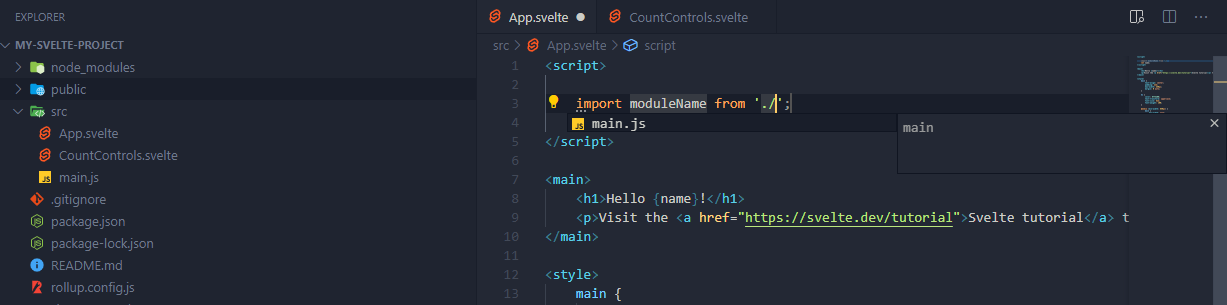
In VSCode, import suggestions for other .svelte component files are not shown when typing an import statement in the <script> tag
To Reproduce
Use the Svelte template as a starting point, open it in VSCode, create another component file and try to import it in the main App.svelte component.
Expected behavior
The Svelte component that is trying to be imported appears as a suggestion in the autocomplete list while typing.
Screenshots
Only completions for standard *.js files show (see CountControls.svelte component in explorer):
System (please complete the following information):
- OS: Windows
- IDE: VSCode
- Plugin/Package: Svelte Beta
Additional context
Tried both Svelte Beta and the old extension, it didn't work with both. What I am trying to achieve is the same that Jason Lengstorf used in in this video.
I also didn't set up VSCode to associate *.svelte files with .html.
 leontepe
All 9 comments
This is a limitation in the current approach. we'll try to find a workaround for it.
For now, if the file is opened, there would be auto-import completion for components outside the import statement. You can use that instead.
---update
I missed one thing when digging typescript source code earlier, turn out to be not very hard.
 jasonlyu123
on 16 Jun 2020
jasonlyu123
on 16 Jun 2020
@jasonlyu123 so this is easy to implement? are you already doing it? if not, I would love to code this into the Svelte language tools myself or participate in its implementation, I wanted to get involved in svelte anyway... 🤔
leontepe
on 16 Jun 2020
I finish it. It's relatively simple to implement, but it does need some digging of typescript's source code to find what should be implemented.
I have found an error that could be a good first issue. Maybe you could try it instead. I posted in 197
jasonlyu123
on 16 Jun 2020
@jasonlyu123 ok thanks, I will take a look at it. can you mention this issue once you publish the PR? so I can look at it.
leontepe
on 16 Jun 2020
Hey I know this is an old issue but for some reason on my Linux machine this behaviour is not working.
I have tried working on my friends computer which is running Windows 10 and the Svelte language server seems to recognize all the svelte files within the workspace but not on my machine.
I am running:
- Ubuntu 20.04
- VsCode 1.54.3
- Svelte for VS Code v104.8.0
Is someone else experiencing this? I would like this to be resolved somehow as it is impacting the quality of life for the development experience and if this is not an unique phenomenon than it is definitely a bug.
 Singha360
on 26 Mar 2021
Singha360
on 26 Mar 2021
@Singha360 we just fix an issue with the import completion on Linux. Specifically with directories with an uppercase name. You can try it again after it is released.
jasonlyu123
on 27 Mar 2021
@jasonlyu123 Thanks for the quick response! I will check it out and leave a feedback on whether it is working or not.
Singha360
on 27 Mar 2021
We just released Svelte for VS Code v104.9.0 - @Singha360 could you check if it works with that version for you?
 dummdidumm
on 6 Apr 2021
dummdidumm
on 6 Apr 2021
@dummdidumm it is working now! Thanks and great work to everyone involved!
Singha360
on 6 Apr 2021
Related issues
 MDoder97
·
3Comments
MDoder97
·
3Comments
 PatrickG
·
3Comments
PatrickG
·
3Comments
 matthewmueller
·
5Comments
matthewmueller
·
5Comments
 canadaduane
·
5Comments
canadaduane
·
5Comments
 vatro
·
3Comments
vatro
·
3Comments