Tell us about your setup
What is your lando version and operating system? (note that the older your version the less likely we are to reply)
v3.0.0-beta.47 on MacOs High Sierra
Tell us about your .lando.yml
name: test-project
recipe: drupal8
config:
  xdebug: true
  webroot: web
proxy:
  directory:
    - admin.solr.lndo.directory:8983
  news:
    - admin.solr.lndo.news:8983
  resources:
    - admin.solr.lndo.resources:8983
  site:
    - admin.solr.lndo.site:8983
services:
  directory:
    type: solr:5.5
    core: directory
    config:
      conf: solr/directory
  news:
    type: solr:5.5
    core: news
    config:
      conf: solr/news
  resources:
    type: solr:5.5
    core: resources
    config:
      conf: solr/resources
  site:
    type: solr:5.5
    core: site
    config:
      conf: solr/site
Is it possible to have multiple solr cores? I tried using the above config but only the last core seems to be available.
Thanks!
 ghost
ghost
All 3 comments
@james-agile-coop its possible your urls aren't understood properly, I think you have to end in lndo.site for the external domain to resolve to 127.0.0.1. I think your proxy statements should look more like this:
proxy:
directory:
- admin.solr.directory.lndo.site:8983
news:
- admin.solr.news.lndo.site:8983
resources:
- admin.solr.resources.lndo.site:8983
site:
- admin.solr.site.lndo.site:8983
For me this works and gives me a container for each of the four solr cores that can be accessed on those domains (on port 80 which maps to 8983). This is only needed for external access though and the internal domains should work within the network. The internal domains can be found with lando info and look something like this: resources.fundraising.internal
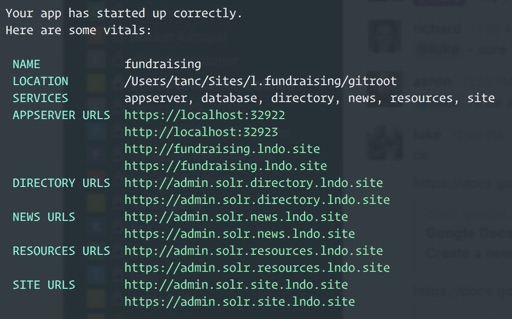
This does however mean four containers running Tomcat and Solr with a core per container. I wonder if its possible to have all cores within one container and whether that would be more performant?
 tanc
on 7 Aug 2018
tanc
on 7 Aug 2018
@tanc is correct about the URLS.
it might be possible to support multiple cores in a single image but that should be a separate issue
 pirog
on 13 Jan 2019
pirog
on 13 Jan 2019
Thanks for sharing your configs, they helped me get in the right direction. I use this for two solr Cores in Drupal 8:
# Get nice URLs for solr service.
proxy:
  search:
    - admin.develop.lndo.site:8983
  solr2search:
    - adminsolr2.develop.lndo.site:8983

services:
  search:
    type: solr:7.1
    core: drupal8
    config:
      conf: web/modules/contrib/search_api_solr/solr-conf/7.x
  solr2search:
    type: solr:7.1
    core: solr2search
    config:
      conf: web/modules/contrib/search_api_solr/solr-conf/7.x
Production cores are on a RedHat server, where the host is called localhost (I believe) and set to that in the config. For local Lando-based development I got this in settings.php:
/* set local hostname for Search API server */
$config['search_api.server.solr_server']['backend_config']['connector_config']['host'] = 'search';
$config['search_api.server.solr2_server']['backend_config']['connector_config']['host'] = 'solr2search';
 gitressa
on 6 Mar 2019
gitressa
on 6 Mar 2019
Related issues
 eleftrik
·
3Comments
eleftrik
·
3Comments
eleftrik
·
3Comments
eleftrik
·
3Comments
 runofthemill
·
4Comments
runofthemill
·
4Comments
 jcmartinez
·
3Comments
jcmartinez
·
3Comments
 davideprevosto
·
3Comments
davideprevosto
·
3Comments
Most helpful comment
Thanks for sharing your configs, they helped me get in the right direction. I use this for two solr Cores in Drupal 8:
Production cores are on a RedHat server, where the host is called localhost (I believe) and set to that in the config. For local Lando-based development I got this in settings.php: