Label-studio: sometime show remarked data when labeling.
Problems
Hi, I have encountered some problems when i label my data. The label studio tool sometimes show remarked data.
For example, If i had labeled the first data. but when i label 500 or more data, the first remarked data show again.
I have checked my data that do not duplicated. So I want to check if whether the tool bug?
Anyone have any ideas?
Environment
- label-studio:
0.8.0 - text data saved on
aws s3. - i used
sentence label.
 MarsSu0618
All 33 comments
Hi, I think you use an old LS version. There are many bugfixes in 0.9, please, try it.
 makseq
on 29 Jan 2021
makseq
on 29 Jan 2021
@makseq Thanks for your response.
I will try it with new version 0.9.0. But i want to check whether if the bug show in older version?
MarsSu0618
on 29 Jan 2021
You need to remember task ID of doubled tasks, if they are the same it could be a bug.
makseq
on 29 Jan 2021
@makseq Yes. Task ID sometimes duplicated. If i label task-id:101, it show 101 again after i label task-id:150
So upgrade version 0.9 that have this issue?
MarsSu0618
on 29 Jan 2021
Can you check: when you see the same task again, has it a completion already? (Check it using task manager)
makseq
on 29 Jan 2021
@makseq I have check it . the completion is already. But task id show again when i labeling.
MarsSu0618
on 29 Jan 2021
Yep, I think it's a bug..
makseq
on 29 Jan 2021
@makseq if this is a bug, it is fixed in version 0.9?
MarsSu0618
on 29 Jan 2021
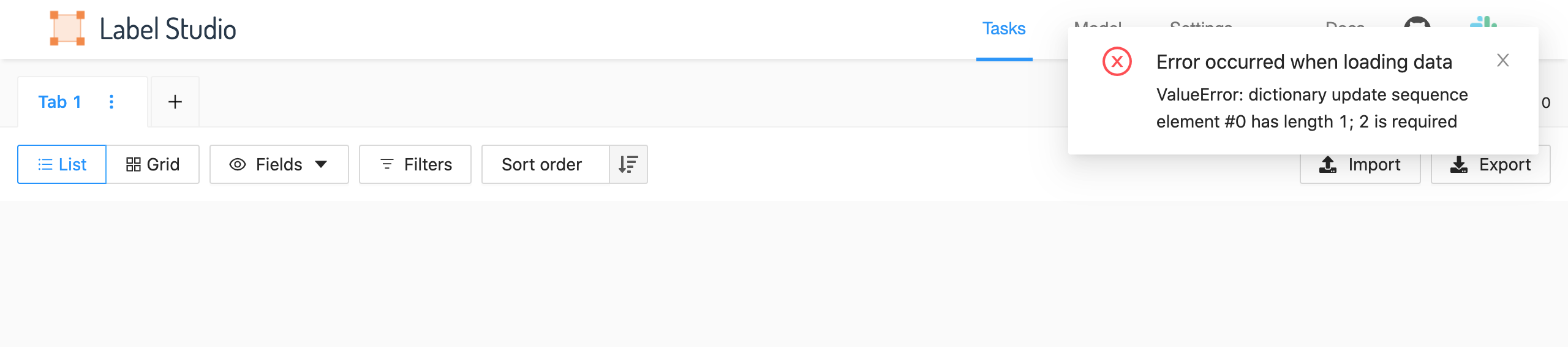
@makseq btw, I used version 0.9.0, connect aws s3 show some error message.follow as
MarsSu0618
on 29 Jan 2021
In this case you have something wrong in s3 files. Are there are json files?
makseq
on 29 Jan 2021
@makseq Yes, I have json file. format follow as:
json=
[
  {"text": "......"}
]
version 0.8.0 is normal, version 0.9.0 show error. and use same json file.
MarsSu0618
on 29 Jan 2021
Yep, this is an error: you must not use list of tasks inside of your json files on s3. Only one task per file. It's a limitation by LS design.
makseq
on 29 Jan 2021
so I need to remove list of task?
{"text": "......"}
and remark and task_id issue still not resolve, right? maybe cache?
MarsSu0618
on 29 Jan 2021
yes, leave task as dict {} only.
and remark and task_id issue still not resolve
you mean duplicates in the labeling?
makseq
on 29 Jan 2021
@makseq I consider the problem is User Interface bug.
Because I used version 0.9.0 UI that it do not have this problem. But used old user interface still have task_id duplicates problem.
So We decide to labeling with new interface. Thanks.
MarsSu0618
on 1 Feb 2021
@makseq Hi, We found other problems about version 0.9.0.
Our data are save AWS S3. Then, Sometimes label studio interface scan have some problem. Please follow as photo.
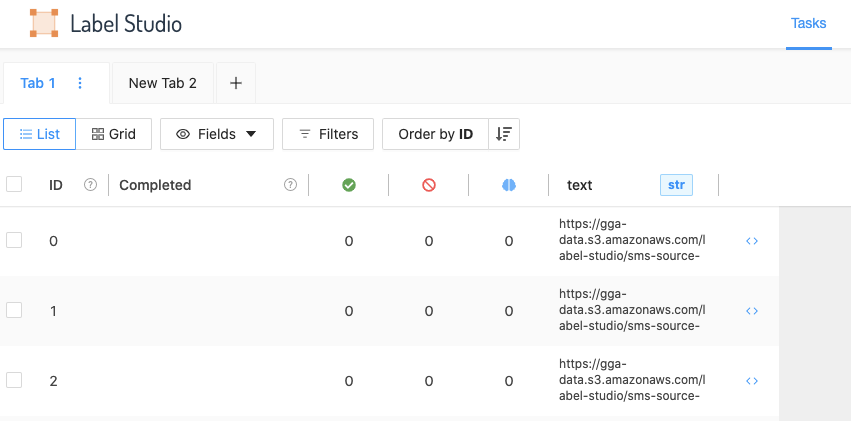
It can not encode file text. Just show file link on s3. and current solution is restart tool service, it is normal.
Hope you can check what is problem. We guess maybe tool redirect and decode problem.
BTW.. new version user interface seem like do have RWD? right?
MarsSu0618
on 1 Feb 2021
Sorry, what is RWD :slightly_smiling_face: ?
makseq
on 1 Feb 2021
Just show file link on s3. and current solution is restart tool service, it is normal.
But what will you see if you go to the labeling? Does it load for labeling normally?
makseq
on 1 Feb 2021
@makseq it can not how normal text. just show text json file link on s3.
Maybe issue like #497 .
MarsSu0618
on 1 Feb 2021
What files do you store on your storage? txt or json? Can you show their examples?
makseq
on 1 Feb 2021
@makseq it is json file.

data content:
{'text': '......'}
Ok, I'll check it by myself and come back to you.
makseq
on 1 Feb 2021
@makseq Thank you.
I found you use ujson lib instead of json lib. Maybe it is problem?
MarsSu0618
on 1 Feb 2021
As I know it's a full analogue of json. But much faster.
makseq
on 1 Feb 2021
@makseq OK, Maybe you need check readable_path from s3.py....
MarsSu0618
on 1 Feb 2021
If you have public s3 storage with these example files it will be much faster to check it for me.
makseq
on 1 Feb 2021
@makseq
We found this problem maybe occurred in import interface. please follow as image:
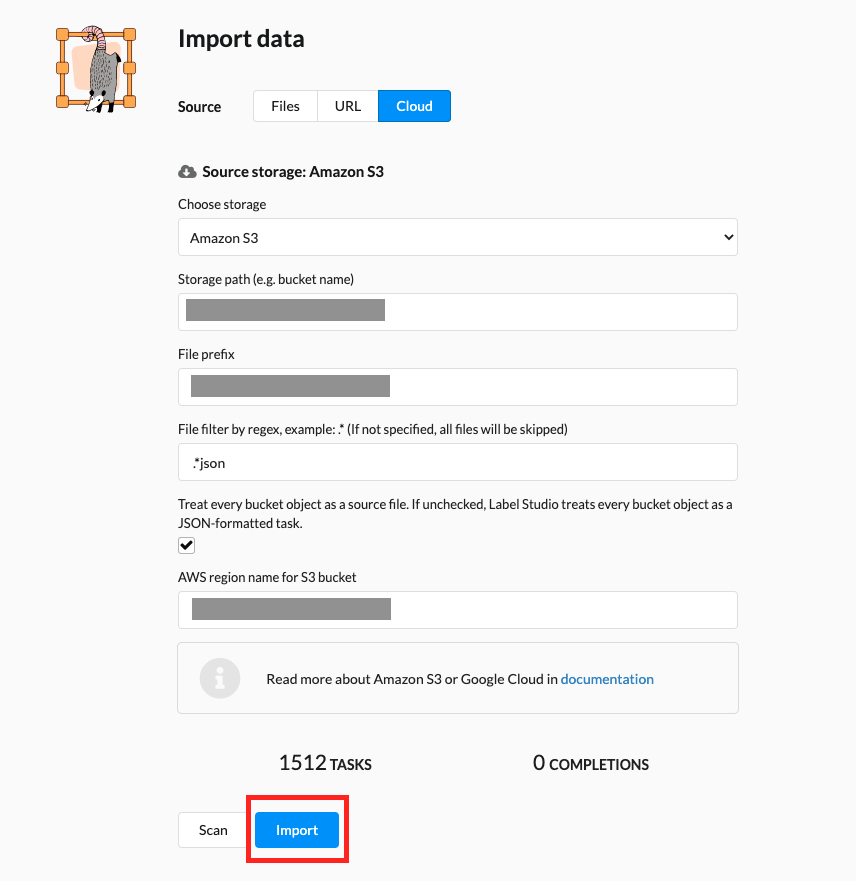
When we click import button and show s3 error.
In addition, We found other solution, which reset data manager, and it become normal.

So, maybe you should check import function code.
MarsSu0618
on 2 Feb 2021
@MarsSu0618 Hm, I see that you have a checkbox "Treat every bucket object as source file ...". In your case it must be off. Maybe something change its state unexpectedly?
makseq
on 2 Feb 2021
@makseq I want to suggest about user interface of label studio. Hope can add search bar so that we can search marked data.
MarsSu0618
on 3 Feb 2021
@MarsSu0618 why don't you use Filters over completion results?
makseq
on 3 Feb 2021
@makseq Because our data sometime have different means according to everyone and need to relabel data.
if it have the search bar function , it can increase user experiences and decrease search cost.
MarsSu0618
on 3 Feb 2021
@MarsSu0618 Ok, I've added it to our backlog, it's a good idea. But it's not relevant for this thread :slightly_smiling_face:
So, what about your previous problem and my previous question?
I see that you have a checkbox "Treat every bucket object as source file ...". In your case it must be off. Maybe something change its state unexpectedly?
Do you still have this problem?
makseq
on 3 Feb 2021
Feel free to reopen if your problem is not gone.
makseq
on 15 Feb 2021
Related issues
 Rishabh-hyperverge
·
3Comments
Rishabh-hyperverge
·
3Comments
 andreaferretti
·
5Comments
andreaferretti
·
5Comments
 laynr
·
4Comments
Rishabh-hyperverge
·
6Comments
andreaferretti
·
6Comments
laynr
·
4Comments
Rishabh-hyperverge
·
6Comments
andreaferretti
·
6Comments