Label-studio: Label sections of video
Is your feature request related to a problem? Please describe.
Unable to label sections of video. To the best of my knowledge, this is not currently possible
Describe the solution you'd like
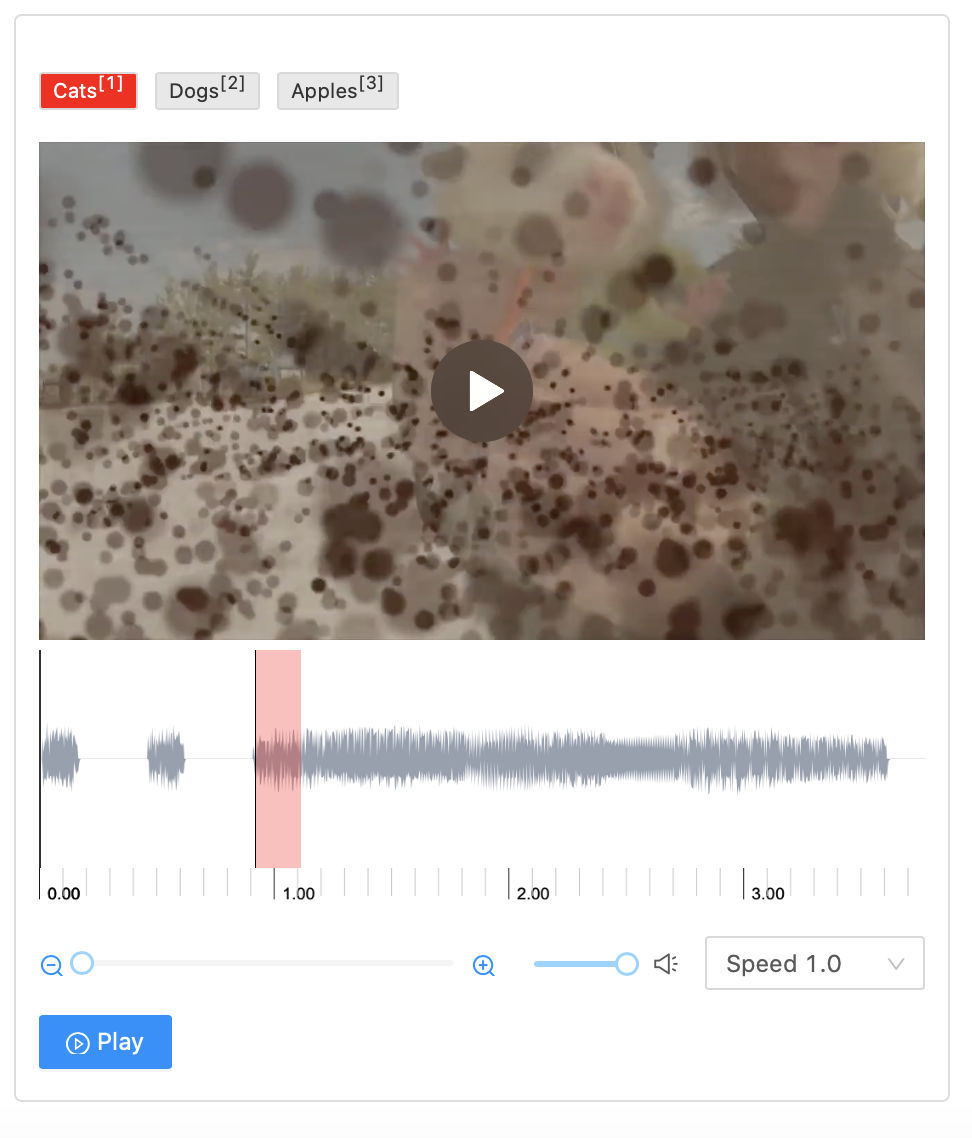
I'd like to label the parts of the video that contain, say, cats, dogs, apples, etc.,
similar to what can currently be done with audio.
Describe alternatives you've considered
None that I can think of (sorry).
Additional context
I'm picturing something like this:
 TariqAHassan
All 17 comments
Hey @TariqAHassan, it's in the pipeline, and will go into the open-source sometime during the summer. If you have any reference points for other solutions that would be great.
 deppp
on 18 May 2020
deppp
on 18 May 2020
I have set this up as well. The current tricky part is keeping the audio linked to the video. A lot of scrubbing back and forth to do the labeling :P
 nickvazz
on 23 May 2020
nickvazz
on 23 May 2020
Hi, try this label config
<View>
  <HyperText name="video" value="$video"/>
  <Labels name="tricks" toName="audio" choice="multiple">
    <Label value="Kickflip" background="#1BB500" />
    <Label value="360 Flip" background="#FFA91D" />
    <Label value="Trick" background="#358EF3" />
  </Labels>
  <AudioPlus name="audio" value="$videoSource" speed="false"/>
</View>
and tasks.json
{
    "0": {
        "id": 0,
        "data": {
            "video": "<video src='/static/samples/opossum_snow.mp4' width=100% muted /><img src onerror=\"$=n=>document.getElementsByTagName(n)[0];a=$('audio');v=$('video');a.onseeked=()=>{v.currentTime=a.currentTime};a.onplay=()=>v.play();a.onpause=()=>v.pause()\" />",
            "videoSource": "/static/samples/opossum_snow.mp4"
        }
    }
}
replace two links '/static/samples/opossum_snow.mp4' (audio and video values) as you need. Note you can use the same sources for audio and video (I've tested it for mp4 format, it works good).
 makseq
on 25 May 2020
makseq
on 25 May 2020
Hi, try this label config
<View>
  <HyperText name="video" value="$video"/>
  <Labels name="tricks" toName="audio" choice="multiple">
    <Label value="Kickflip" background="#1BB500" />
    <Label value="360 Flip" background="#FFA91D" />
    <Label value="Trick" background="#358EF3" />
  </Labels>
  <AudioPlus name="audio" value="$videoSource" speed="false"/>
</View>
and tasks.json
{
    "0": {
        "id": 0,
        "data": {
            "video": "<video src='/static/samples/opossum_snow.mp4' width=100% muted /><img src onerror=\"$=n=>document.getElementsByTagName(n)[0];a=$('audio');v=$('video');a.onseeked=()=>{v.currentTime=a.currentTime};a.onplay=()=>v.play();a.onpause=()=>v.pause()\" />",
            "videoSource": "/static/samples/opossum_snow.mp4"
        }
    }
}
replace two links '/static/samples/opossum_snow.mp4' (audio and video values) as you need. Note you can use the same sources for audio and video (I've tested it for mp4 format, it works good).
If I use this config and tasks.json, I get an Import Error with the following message:
Error: can't upload/process file on server side. Reasons:
Error at item 0: "video" key is expected in task data [assume: item = {...}, item is task root]
{'0': {'id': 0, 'data': {'video': '<video src=\'/static/samples/opossum_snow.mp4\' width=100% muted /><img src onerror="$=n=>document.getElementsByTagName(n)[0];a=$(\'audio\');v=$(\'video\');a.onseeked=()=>{v.currentTime=a.currentTime};a.onplay=()=>v.play();a.onpause=()=>v.pause()" />', 'videoSource': '/static/samples/opossum_snow.mp4'}}}
 Maestro157
on 31 May 2020
Maestro157
on 31 May 2020
@Maestro157 for import use:
[
{
"data": {
"video": "<video src='/static/samples/opossum_snow.mp4' width=100% muted /><img src onerror=\"$=n=>document.getElementsByTagName(n)[0];a=$('audio');v=$('video');a.onseeked=()=>{v.currentTime=a.currentTime};a.onplay=()=>v.play();a.onpause=()=>v.pause()\" />",
"videoSource": "/static/samples/opossum_snow.mp4"
}
}
]
tasks.json is a file from your project directory.
makseq
on 31 May 2020
That works, thank you.
I tried to import a tasks.json file already formatted like the one label-studio writes to file, apparently I have to import a json file formatted as a list of collections.
Maestro157
on 31 May 2020
I am trying the same thing with the config in config.xml and a local video in my tasks.json but my labeling interface always shows up like this - empty
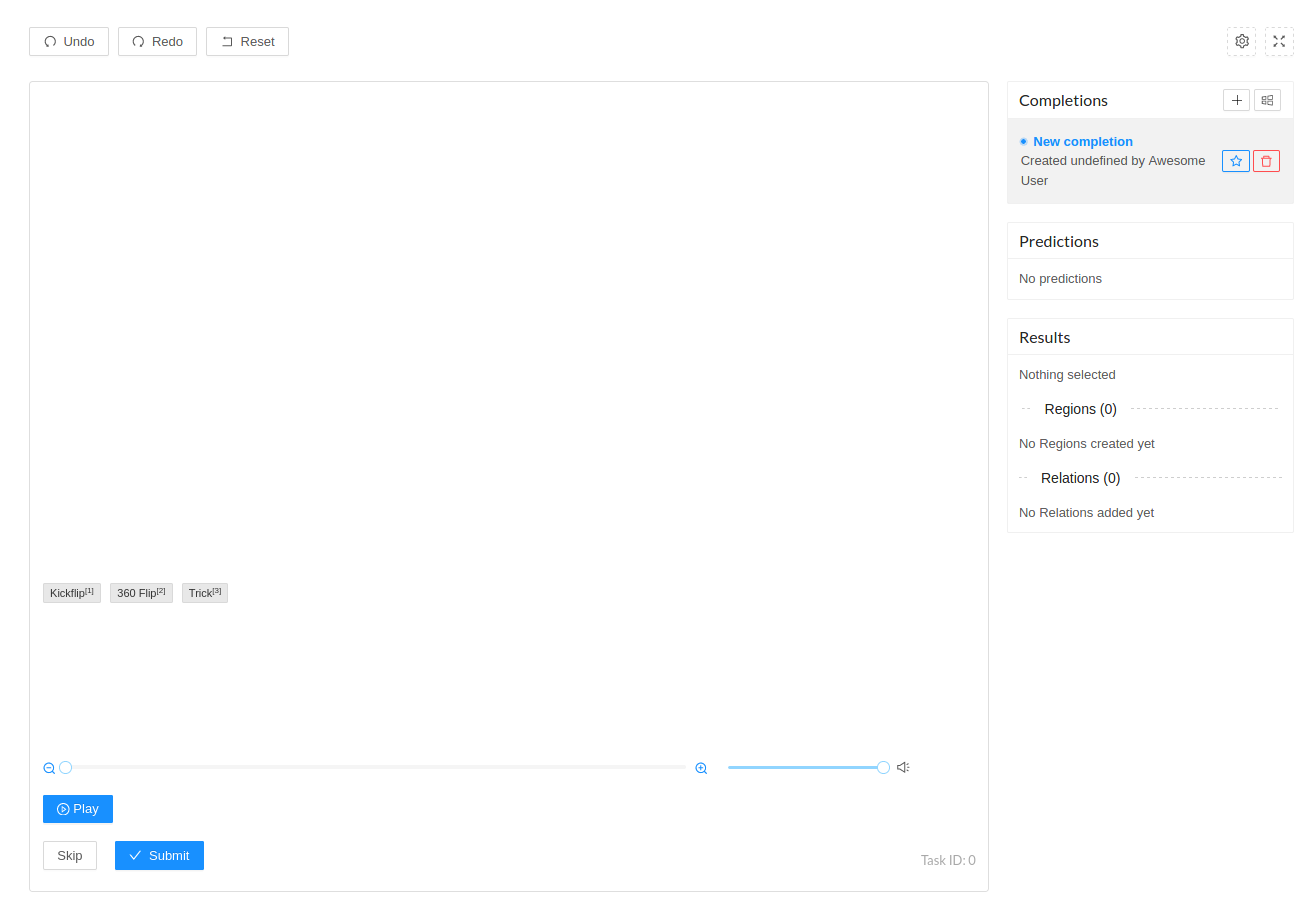
Any ideas what I might try?
 stalagmite7
on 16 Jun 2020
stalagmite7
on 16 Jun 2020
@stalagmite7 It's hard to help you without your current label config and tasks.json.
Also you may look at browser console, are there any errors?
It looks like incorrect access rights to the video file.
makseq
on 16 Jun 2020
@stalagmite7 if you try to make it with old versions of LS (before 0.7.2) then you need to use another .mp4 file, because /static/samples/opossum_snow.mp4 doesn't exist there.
makseq
on 17 Jun 2020
Sorry, I meant I have exactly the same label config and tasks.json as you'd mentioned in an earlier comment:
config.xml
<View>
  <HyperText name="video" value="$video"/>
  <Labels name="tricks" toName="audio" choice="multiple">
    <Label value="Kickflip" background="#1BB500" />
    <Label value="360 Flip" background="#FFA91D" />
    <Label value="Trick" background="#358EF3" />
  </Labels>
  <AudioPlus name="audio" value="$videoSource" speed="false"/>
</View>
and tasks.json
{
    "0": {
        "id": 0,
        "data": {
            "video": "<video src='/home/sandbox/video_project/0cfe1ea4-0af6-4076-8ff8-0e0ab46fa560.mp4' width=100% muted /><img src onerror=\"$=n=>document.getElementsByTagName(n)[0];a=$('audio');v=$('video');a.onseeked=()=>{v.currentTime=a.currentTime};a.onplay=()=>v.play();a.onpause=()=>v.pause()\" />",
            "videoSource": "/home/sandbox/video_project/0cfe1ea4-0af6-4076-8ff8-0e0ab46fa560.mp4"
        }
    }
}
@stalagmite7 The browser can't access files on the hard drive directly. You need to put your resource files to some hosting. For examples, move "0cfe1ea4-0af6-4076-8ff8-0e0ab46fa560.mp4" => label_studio/static/xxx.mp4 =>
{
    "0": {
        "id": 0,
        "data": {
            "video": "<video src='/static/xxx.mp4' width=100% muted /><img src onerror=\"$=n=>document.getElementsByTagName(n)[0];a=$('audio');v=$('video');a.onseeked=()=>{v.currentTime=a.currentTime};a.onplay=()=>v.play();a.onpause=()=>v.pause()\" />",
            "videoSource": "/static/xxx.mp4"
        }
    }
}
@stalagmite7 or another folder:
[your-label-studio-project-name]/upload/xxx.mp4
=>
/data/upload/xxx.mp4
makseq
on 17 Jun 2020
Hm, I see. So I have tried to put it in video_project/static and changed the path in my tasks.json to reflect that (so in tasks.json, video src='/static/0cfe1ea4-0af6-4076-8ff8-0e0ab46fa560.mp4)
Still no change :\
To be clear, this is what my working folder for the project looks like:
    - completions/
    - config.json
    - config.xml
    - source.json
    - tasks.json
    - static/
        - 0cfe1ea4-0af6-4076-8ff8-0e0ab46fa560.mp4
Try this:
video_project/upload/0cfe1ea4-0af6-4076-8ff8-0e0ab46fa560.mp4
{
    "0": {
        "id": 0,
        "data": {
            "video": "<video src='/data/upload/0cfe1ea4-0af6-4076-8ff8-0e0ab46fa560.mp4' width=100% muted /><img src onerror=\"$=n=>document.getElementsByTagName(n)[0];a=$('audio');v=$('video');a.onseeked=()=>{v.currentTime=a.currentTime};a.onplay=()=>v.play();a.onpause=()=>v.pause()\" />",
            "videoSource": "/data/upload/0cfe1ea4-0af6-4076-8ff8-0e0ab46fa560.mp4"
        }
    }
}
Great, thanks! That seems to have worked, at least in getting the video to display. However, my results is turning up empty now
[
  {
    "completions": [
      {
        "created_at": 1592348172,
        "id": 1,
        "lead_time": 45.659,
        "result": []
      }
    ],
    "data": {
      "video": "<video src='/data/upload/0cfe1ea4-0af6-4076-8ff8-0e0ab46fa560.mp4' width=100% muted /><img src onerror=\"$=n=>document.getElementsByTagName(n)[0];a=$('audio');v=$('video');a.onseeked=()=>{v.currentTime=a.currentTime};a.onplay=()=>v.play();a.onpause=()=>v.pause()\" />",
      "videoSource": "/data/upload/0cfe1ea4-0af6-4076-8ff8-0e0ab46fa560.mp4"
    },
    "id": 0
  }
]
Is it right of me to expect to see some kind of timestamping with classifications in the outputs?
stalagmite7
on 17 Jun 2020
Oh never mind, I hadn't been clicking and dragging. This works, thanks very much for all your help!
stalagmite7
on 17 Jun 2020
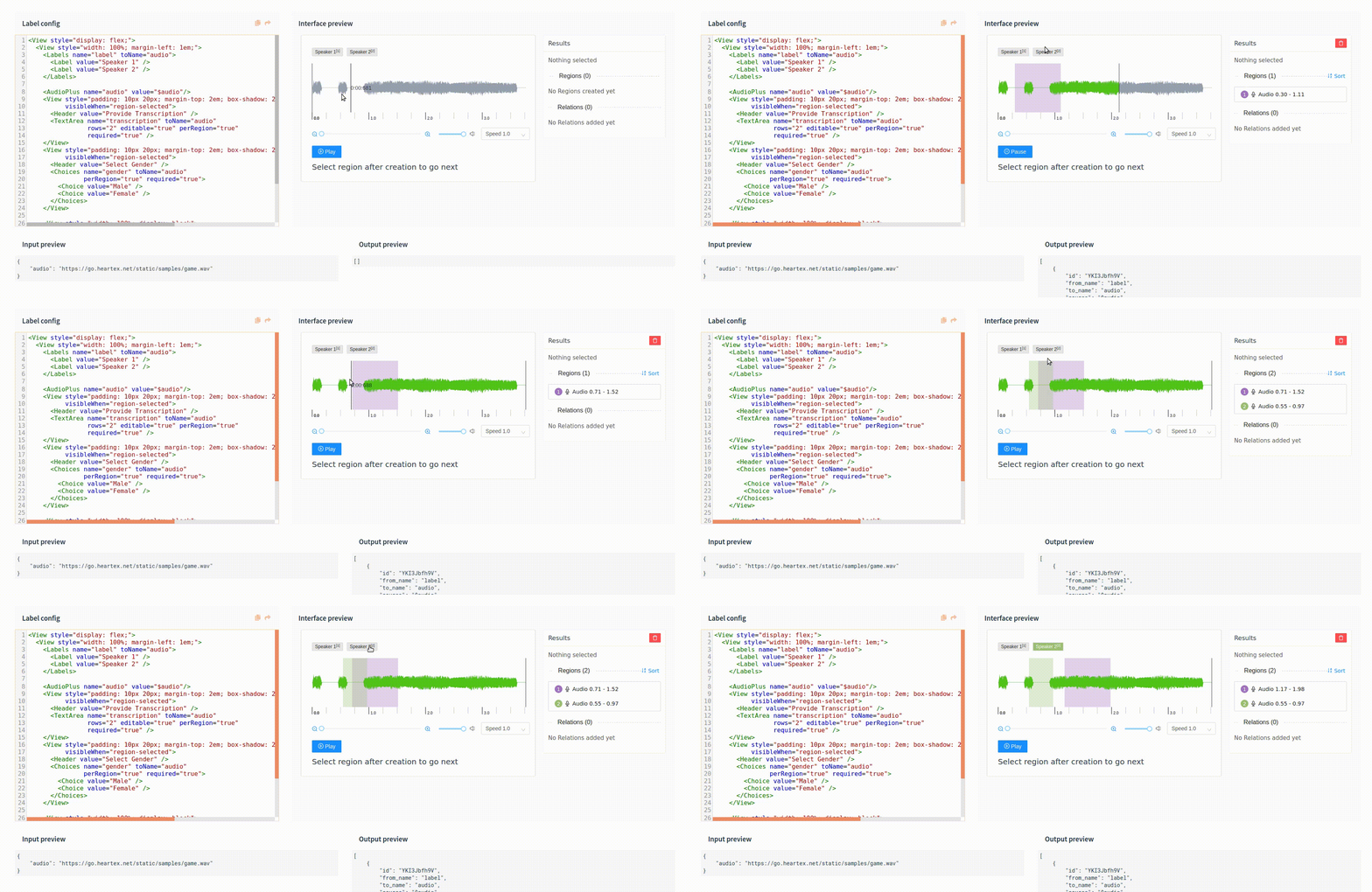
I am trying to annotate "multilabel" audio regions (which is basically multi-label for my video segments); my problem is that after selecting region1, if region2 starts after region1 does, theres no way to label that overlap because instead it ends up _moving_ region1. I have added in an example screen recording when I tried to do this on the playground too, so I think this may not be a feature yet...but definitely a useful feature to have
It seems to work if region2 starts before region1 and continues into region1, though.
stalagmite7
on 18 Jun 2020
Related issues
 fakyras
·
3Comments
fakyras
·
3Comments
 dalekube
·
5Comments
dalekube
·
5Comments
 andreaferretti
·
6Comments
andreaferretti
·
6Comments
 Rishabh-hyperverge
·
3Comments
Rishabh-hyperverge
·
6Comments
Rishabh-hyperverge
·
3Comments
Rishabh-hyperverge
·
6Comments
Most helpful comment
Hi, try this label config
and tasks.json
replace two links '/static/samples/opossum_snow.mp4' (audio and video values) as you need. Note you can use the same sources for audio and video (I've tested it for mp4 format, it works good).