kustomize edit set image changes "bases" to "resources" inside kustomization.yaml
As title says, running kustomize edit set image changes bases to resources inside kustomization.yaml
Here's the minimal example:
DEMO_HOME=$(mktemp -d)
mkdir -p $DEMO_HOME
cat <<EOF >$DEMO_HOME/kustomization.yaml
apiVersion: kustomize.config.k8s.io/v1beta1
kind: Kustomization
bases:
  - ../base
EOF
cd $DEMO_HOME
kustomize edit set image test=test
cat kustomization.yaml
Expected output / kustomization.yaml content:
apiVersion: kustomize.config.k8s.io/v1beta1
kind: Kustomization
bases:
  - ../base
images:
- name: test
  newName: test
Actual output / kustomization.yaml content:
apiVersion: kustomize.config.k8s.io/v1beta1
kind: Kustomization
resources:
- ../base
images:
- name: test
  newName: test
kustomize versions 3.0.1 & 2.1.0 are both affected
 pfyod
pfyod
All 7 comments
The bases field was deprecated in v2.1.0. The read / write cycle for the kustomization file with kustomize edit sub-commands will perform cleanup of deprecated fields in the same way as explicitly running kustomize edit fix.
Additional documentation is probably warranted to help make this less of a surprise.
 richardmarshall
on 12 Jul 2019
richardmarshall
on 12 Jul 2019
Whoops. I got confused by the differences between kubectl's built in kustomize and standalone... What I've been trying to do is run kustomize edit set image and then kubectl apply -k. That didn't work because kubectl's kustomize does not accept directories inside resources (yet, I guess). My bad!
pfyod
on 13 Jul 2019
I was about to open an issue about this exact problem. I have kustomize updating images on a gitops workflow and my resources were simply breaking up.
Whatever fixes kustomize is doing are not working: the resulting change breaks my previously working deploy, so at the very least it must not be a silent edit.
A warning with a return value different than zero, in my humble opinion, should be enough.
 guhcampos
on 19 Jul 2019
guhcampos
on 19 Jul 2019
Whoops. I got confused by the differences between kubectl's built in kustomize and standalone... What I've been trying to do is run
kustomize edit set imageand thenkubectl apply -k. That didn't work because kubectl's kustomize does not accept directories inside resources (yet, I guess). My bad!
@pfyod how did you get around this? Having the exact same issue.
 rihardssceredins
on 20 Aug 2019
rihardssceredins
on 20 Aug 2019
@rihardssceredins IMO, the only proper solution is not to use kubectl -k but rather something like kustomize build <directory> | kubectl apply -f -...
pfyod
on 22 Aug 2019
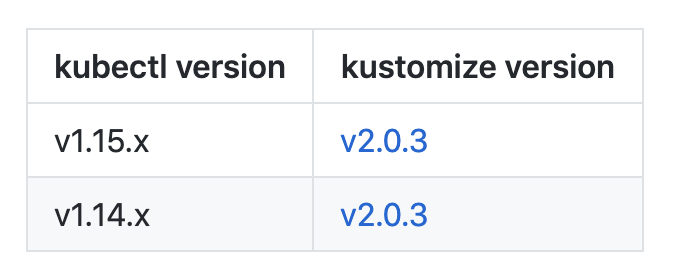
Is it normal for kustomize to break support for kubectl apply -k in the most recent version of kubectl? Is there some way that I can go about ensuring that my kubectl and my kustomize are fully compatible with one another?
EDIT: Ah, saw the chart in README.md, that'll do ❤
 iameli
on 13 Sep 2019
iameli
on 13 Sep 2019
Looks like kubectl is currently still using kustomize 2.0.3. https://github.com/kubernetes/kubectl/blob/master/go.mod#L46
Direct download for those who need a compatible version (cannot get it using install_kustomize.sh): https://github.com/kubernetes-sigs/kustomize/releases/download/v2.0.3/kustomize_2.0.3_linux_amd64
 jasper-d
on 19 Oct 2020
jasper-d
on 19 Oct 2020
Related issues
 yujunz
·
5Comments
yujunz
·
5Comments
 davidknezic
·
3Comments
davidknezic
·
3Comments
 lionelvillard
·
4Comments
lionelvillard
·
4Comments
 sidps
·
5Comments
sidps
·
5Comments
 davidsbond
·
3Comments
davidsbond
·
3Comments
Most helpful comment
Is it normal for
kustomizeto break support forkubectl apply -kin the most recent version ofkubectl? Is there some way that I can go about ensuring that mykubectland mykustomizeare fully compatible with one another?EDIT: Ah, saw the chart in README.md, that'll do ❤