Acceptance Criteria
- [ ] base Acct Setting landing page (React)
- [ ] sidebar navigation component
- [ ] button styling
- [ ] title bar/name
sidebar nav changes from design comps-
- update link 'email'->'email preferences' / slide 3
- add link 'email addresses' link->slide 9
 tobinmori
All 24 comments
Quick question before starting on the work. Currently, the user profile edit page lives at: profiles/username/edit
I assume that while we work on the new account settings functionality we want to keep the current functionality/pages live but separate. At the same time we want to be able to merge to master and deploy in order to aid testing and review until we are satisfied with the UI, UX, and functionality.
For this I see two possible options.
The Waffle
For existing routes such as profiles/username/edit we amend the view logic so that it loads one of two templates based on a waffle flag. For new routes we simply create a new Django view, for example, profiles/username/email-preferences
One question here is whether we want to place all routes behind the waffle flag?
New routes
The other option is to implement the new account settings on a new URL/route structure. This makes sense to me as we are moving away from the idea of profiles and towards accounts. As such, the new URL structure could be something like:
account/username/edit
account/username/email
account/username/email-preferences
account/username/subscriptions
Two questions here:
- Should we keep the
usernameas part of the URL or wouldaccount/editetc. be sufficient? - Should we also keep these routes behind a waffle flag?
Thoughts @tobinmori, @atopal, @peterbe, @escattone, @mindy, @Gregoor
 schalkneethling
on 21 May 2020
schalkneethling
on 21 May 2020
- Should we keep the
usernameas part of the URL or wouldaccount/editetc. be sufficient?I think not.
Just like GitHub, you can say to your friend, "To change your settings, go to https://github.com/settings/profile and press the button".
- Should we also keep these routes behind a waffle flag?
I think not. Waffle flags aren't free and should be used sparingly. Both performance and complexity. There might be a waffle flag for enabling it at all. E.g.
{userData.waffle.account_settings && <li><a href="/account/settings">Settings</a></li>}
<li><a herf="/signout">SIgn out</a></li>
But not question it anywhere else.
Or, you could simply not bother at all. We develop the functionality by building the new React routes and the new v1 API endpoints but don't put in a link in the signed-in drop-down (in master). People (within the staff org) can try it out by manually typing in /account/settings in their address bar. Once it looks fine, we commit a change to login.jsx (or whatever it's called) that makes a link to it.
 peterbe
on 21 May 2020
peterbe
on 21 May 2020
My vote would be for something like this:
/settings/settings/email/settings/subscription
I like that word better than account and I think the "home page" of it doesn't need to be called edit specifically.
peterbe
on 21 May 2020
My vote is for new routes sans username. I think both settings and account make sense, so I don't have a preference for which one we choose.
 mindy
on 21 May 2020
mindy
on 21 May 2020
Thank you for the feedback! Because we use the account nomenclature in so many places already, I reckon it is best to stick with it so, I am going to assume the following URLs:
account/
account/email
account/email-preferences
account/subscriptions
And with that, I reckon let's not waffle either. Let me know if anyone vehemently disagrees 😄
schalkneethling
on 22 May 2020
+1 to not using username. generic is good, so you can point to a generic acct url.
+1 to no waffle, if we don't need it.
One other side issue. I find the 'email' vs 'email-preferences' distinction vague, or at worse, confusing (assuming explicit URLs are a good thing). Some ideas:
The explicit, yet maybe overly verbose way:
account/
account/email-lists (or, email-subscriptions)
account/email
account/payment-subscriptions
Or, a more succinct way:
/account/
/account/email/lists (or /account/email-lists)
/account/email
/account/payments
One other side issue. I find the 'email' vs 'email-preferences' distinction vague, or at worse, confusing (assuming explicit URLs are a good thing).
I think so too. Some more suggestions-- calling it "Email addresses" or "Manage emails" ?
mindy
on 22 May 2020
- +1 for no username
- +1 for no waffle
- I like
settingsbetter thanaccount, but understand that it's probably best to remain consistent with what we have. - I also find the "email" vs "email-preferences" distinction confusing. I like something like @mindy's idea, could we have a single endpoint
/account/manage-email? I'm feeling a bit disconnected from all of this, so ignore if that doesn't make sense.
 escattone
on 22 May 2020
escattone
on 22 May 2020
Thinking over this some more. We literally have 1 newsletter subscription at the moment(that I am aware of anyhow). What I we simply have:
/account/
/account/manage-email
/account/subscription
We can then have the newsletter subscription toggle on /account/manage-email along with managing your email addresses. Something like the following:
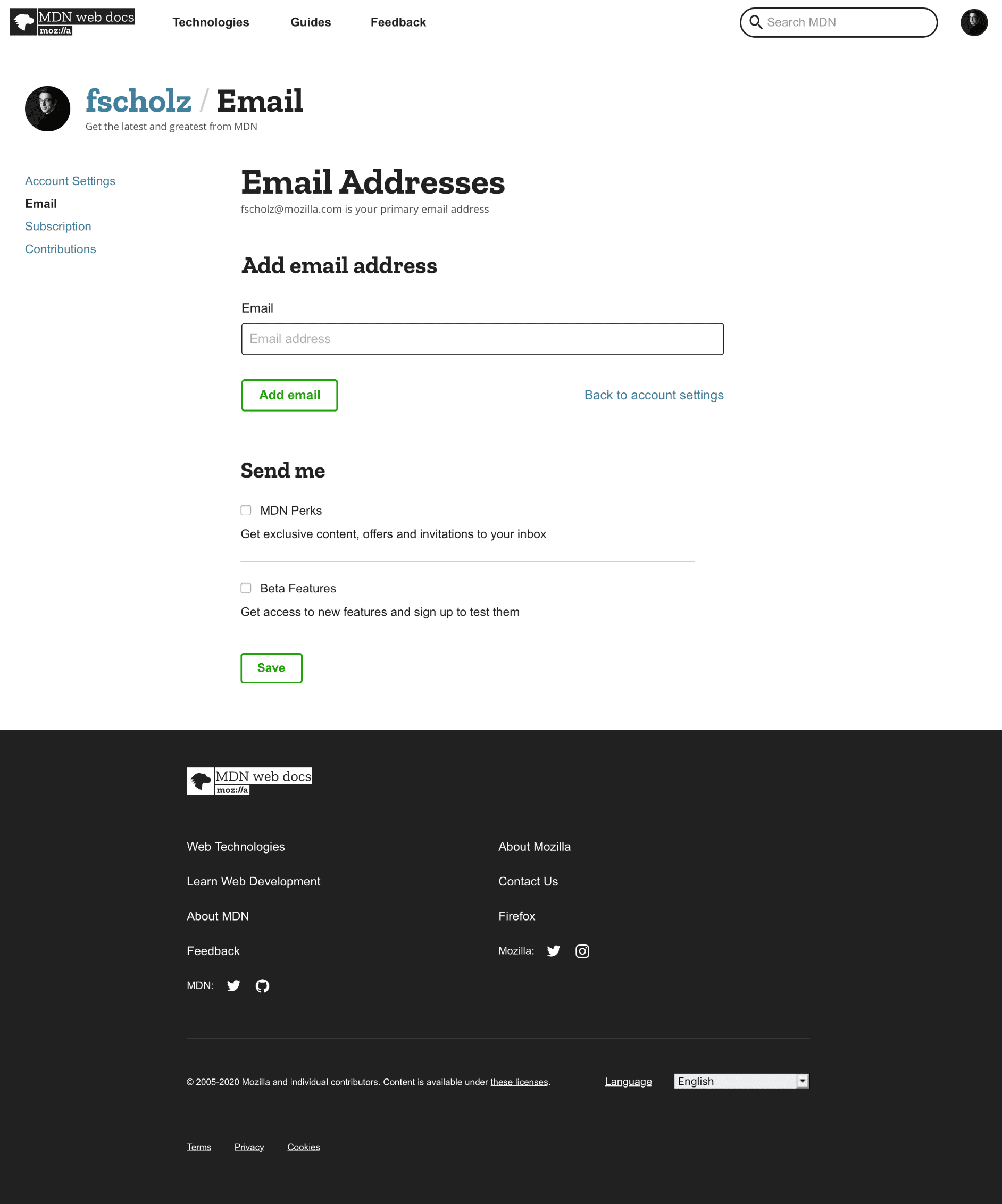
Thoughts @malqinneh
schalkneethling
on 25 May 2020
@escattone, @peterbe or @Gregoor
I notice that under the main title text in the title bar there is a sentence that reads as follows:
"Change your avatar from github.com"
Now, this could also be google.com. Thing is, userData does not contain information about the auth provider the user used to signup with so, we have no way of knowing whether to point them to Github or Google.
How much effort would it be to add that to userData?
@malqinneh @atopal FYI ^
schalkneethling
on 25 May 2020
Better to put that into a new API endpoint. Eg /api/v1/users/12346
It’ll load that once you start the settings SPA
peterbe
on 25 May 2020
I’m not working today but the API endpoint should not have an ID in it because it will never be public and the cookie will dictate which user ID we’re talking about.
peterbe
on 25 May 2020
I don't feel strongly about naming, /settings or /accounts is fine with me. I'd go with /emails for that route. Adding @malqinneh
 atopal
on 25 May 2020
atopal
on 25 May 2020
@schalkneethling
Correct me if I'm wrong/need to clarify; we initially designed [Email addresses] to maintain all current UX/implementation (which currently takes users to a separate flow/page to edit or add email addresses to their account). Did we decide to implement the [Email addresses] flow from the user settings sidebar?
 malqinneh
on 26 May 2020
malqinneh
on 26 May 2020
@schalkneethling
Correct me if I'm wrong/need to clarify; we initially designed [Email addresses] to maintain all current UX/implementation (which currently takes users to a separate flow/page to edit or add email addresses to their account). Did we decide to implement the [Email addresses] flow from the user settings sidebar?
Yup. It made sense to keep the same base template, so to speak, for all of the pieces of the new account experience.
schalkneethling
on 26 May 2020
I don't remember making that decision. I remember that we wanted to keep the settings sidebar visible, but the interaction to add/change email addresses was still to be started from the account settings. I don't feel strongly about it, but let's make a deliberate decision if that's really what we want to change.
atopal
on 26 May 2020
Yup. It made sense to keep the same base template, so to speak, for all of the pieces of the new account experience.
If we want to incorporate [Email Addresses] into the new account settings/sidebar flow, there are a few options to consider:
- Tackle functionality with first principles / optimize for editing the email address. The email field is editable and users can change it, click save, and reconfirm their email address accordingly. Not necessary/omit adding multiple email addresses
- If the above is too extreme - gather additional insight on the value of adding multiple email addresses for our users; interview a handful of the 2,501 users that have more than one email address to understand their use-cases
- Propose new UX keeping the current implementation but avoid awkward UX patterns as much as possible (similar to the solution in the above screenshot from Schalk)
I think 3 is a subtle improvement over keeping the original / separate flow for adding [Email Addresses]. But 1 is a bigger improvement for editing an email address field.
What do you think? (cc @schalkneethling @atopal)
malqinneh
on 26 May 2020
Thank you for your feedback @malqinneh,
Tackle functionality with first principles / optimize for editing the email address. The email field is editable and users can change it, click save, and reconfirm their email address accordingly. Not necessary/omit adding multiple email addresses
At this time we do not allow editing of email addresses. It is a little confusing as you can technically change(edit) an email address, the process is just very involved :)
If the above is too extreme - gather additional insight on the value of adding multiple email addresses for our users; interview a handful of the 2,501 users that have more than one email address to understand their use-cases
If we have the bandwidth and budget for this, I would recommend we do this irrespective. It is always super useful to hear directly from our users.
Propose new UX keeping the current implementation but avoid awkward UX patterns as much as possible (similar to the solution in the above screenshot from Schalk)
I would vote for this while we do some user research to determine real user need.
schalkneethling
on 27 May 2020
Seeing that we have already run into a problem with using account as the basis for the new functionality, I am going to switch to settings. That means these are the base URLs:
/settings/ ⛔️
/settings/email/lists (or /account/email-lists) ⛔️
/settings/email ⛔️
/settings/payments ⛔️
Long live settings! 🙌
======= Turns out update
settings is already in use 🤣 I am going to switch to preferences. That means these are the base URLs:
/preferences/
/preferences/email/lists (or /account/email-lists)
/preferences/email
/preferences/payments
Long live preferences! 🙌
schalkneethling
on 27 May 2020
@malqinneh I would appreciate your thoughts on the following comment: https://github.com/mdn/kuma/issues/7073#issuecomment-633524429
Thank you!
schalkneethling
on 27 May 2020
Ignore https://github.com/mdn/kuma/issues/7073#issuecomment-634493823 :) With @peterbe assistance we are now running on account - Long live account
schalkneethling
on 27 May 2020
Ignore #7073 (comment) :) With @peterbe assistance we are now running on
account - Long live account
The underlying app is called accountsettings and the base URL is /en-US/account/ but I think we should be vigilant about the URL (and the addressbar).
One potential thing to consider is these URLs:
/en-US/account/settings/
/en-US/account/email/
/en-US/account/subscriptions/
where
/en-US/account and /en-US/account/ redirects to /en-US/account/settings/.
peterbe
on 27 May 2020
If we want to incorporate [Email Addresses] into the new account settings/sidebar flow, there are a few options to consider:
I'm not sure I understand what we are discussing here. Schalk asked whether the side bar could be visible in the "add email flow", I said yes. After that, Schalk suggested adding that "add email flow" directly to the email settings page. I don't see much value in that, it's most likely a rarely used feature (and a reminder again that we should really add telemetry for every feature we add), but don't feel strongly about it either.
1. Tackle functionality with first principles / optimize for editing the email address. The email field is editable and users can change it, click save, and reconfirm their email address accordingly. Not necessary/omit adding multiple email addresses
If you want to make sure you always have a validated email address, you'll still need a flow around that.
2. If the above is too extreme - gather additional insight on the value of adding multiple email addresses for our users; interview a handful of the 2,501 users that have more than one email address to understand their use-cases

3. Propose new UX keeping the current implementation but avoid awkward UX patterns as much as possible (similar to the solution in the above screenshot from Schalk)
I think 3 is a subtle improvement over keeping the original / separate flow for adding [Email Addresses]. But 1 is a bigger improvement for editing an email address field.
What do you think? (cc @schalkneethling @atopal)
I think there is limited upside in coming up with great UX for this use case. Quick wins are great, but I'd rather focus on other issues, if we spend time on research, design and implementation.
atopal
on 28 May 2020
I'm not sure I understand what we are discussing here. Schalk asked whether the side bar could be visible in the "add email flow", I said yes.
This is the main thing I was referring to.
After that, Schalk suggested adding that "add email flow" directly to the email settings page.
That was mainly based on the fact that we only have one newsletter and it seemed like consolidating it could be an option. I am not so concerned about this particular topic.
schalkneethling
on 28 May 2020
Related issues
 groovecoder
·
10Comments
peterbe
·
6Comments
schalkneethling
·
10Comments
peterbe
·
6Comments
groovecoder
·
10Comments
peterbe
·
6Comments
schalkneethling
·
10Comments
peterbe
·
6Comments
 Matsuuu
·
5Comments
Matsuuu
·
5Comments
Most helpful comment
I think not. Waffle flags aren't free and should be used sparingly. Both performance and complexity. There might be a waffle flag for enabling it at all. E.g.
But not question it anywhere else.
Or, you could simply not bother at all. We develop the functionality by building the new React routes and the new v1 API endpoints but don't put in a link in the signed-in drop-down (in
master). People (within the staff org) can try it out by manually typing in/account/settingsin their address bar. Once it looks fine, we commit a change tologin.jsx(or whatever it's called) that makes a link to it.