Kudu: [kudu REST API upload zip] Number of entries expected in End Of Central Directory does not correspond to number of entries in Central Directory
Hi team,
I'm trying to upload a zip file to my azure function app using python.
I have verified the REST api: (PUT /api/zip/{path}/) can work in the postman.
But when I start to write the python script, I got the 500 error message:
{
    "Message": "An error has occurred.",
    "ExceptionMessage": "Number of entries expected in End Of Central Directory does not correspond to number of entries in Central Directory.",
    "ExceptionType": "System.IO.InvalidDataException",
    "StackTrace": "   at System.IO.Compression.ZipArchive.ReadCentralDirectory()\r\n   at System.IO.Compression.ZipArchive.get_Entries()\r\n   at Kudu.Core.Infrastructure.ZipArchiveExtensions.Extract(ZipArchive archive, String directoryName)\r\n   at Kudu.Services.Zip.ZipController.<CreateDirectoryPutResponse>d__3.MoveNext()\r\n--- End of stack trace from previous location where exception was thrown ---\r\n   at System.Runtime.CompilerServices.TaskAwaiter.ThrowForNonSuccess(Task task)\r\n   at System.Runtime.CompilerServices.TaskAwaiter.HandleNonSuccessAndDebuggerNotification(Task task)\r\n   at System.Threading.Tasks.TaskHelpersExtensions.<CastToObject>d__3`1.MoveNext()\r\n--- End of stack trace from previous location where exception was thrown ---\r\n   at System.Runtime.CompilerServices.TaskAwaiter.ThrowForNonSuccess(Task task)\r\n   at System.Runtime.CompilerServices.TaskAwaiter.HandleNonSuccessAndDebuggerNotification(Task task)\r\n   at System.Web.Http.Controllers.ApiControllerActionInvoker.<InvokeActionAsyncCore>d__0.MoveNext()\r\n--- End of stack trace from previous location where exception was thrown ---\r\n   at System.Runtime.CompilerServices.TaskAwaiter.ThrowForNonSuccess(Task task)\r\n   at System.Runtime.CompilerServices.TaskAwaiter.HandleNonSuccessAndDebuggerNotification(Task task)\r\n   at System.Web.Http.Filters.ActionFilterAttribute.<CallOnActionExecutedAsync>d__5.MoveNext()\r\n--- End of stack trace from previous location where exception was thrown ---\r\n   at System.Web.Http.Filters.ActionFilterAttribute.<CallOnActionExecutedAsync>d__5.MoveNext()\r\n--- End of stack trace from previous location where exception was thrown ---\r\n   at System.Runtime.CompilerServices.TaskAwaiter.ThrowForNonSuccess(Task task)\r\n   at System.Runtime.CompilerServices.TaskAwaiter.HandleNonSuccessAndDebuggerNotification(Task task)\r\n   at System.Web.Http.Filters.ActionFilterAttribute.<ExecuteActionFilterAsyncCore>d__0.MoveNext()\r\n--- End of stack trace from previous location where exception was thrown ---\r\n   at System.Runtime.CompilerServices.TaskAwaiter.ThrowForNonSuccess(Task task)\r\n   at System.Runtime.CompilerServices.TaskAwaiter.HandleNonSuccessAndDebuggerNotification(Task task)\r\n   at System.Web.Http.Filters.ActionFilterAttribute.<CallOnActionExecutedAsync>d__5.MoveNext()\r\n--- End of stack trace from previous location where exception was thrown ---\r\n   at System.Web.Http.Filters.ActionFilterAttribute.<CallOnActionExecutedAsync>d__5.MoveNext()\r\n--- End of stack trace from previous location where exception was thrown ---\r\n   at System.Runtime.CompilerServices.TaskAwaiter.ThrowForNonSuccess(Task task)\r\n   at System.Runtime.CompilerServices.TaskAwaiter.HandleNonSuccessAndDebuggerNotification(Task task)\r\n   at System.Web.Http.Filters.ActionFilterAttribute.<ExecuteActionFilterAsyncCore>d__0.MoveNext()\r\n--- End of stack trace from previous location where exception was thrown ---\r\n   at System.Runtime.CompilerServices.TaskAwaiter.ThrowForNonSuccess(Task task)\r\n   at System.Runtime.CompilerServices.TaskAwaiter.HandleNonSuccessAndDebuggerNotification(Task task)\r\n   at System.Web.Http.Controllers.ActionFilterResult.<ExecuteAsync>d__2.MoveNext()\r\n--- End of stack trace from previous location where exception was thrown ---\r\n   at System.Runtime.CompilerServices.TaskAwaiter.ThrowForNonSuccess(Task task)\r\n   at System.Runtime.CompilerServices.TaskAwaiter.HandleNonSuccessAndDebuggerNotification(Task task)\r\n   at System.Web.Http.Controllers.ExceptionFilterResult.<ExecuteAsync>d__0.MoveNext()\r\n--- End of stack trace from previous location where exception was thrown ---\r\n   at System.Web.Http.Controllers.ExceptionFilterResult.<ExecuteAsync>d__0.MoveNext()\r\n--- End of stack trace from previous location where exception was thrown ---\r\n   at System.Runtime.CompilerServices.TaskAwaiter.ThrowForNonSuccess(Task task)\r\n   at System.Runtime.CompilerServices.TaskAwaiter.HandleNonSuccessAndDebuggerNotification(Task task)\r\n   at System.Web.Http.Dispatcher.HttpControllerDispatcher.<SendAsync>d__1.MoveNext()"
}
My python code is written like this:
files = {"file": open(ZIP_FILE_NAME, 'rb')}
response = requests.put(url=url, auth=(usr, pwd), files=files)
if response.status_code not in [200, 201]:
     return False
 else:
     return True
and some refrences about the requests lib is here.
My request header:
{
    'Content-Length': '1254',
    'Accept-Encoding': 'gzip, deflate',
    'Accept': '*/*',
    'User-Agent': 'python-requests/2.13.0',
    'Connection': 'keep-alive',
    'Content-Type': 'multipart/form-data; boundary=9963ab3e05c0477eb70f72a0a8813238',
    'Authorization': 'Basic <hidden_base64_string>'
}
To verified if my upload script is wrong. I also wrote a simple server code to receive the upload file and it can receive the zip file. And the received zip file can be unzipped successfully.
Any suggestions about what's wrong here?
Thanks
 jdneo
jdneo
All 11 comments
And if you drag and drop that exact same zip file into the Kudu Console special zip-drop area, it works fine? If so, please use a tool like fiddler to try to identify possible differences between the working and non-working case.
 davidebbo
on 6 Apr 2017
davidebbo
on 6 Apr 2017
I haven't looked into fiddler yet, but I have this same problem. When I upload a zipfile with curl, I get the same error message as jdneo. I can add that if I upload a non-zip file, I get a different error, "End of Central Directory record could not be found." I can confirm that it does work when I drop the file into the console.
The curl command I use is
curl -u 'user:pass' -X PUT 'https://myfunctions.scm.azurewebsites.net/api/zip/site/wwwroot/' -F [email protected]
and the zipfile contains a directory test-function which itself contains function.json and run.py.
 ChickenProp
on 26 Jun 2017
ChickenProp
on 26 Jun 2017
@ChickenProp in case that matters, what OS & shell are you doing this from?
davidebbo
on 26 Jun 2017
OS X 10.11.5
GNU bash, version 3.2.57(1)-release (x86_64-apple-darwin15)
ChickenProp
on 27 Jun 2017
I have the same problem uploading a (70kb) zip file via javascript. The zip file can be extracted fine on macOs and Windows 10, so I assume it was created correctly. This is a basic gulpfile:
const gulp = require('gulp')
const zip = require('gulp-zip')
const rq = require('request-promise')
const fs = require('fs')
const outDir = './artefacts'
const deployDir = './dist'
const user = 'myAzureUsername'
const password = 'myAzurePassword'
const azureUrl = 'https://my-azure-site.scm.azurewebsites.net'
gulp.task('zip', () => {
return gulp.src(`${outDir}/**/*`)
.pipe(zip('app.zip'))
.pipe(gulp.dest(deployDir))
})
gulp.task('upload', ['zip'], () => {
return rq.put({
uri: `${azureUrl}/api/zip/site/wwwroot`,
auth: {
user: user,
pass: password
},
formData: {
custom_file: {
value: fs.createReadStream(`${deployDir}/app.zip`),
options: {
filename: 'app.zip',
contentType: 'application/zip'
}
}
}
})
})
Drag & drop of a zip file in the Kudu portal works, too. So is there a problem with the method of upload?
edit: added zip file size
 Bomret
on 6 Jul 2017
Bomret
on 6 Jul 2017
try this instead
rq.put({
  uri: `${azureUrl}/api/zip/site/wwwroot`,
  auth: {
    user: user,
    pass: password
  },
  body: fs.createReadStream(`${deployDir}/app.zip`)
})
You can check this https://github.com/c9/vfs-http-adapter for the specs vfs and zip controllers are implementing (though they are not a complete implementation)
 ahmelsayed
on 7 Jul 2017
ahmelsayed
on 7 Jul 2017
@ahmelsayed that works, thanks!
Bomret
on 7 Jul 2017
Ok, so it sounds like the root of the issue was that the request was incorrect on the client, trying to pass the file as form data instead of binary.
davidebbo
on 7 Jul 2017
@davidebbo yes, exactly.
Bomret
on 7 Jul 2017
Ah, thanks! The corresponding curl command is
curl -u 'user:pass' -X PUT 'https://myfunctions.scm.azurewebsites.net/api/zip/site/wwwroot/' --data-binary @test-function.zip
I'd previously tried with --data (instead of --data-binary) and that didn't work. (The error in that case was "End of Central Directory record could not be found.")
ChickenProp
on 7 Jul 2017
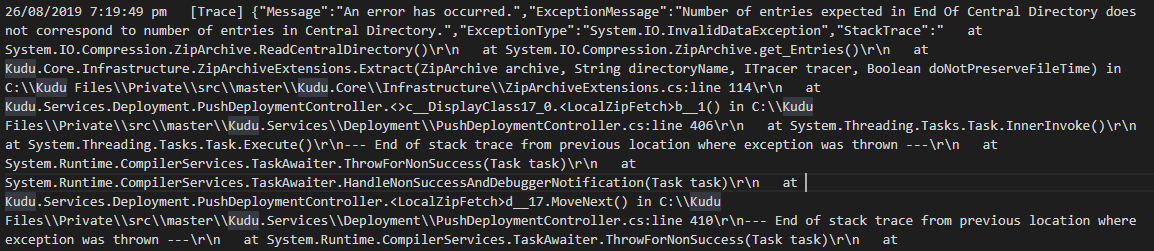
I'm having this issue when sending a POST request of a large file to the ZipDeploy API. I'm trying to write an app that automate the app service deployment and it throws this error; however sending a CURL request and dragging to the Zip Push deploy interface works just fine.
 rfabro
on 26 Aug 2019
rfabro
on 26 Aug 2019
Related issues
jdneo
·
8Comments
 chillyistkult
·
8Comments
chillyistkult
·
8Comments
 MartinHnik
·
5Comments
MartinHnik
·
5Comments
 garimpeirodouniverso
·
4Comments
garimpeirodouniverso
·
4Comments
 Benjiiim
·
7Comments
Benjiiim
·
7Comments
Most helpful comment
try this instead
You can check this https://github.com/c9/vfs-http-adapter for the specs vfs and zip controllers are implementing (though they are not a complete implementation)