Kubevirt: Virtctl doesn't work for clusters setup by Rancher
/kind bug
What happened:
We noticed that Virtctl doesn't work normally with k8s clusters that are setup by Rancher (https://rancher.com/). We think this could be because Rancher is proxying the requests coming to the actual cluster's APIs
$ virtctl console mark-gateway
Can't connect to websocket (404): websocket: bad handshake
What you expected to happen:
This works ok like below on clusters not setup with Rancher:
$ virtctl console mark-gateway
Successfully connected to mark-gateway console. The escape sequence is ^]

Ubuntu 16.04.6 LTS ubuntu ttyS0

ubuntu login:
How to reproduce it (as minimally and precisely as possible):
- Setup kubernetes cluster with Rancher, install kubevirt, etc
- Start a VM with Kubevirt
- Try to console or vnc with virtctl
Anything else we need to know?:
Environment:
- KubeVirt version (use
virtctl version): any - Kubernetes version (use
kubectl version): v1.15.5, but we've seen it on other versions too - VM or VMI specifications: any
- OS (e.g. from /etc/os-release): any
- Kernel (e.g.
uname -a): any - Others: Cluster nodes needs to have been setup by rancher
 MarkSpencerTan
All 7 comments
@MarkSpencerTan thanks. I think we had one or two issues about this already. Just can't find them right now.
Are people downloading a special kubectl binary from rancher or just use theirs? If the second is the case there should be a way for us to make virtctl work out of the box (and I actually wonder why it doesn't work).
 rmohr
on 6 Jul 2020
rmohr
on 6 Jul 2020
@MarkSpencerTan thanks. I think we had one or two issues about this already. Just can't find them right now.
Are people downloading a special
kubectlbinary from rancher or just use theirs? If the second is the case there should be a way for us to makevirtctlwork out of the box (and I actually wonder why it doesn't work).
Thanks for the reply @rmohr!
Nope, just the standard official kubectl binary using the kubeconfig file that rancher provides. I think it maybe due to the Rancher Authentication proxy showed here: https://rancher.com/docs/rancher/v2.x/en/overview/architecture/#4-authorized-cluster-endpoint. Maybe some requests virtctl is making to the cluster API isn't being allowed by the proxy :(
MarkSpencerTan
on 6 Jul 2020
Something that I found while looking through the documentation of Rancher is the ability to enable "Authorized Endpoints" in Rancher. When that is enabled, it will throw in an extra entry in your kubeconfig file for your node that has direct access to the cluster API, which won't go through the Authentication proxy. Switching to this kubeconfig made virtctl work for the cluster!
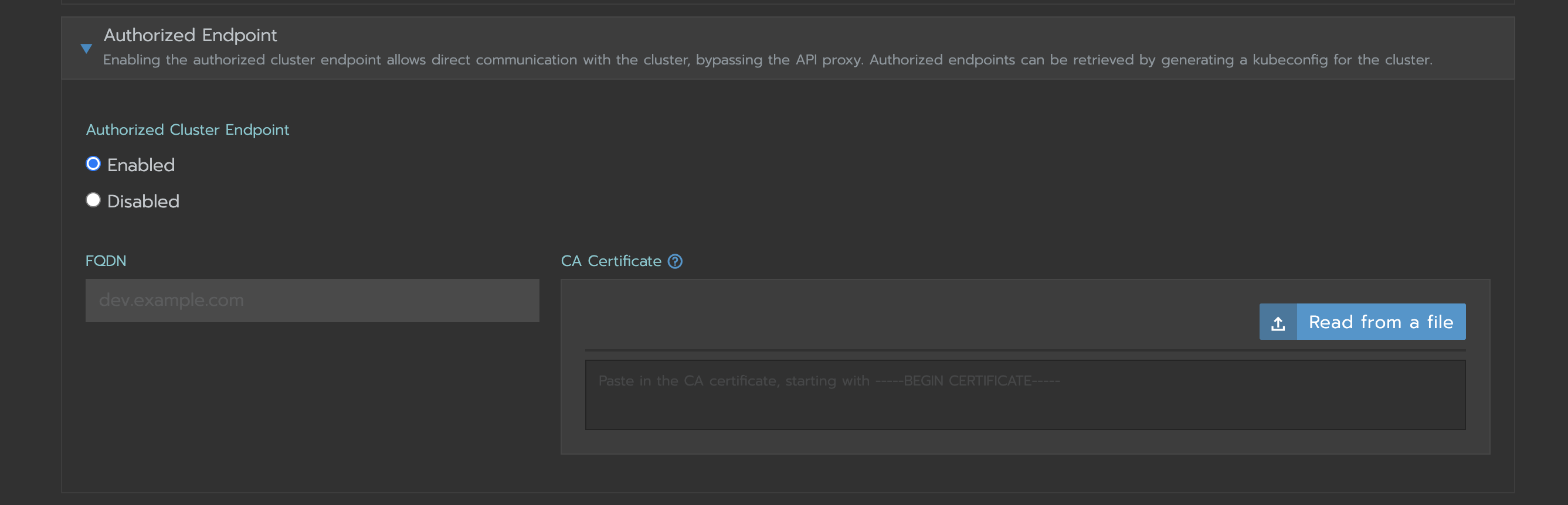
I'm good with this workaround @rmohr, closing the ticket
MarkSpencerTan
on 6 Jul 2020
@MarkSpencerTan that's great to hear. Thanks for the update.
rmohr
on 6 Jul 2020
Hey there - I'm still seeing this even with Authorize Cluster Endpoint set. @MarkSpencerTan did you set a FQDN and import a cert?
 alexanderturner
on 13 Jul 2020
alexanderturner
on 13 Jul 2020
@alexanderturner, all I had to do in addition to setting the authorize cluster endpoint is setting my kubeconfig file to point to the correct cluster context that is for one of your nodes in the kubeconfig file. Did you do that part already?
so in your new kubeconfig from Rancher you should see something like this:
apiVersion: v1
kind: Config
clusters:
- name: "mycluster"
... - name: "mycluster-node1"
...
Make sure you use the config for "mycluster-node1" or whatever name it shows there
MarkSpencerTan
on 13 Jul 2020
Thanks @MarkSpencerTan !!
For others playing along at home - I also had to set the current-context: to the mycluster-node1 once that was done, it was working fine.
apiVersion: v1
kind: Config
clusters:
- name: "mycluster"
  cluster:
    server: "https://192.168.1.1/k8s/clusters/c-bwjlt"
    certificate-authority-data: "ScarySecret"
- name: "mycluster-kube-host1"
  cluster:
    server: "https://192.168.1.1:6443"
    certificate-authority-data: "SuperSecret"

users:
- name: "mycluster"
  user:
    token: "kubeconfig-user-82jzn.c-bwjlt:token"

contexts:
- name: "mycluster"
  context:
    user: "mycluster"
    cluster: "mycluster"
- name: "mycluster-node1"
  context:
    user: "mycluster"
    cluster: "mycluster-node1"

current-context: "mycluster-kube-host1"
Related issues
 enp0s3
·
6Comments
enp0s3
·
6Comments
 shubhindia
·
6Comments
shubhindia
·
6Comments
 lukas-bednar
·
7Comments
lukas-bednar
·
7Comments
 nunnatsa
·
3Comments
nunnatsa
·
3Comments
 booxter
·
10Comments
booxter
·
10Comments
Most helpful comment
Thanks @MarkSpencerTan !!
For others playing along at home - I also had to set the
current-context:to themycluster-node1once that was done, it was working fine.