Kubespray: vagrant up not working
BUG
I clone the repo, change the OS to centos and then run pip install -r and then vagrant up.
This is the output.
Is there something i am doing wrong?
Thank you,
T
Environment:
- Cloud provider or hardware configuration: VAGRANT
OS (
printf "$(uname -srm)\n$(cat /etc/os-release)\n"): macOSVersion of Ansible (
ansible --version): 2.7.2
Kubespray version (commit) (git rev-parse --short HEAD): 0cfcd39d
Network plugin used:
default
Copy of your inventory file:
??
Command used to invoke ansible:
vagrant up
Output of ansible run:
```==> k8s-3: Running provisioner: ansible...
Vagrant has automatically selected the compatibility mode '2.0'
according to the Ansible version installed (2.7.2).
Alternatively, the compatibility mode can be specified in your Vagrantfile:
https://www.vagrantup.com/docs/provisioning/ansible_common.html#compatibility_mode
k8s-3: Running ansible-playbook...
SUDO password:
/Users/christophe.trefois/dev/test/kubespray/inventory/sample as an inventory
source
that the implicit localhost does not match 'all'
PLAY [localhost] ********************
skipping: no hosts matched
PLAY [bastion[0]] *******************
skipping: no hosts matched
PLAY [k8s-cluster:etcd:calico-rr] **************
skipping: no hosts matched
PLAY [k8s-cluster:etcd:calico-rr] **************
skipping: no hosts matched
PLAY [k8s-cluster:etcd:calico-rr] **************
skipping: no hosts matched
PLAY [etcd] **********************
skipping: no hosts matched
PLAY [k8s-cluster:calico-rr] *****************
skipping: no hosts matched
PLAY [k8s-cluster] *******************
skipping: no hosts matched
PLAY [kube-master] *******************
skipping: no hosts matched
PLAY [k8s-cluster] *******************
skipping: no hosts matched
PLAY [kube-master[0]] ******************
skipping: no hosts matched
PLAY [kube-master] *******************
skipping: no hosts matched
PLAY [calico-rr] *********************
skipping: no hosts matched
PLAY [k8s-cluster] *******************
skipping: no hosts matched
PLAY [kube-master] *******************
skipping: no hosts matched
PLAY RECAP ***********************
Thursday 22 November 2018 12:09:45 +0100 (0:00:00.083) 0:00:00.083 *
===============================================================================```
 Trefex
All 15 comments
cc @jhalfmoon ^
 ant31
on 22 Nov 2018
ant31
on 22 Nov 2018
Confirmed. My cleanup of the vagrant file changed a reference to a non-existent file: hosts. The vagrantfile now actually references an existing file, hosts.ini, ironically breaking the vagrant config. The quick fix for this is to rename or remove inventory/sample/hosts.ini before you start the vagrant run. I'll do a PR as soon as I've tested of this. The reason I didn't catch this error earlier is because I use a script to test my changes and in this script I had an 'rm hosts.ini', for test purposes, which I had forgotten about.
 jhalfmoon
on 22 Nov 2018
jhalfmoon
on 22 Nov 2018
I can confirm nuking the inventory/sample/hosts.ini gets things moving. Thanks @jhalfmoon
 easel
on 27 Nov 2018
easel
on 27 Nov 2018
This solution worked for me. Is this still open (not merged)? I thought it would have landed in the latest release.
 tdensmore
on 4 Jan 2019
tdensmore
on 4 Jan 2019
Even after deleting the inventory/sample/hosts.ini file, you still need to enter the password of the local user. This is not in the docs.
 rgevaert
on 20 Jan 2019
rgevaert
on 20 Jan 2019
@jhalfmoon which PR would that be?
Is this still a problem?
 Miouge1
on 7 Feb 2019
Miouge1
on 7 Feb 2019
This is definitely still a problem @Miouge1. First time using kubespray to setup a local multi-node dev environment and I'm getting this:
Version: master branch an hour ago.
==> k8s-3: Running provisioner: ansible...
Vagrant has automatically selected the compatibility mode '2.0'
according to the Ansible version installed (2.7.7).

Alternatively, the compatibility mode can be specified in your Vagrantfile:
https://www.vagrantup.com/docs/provisioning/ansible_common.html#compatibility_mode

    k8s-3: Running ansible-playbook...
SUDO password:
 [WARNING]: provided hosts list is empty, only localhost is available. Note
that the implicit localhost does not match 'all'


PLAY [localhost] ***************************************************************
skipping: no hosts matched
 [WARNING]: Could not match supplied host pattern, ignoring: bastion


PLAY [bastion[0]] **************************************************************
skipping: no hosts matched
 [WARNING]: Could not match supplied host pattern, ignoring: calico-rr


PLAY [k8s-cluster:etcd:calico-rr] **********************************************
skipping: no hosts matched

PLAY [k8s-cluster:etcd:calico-rr] **********************************************
skipping: no hosts matched

PLAY [k8s-cluster:etcd:calico-rr] **********************************************
skipping: no hosts matched

PLAY [etcd] ********************************************************************
skipping: no hosts matched

PLAY [k8s-cluster:calico-rr] ***************************************************
skipping: no hosts matched

PLAY [k8s-cluster] *************************************************************
skipping: no hosts matched

PLAY [kube-master] *************************************************************
skipping: no hosts matched

PLAY [k8s-cluster] *************************************************************
skipping: no hosts matched

PLAY [kube-master[0]] **********************************************************
skipping: no hosts matched

PLAY [kube-master] *************************************************************
skipping: no hosts matched

PLAY [calico-rr] ***************************************************************
skipping: no hosts matched

PLAY [k8s-cluster] *************************************************************
skipping: no hosts matched

PLAY [kube-master] *************************************************************
skipping: no hosts matched

PLAY RECAP *********************************************************************
 dotnwat
on 8 Feb 2019
dotnwat
on 8 Feb 2019
The ini extension is ignored in ansible.cfg so an inventory relying on an .ini file can't be supplied as a directory.
Looks like #4153 resolves the issue for the Vagrantfile.
Why are .ini files ignored for inventory in the first place if that's what the examples use?
 mhio
on 11 Feb 2019
mhio
on 11 Feb 2019
Looks like #2446 added the inventory_ignore_extensions line with more than just .creds. Maybe ini should be removed?
mhio
on 11 Feb 2019
It's the Ansible default, see https://github.com/ansible/ansible/issues/39562#issuecomment-385696800:
This is on purpose, due to the legacy of inventory scripts and their reliance on
.inifiles for configuration. If you point at the file directly or change the configuration it will work, but if we change the default it will break many existing setups that rely on the.inifiles being ignored. Also the ini plugin can parse files w/o the.iniextension.
And https://github.com/kubernetes-sigs/kubespray/pull/2446#discussion_r175597591
 manics
on 11 Feb 2019
manics
on 11 Feb 2019
I had same issue when trying vagrant up at the first time. To make this easier, is it possible
to remove or rename hosts.ini file under inventory/sample? Renaming like
hosts_sample.ini might be easy to understand the purpose.
This repo is great for vagrant users, thanks to all.
 kobayashi
on 1 Mar 2019
kobayashi
on 1 Mar 2019
Just followed this comment: https://github.com/polyaxon/polyaxon/issues/349#issuecomment-462052351 and vagrant up worked as charm.
Also I had to upgrade to latest Vagrant (from 2.0.2 to 2.2.4), since I got ruby errors along the way, eg. #<Thread:0x0000556fc7ef62a8@/usr/share/rubygems-integration/all/gems/vagrant-2.0.2/lib/vagrant/batch_action.rb:71 run> terminated with exception (report_on_exception is true):
Traceback (most recent call last):
107: from /usr/share/rubygems-integration/all/gems/vagrant-2.0.2/lib/vagrant/batch_action.rb:82:in `block (2 levels) in run'
106: from /usr/share/rubygems-integration/all/gems/vagrant-2.0.2/lib/vagrant/machine.rb:188:in `action...
Hope it helps.
 atrakic
on 5 Mar 2019
atrakic
on 5 Mar 2019
Thats not a problem i guess @rgevaert, most of vagrant boxes' root password is vagrant
 bilalcaliskan
on 8 Mar 2019
bilalcaliskan
on 8 Mar 2019
Regarding the sudo password, I submitted PR #4457 to address it.
Miouge1
on 8 Apr 2019
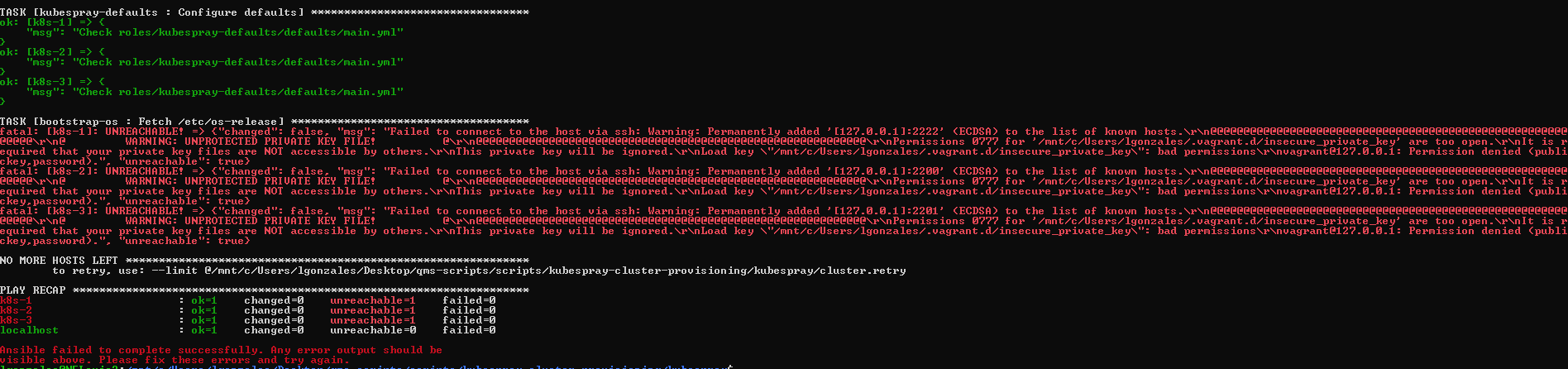
Please help still encountering this issue :(
- clone the kubespray
- install the requirements
- execute vagrant up command
note: I'm using WSL

 junlouiegonzales
on 24 Feb 2020
junlouiegonzales
on 24 Feb 2020
Related issues
 bosatsu
·
3Comments
bosatsu
·
3Comments
 lacebal
·
3Comments
lacebal
·
3Comments
 butuzov
·
4Comments
butuzov
·
4Comments
 IvanBiv
·
3Comments
IvanBiv
·
3Comments
 sermilrod
·
4Comments
sermilrod
·
4Comments
Most helpful comment
I can confirm nuking the
inventory/sample/hosts.inigets things moving. Thanks @jhalfmoon