Kubespray: Server field in kube-proxy config is not set to external LB address
BUG REPORT:
Environment:
- bare metal
- OS:
Linux 3.10.0-693.21.1.el7.x86_64 x86_64
NAME="Red Hat Enterprise Linux Server"
VERSION="7.4 (Maipo)"
ID="rhel"
ID_LIKE="fedora"
VARIANT="Server"
VARIANT_ID="server"
VERSION_ID="7.4"
PRETTY_NAME="Red Hat Enterprise Linux Server 7.4 (Maipo)"
ANSI_COLOR="0;31"
CPE_NAME="cpe:/o:redhat:enterprise_linux:7.4:GA:server"
HOME_URL="https://www.redhat.com/"
BUG_REPORT_URL="https://bugzilla.redhat.com/"

REDHAT_BUGZILLA_PRODUCT="Red Hat Enterprise Linux 7"
REDHAT_BUGZILLA_PRODUCT_VERSION=7.4
REDHAT_SUPPORT_PRODUCT="Red Hat Enterprise Linux"
REDHAT_SUPPORT_PRODUCT_VERSION="7.4"
- Version of Ansible:
ansible 2.6.1
  config file = /etc/ansible/ansible.cfg
  configured module search path = [u'/home/l.gomez/.ansible/plugins/modules', u'/usr/share/ansible/plugins/modules']
  ansible python module location = /usr/lib/python2.7/site-packages/ansible
  executable location = /usr/bin/ansible
  python version = 2.7.5 (default, May  3 2017, 07:55:04) [GCC 4.8.5 20150623 (Red Hat 4.8.5-14)]
Network plugin used:
Calico
Anything else do we need to know:
I have an external LB for the api server configured
loadbalancer_apiserver:
 address: LB ip addres
 port: LB port

## Internal loadbalancers for apiservers
loadbalancer_apiserver_localhost: false
but server field in kube-proxy kubeconfig is configured to use localhost:6443 instead of loadbalancer apiserver.
As we can see here, server field in kube-proxy kubeconfig is set to kube_apiserver_endpoint, which is set to https://{{ kube_apiserver_bind_address | regex_replace('0\.0\.0\.0','127.0.0.1') }}:{{ kube_apiserver_port }} due to this logic (since the task "Update server field in kube-proxy kubeconfig" only run when you are on a master).
Due to this, all kube-proxy instances are failing on all nodes, since the config is set to use localhost:6443 and there is not internal nginx loadbalancer enabled in the nodes.
According to my understanding this logic is wrong since the LB balancer IP address is the one that should be set in the server field in kube-proxy config. I edit it manually, to the value of the LB dns name, and all kube-proxy instances started to work again.
 luisyonaldo
All 12 comments
I was also debugging this issue and came to such a conclusion:
if kube-proxy would get its configuration from the file on the host /etc/kubernetes/kubeadm-config.yaml, then on nodes API endpoint could be set to load balancer and on masters to localhost. But this task Update server field in kube-proxy kubeconfig updates configmap which is shared by all kube-proxies, so it breaks the setup with load balancer for all nodes
@riverzhang what do you think, it was your commit, shall we change it? Probably via patch to get configmap from the host or maybe you can think of better solution. And then the task Update server field in kube-proxy kubeconfig will be applied to files on master nodes, while worker nodes will just keep default API endpoint which will be set to load balancer
 mlushpenko
on 13 Aug 2018
mlushpenko
on 13 Aug 2018
I just redeployed a new cluster and here is how kube-pory configmap looks like
ubuntu@node1:~$ kubectl -n kube-system get cm kube-proxy -oyaml
apiVersion: v1
data:
  config.conf: |-
    apiVersion: kubeproxy.config.k8s.io/v1alpha1
    bindAddress: 0.0.0.0
    clientConnection:
      acceptContentTypes: ""
      burst: 10
      contentType: application/vnd.kubernetes.protobuf
      kubeconfig: /var/lib/kube-proxy/kubeconfig.conf
      qps: 5
    clusterCIDR: 10.233.64.0/18
    configSyncPeriod: 15m0s
    conntrack:
      max: null
      maxPerCore: 32768
      min: 131072
      tcpCloseWaitTimeout: 1h0m0s
      tcpEstablishedTimeout: 24h0m0s
    enableProfiling: false
    healthzBindAddress: 0.0.0.0:10256
    hostnameOverride: ""
    iptables:
      masqueradeAll: false
      masqueradeBit: 14
      minSyncPeriod: 0s
      syncPeriod: 30s
    ipvs:
      minSyncPeriod: 0s
      scheduler: ""
      syncPeriod: 30s
    kind: KubeProxyConfiguration
    metricsBindAddress: 127.0.0.1:10249
    mode: ""
    nodePortAddresses: null
    oomScoreAdj: -999
    portRange: ""
    resourceContainer: /kube-proxy
    udpIdleTimeout: 250ms
  kubeconfig.conf: |-
    apiVersion: v1
    kind: Config
    clusters:
    - cluster:
        certificate-authority: /var/run/secrets/kubernetes.io/serviceaccount/ca.crt
        server: https://127.0.0.1:6443
      name: default
    contexts:
    - context:
        cluster: default
        namespace: default
        user: default
      name: default
    current-context: default
    users:
    - name: default
      user:
        tokenFile: /var/run/secrets/kubernetes.io/serviceaccount/token
kind: ConfigMap
metadata:
  creationTimestamp: 2018-07-31T14:26:41Z
  labels:
    app: kube-proxy
  name: kube-proxy
  namespace: kube-system
  resourceVersion: "784657"
  selfLink: /api/v1/namespaces/kube-system/configmaps/kube-proxy
  uid: be701d8a-94cd-11e8-b98a-0a5d62a8cfa4
Important part is server URL which is localhost.
Then, on the node we can see proper endpoint for loadbalancer
root@node2:~# cat /etc/kubernetes/kubeadm-client.conf
apiVersion: kubeadm.k8s.io/v1alpha1
kind: NodeConfiguration
caCertPath: /etc/kubernetes/ssl/ca.crt
token: lkzktl.x6xfkx3bzc1qj2ki
discoveryTokenAPIServers:
- internal-elb-k8s-1332421559.eu-west-1.elb.amazonaws.com:443
DiscoveryTokenCACertHashes:
- sha256:27f013d2e8ddb8addd9ffaa30e0a7c77fb036efcdf643779ae0fbbe829b46199
And two kube-proxies, one working fine on master with localhost:
ubuntu@node1:~$ kubectl -n kube-system logs kube-proxy-bqkcl
I0813 07:55:54.376179       1 feature_gate.go:226] feature gates: &{{} map[]}
W0813 07:55:54.385303       1 server_others.go:290] Can't use ipvs proxier, trying iptables proxier
I0813 07:55:54.386306       1 server_others.go:140] Using iptables Proxier.
I0813 07:55:54.398632       1 server_others.go:174] Tearing down inactive rules.
I0813 07:55:54.636350       1 server.go:444] Version: v1.10.4
I0813 07:55:54.699469       1 conntrack.go:98] Set sysctl 'net/netfilter/nf_conntrack_max' to 131072
I0813 07:55:54.705221       1 conntrack.go:52] Setting nf_conntrack_max to 131072
I0813 07:55:54.705301       1 conntrack.go:98] Set sysctl 'net/netfilter/nf_conntrack_tcp_timeout_established' to 86400
I0813 07:55:54.705335       1 conntrack.go:98] Set sysctl 'net/netfilter/nf_conntrack_tcp_timeout_close_wait' to 3600
I0813 07:55:54.708028       1 config.go:202] Starting service config controller
I0813 07:55:54.708045       1 controller_utils.go:1019] Waiting for caches to sync for service config controller
I0813 07:55:54.708185       1 config.go:102] Starting endpoints config controller
I0813 07:55:54.708198       1 controller_utils.go:1019] Waiting for caches to sync for endpoints config controller
I0813 07:55:54.808204       1 controller_utils.go:1026] Caches are synced for service config controller
I0813 07:55:54.808359       1 controller_utils.go:1026] Caches are synced for endpoints config controller
And one failing on the node, also with localhost while it should have been loadbalancer:
ubuntu@node1:~$ kubectl -n kube-system logs kube-proxy-2lhmt
I0813 07:55:55.195696       1 feature_gate.go:226] feature gates: &{{} map[]}
W0813 07:55:55.204205       1 server_others.go:290] Can't use ipvs proxier, trying iptables proxier
I0813 07:55:55.205141       1 server_others.go:140] Using iptables Proxier.
W0813 07:55:55.205557       1 server.go:601] Failed to retrieve node info: Get https://127.0.0.1:6443/api/v1/nodes/node2: dial tcp 127.0.0.1:6443: getsockopt: connection refused
W0813 07:55:55.205644       1 proxier.go:306] invalid nodeIP, initializing kube-proxy with 127.0.0.1 as nodeIP
I0813 07:55:55.205720       1 server_others.go:174] Tearing down inactive rules.
I0813 07:55:55.236790       1 server.go:444] Version: v1.10.4
I0813 07:55:55.260424       1 conntrack.go:98] Set sysctl 'net/netfilter/nf_conntrack_max' to 131072
I0813 07:55:55.260561       1 conntrack.go:52] Setting nf_conntrack_max to 131072
I0813 07:55:55.260635       1 conntrack.go:98] Set sysctl 'net/netfilter/nf_conntrack_tcp_timeout_established' to 86400
I0813 07:55:55.260664       1 conntrack.go:98] Set sysctl 'net/netfilter/nf_conntrack_tcp_timeout_close_wait' to 3600
I0813 07:55:55.261968       1 config.go:202] Starting service config controller
I0813 07:55:55.261983       1 controller_utils.go:1019] Waiting for caches to sync for service config controller
I0813 07:55:55.262077       1 config.go:102] Starting endpoints config controller
I0813 07:55:55.262097       1 controller_utils.go:1019] Waiting for caches to sync for endpoints config controller
E0813 07:55:55.263093       1 reflector.go:205] k8s.io/kubernetes/pkg/client/informers/informers_generated/internalversion/factory.go:86: Failed to list *core.Service: Get https://127.0.0.1:6443/api/v1/services?limit=500&resourceVersion=0: dial tcp 127.0.0.1:6443: getsockopt: connection refused
@luisyonaldo @mlushpenko Cloud you please try this pr(#3130 )
 riverzhang
on 19 Aug 2018
riverzhang
on 19 Aug 2018
hi @riverzhang I wanted to say everything went well, but it worked because endpoint was set to first master URL and master port, not load balancer
kubectl -n kube-system get cm kube-proxy -oyaml
apiVersion: v1
data:
  config.conf: |-
...
  kubeconfig.conf: |-
    apiVersion: v1
    kind: Config
    clusters:
    - cluster:
        certificate-authority: /var/run/secrets/kubernetes.io/serviceaccount/ca.crt
        server: https://30.0.24.6:6443
      name: default
    contexts:
    - context:
        cluster: default
        namespace: default
        user: default
      name: default
    current-context: default
    users:
    - name: default
      user:
        tokenFile: /var/run/secrets/kubernetes.io/serviceaccount/token
...
while node configuration still point to load balancer
ubuntu@node2:~$ sudo cat /etc/kubernetes/kubeadm-client.conf
apiVersion: kubeadm.k8s.io/v1alpha1
kind: NodeConfiguration
caCertPath: /etc/kubernetes/ssl/ca.crt
token: 5xhwdz.t10yw8fya2v1h924
discoveryTokenAPIServers:
- internal-elb-k8s-1332421559.eu-west-1.elb.amazonaws.com:443
DiscoveryTokenCACertHashes:
- sha256:27f013d2e8ddb8addd9ffaa30e0a7c77fb036efcdf643779ae0fbbe829b46199
@mlushpenko I don't know. May be work fine when discoveryTokenAPIServers point to load balancer.
I fix it #3142
and discussions https://github.com/kubernetes/kubeadm/issues/905
riverzhang
on 20 Aug 2018
@riverzhang I did one mistake kinda - my test environment had 1 master and 1 node, and in conditions you are setting you check if master count is more than one, so I will update my environment and le you know.
mlushpenko
on 20 Aug 2018
@mlushpenko Thanks.
riverzhang
on 20 Aug 2018
@riverzhang it didn't work, one thing - port is hardcoded to 6443, so I needed to update it to loadbalancer_apiserver.port in two files: roles/kubernetes/kubeadm/templates/kubeadm-client.conf.v1alpha2.j2 and roles/kubernetes/kubeadm/templates/kubeadm-client.conf.v1alpha1.j2.
Still, port 6443 is used in some places.
Here is the error I am getting:
TASK [kubernetes/master : kubeadm | Initialize first master] *************************************************************************************
Friday 24 August 2018  09:34:12 +0000 (0:00:02.388)       0:09:34.959 *********
fatal: [master0]: FAILED! => {"changed": true, "cmd": ["timeout", "-k", "240s", "240s", "/usr/local/bin/kubeadm", "init", "--config=/etc/kubernetes/kubeadm-config.v1alpha2.yaml", "--ignore-preflight-errors=all"], "delta": "0:04:00.005400", "end": "2018-08-24 09:38:13.142105", "failed_when_result": true, "msg": "non-zero return code", "rc": 124, "start": "2018-08-24 09:34:13.136705", "stderr": "\t[WARNING FileExisting-crictl]: crictl not found in system path\nI0824 09:34:13.190731   13131 kernel_validator.go:81] Validating kernel version\nI0824 09:34:13.190812   13131 kernel_validator.go:96] Validating kernel config\n\t[WARNING KubeletVersion]: couldn't get kubelet version: executable file not found in $PATH", "stderr_lines": ["\t[WARNING FileExisting-crictl]: crictl not found in system path", "I0824 09:34:13.190731   13131 kernel_validator.go:81] Validating kernel version", "I0824 09:34:13.190812   13131 kernel_validator.go:96] Validating kernel config", "\t[WARNING KubeletVersion]: couldn't get kubelet version: executable file not found in $PATH"], "stdout": "[init] using Kubernetes version: v1.11.2\n[preflight] running pre-flight checks\n[preflight/images] Pulling images required for setting up a Kubernetes cluster\n[preflight/images] This might take a minute or two, depending on the speed of your internet connection\n[preflight/images] You can also perform this action in beforehand using 'kubeadm config images pull'\n[kubelet] Writing kubelet environment file with flags to file \"/var/lib/kubelet/kubeadm-flags.env\"\n[kubelet] Writing kubelet configuration to file \"/var/lib/kubelet/config.yaml\"\n[preflight] Activating the kubelet service\n[certificates] Generated ca certificate and key.\n[certificates] Generated apiserver certificate and key.\n[certificates] apiserver serving cert is signed for DNS names [master0 kubernetes kubernetes.default kubernetes.default.svc kubernetes.default.svc.cluster.local internal-elb-k8s-1332421559.eu-west-1.elb.amazonaws.com kubernetes kubernetes.default kubernetes.default.svc kubernetes.default.svc.cluster.local localhost master0 master1 master2 internal-elb-k8s-1332421559.eu-west-1.elb.amazonaws.com] and IPs [10.233.0.1 30.0.25.137 10.233.0.1 127.0.0.1 30.0.25.137 30.0.29.147 30.0.22.221]\n[certificates] Generated apiserver-kubelet-client certificate and key.\n[certificates] Generated sa key and public key.\n[certificates] Generated front-proxy-ca certificate and key.\n[certificates] Generated front-proxy-client certificate and key.\n[certificates] valid certificates and keys now exist in \"/etc/kubernetes/ssl\"\n[kubeconfig] Wrote KubeConfig file to disk: \"/etc/kubernetes/admin.conf\"\n[kubeconfig] Wrote KubeConfig file to disk: \"/etc/kubernetes/kubelet.conf\"\n[kubeconfig] Wrote KubeConfig file to disk: \"/etc/kubernetes/controller-manager.conf\"\n[kubeconfig] Wrote KubeConfig file to disk: \"/etc/kubernetes/scheduler.conf\"\n[controlplane] wrote Static Pod manifest for component kube-apiserver to \"/etc/kubernetes/manifests/kube-apiserver.yaml\"\n[controlplane] wrote Static Pod manifest for component kube-controller-manager to \"/etc/kubernetes/manifests/kube-controller-manager.yaml\"\n[controlplane] wrote Static Pod manifest for component kube-scheduler to \"/etc/kubernetes/manifests/kube-scheduler.yaml\"\n[init] waiting for the kubelet to boot up the control plane as Static Pods from directory \"/etc/kubernetes/manifests\" \n[init] this might take a minute or longer if the control plane images have to be pulled", "stdout_lines": ["[init] using Kubernetes version: v1.11.2", "[preflight] running pre-flight checks", "[preflight/images] Pulling images required for setting up a Kubernetes cluster", "[preflight/images] This might take a minute or two, depending on the speed of your internet connection", "[preflight/images] You can also perform this action in beforehand using 'kubeadm config images pull'", "[kubelet] Writing kubelet environment file with flags to file \"/var/lib/kubelet/kubeadm-flags.env\"", "[kubelet] Writing kubelet configuration to file \"/var/lib/kubelet/config.yaml\"", "[preflight] Activating the kubelet service", "[certificates] Generated ca certificate and key.", "[certificates] Generated apiserver certificate and key.", "[certificates] apiserver serving cert is signed for DNS names [master0 kubernetes kubernetes.default kubernetes.default.svc kubernetes.default.svc.cluster.local internal-elb-k8s-1332421559.eu-west-1.elb.amazonaws.com kubernetes kubernetes.default kubernetes.default.svc kubernetes.default.svc.cluster.local localhost master0 master1 master2 internal-elb-k8s-1332421559.eu-west-1.elb.amazonaws.com] and IPs [10.233.0.1 30.0.25.137 10.233.0.1 127.0.0.1 30.0.25.137 30.0.29.147 30.0.22.221]", "[certificates] Generated apiserver-kubelet-client certificate and key.", "[certificates] Generated sa key and public key.", "[certificates] Generated front-proxy-ca certificate and key.", "[certificates] Generated front-proxy-client certificate and key.", "[certificates] valid certificates and keys now exist in \"/etc/kubernetes/ssl\"", "[kubeconfig] Wrote KubeConfig file to disk: \"/etc/kubernetes/admin.conf\"", "[kubeconfig] Wrote KubeConfig file to disk: \"/etc/kubernetes/kubelet.conf\"", "[kubeconfig] Wrote KubeConfig file to disk: \"/etc/kubernetes/controller-manager.conf\"", "[kubeconfig] Wrote KubeConfig file to disk: \"/etc/kubernetes/scheduler.conf\"", "[controlplane] wrote Static Pod manifest for component kube-apiserver to \"/etc/kubernetes/manifests/kube-apiserver.yaml\"", "[controlplane] wrote Static Pod manifest for component kube-controller-manager to \"/etc/kubernetes/manifests/kube-controller-manager.yaml\"", "[controlplane] wrote Static Pod manifest for component kube-scheduler to \"/etc/kubernetes/manifests/kube-scheduler.yaml\"", "[init] waiting for the kubelet to boot up the control plane as Static Pods from directory \"/etc/kubernetes/manifests\" ", "[init] this might take a minute or longer if the control plane images have to be pulled"]}
If I check config file, controlEndpoint is there, but there is also advertiseAddress and bindPort which are not needed I think and perhaps causing some conflict:
[ec2-user@master0 ~]$ cat /etc/kubernetes/kubeadm-config.v1alpha2.yaml
apiVersion: kubeadm.k8s.io/v1alpha2
kind: MasterConfiguration
api:
  advertiseAddress: 30.0.25.137
  bindPort: 6443
  controlPlaneEndpoint: internal-elb-k8s-1332421559.eu-west-1.elb.amazonaws.com
Then, following the error message, I am checking KubeConfig file and see wrong port again:
sudo cat /etc/kubernetes/kubelet.conf
apiVersion: v1
clusters:
- cluster:
    server: https://internal-elb-k8s-1332421559.eu-west-1.elb.amazonaws.com:6443
  name: kubernetes
And, not related to this issue, but for RedHat systems on AWS and probably everywhere else I needed to apply fix from here https://github.com/kubernetes-incubator/kubespray/issues/1032, perhaps you will want to include it as well. But I see that @ant31 already added it to 2.7 milestone, so I guess it will be added anyway.
And, sorry for lots of text, same question as @luisyonaldo asked, is there a need to define a new variable if loadbalancer_apiserver is already defined?
I will debug more and come back.
mlushpenko
on 24 Aug 2018
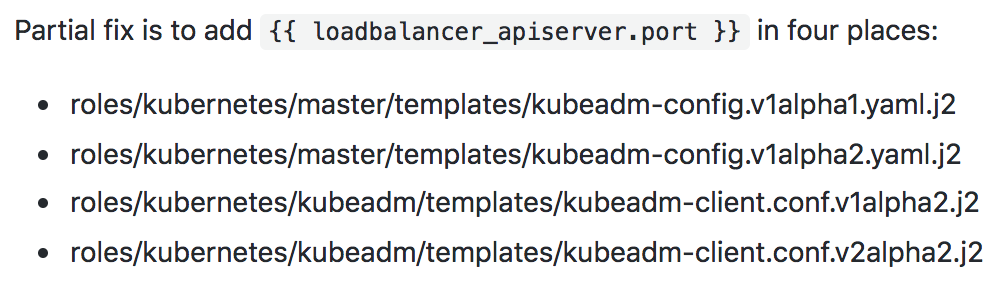
Partial fix is to add {{ loadbalancer_apiserver.port }} in four places:
- roles/kubernetes/master/templates/kubeadm-config.v1alpha1.yaml.j2
- roles/kubernetes/master/templates/kubeadm-config.v1alpha2.yaml.j2
- roles/kubernetes/kubeadm/templates/kubeadm-client.conf.v1alpha2.j2
- roles/kubernetes/kubeadm/templates/kubeadm-client.conf.v2alpha2.j2
Now, I am getting error during upgrade:
TASK [kubernetes/master : kubeadm | Upgrade first master] **********************************************************
Friday 24 August 2018  10:07:52 +0000 (0:00:00.159)       0:08:49.394 *********
fatal: [master0]: FAILED! => {"changed": true, "cmd": ["timeout", "-k", "240s", "240s", "/usr/local/bin/kubeadm", "upgrade", "apply", "-y", "v1.11.2", "--config=/etc/kubernetes/kubeadm-config.v1alpha2.yaml", "--ignore-preflight-errors=all", "--allow-experimental-upgrades", "--allow-release-candidate-upgrades"], "delta": "0:02:00.039872", "end": "2018-08-24 10:09:52.872625", "failed_when_result": true, "msg": "non-zero return code", "rc": 1, "start": "2018-08-24 10:07:52.832753", "stderr": "\t[WARNING APIServerHealth]: the API Server is unhealthy; /healthz didn't return \"ok\"\n\t[WARNING MasterNodesReady]: couldn't list masters in cluster: Get https://internal-elb-k8s-1332421559.eu-west-1.elb.amazonaws.com:6443/api/v1/nodes?labelSelector=node-role.kubernetes.io%2Fmaster%3D: dial tcp 30.0.20.158:6443: i/o timeout
Even though init task goes well and I got proper port in controlEndpoint:
[ec2-user@master0 ~]$ cat /etc/kubernetes/kubeadm-config.v1alpha2.yaml
apiVersion: kubeadm.k8s.io/v1alpha2
kind: MasterConfiguration
api:
  advertiseAddress: 30.0.25.137
  bindPort: 6443
  controlPlaneEndpoint: internal-elb-k8s-1332421559.eu-west-1.elb.amazonaws.com:443
I tried commenting advertiseAddress and bindPort and running upgrade task manually and still getting port 6443, shall I open another issue in kubeadm? I have a feeling it is hardcoded for upgrade command but wasn't able to find exact piece of code in kubeadm about that.
@riverzhang @ant31 do you think this can get some priority? HA setups are important for production use-cases
mlushpenko
on 24 Aug 2018
ok, I've done kubeadm reset on all nodes, resintalled and looks like kube-proxy load-balancer problem is fixed after making these 4 changes. I am having some other errors with kubeadm join but they are not realted to load balancer
mlushpenko
on 24 Aug 2018
yes, if controlPlaneEndpoint is defined in kubeadm-config file, need delete advertiseAddress value.
@mlushpenko Are you tested about it?
This issue also affects the highly available deployment of the cluster, including the kubeadm deployment.https://github.com/kubernetes-incubator/kubespray/issues/2937
riverzhang
on 29 Aug 2018
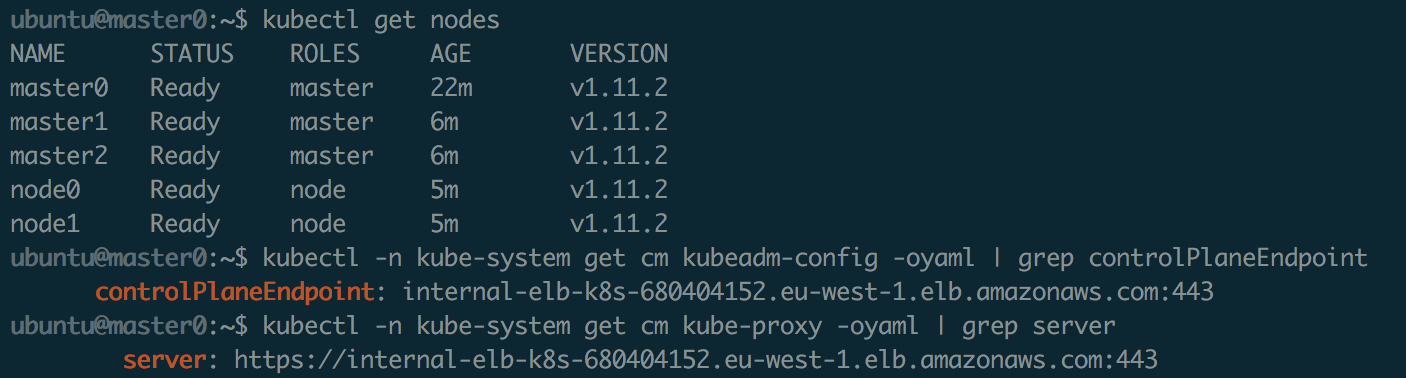
@riverzhang I did more tests and everything looks good with small updates, I created a merge request https://github.com/kubernetes-incubator/kubespray/pull/3219
mlushpenko
on 1 Sep 2018
Related issues
 hellwen
·
4Comments
hellwen
·
4Comments
 njdevils9
·
3Comments
njdevils9
·
3Comments
 butuzov
·
4Comments
butuzov
·
4Comments
 ionsquare
·
4Comments
ionsquare
·
4Comments
 danielm0hr
·
4Comments
danielm0hr
·
4Comments
Most helpful comment
@riverzhang I did more tests and everything looks good with small updates, I created a merge request https://github.com/kubernetes-incubator/kubespray/pull/3219