Kubernetes-ingress: On nginx pod launch, slow to reconfigure and high memory usage, with large number of ingresses
Describe the bug
On POD nginx boot, it will keep reconfigure with:
I0826 17:26:30.029028 1 event.go:255] Event(v1.ObjectReference{Kind:"Ingress", Namespace:"instance-24223", Name:"main-ingress", UID:"5ed28e93-7999-4a26-af09-9c0a650745ab", APIVersion:"extensions/v1beta1", ResourceVersion:"19867619", FieldPath:""}): type: 'Normal' reason: 'AddedOrUpdated' Configuration for instance-24223/main-ingress was added or updated
One by one, 1 per second. Also I observe: it loads lots of configurations at the beginning, and then start getting more slow, to the point at 1 per second, then 1 per 2 seconds, etc...
...
2020/08/26 17:27:45 [notice] 8826#8826: signal process started
2020/08/26 17:27:46 [notice] 14#14: signal 1 (SIGHUP) received from 8826, reconfiguring
2020/08/26 17:27:46 [notice] 14#14: reconfiguring
As I have about 1500 ingresses, this is taking almost an hour, and as long as they are not "reconfigured", services are offline, and even sometimes it takes all memory in a 8 GB RAM machine.
To Reproduce
default configurations
Expected behavior
Your environment
- Version of the Ingress Controller - release version or a specific commit
- Version of Kubernetes
1.17
- Kubernetes platform (e.g. Mini-kube or GCP)
Digital ocean
- Using NGINX or NGINX Plus
NGINX
Additional context
Any idea on to improve this - reduce memory consumption and speed up configurations on boot.
Edit: I see related to the slow startup time, it was noticed here https://github.com/nginxinc/kubernetes-ingress/issues/203
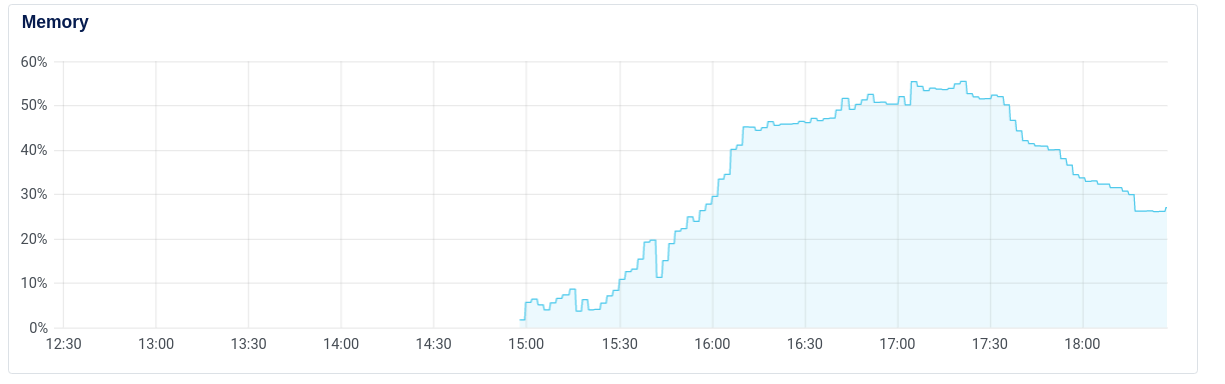
I monitored the launch process, see below the figure. This is a 32 GB RAM machine. From 15:00 up to 16:15 it was loading the ingress configurations (only). Then it started from 16:15 to load certificates and others Is there some memory leak? Is there a way to decrease this memory usage on startup and speed up this process?
 martinlevesque
All 5 comments
Hi @martinlevesque
The memory usage of the Ingress Controller depends on:
- memory usage of Ingress Controller process, which in turns depends on the number resources you have in the cluster (Ingress, Secrets, Endpoints, Services, Pods, ConfigMaps). The Ingress Controller maintains copies of those resources in memory, so more resources you have in the cluster, more memory the IC will use.
- memory usage of NGINX. This depends on how big its configuration, how many virtual servers, TLS certificates are used. Once NGINX starts receiving traffic, it will also increase its memory usage.
Also, the bigger configuration of NGINX, more time it will take to reload. When the Ingress Controller starts, it processes Ingress resources one by one.
I wonder how big is your cluster? How many services, endpoints, pods, configmaps, nodes do you have?
I would recommend exploring the following options to reduce the reload time and memory usage:
(1)
Using multiple Ingress Controllers, each where each IC handles a portion of Ingress resources. Please take a look at this doc -- https://docs.nginx.com/nginx-ingress-controller/installation/running-multiple-ingress-controllers/ You can run Ingress Controller per namespace or per class. That way one Ingress Controller will only handle its subset of Ingress resources. If you restrict the IC to a namespace, it will also reduce the number of resources it will have in its caches.
(2)
Minimizing the number of Ingress resources.
I wonder if Is it possible to reduce the number of Ingress resources. For example, if you have multiple Ingress resources that only differ in their hostnames (backends and secrets are the same), it is possible to have one Ingress resource for one host and add another hosts as aliases via an annotation.
Note that you could monitor the IC and see how much it takes for NGINX to reload. See https://docs.nginx.com/nginx-ingress-controller/logging-and-monitoring/prometheus/ , the metric is controller_nginx_last_reload_milliseconds.
 pleshakov
on 27 Aug 2020
pleshakov
on 27 Aug 2020
Hi @pleshakov
Thanks for your response.
I think the option (1) could have potential.
Few questions:
In https://docs.nginx.com/nginx-ingress-controller/installation/running-multiple-ingress-controllers/#running-multiple-nginx-ingress-controllers Cluster-wide Ingress Controller (default) - can we set multiples replicas in the nginx deployment to N in one default namespace and in this case each POD handles a subset of ingresses? Or each pod would load and handle all ingresses? Let's say you would set replicas = 4, each one would take care of 25% of ingresses?
For Single-namespace Ingress Controller This means you no more need one POD in default namespace, but configure one NGINX pod per namespace? And in this case you can have a single load balancer service in the front? Is there further documentation/examples somewhere? Also, is there a way in this case to share some NGINX configurations ?
Thanks
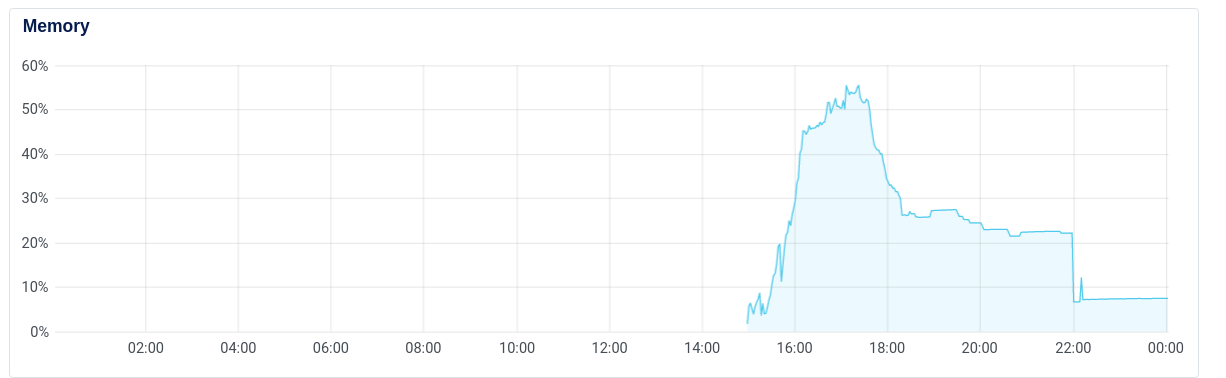
Update of my graph after more hours:
As one see the memory usage drops when no or light reconfiguration occurs.. pretty sure there are some memory leak which could be fixed somewhere. It drops below 10%, when it was at more than 50% when the startup occurs.
martinlevesque
on 27 Aug 2020
can we set multiples replicas in the nginx deployment to N in one default namespace and in this case each POD handles a subset of ingresses? Or each pod would load and handle all ingresses? Let's say you would set replicas = 4, each one would take care of 25% of ingresses?
it's not possible to assign a class per replica, only per deployment. So you can deploy 4 IC deployments: one with class A, with B, with C and with D. And then you can split your Ingresses among those deployments, where each Ingress has an annotation kubernetes.io/ingress.class: <class> like kubernetes.io/ingress.class: A. So you can make each deployment take 25% of Ingresses, but you will need to assign a class to your Ingresses.
This means you no more need one POD in default namespace, but configure one NGINX pod per namespace? And in this case you can have a single load balancer service in the front? Is there further documentation/examples somewhere? Also, is there a way in this case to share some NGINX configurations ?
You would probably still need at least two pods per namespace, for HA purposes. In a managed Kubernetes version in the cloud, you would typically expose Ingress Controller pods via a Service of the type LoadBalancer, which will allocate a cloud L3/L4 load balancer for IC pods. However, since load balancing is done at L3/L4, you need to have one load balancer per Ingress Controller deployment. Unless you have another L7 load balancer/proxy in front. But I don't have a good example for that case.
pretty sure there are some memory leak which could be fixed somewhere. It drops below 10%, when it was at more than 50% when the startup occurs.
we will need to further investigate it
pleshakov
on 27 Aug 2020
Got it thanks.
I will probably compare this behavior with other solutions (e.g. https://github.com/kubernetes/ingress-nginx ) and see what I can do.
martinlevesque
on 27 Aug 2020
@martinlevesque
You can also encounter memory problems with the IC after the initial configuration. This recent issue here https://github.com/nginxinc/kubernetes-ingress/issues/1116 includes more details.
pleshakov
on 28 Aug 2020
Related issues
 jaytaylor
·
4Comments
jaytaylor
·
4Comments
 ghost
·
3Comments
ghost
·
3Comments
 bprashanth
·
6Comments
bprashanth
·
6Comments
 edingroot
·
5Comments
edingroot
·
5Comments
 Uter1007
·
5Comments
Uter1007
·
5Comments