Kubernetes-ingress: Ingress Address EMPTY
Describe the bug
ADDRESS state is EMPTY
i'm trying use ingress to reach 80 port using domain name, but ADDRESS section is EMPTY.
To Reproduce
Steps to reproduce the behavior:
- Deploy x to '...' using https://github.com/nginxinc/kubernetes-ingress/blob/master/docs/installation.md 2.
kubectl get pods --all-namespaces
NAMESPACE       NAME                                       READY   STATUS    RESTARTS   AGE
default         nginx-76b559bfb-dt8nq                      1/1     Running   2          20h
kube-system     calico-kube-controllers-8646dd497f-tq6fb   1/1     Running   1          26h
kube-system     calico-node-r4skq                          1/1     Running   1          26h
kube-system     coredns-fb8b8dccf-7c64l                    1/1     Running   1          26h
kube-system     coredns-fb8b8dccf-k7r9t                    1/1     Running   1          26h
kube-system     etcd-ing.sysadm.kz                         1/1     Running   1          26h
kube-system     kube-apiserver-ing.sysadm.kz               1/1     Running   1          26h
kube-system     kube-controller-manager-ing.sysadm.kz      1/1     Running   1          26h
kube-system     kube-proxy-bx8kl                           1/1     Running   1          26h
kube-system     kube-scheduler-ing.sysadm.kz               1/1     Running   1          26h
nginx-ingress   nginx-ingress-6957586bf6-zngtn             1/1     Running   1          16h
kubectl get svc
NAME         TYPE        CLUSTER-IP      EXTERNAL-IP   PORT(S)        AGE
kubernetes   ClusterIP   10.96.0.1       <none>        443/TCP        26h
nginx        NodePort    10.109.225.69   <none>        80:32376/TCP   18h


md5-0e2ce071ba00379dc27f06724d64fbfa


kubectl describe svc nginx

Name:                     nginx
Namespace:                default
Labels:                   <none>
Annotations:              kubectl.kubernetes.io/last-applied-configuration:
                            {"apiVersion":"v1","kind":"Service","metadata":{"annotations":{},"name":"nginx","namespace":"default"},"spec":{"ports":[{"port":80}],"sele...
Selector:                 app=nginx
Type:                     NodePort
IP:                       10.109.225.69
Port:                     <unset>  80/TCP
TargetPort:               80/TCP
NodePort:                 <unset>  32376/TCP
Endpoints:                172.16.210.143:80
Session Affinity:         None
External Traffic Policy:  Cluster
Events:                   <none>


md5-d2e8c7d191ed43ffb5b024bcc0d5a0e5


kubectcl get ing
NAME    HOSTS                         ADDRESS   PORTS   AGE
nginx   ggg.sysadm.kz,ing.sysadm.kz             80      16h


md5-0e2ce071ba00379dc27f06724d64fbfa


># kubectl describe ing nginx
Name:             nginx
Namespace:        default
Address:
Default backend:  default-http-backend:80 (<none>)
Rules:
  Host           Path  Backends
  ----           ----  --------
  ggg.sysadm.kz
                    nginx:80 (172.16.210.143:80)
  ing.sysadm.kz
                    nginx:80 (172.16.210.143:80)
Annotations:
  kubectl.kubernetes.io/last-applied-configuration:  {"apiVersion":"extensions/v1beta1","kind":"Ingress","metadata":{"annotations":{},"name":"nginx","namespace":"default"},"spec":{"rules":[{"host":"ggg.sysadm.kz","http":{"paths":[{"backend":{"serviceName":"nginx","servicePort":80}}]}},{"host":"ing.sysadm.kz","http":{"paths":[{"backend":{"serviceName":"nginx","servicePort":80}}]}}]}}

Events:  <none>

**Expected behavior**
A clear and concise description of what you expected to happen.

**Your environment**
OS: Ubuntu Linux 4.18.0-1012-gcp
* Version of the Ingress Controller - GitCommit=42f5fba7
* Version of Kubernetes 1.14.2
* Kubernetes platform (GCP Compute Engine Virtual Machine)
* Using NGINX

**Additional context**


md5-5281f4f7f97a7c9555fbb32f932e820b


I0609 07:19:54.839837       1 event.go:209] Event(v1.ObjectReference{Kind:"ConfigMap", Namespace:"nginx-ingress", Name:"nginx-config", UID:"be822be2-8a0b-11e9-aad1-42010aa40fdc", APIVersion:"v1", ResourceVersion:"47919", FieldPath:""}): type: 'Normal' reason: 'Updated' Configuration from nginx-ingress/nginx-config was updated
2019/06/09 07:19:54 [notice] 28#28: signal process started
2019/06/09 07:19:54 [notice] 13#13: signal 1 (SIGHUP) received from 28, reconfiguring
2019/06/09 07:19:54 [notice] 13#13: reconfiguring
2019/06/09 07:19:54 [notice] 13#13: using the "epoll" event method
2019/06/09 07:19:54 [notice] 13#13: start worker processes
2019/06/09 07:19:54 [notice] 13#13: start worker process 29
2019/06/09 07:19:54 [notice] 13#13: start worker process 30
2019/06/09 07:19:54 [notice] 25#25: gracefully shutting down
2019/06/09 07:19:54 [notice] 26#26: gracefully shutting down
2019/06/09 07:19:54 [notice] 26#26: exiting
2019/06/09 07:19:54 [notice] 25#25: exiting
2019/06/09 07:19:54 [notice] 26#26: exit
2019/06/09 07:19:54 [notice] 25#25: exit
2019/06/09 07:19:54 [notice] 13#13: signal 17 (SIGCHLD) received from 20
2019/06/09 07:19:54 [notice] 13#13: worker process 20 exited with code 0
2019/06/09 07:19:54 [notice] 13#13: worker process 21 exited with code 0
2019/06/09 07:19:54 [notice] 13#13: signal 29 (SIGIO) received
I0609 07:19:54.985125       1 event.go:209] Event(v1.ObjectReference{Kind:"Ingress", Namespace:"default", Name:"nginx", UID:"19dc55f6-8a0c-11e9-aad1-42010aa40fdc", APIVersion:"extensions/v1beta1", ResourceVersion:"48149", FieldPath:""}): type: 'Normal' reason: 'AddedOrUpdated' Configuration for default/nginx was added or updated
2019/06/09 07:19:54 [notice] 13#13: signal 17 (SIGCHLD) received from 26
2019/06/09 07:19:54 [notice] 13#13: worker process 25 exited with code 0
2019/06/09 07:19:54 [notice] 13#13: worker process 26 exited with code 0
2019/06/09 07:19:54 [notice] 13#13: signal 29 (SIGIO) received
2019/06/09 07:19:54 [notice] 13#13: signal 17 (SIGCHLD) received from 25


md5-0e2ce071ba00379dc27f06724d64fbfa
 Nurlan199206
All 5 comments
any help?
Nurlan199206
on 9 Jun 2019
Please take a look at this doc https://github.com/nginxinc/kubernetes-ingress/blob/master/docs/report-ingress-status.md
If you want the Ingres Controller to set the Address of an Ingress resource, you either need to create a service with the type load balancer, for which the cloud provider will allocate a load balancer with an IP address(es), or configure the required IP address in the ConfigMap.
 pleshakov
on 9 Jun 2019
pleshakov
on 9 Jun 2019
I re-deployed nginx-ingress.yaml with args below... still not working.
kubectl describe pod -n nginx-ingress nginx-ingress-794566f74d-hwlj2
Args:
-nginx-configmaps=$(POD_NAMESPACE)/nginx-config
-default-server-tls-secret=$(POD_NAMESPACE)/default-server-secret
-report-ingress-status
-external-service=nginx-ingress
-enable-leader-election
-enable-prometheus-metrics
-enable-custom-resources
State: Running
```
args:
- -nginx-configmaps=$(POD_NAMESPACE)/nginx-config
- -default-server-tls-secret=$(POD_NAMESPACE)/default-server-secret
#- -v=3 # Enables extensive logging. Useful for troubleshooting.
- -report-ingress-status
- -external-service=nginx-ingress
- -enable-leader-election
- -enable-prometheus-metrics
- -enable-custom-resources
k get svc -A
NAMESPACE NAME TYPE CLUSTER-IP EXTERNAL-IP PORT(S) AGE
default coffee-svc ClusterIP 10.111.96.202
default kubernetes ClusterIP 10.96.0.1
default nginx NodePort 10.106.99.232
default tea-svc ClusterIP 10.103.117.157
kube-system kube-dns ClusterIP 10.96.0.10
nginx-ingress nginx-ingress NodePort 10.102.225.253
k describe ing nginx
Name: nginx
Namespace: default
Address:
Default backend: default-http-backend:80 (
Rules:
Host Path Backends
---- ---- --------
ing.sysadm.kz
nginx:80 (172.16.210.166:80)
Annotations:
kubectl.kubernetes.io/last-applied-configuration: {"apiVersion":"extensions/v1beta1","kind":"Ingress","metadata":{"annotations":{},"name":"nginx","namespace":"default"},"spec":{"rules":[{"host":"ing.sysadm.kz","http":{"paths":[{"backend":{"serviceName":"nginx","servicePort":80}}]}}]}}
Events:
Type Reason Age From Message
---- ------ ---- ---- -------
Normal AddedOrUpdated 35m (x4 over 63m) nginx-ingress-controller Configuration for default/nginx was added or updated
```
Nurlan199206
on 10 Jun 2019
Wow, i'm fixed it. I'm added IP tonginx-config.yaml
k get ing
NAME           HOSTS              ADDRESS         PORTS     AGE
cafe-ingress   cafe.example.com   10.164.15.220   80, 443   16h
nginx          ing.sysadm.kz      10.164.15.220   80        145m
kind: ConfigMap
apiVersion: v1
metadata:
  name: nginx-config
  namespace: nginx-ingress
data:
  proxy-connect-timeout: "10s"
  proxy-read-timeout: "10s"
  client-max-body-size: "2m"
  external-status-address: "10.164.15.220"
Hi can you please let me know what is the use of the address. Beacause i deployed ingress service as al load balancer and accessing all the services via loadbalancer IP. When i curl the IP assigned by the ngnix it is not working

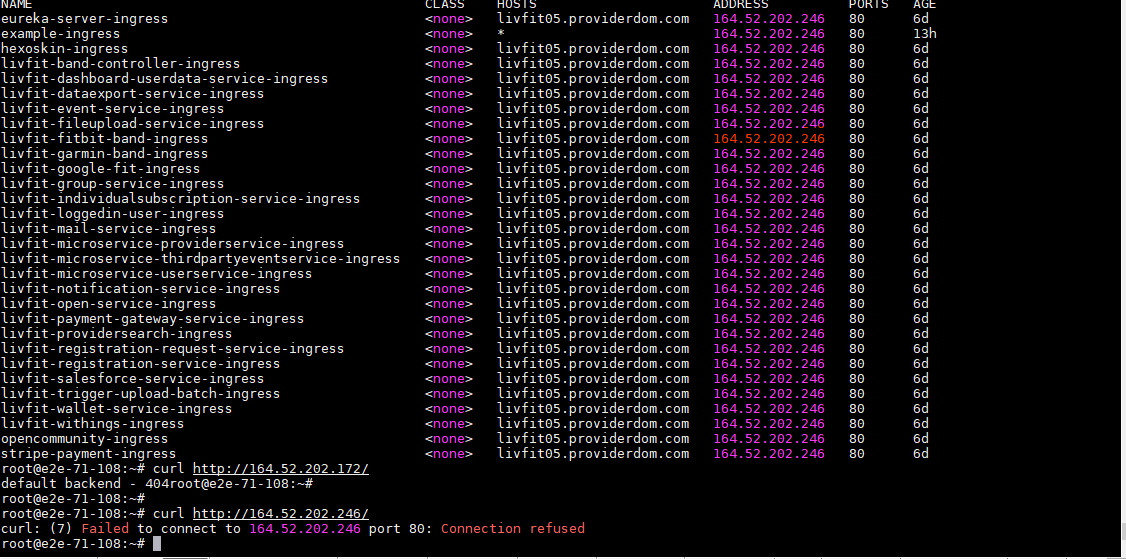
164.52.202.246 ---this IP is one of my worker nodes IP
 sksaranraj
on 26 Dec 2020
sksaranraj
on 26 Dec 2020
Related issues
 toddams
·
6Comments
toddams
·
6Comments
 ajpinedam
·
4Comments
ajpinedam
·
4Comments
 jmastr
·
4Comments
jmastr
·
4Comments
 zhangtiny123
·
3Comments
zhangtiny123
·
3Comments
 aprisniak
·
4Comments
aprisniak
·
4Comments
Most helpful comment
Wow, i'm fixed it. I'm added IP to
nginx-config.yaml