Kubectl: Kubectl WSL2 The connection to the server 127.0.0.1:32770 was refused
I am new to kubernetes. I am trying to run it locally on my windows 10 using WSL2 (following this tutorial )
Everything was fine until I got to the section about minikube. After installing systemd, kubernetes seems to not working properly. Even kubectl version which worked previously stopped working, and same with KinD dashboard that is also not working.
currently this is my issue:
ubuntu@DESKTOP-HED9HVG:~$ kubectl version
^C   <== (process just hand here)

ubuntu@DESKTOP-HED9HVG:~$ sudo kubectl version
Client Version: version.Info{Major:"1", Minor:"18", GitVersion:"v1.18.8", GitCommit:"9f2892aab98fe339f3bd70e3c470144299398ace", GitTreeState:"clean", BuildDate:"2020-08-13T16:12:48Z", GoVersion:"go1.13.15", Compiler:"gc", Platform:"linux/amd64"}
The connection to the server 127.0.0.1:32770 was refused - did you specify the right host or port?
How to debug this?
 hershkoy
All 4 comments
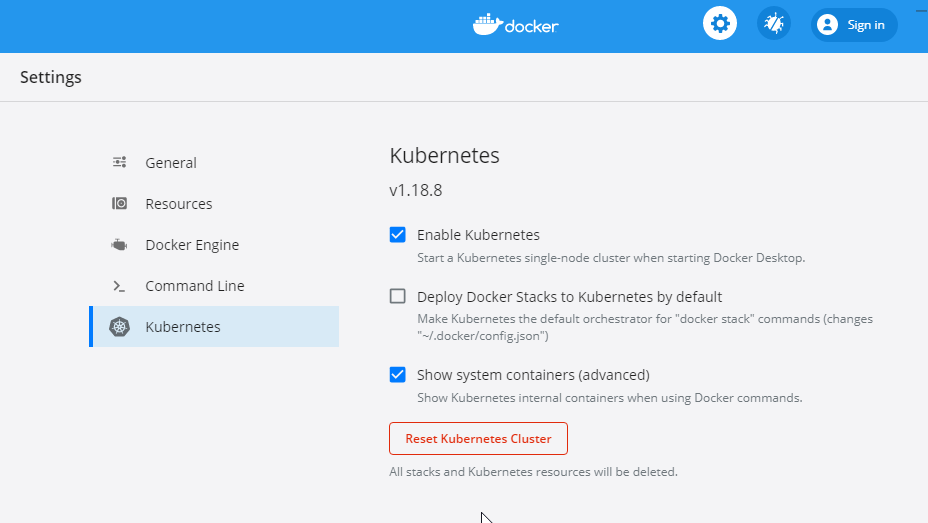
I enabled the "show system containers". I see that kubernetes containers are created, but I don't see any one that has port 32770 open.
I don't know if this information helps, just try to debug it.
I also tried restarting the docker service, and reset the Kubernetes cluster.
$ docker ps -a
CONTAINER ID IMAGE COMMAND CREATED STATUS PORTS NAMES
6c7994eefc27 79da37e5a3aa "/kube-vpnkit-forwar…" About a minute ago Up About a minute k8s_vpnkit-controller_vpnkit-controller_kube-system_13533fda-c6fb-40cb-8a9b-cfffafe1b72a_0
9badc4784fd3 e704287ce753 "/storage-provisione…" About a minute ago Up About a minute k8s_storage-provisioner_storage-provisioner_kube-system_3d6d2fb7-12c7-4002-b4ef-8cf729fc7f8e_0
2d69f4509a94 k8s.gcr.io/pause:3.2 "/pause" About a minute ago Up About a minute k8s_POD_vpnkit-controller_kube-system_13533fda-c6fb-40cb-8a9b-cfffafe1b72a_0
5682ac646704 k8s.gcr.io/pause:3.2 "/pause" About a minute ago Up About a minute k8s_POD_storage-provisioner_kube-system_3d6d2fb7-12c7-4002-b4ef-8cf729fc7f8e_0
4d492b00dd3d 67da37a9a360 "/coredns -conf /etc…" 2 minutes ago Up 2 minutes k8s_coredns_coredns-66bff467f8-46jq6_kube-system_3a75c5c6-ee5b-41b9-ad5e-69f34debd9b4_0
71a01f1f7d96 67da37a9a360 "/coredns -conf /etc…" 2 minutes ago Up 2 minutes k8s_coredns_coredns-66bff467f8-g4bf4_kube-system_353d3f42-8505-4d7c-b725-72196e2ff02f_0
adb0a5646d90 k8s.gcr.io/pause:3.2 "/pause" 2 minutes ago Up 2 minutes k8s_POD_coredns-66bff467f8-g4bf4_kube-system_353d3f42-8505-4d7c-b725-72196e2ff02f_0
a7cc0ba1a032 k8s.gcr.io/pause:3.2 "/pause" 2 minutes ago Up 2 minutes k8s_POD_coredns-66bff467f8-46jq6_kube-system_3a75c5c6-ee5b-41b9-ad5e-69f34debd9b4_0
2bde645459d4 0fb7201f92d0 "/usr/local/bin/kube…" 2 minutes ago Up 2 minutes k8s_kube-proxy_kube-proxy-nqk4k_kube-system_5b159092-c530-4f8b-b383-a815696b6af0_0
75a2f75a86c7 k8s.gcr.io/pause:3.2 "/pause" 2 minutes ago Up 2 minutes k8s_POD_kube-proxy-nqk4k_kube-system_5b159092-c530-4f8b-b383-a815696b6af0_0
c06c2507ba78 6f7135fb47e0 "kube-scheduler --au…" 3 minutes ago Up 3 minutes k8s_kube-scheduler_kube-scheduler-docker-desktop_kube-system_c808ba8a724ff4e00643b5c4f7fc454b_0
ba4193df4818 6a979351fe5e "kube-controller-man…" 3 minutes ago Up 3 minutes k8s_kube-controller-manager_kube-controller-manager-docker-desktop_kube-system_4f20c2277b1a9bc95a8d0aefdd70ac22_0
7b912723e1c8 303ce5db0e90 "etcd --advertise-cl…" 3 minutes ago Up 3 minutes k8s_etcd_etcd-docker-desktop_kube-system_d6844c5fb9714fb5465ba8579918e27e_0
6d5b5dc3c2a7 92d040a0dca7 "kube-apiserver --ad…" 3 minutes ago Up 3 minutes k8s_kube-apiserver_kube-apiserver-docker-desktop_kube-system_04dc74f076b53c39b47cb1bf82330dfd_0
96311c452e2d k8s.gcr.io/pause:3.2 "/pause" 3 minutes ago Up 3 minutes k8s_POD_kube-scheduler-docker-desktop_kube-system_c808ba8a724ff4e00643b5c4f7fc454b_0
eb99624d5a0e k8s.gcr.io/pause:3.2 "/pause" 3 minutes ago Up 3 minutes k8s_POD_kube-controller-manager-docker-desktop_kube-system_4f20c2277b1a9bc95a8d0aefdd70ac22_0
e5e5fad31ae3 k8s.gcr.io/pause:3.2 "/pause" 3 minutes ago Up 3 minutes k8s_POD_kube-apiserver-docker-desktop_kube-system_04dc74f076b53c39b47cb1bf82330dfd_0
44f63d157d03 k8s.gcr.io/pause:3.2 "/pause" 3 minutes ago Up 3 minutes k8s_POD_etcd-docker-desktop_kube-system_d6844c5fb9714fb5465ba8579918e27e_0
I did
mv .kube .kube_1
And there is a slight improvement, as kubectl is at least not stuck anymore when activated without sudo:
ubuntu@DESKTOP-HED9HVG:~$ kubectl version
Client Version: version.Info{Major:"1", Minor:"18", GitVersion:"v1.18.8", GitCommit:"9f2892aab98fe339f3bd70e3c470144299398ace", GitTreeState:"clean", BuildDate:"2020-08-13T16:12:48Z", GoVersion:"go1.13.15", Compiler:"gc", Platform:"linux/amd64"}
The connection to the server localhost:8080 was refused - did you specify the right host or port?
The connection refused issue still exists though
hershkoy
on 9 Oct 2020
Update:
I did
ubuntu@DESKTOP-HED9HVG:~$ kind create cluster --name wslkind
Creating cluster "wslkind" ...
✓ Ensuring node image (kindest/node:v1.17.0) 🖼
✓ Preparing nodes 📦
✓ Writing configuration 📜
✓ Starting control-plane 🕹️
✓ Installing CNI 🔌
✓ Installing StorageClass 💾
Set kubectl context to "kind-wslkind"
You can now use your cluster with:
kubectl cluster-info --context kind-wslkind
Have a nice day! 👋
And now it seems that kubectl is working
ubuntu@DESKTOP-HED9HVG:~$ kubectl cluster-info
Kubernetes master is running at https://127.0.0.1:32768
KubeDNS is running at https://127.0.0.1:32768/api/v1/namespaces/kube-system/services/kube-dns:dns/proxy
To further debug and diagnose cluster problems, use 'kubectl cluster-info dump'.
But as far as I can understand, it is still not running from the default cluster
hershkoy
on 9 Oct 2020
ok, I managed to solve it, I think
first, I deleted the cluster I created previously, and as expected got the same refused error:
$kubectl config delete-cluster kind-wslkind
$kubectl cluster-info
To further debug and diagnose cluster problems, use 'kubectl cluster-info dump'.
The connection to the server localhost:8080 was refused - did you specify the right host or port?
I deleted the ~/.kube folder and then:
ubuntu@DESKTOP-HED9HVG:~$ mkdir ~/.kube && cp /mnt/c/Users/[USERNAME]/.kube/config ~/.kube
ubuntu@DESKTOP-HED9HVG:~$ kubectl config get-contexts
CURRENT   NAME             CLUSTER          AUTHINFO         NAMESPACE
*         docker-desktop   docker-desktop   docker-desktop
ubuntu@DESKTOP-HED9HVG:~$ kubectl config use-context docker-desktop
And now cluster seems to work again as expected:
ubuntu@DESKTOP-HED9HVG:~$ kubectl cluster-info
Kubernetes master is running at https://kubernetes.docker.internal:6443
KubeDNS is running at https://kubernetes.docker.internal:6443/api/v1/namespaces/kube-system/services/kube-dns:dns/proxy
Related issues
 mnussbaum
·
6Comments
mnussbaum
·
6Comments
 pwittrock
·
6Comments
pwittrock
·
6Comments
 J-Siu
·
4Comments
J-Siu
·
4Comments
 ameukam
·
5Comments
pwittrock
·
4Comments
ameukam
·
5Comments
pwittrock
·
4Comments
Most helpful comment
ok, I managed to solve it, I think
first, I deleted the cluster I created previously, and as expected got the same refused error:
I deleted the
~/.kubefolder and then:And now cluster seems to work again as expected: