Kubeapps: Support for rollback of releases
Can kubeapps do a helm rollback of an application?
 alexcurtin
All 10 comments
Hi @alexcurtin,
Right now that is not supported but it would be a nice feature. We talked in the past about storing the history of the values.yaml for the different versions (which is related to the rollback command). See this issue for more details: https://github.com/kubeapps/kubeapps/issues/614
 andresmgot
on 21 Mar 2019
andresmgot
on 21 Mar 2019
I am going to start working on this cc/ @Angelmmiguel @absoludity
My plan is to add a new endpoint in Tiller-proxy: POST /namespaces/{namespace}/releases/{releaseName}/version/{releaseVersion}
The body of the request should contain the details of the chart we are modifying to ensure that the user has the right permissions to modify the resources.
Then we can just use the helmClient to call the supported method: helmClient.RollbackRelease
From the UX point of view we can add a new button close to the upgrade button:

Then, after clicking, we show the confirmation modal:
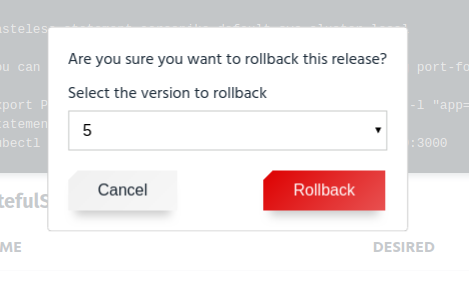
If an application doesn't have a history of releases (e.g. it has never been upgraded), we would show a message when trying to rollback. We can detect this just checking if the current version is 1:
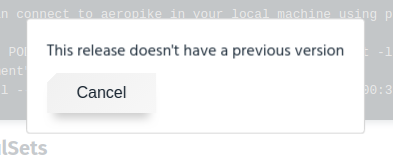
andresmgot
on 7 Aug 2019
My plan is to add a new endpoint in Tiller-proxy:
POST /namespaces/{namespace}/releases/{releaseName}/version/{releaseVersion}
I'm not sure POST is the right verb here? We're not creating a new release revision/version, but rather modifying the revision of the existing release right? So PUT might be more appropriate?
I was initially wondering if a new endpoint is even required here. Currently PUT /namespaces/{namespace}/releases/{releaseName} is used to modify an existing release - currently limited to upgrading the release only. You can already PUT to this endpoint to downgrade (as opposed to performing a rollback) already. Since upgrading updates the release revision (version - are these synonymous) to a new value, it seems a little odd to have a separate endpoint to update the release revision to an old one. I don't feel I yet have the experience here, so see what you think... perhaps @prydonius or @migmartri too.
If an application doesn't have a history of releases (e.g. it has never been upgraded), we would show a message when trying to rollback. We can detect this just checking if the current version is 1
I think it'd be better to not enable the "Rollback" button if the current revision is 1? (perhaps with a hint).
Also, in terms of doing this incrementally, you could first implement "Rollback to last working revision" (ie. equivalent of helm rollback <release-name> 0)?
 absoludity
on 8 Aug 2019
absoludity
on 8 Aug 2019
You can already PUT to this endpoint to downgrade (as opposed to performing a rollback) already. Since upgrading updates the release revision (version - are these synonymous) to a new value, it seems a little odd to have a separate endpoint to update the release revision to an old one
That sounds good for me, I don't have a strong opinion about that. For technical reasons it's easier to have the version to rollback either as parameter or a query so it could be:
PUT /namespaces/{namespace}/releases/{releaseName}?action=rollback&version=3
I think it'd be better to not enable the "Rollback" button if the current revision is 1? (perhaps with a hint).
Both approaches are fine but I think that disabling a button and adding a hint is a bit more complex to implement and also a bit more confusing?
I mean, users would see a weird-looking button and a question mark on top of it so they would try to figure out what that means while if that is a normal button that they will never click they will let that be. In the case they click, a self-explanatory message will appear.
As I say, I don't have a strong opinion, @Angelmmiguel wdyt?
andresmgot
on 8 Aug 2019
Both approaches are fine but I think that disabling a button and adding a hint is a bit more complex to implement and also a bit more confusing?
Could be - though there are other options (ie. not displaying if there's no need to rollback - but that can be confusing too when a UI presents options sometimes and not others).
As I say, I don't have a strong opinion, @Angelmmiguel wdyt?
Yeah - same :)
absoludity
on 8 Aug 2019
Both approaches are fine but I think that disabling a button and adding a hint is a bit more complex to implement and also a bit more confusing?
I mean, users would see a weird-looking button and a question mark on top of it so they would try to figure out what that means while if that is a normal button that they will never click they will let that be. In the case they click, a self-explanatory message will appear.
If we're not going to provide a feature for X reason, I believe it's better to hide it. For example, you don't usually show a Delete button until a resource can be deleted or options for users that don't have permissions to execute it.
As a note to improve this view, we may want to add a History subsection for deployments :)
 Angelmmiguel
on 8 Aug 2019
Angelmmiguel
on 8 Aug 2019
Okay, let's not show the rollback button then if there is nothing to rollback to.
andresmgot
on 8 Aug 2019
BTW, I missed this comment:
Also, in terms of doing this incrementally, you could first implement "Rollback to last working revision" (ie. equivalent of helm rollback
0)?
I thought about that but the effort is mostly the same.
andresmgot
on 8 Aug 2019
Could be - though there are other options (ie. not displaying if there's no need to rollback - but that can be confusing too when a UI presents options sometimes and not others).
The system cannot know when there is no need for a rollback. A deployment can appear to run just fine but need to be rolled back because of user preference. Or am I missing something?
If we're not going to provide a feature for X reason, I believe it's better to hide it. For example, you don't usually show a Delete button until a resource can be deleted or options for users that don't have permissions to execute it.
I'd say it's pretty common to have a greyed out button, when an action exists but is unavailable.
 lindhe
on 8 Aug 2019
lindhe
on 8 Aug 2019
Could be - though there are other options (ie. not displaying if there's no need to rollback - but that can be confusing too when a UI presents options sometimes and not others).
The system cannot know when there is no need for a rollback. A deployment can appear to run just fine but need to be rolled back because of user preference. Or am I missing something?
Sorry, my wording was incorrect, I meant "ie. not displaying if there's no ability to rollback" (the context was that if the revision is 1 then there is nothing to which you can roll back).
If we're not going to provide a feature for X reason, I believe it's better to hide it. For example, you don't usually show a Delete button until a resource can be deleted or options for users that don't have permissions to execute it.
I'd say it's pretty common to have a greyed out button, when an action exists but is unavailable.
Yep, I agree - in some contexts it makes more sense to grey out an option (ie. when an action will be possible as soon as a user selects something in the current UI - when interacting with item lists), while in others it makes sense to not display the button (ie. possibly when there is nothing the user can change in the current context which will enable the action). I'm happy either way in this case (ie. communicating that you will be able to roll back once you upgrade, with a disabled button, seems useful to me. On the other hand, only showing the rollback action once the you have upgraded a chart would be simpler - :man_shrugging: )
absoludity
on 9 Aug 2019
Related issues
absoludity
·
8Comments
 migmartri
·
8Comments
migmartri
·
8Comments
 prydonius
·
4Comments
prydonius
·
4Comments
 rarick
·
7Comments
lindhe
·
5Comments
rarick
·
7Comments
lindhe
·
5Comments
Most helpful comment
Sorry, my wording was incorrect, I meant "ie. not displaying if there's no ability to rollback" (the context was that if the revision is 1 then there is nothing to which you can roll back).
Yep, I agree - in some contexts it makes more sense to grey out an option (ie. when an action will be possible as soon as a user selects something in the current UI - when interacting with item lists), while in others it makes sense to not display the button (ie. possibly when there is nothing the user can change in the current context which will enable the action). I'm happy either way in this case (ie. communicating that you will be able to roll back once you upgrade, with a disabled button, seems useful to me. On the other hand, only showing the rollback action once the you have upgraded a chart would be simpler - :man_shrugging: )