Kubeadm: centos7.6 coredns is always pending and flannel cni is running
What keywords did you search in kubeadm issues before filing this one?
coredns, coredns pending, taints, node(s) had taints that the pod didn't tolerate., flannel, cni,resolve.conf
Is this a BUG REPORT or FEATURE REQUEST?
BUG REPORT
Versions
kubeadm version (use kubeadm version):
Environment:
- Kubernetes version (use
kubectl version):
kubeadm version: &version.Info{Major:"1", Minor:"14", GitVersion:"v1.14.1", GitCommit:"b7394102d6ef778017f2ca4046abbaa23b88c290", GitTreeState:"clean", BuildDate:"2019-04-08T17:08:49Z", GoVersion:"go1.12.1", Compiler:"gc", Platform:"linux/amd64"} - Cloud provider or hardware configuration:
2 core 8g mem virtual mechine - OS (e.g. from /etc/os-release):
NAME="CentOS Linux"
VERSION="7 (Core)"
ID="centos"
ID_LIKE="rhel fedora"
VERSION_ID="7"
PRETTY_NAME="CentOS Linux 7 (Core)"
ANSI_COLOR="0;31"
CPE_NAME="cpe:/o:centos:centos:7"
HOME_URL="https://www.centos.org/"
BUG_REPORT_URL="https://bugs.centos.org/"
CENTOS_MANTISBT_PROJECT="CentOS-7"
CENTOS_MANTISBT_PROJECT_VERSION="7"
REDHAT_SUPPORT_PRODUCT="centos"
REDHAT_SUPPORT_PRODUCT_VERSION="7"
- Kernel (e.g.
uname -a):
Linux k8smaster 3.10.0-957.el7.x86_64 #1 SMP Thu Nov 8 23:39:32 UTC 2018 x86_64 x86_64 x86_64 GNU/Linux - Others:
What happened?
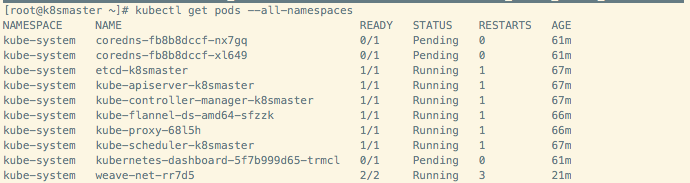
I successfully kubeadm init and ran the flannel cni plug-in, but coredns is always pending
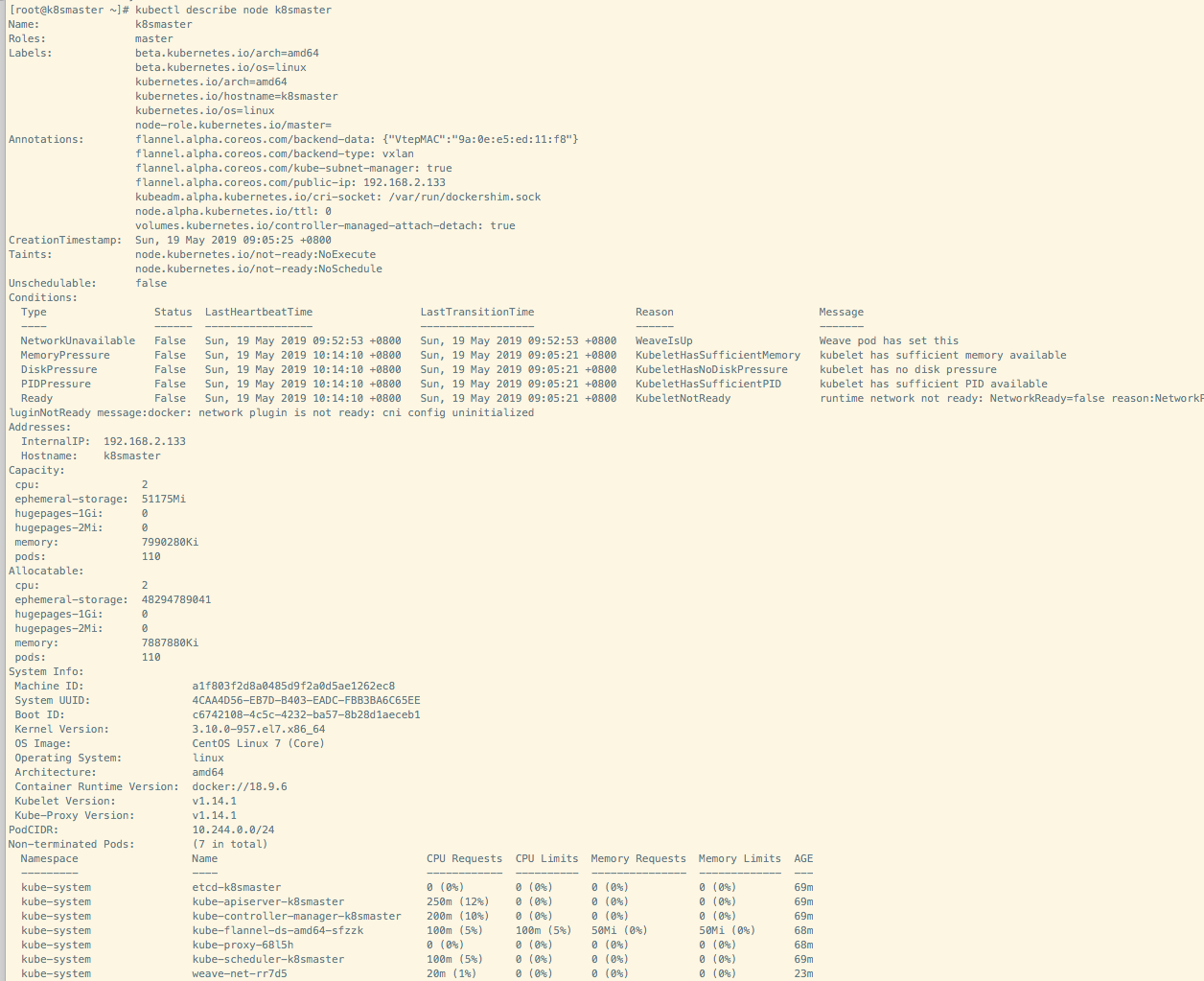
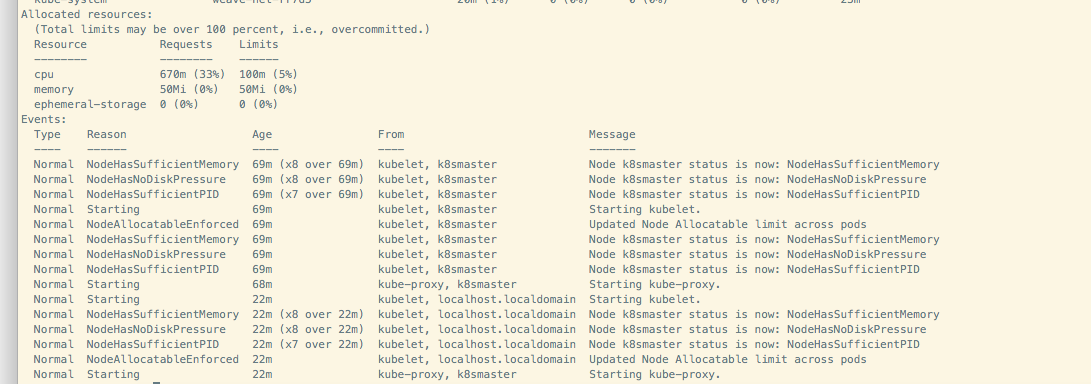
this is node info
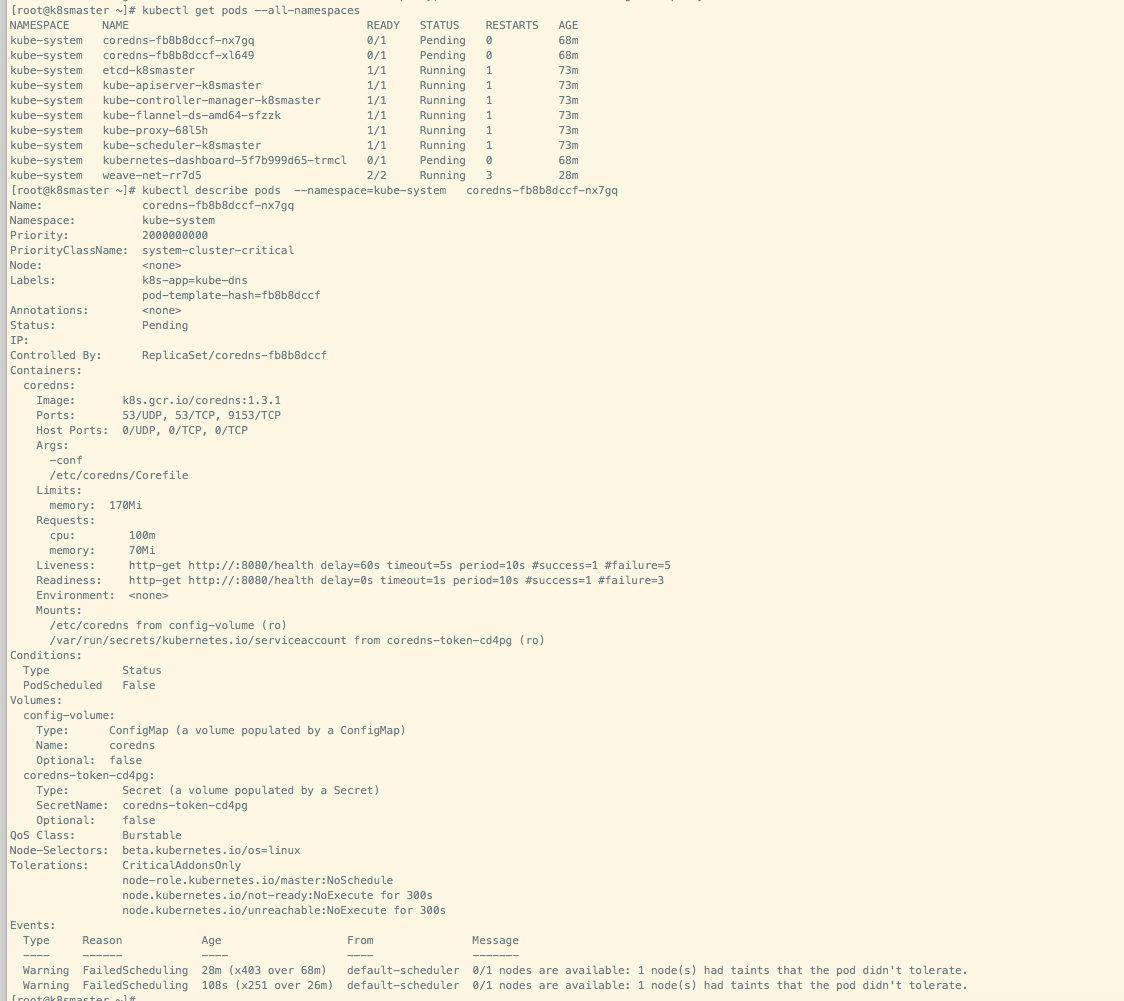
kubectl describe pods --namespace=kube-system coredns-fb8b8dccf-nx7gq
What you expected to happen?
I want to see coredns start
How to reproduce it (as minimally and precisely as possible)?
run with my shell script in centos 7.6
Anything else we need to know?
this is my deploy shell script
echo "开始安装docker......" &&\
export K8S_SERVER_IP='192.168.2.133' && \
export K8S_HOST='k8smaster'
export START_DIR=$PWD && \
hostname k8smaster && echo "$K8S_SERVER_IP $K8S_HOST" >> /etc/hosts && \
mv /etc/yum.repos.d/CentOS-Base.repo /etc/yum.repos.d/CentOS-Base.repo.backup && \
curl -o /etc/yum.repos.d/CentOS-Base.repo http://mirrors.aliyun.com/repo/Centos-7.repo && \
yum clean all && yum makecache && yum install -y curl wget gcc make git zip unzip yum-utils device-mapper-persistent-data lvm2 ntpdate && \
ntpdate us.pool.ntp.org && \
yum-config-manager --add-repo http://mirrors.aliyun.com/docker-ce/linux/centos/docker-ce.repo && yum makecache fast && yum -y install docker-ce
#wget http://down.37work.cn/k8s/docker-18.09.6.tgz && tar -zxf docker-18.09.6.tgz && cp docker/* /usr/bin/ && \
#systemctl unmask docker.service && \
#mv docker.service /etc/systemd/system/docker.service && chmod +x /etc/systemd/system/docker.service && \
mkdir -p /etc/docker && mv daemon.json /etc/docker && \
#rm -rf docker docker-18.09.6.tgz docker-18.09.6.tgz && \
systemctl enable docker && systemctl start docker  && \
echo "docker安装完毕!" && \
sleep 1 && \
echo "开始安装socat(kubeadm依赖)" &&\
wget http://down.37work.cn/k8s/socat-1.7.3.3.tar.gz && tar -xzf socat-1.7.3.3.tar.gz && cd socat-1.7.3.3 && ./configure && make && make install && cd .. && rm -rf socat-* &&\
echo "socat安装完毕!" &&\
sleep 1 && \
echo "开始安装kubeadm........" && \
rm -rf /opt/cni/bin && \
mkdir -p /opt/cni/bin && \
cd /opt/cni/bin && \
wget http://down.37work.cn/k8s/cni-plugins-amd64-v0.6.0.tgz && tar -zxf cni-plugins-amd64-v0.6.0.tgz&& \
wget http://down.37work.cn/k8s/crictl-v1.11.1-linux-amd64.tar.gz && tar -zxf crictl-v1.11.1-linux-amd64.tar.gz && \
rm -rf /opt/bin cni-plugins-amd64-v0.6.0.tgz crictl-v1.11.1-linux-amd64.tar.gz && \
ln -s  /opt/cni/bin/bridge /usr/bin && \
ln -s  /opt/cni/bin/crictl /usr/bin && \
ln -s  /opt/cni/bin/dhcp /usr/bin && \
ln -s  /opt/cni/bin/flannel /usr/bin && \
ln -s  /opt/cni/bin/host-local /usr/bin && \
ln -s  /opt/cni/bin/ipvlan /usr/bin && \
ln -s  /opt/cni/bin/loopback /usr/bin && \
ln -s  /opt/cni/bin/macvlan /usr/bin && \
ln -s  /opt/cni/bin/portmap /usr/bin && \
ln -s  /opt/cni/bin/ptp /usr/bin && \
ln -s  /opt/cni/bin/sample /usr/bin && \
ln -s  /opt/cni/bin/tuning /usr/bin && \
ln -s  /opt/cni/bin/vlan /usr/bin && \
mkdir -p /opt/bin && \
cd /opt/bin && \
wget http://down.37work.cn/k8s/kubeadm && chmod +x kubeadm && ln -sf /opt/bin/kubeadm /usr/bin/ && \
wget http://down.37work.cn/k8s/kubectl && chmod +x kubectl && ln -sf /opt/bin/kubectl /usr/bin/ && \
wget http://down.37work.cn/k8s/kubelet && chmod +x kubelet && ln -sf /opt/bin/kubelet /usr/bin/ && \
mkdir -p /etc/systemd/system && systemctl unmask kubelet.service && \
cd /etc/systemd/system && wget  -O kubelet.service "http://down.37work.cn/k8s/kubelet.service" &&  sed -i "s/\/usr\/bin/\/opt\/bin/g"  kubelet.service && \
chmod +x /etc/systemd/system/kubelet.service && \
mkdir -p /etc/systemd/system/kubelet.service.d && \
cd /etc/systemd/system/kubelet.service.d && wget -O 10-kubeadm.conf "http://down.37work.cn/k8s/10-kubeadm.conf" && sed -i "s/\/usr\/bin/\/opt\/bin/g"  10-kubeadm.conf && \
chmod +x /etc/systemd/system/kubelet.service.d/10-kubeadm.conf && \
echo 1 > /proc/sys/net/bridge/bridge-nf-call-iptables && \
echo 1 > /proc/sys/net/bridge/bridge-nf-call-ip6tables && \
echo "net.bridge.bridge-nf-call-ip6tables = 1" >>/etc/sysctl.conf && \
echo "net.bridge.bridge-nf-call-iptables = 1" >> /etc/sysctl.conf
docker pull registry.cn-beijing.aliyuncs.com/shf4715/kube-apiserver:v1.14.1
docker pull registry.cn-beijing.aliyuncs.com/shf4715/kube-controller-manager:v1.14.1
docker pull registry.cn-beijing.aliyuncs.com/shf4715/kube-scheduler:v1.14.1
docker pull registry.cn-beijing.aliyuncs.com/shf4715/kube-proxy:v1.14.1
docker pull registry.cn-beijing.aliyuncs.com/shf4715/pause:3.1
docker pull registry.cn-beijing.aliyuncs.com/shf4715/etcd:3.3.10
docker pull registry.cn-beijing.aliyuncs.com/shf4715/coredns:1.3.1
docker pull registry.cn-beijing.aliyuncs.com/shf4715/kubernetes-dashboard-amd64:v1.10.1
docker pull registry.cn-beijing.aliyuncs.com/shf4715/heapster-grafana-amd64:v4.4.3
docker pull registry.cn-beijing.aliyuncs.com/shf4715/heapster-amd64:v1.5.3
docker pull registry.cn-beijing.aliyuncs.com/shf4715/heapster-influxdb-amd64:v1.3.3
docker pull registry.cn-beijing.aliyuncs.com/shf4715/flannel:v0.10.0-amd64
docker tag registry.cn-beijing.aliyuncs.com/shf4715/kube-apiserver:v1.14.1 k8s.gcr.io/kube-apiserver:v1.14.1
docker tag registry.cn-beijing.aliyuncs.com/shf4715/kube-controller-manager:v1.14.1 k8s.gcr.io/kube-controller-manager:v1.14.1
docker tag registry.cn-beijing.aliyuncs.com/shf4715/kube-scheduler:v1.14.1 k8s.gcr.io/kube-scheduler:v1.14.1
docker tag registry.cn-beijing.aliyuncs.com/shf4715/kube-proxy:v1.14.1 k8s.gcr.io/kube-proxy:v1.14.1
docker tag registry.cn-beijing.aliyuncs.com/shf4715/pause:3.1 k8s.gcr.io/pause:3.1
docker tag registry.cn-beijing.aliyuncs.com/shf4715/etcd:3.3.10 k8s.gcr.io/etcd:3.3.10
docker tag registry.cn-beijing.aliyuncs.com/shf4715/coredns:1.3.1 k8s.gcr.io/coredns:1.3.1
docker tag registry.cn-beijing.aliyuncs.com/shf4715/kubernetes-dashboard-amd64:v1.10.1 k8s.gcr.io/kubernetes-dashboard-amd64:v1.10.1
docker tag registry.cn-beijing.aliyuncs.com/shf4715/heapster-grafana-amd64:v4.4.3 gcr.io/google_containers/heapster-grafana-amd64:v4.4.3
docker tag registry.cn-beijing.aliyuncs.com/shf4715/heapster-amd64:v1.5.3 gcr.io/google_containers/heapster-amd64:v1.5.3
docker tag registry.cn-beijing.aliyuncs.com/shf4715/heapster-influxdb-amd64:v1.3.3 gcr.io/google_containers/heapster-influxdb-amd64:v1.3.3
docker tag registry.cn-beijing.aliyuncs.com/shf4715/flannel:v0.10.0-amd64 quay.io/coreos/flannel:v0.10.0-amd64
systemctl enable kubelet && systemctl start kubelet && kubeadm init --pod-network-cidr=10.244.0.0/16  --apiserver-advertise-address=$K8S_SERVER_IP --token o9qz1b.eznnsxm2u6njo91u  && \
mkdir -p $HOME/.kube && \
sudo cp -i /etc/kubernetes/admin.conf $HOME/.kube/config && \
sudo chown $(id -u):$(id -g) $HOME/.kube/config && \
kubectl describe node $K8S_HOST | grep -A 10 Taint
kubectl taint nodes --all node-role.kubernetes.io/master:NoSchedule-
kubectl taint nodes --all node.kubernetes.io/not-ready:NoSchedule-
kubectl describe node $K8S_HOST | grep -A 10 Taint
echo "kubeadm安装完毕!" && \
sleep 1 && \
echo "开始安装flannel" && \
kubectl apply -f http://down.37work.cn/k8s/kube-flannel.yml && systemctl restart kubelet && \
echo "flannel安装完成" && \
sleep 1 && \
echo "开始安装kubedashboard..." && \
kubectl apply -f http://down.37work.cn/k8s/kubernetes-dashboard.yaml &&\
echo "kubedashboard安装完成,路径:http://$K8S_SERVER_IP:8001/api/v1/namespaces/kube-system/services/https:kubernetes-dashboard:/proxy/" &&\
sleep 15 && \
kubectl get pods --all-namespaces && \
exit 0
and this is daemon.json
{
  "registry-mirrors": ["https://o5zzel6y.mirror.aliyuncs.com"],
  "exec-opts": ["native.cgroupdriver=systemd"],
  "log-driver": "json-file",
  "log-opts": {
    "max-size": "100m"
  },
  "storage-driver": "overlay2"
}
 ghost
ghost
All 18 comments
this is my shell https://gitee.com/sunhf_git/devops.git
ghost
on 19 May 2019
The node says KubeletNotReady runtime nework not ready ... It seems you have something wrong with your CNI configuration, it´s a bit odd that you mention flannel and there are several weave pods running.
I would check why is weave running and the content of the /etc/cni/net.d/, you should have only the flannel conf file
 aojea
on 19 May 2019
aojea
on 19 May 2019
It was deployed when I tried to fix coredns, and I only installed flannel
ghost
on 19 May 2019
@shf4715 could you please try removing weave pods and apply flannel?
 RA489
on 21 May 2019
RA489
on 21 May 2019
@shf4715 i tried this on centos coredns is in running state
> [root@localhost ~]# kubectl get pods --all-namespaces
> NAMESPACE     NAME                                            READY   STATUS    RESTARTS   AGE
> kube-system   coredns-86c58d9df4-f74hx                        1/1     Running   0          6m47s
> kube-system   coredns-86c58d9df4-tsf9v                        1/1     Running   0          6m47s
> kube-system   etcd-localhost.localdomain                      1/1     Running   0          6m14s
> kube-system   kube-apiserver-localhost.localdomain            1/1     Running   0          6m5s
> kube-system   kube-controller-manager-localhost.localdomain   1/1     Running   0          6m
> kube-system   kube-flannel-ds-amd64-c58xg                     1/1     Running   0          4m56s
> kube-system   kube-proxy-fsxjq                                1/1     Running   0          6m47s
> kube-system   kube-scheduler-localhost.localdomain            1/1     Running   0          6m10s
>
@shf4715 do you still thinks it is bug
RA489
on 24 May 2019
Let me see if there's something else
ghost
on 27 May 2019
My problem is solved. I tried to remove the $KUBELET_NETWORK_ARGS configuration from the 10-kubeadm.conf file
ghost
on 28 May 2019
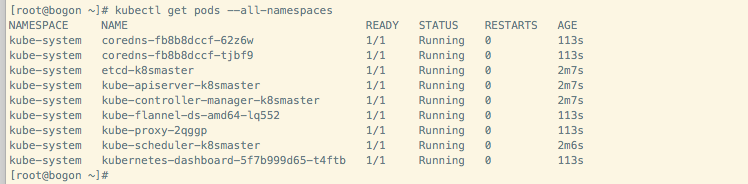
ghost
on 28 May 2019
@shf4715 can we close this ticket?
RA489
on 28 May 2019
The problem was solved.
/close
 yagonobre
on 28 May 2019
yagonobre
on 28 May 2019
@yagonobre: Closing this issue.
In response to this:
The problem was solved.
/close
Instructions for interacting with me using PR comments are available here. If you have questions or suggestions related to my behavior, please file an issue against the kubernetes/test-infra repository.
 k8s-ci-robot
on 28 May 2019
k8s-ci-robot
on 28 May 2019
@yagonobre Thanks!
RA489
on 28 May 2019
我安装1.16版也遇到你这情况了,但是kubeadm的配置文件里没有你说的$KUBELET_NETWORK_ARGS 这个选项,所以一直没有解决。刚退回1.15版能成功初始化。有人遇到过类似情况吗
 hssz202pgw
on 25 Sep 2019
hssz202pgw
on 25 Sep 2019
我安装1.16版也遇到你这情况了,但是kubeadm的配置文件里没有你说的$KUBELET_NETWORK_ARGS 这个选项,所以一直没有解决。刚退回1.15版能成功初始化。有人遇到过类似情况吗
I just had this issue too when using Flannel on Kubernetes 1.16 with Raspian Buster. In my case, I needed to add "cniVersion": "0.2.0" to /etc/cni/net.d/10-flannel.conflist, as seen in the following commit: https://github.com/coreos/flannel/pull/1181/files
After this coredns was running.
 jheruty
on 25 Sep 2019
jheruty
on 25 Sep 2019
I had the same issue on Ubuntu 16 and fixed it by adding "cniVersion": "0.2.0" to /etc/cni/net.d/10-flannel.conflist,
 augustinetom17
on 26 Sep 2019
augustinetom17
on 26 Sep 2019
Worked for me too using Ubuntu 18.04 + GCP on Kubernetes 1.16.
Had to perform this as well on my worker nodes.
 svatwork
on 26 Sep 2019
svatwork
on 26 Sep 2019
Hi, adding one more note that the suggestion made by @jheruty worked for me.
 micahg
on 26 Sep 2019
micahg
on 26 Sep 2019
Related issues
 atoato88
·
4Comments
atoato88
·
4Comments
 ep4eg
·
3Comments
ep4eg
·
3Comments
 ggee
·
4Comments
ggee
·
4Comments
 shenshouer
·
3Comments
shenshouer
·
3Comments
 cnmade
·
4Comments
cnmade
·
4Comments
Most helpful comment
I just had this issue too when using Flannel on Kubernetes 1.16 with Raspian Buster. In my case, I needed to add "cniVersion": "0.2.0" to /etc/cni/net.d/10-flannel.conflist, as seen in the following commit: https://github.com/coreos/flannel/pull/1181/files
After this coredns was running.