Ktor: IllegalArgumentException: Neither port nor sslPort specified.
For Ktor 1.0.0 server, java version 1.8.0_181 (running server on localhost, Ubuntu 18.04.1 LTS)
Facing the following issue:
Exception in thread "main" java.lang.IllegalArgumentException: Neither port nor sslPort specified. Use command line options -port/-sslPort or configure connectors in application.conf
    at io.ktor.server.engine.CommandLineKt$commandLineEnvironment$environment$1.invoke(CommandLine.kt:121)
    at io.ktor.server.engine.CommandLineKt$commandLineEnvironment$environment$1.invoke(CommandLine.kt)
    at io.ktor.server.engine.ApplicationEngineEnvironmentBuilder.build(ApplicationEngineEnvironment.kt:95)
    at io.ktor.server.engine.ApplicationEngineEnvironmentKt.applicationEngineEnvironment(ApplicationEngineEnvironment.kt:40)
    at io.ktor.server.engine.CommandLineKt.commandLineEnvironment(CommandLine.kt:50)
    at io.ktor.server.netty.EngineMain.main(EngineMain.kt:16)
    at com.gurpreetsk.ApplicationKt.main(Application.kt:36)
However, the application.conf file contains the following:
ktor {
  deployment {
    port = 8080
    port = ${?PORT}
  }
  application {
    modules = [ com.gurpreetsk.ApplicationKt.module ]
  }
}
 imGurpreetSK
All 11 comments
Most likely application.conf is not in the classpath
 cy6erGn0m
on 5 Dec 2018
cy6erGn0m
on 5 Dec 2018
How do I add it to the classpath? It is not working of a new ktor project either.
imGurpreetSK
on 5 Dec 2018
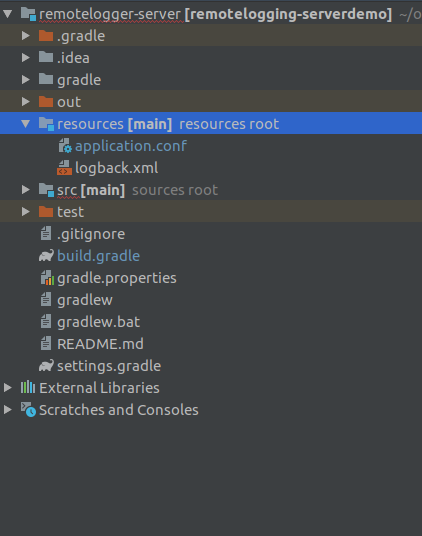
Is it placed in a resources source root?
cy6erGn0m
on 5 Dec 2018
Yes. Attaching project structure screenshot along-with:
imGurpreetSK
on 6 Dec 2018
That's quite strange that you have orange test and out directories. For sure something is misconfigured.
application.conf should be in out directory, like this:

I've just tried to create a project using ktor plugin and it runs just fine in IDEA and via gradle as well. Same for website https://start.ktor.io
cy6erGn0m
on 7 Dec 2018
Let me try and update here in some time if I solve this.
imGurpreetSK
on 7 Dec 2018
Have you resolved the issue?
cy6erGn0m
on 18 Dec 2018
No. I still can't figure out what's wrong. However, it seems like a machine issue (wrong PATH or something) as the project runs fine on my other machine.
imGurpreetSK
on 20 Dec 2018
Hello.
I just update IDEA and ktor plugin and get same issue.
It's my old good working small feature testing project
ktor 1.0.0, Win7 64
 AlexTver
on 28 Dec 2018
AlexTver
on 28 Dec 2018
I also encountered the same problem. totally do not understand.
 yanghengyh
on 10 Jan 2019
yanghengyh
on 10 Jan 2019
There was the same problem after the update of the IDE, it helped "Sync Project with Gradle Files"
 piritus
on 15 Jan 2019
piritus
on 15 Jan 2019
Related issues
 shinriyo
·
4Comments
shinriyo
·
4Comments
 guenhter
·
4Comments
guenhter
·
4Comments
 dedward3
·
4Comments
dedward3
·
4Comments
 baruchn
·
3Comments
baruchn
·
3Comments
 evgfilim1
·
4Comments
evgfilim1
·
4Comments
Most helpful comment
There was the same problem after the update of the IDE, it helped "Sync Project with Gradle Files"