In the samples it would be very nice to have explicit imports, as opposed to the standard start imports.
While I understand start imports is part of the official Kotlin code style, the samples are meant to serve as a learning documentation, and start imports don't suite that well.
For instance, I was just looking at the Kweet sample in Github and it's very difficult to understand that I should be importing io.ktor.locations.post instead of io.ktor.routing.post. While I can see that the io.ktor.routing.* package is not imported, without knowing first where to look that becomes cumbersome.
I also understand that I could download the sample and run it in IntelliJ to get that info, but that is a commitment I rarely make with sample code, since it's usefulness is usually short lived.
 rharter
All 7 comments
I can understand your point, but when writing Kotlin you normally do not import things manually.
You usually just start writing your subject, then press dot and you get a list of members and extension properties/methods to apply transformations to that subject, both reading and writing that subject and transformations from left to right.
When writing top level members, you just press ctrl+space to get a list of available members/functions/signatures.
After you type or select the right extension member with the desired signature from the list, the IDE automatically imports all that is required. And if you miss something, you can import it later by pressing alt+return and selecting the proper quickfix.
The idea here is that you have to care that your code is easy to write and to read, and you shouldn't care too much about where that code comes from when writing or reviewing. You can always use cmd+left click to see definitions inside the IDE but your code should be self explanatory whenever it is possible.
In the case of the locations, that API is experimental. But still should work.
An example showing this:
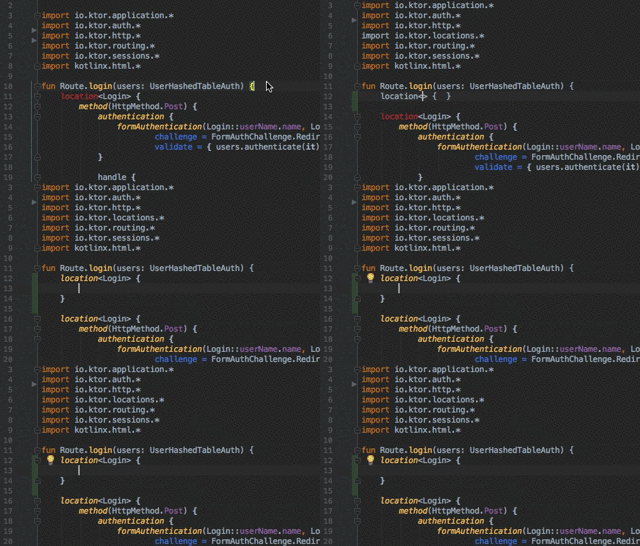
So my suggestion:
- When reading, just pay attention to the classes and methods/properties used, but do not pay that much attention to the imports. That's usually handled by the IDE. In Java you would normally use static methods in classes and in that case you usually need to know where are those methods, and then imports are more important, but in Kotlin it is not that important when using extension members.
- When writing use autocompletion to get rid of imports.
You can still disagree with this, and that is totally acceptable.
In my case I have been working a lot of years in other languages and then switched to Kotlin. At the beginning it feels a bit strange, but once you get used to it, imports are not that relevant and you can focus on other things more important.
Hope this helps in any case :)
 soywiz
on 25 Mar 2018
soywiz
on 25 Mar 2018
Thanks, @soywiz, for the thoughtful response. I can understand the arguments for star imports in Kotlin and the focus on code, and appreciate your careful explanation.
My comment is less about the value of star imports for actual code and more about the fact that the sample code is also documentation, meant to introduce developers to certain features of Ktor.
When considering the sample code as documentation, akin to a tutorial, I think it's important to consider that many people may not download and import it into their IDE, but will view it in a static context from the web. In that case, relying on IDE features to be able to identify basic components is rather difficult.
Compound that with the fact that by heavily utilizing extension methods (which is 👍) there are many members in the API that have very similar signatures (io.ktor.locations.post and io.ktor.routing.post are only differentiated by a type param, I believe), it can be difficult for someone unfamiliar with the API to easily identify "the right member".
While I wouldn't ask that the actual code in the library change away from the standard import code styles, IMHO adding explicit imports to just the samples would make them clearer documentation and more helpful for introducing new users to the API. When users are presented with the pop-up asking which of the post methods they'd like to import, or any other function with multiple options, they can easily look at the sample they're referencing to identify the right member.
I understand this is a subjective matter and am happy to close the issue with a "won't fix".
rharter
on 26 Mar 2018
The problem I see here is that we would have to change the codestyle here just for that and potentially add a lot of lines to the beginning of the file that most people is going to skip if/when reviewing samples from github.
When autocompleting, people won’t see clearly the source of that overload either.
What would you think about a mixed approach?
Having to check github samples to understand ktor might be a symptom of something else: Maybe there is a lack on kdoc, or the website is not clear enough or some APIs need revisiting.
Also right now I’m working on documenting samples, maybe if I update the README linking to the used features, or adding inline comments explaining that this overload is defined in the locations feature and is used because of... Would that help?
Have into account also that locations is an experimental feature. We have already changed other features to avoid confusions and to improve the usage.
Still I’m not the one to decide this, but wanted to provide my opinion in the meantime. If you still think, you would change imports because of that, lets wait someone else to join the conversation and decide about it.
And also thank you so much for the feedback! All the feedback will help to improve ktor and its learning resources :)
soywiz
on 26 Mar 2018
I understand the problem of having to change code styles just for samples, and how that could be cumbersome. I'm not sure of a good solution for that.
As for autocompleting, In the case of a conflict users are presented with the options in a list that shows the full package of the import (for extension functions, at least), so that is the point that I think this could clarify.
In this example, IntelliJ's auto complete actually defaults to the wrong choice, so simply typing alt-return results in broken code.

Understanding the burden of multiple code styles (not sure IntelliJ support per-module code styles 😉), perhaps a documented approach would be better. Short of clarifying in the API (identical signatures on extension functions seems extremely error prone), I think it would help to either comment inline where there are multiple choices (deleting all imports and seeing what IntelliJ can't choose for you is a decent way to identify these) or mentioning in the readme what APIs will be used ("This sample uses the io.ktor.locations package...").
rharter
on 26 Mar 2018
Now I think I can see the problem.
But what happens if you use both signatures in the same file? Non-star imports wouldn't help either to differentiate. (Not sure if that happens in the samples).
Could IntelliJ help in this case to find the best import that fits the signature or at least that is generic?
For the record:
I have tried adding a generic post, removing all the imports and manually adding imports.
If the non generic normal post function is imported before, it seems that the IDE suggests you to make that function generic instead of suggesting to import the other signature:
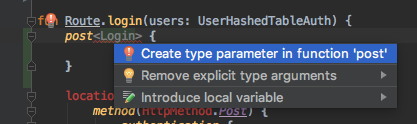
I think this issue is likely to happen mixing generic and non-generic functions available in the same scope with the same name, defined in different packages.
I agree that this is a bit confusing and error-prone to write.
Maybe the IntelliJ plugin could detect that there is a generic post function available in other package in addition to suggesting to create a generic version of the function.
We could also change the names of the functions to something like postTyped or typedPost or wrap inside something like typed { post<> }. Or just try something different.
I'm aware that the locations API is experimental and maybe it was experimental because the experience using it was not as good as expected because of some issues like this one.
Let's keep this issue open to potentially revisit the locations API / reporting to the IntelliJ plugin and to decide what to do with this.
In the meantime I'm going to check the documentation and the samples. Maybe we can clarify things a bit to palliate this issue until there is a better solution or something is decided.
Thanks for reporting!
soywiz
on 26 Mar 2018
I have added a note in the documentation about this: https://ktor.io/features/locations.html#route-handlers
soywiz
on 27 Mar 2018
This issue has been automatically marked as stale because it has not had recent activity.
![stale[bot] picture](https://avatars.githubusercontent.com/in/1724?v=4&s=40) stale[bot]
on 24 Sep 2019
stale[bot]
on 24 Sep 2019
Related issues
 gabin8
·
4Comments
gabin8
·
4Comments
 baruchn
·
3Comments
baruchn
·
3Comments
 ManifoldFR
·
4Comments
ManifoldFR
·
4Comments
 r4zzz4k
·
4Comments
gabin8
·
3Comments
r4zzz4k
·
4Comments
gabin8
·
3Comments