Kratos: Inquiry about stress output in MPI Kratos / bug in output
Dear Kratos Developers,
first of all, I would like to thank you for the great job you are doing. I have managed to compile and run an MPI parallel version of Kratos on my local computer as well as cluster without significant problems.
There is however an issue that maybe someone of you has also encountered. Namely, I have a problem with output of Gauss point variables (e.g. stress, Von Mises stress etc). It appears that always one partition is written separately (see the attached images). I show here for Stress_YY, but it is same for all Gauss point values. For nodal values, I get continuous plot.
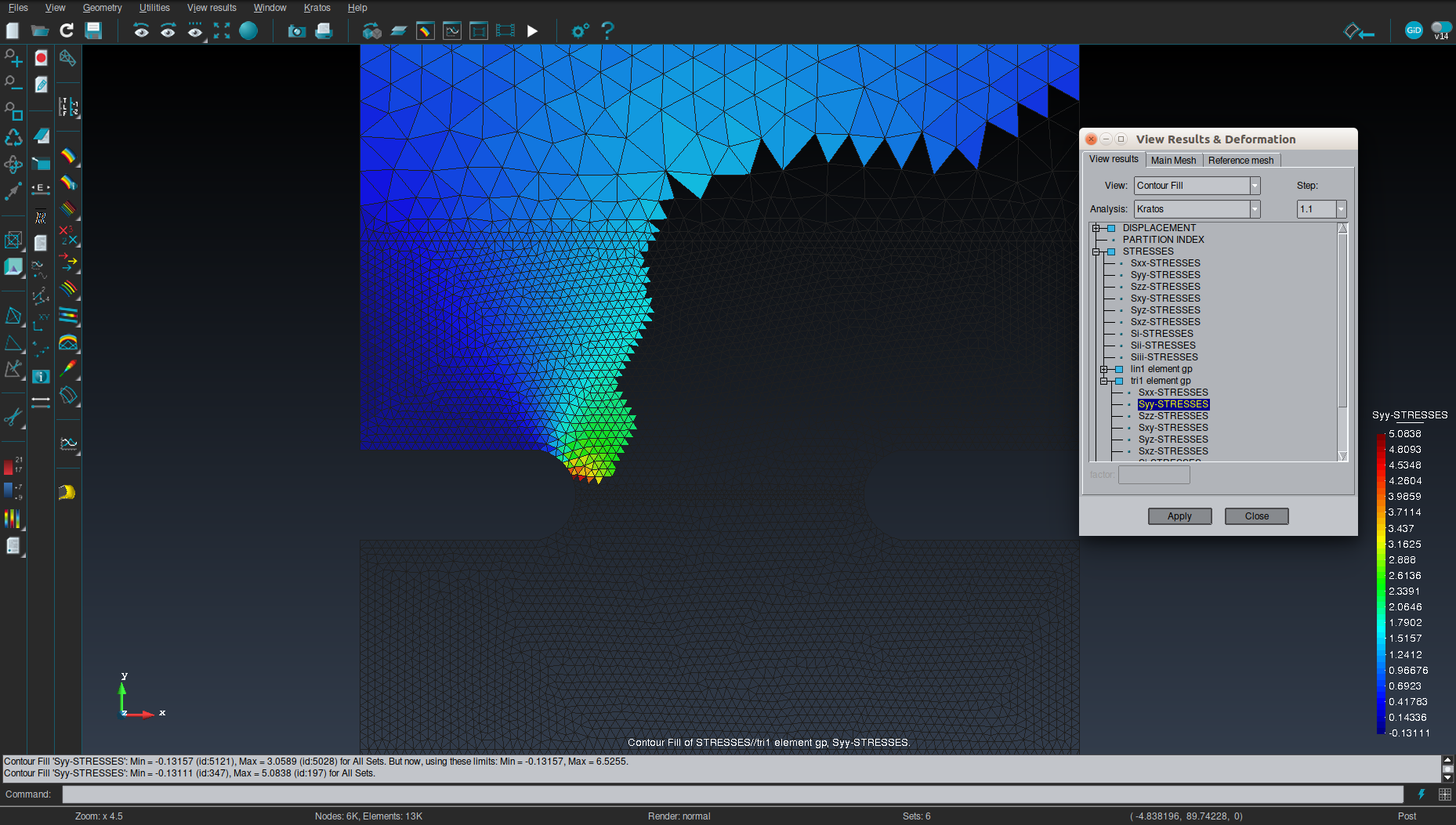
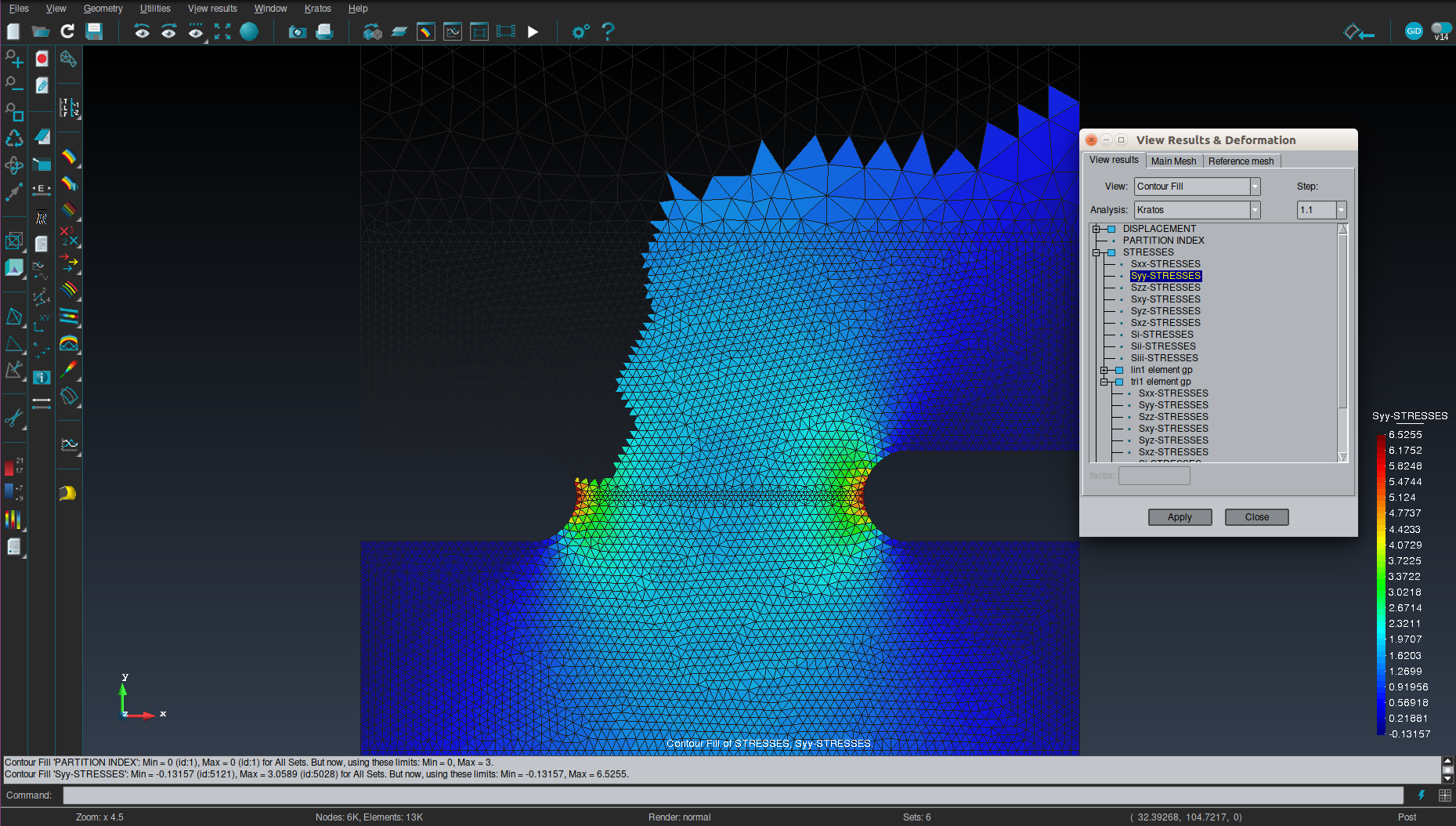
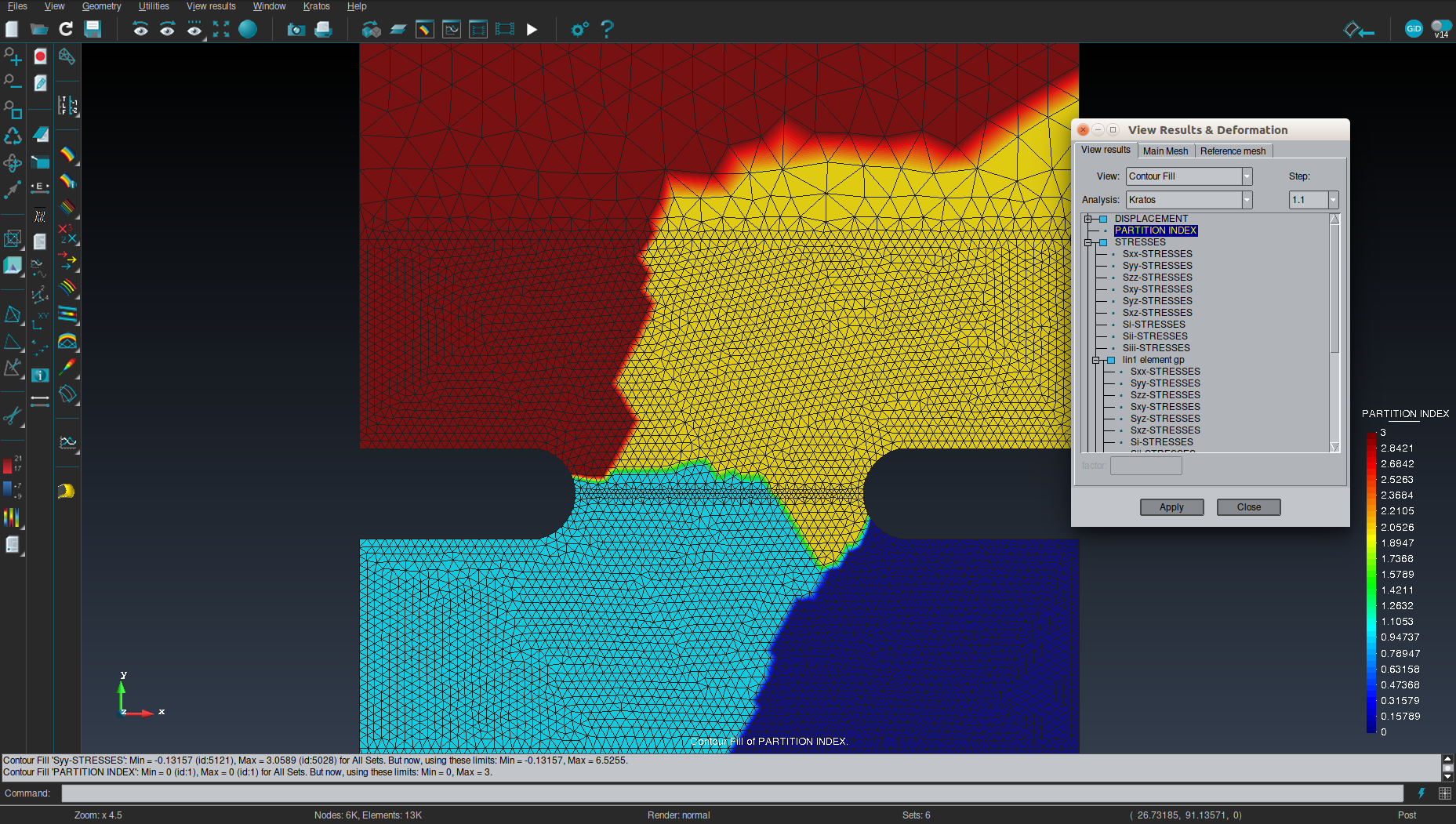
The same thing happens also when I solve only using two processes.
Is there a way to have all the Gauss point info plotted at all partitions at the same time?
Also maybe related, maybe unrelated to this, I get a strange error when the simulation is done:
* Error in
runkratos': double free or corruption (!prev): 0x000000000180e9c0 ***
*** Error in
runkratos': double free or corruption (!prev): 0x00000000020239a0 *
======= Backtrace: =========
======= Backtrace: =========
/lib/x86_64-linux-gnu/libc.so.6(+0x777e5)[0x7fac95be17e5]
/lib/x86_64-linux-gnu/libc.so.6(+0x777e5)[0x7f7dd594a7e5]
/lib/x86_64-linux-gnu/libc.so.6(+0x8037a)[0x7fac95bea37a]
/lib/x86_64-linux-gnu/libc.so.6(+0x8037a)[0x7f7dd595337a]
/lib/x86_64-linux-gnu/libc.so.6(cfree+0x4c)[0x7f7dd595753c]
/home/vladislav/kratos_official/Kratos/bin/Release/libs/libKratosCore.so(_ZN6Kratos12GeometryDataD1Ev+0x195)[0x7fac9098a5e5]
/lib/x86_64-linux-gnu/libc.so.6(+0x39ff8)[0x7fac95ba3ff8]
/lib/x86_64-linux-gnu/libc.so.6(+0x3a045)[0x7fac95ba4045]
/lib/x86_64-linux-gnu/libc.so.6(__libc_start_main+0xf7)[0x7fac95b8a837]
/home/vladislav/kratos_official/Kratos/bin/Release/libs/libKratosCore.so(_ZN6Kratos12GeometryDataD1Ev+0x195)[0x7f7dd06f35e5]
/lib/x86_64-linux-gnu/libc.so.6(+0x39ff8)[0x7f7dd590cff8]
/lib/x86_64-linux-gnu/libc.so.6(+0x3a045)[0x7f7dd590d045]
/lib/x86_64-linux-gnu/libc.so.6(__libc_start_main+0xf7)[0x7f7dd58f3837]
runkratos(_start+0x29)[0x4014c9]
======= Memory map: ========
....I cut out the memory map part, it is a lot of text. If it is helpful, I can include it.
I would be grateful if you take a look at this issue. Here is the example I used:
notched_prism_coarse_2d_elastic_mpi.gid.zip
Regards
Vladislav
EDIT: I forgot to say - I am using StructuralMechanicsApplication
 vgudzulic
All 11 comments
this seems like a postprocessing issue with GiD
@jginternational can you help?
regarding the double-free I don't know what could cause this :/ I haven't seen such an error recently
would it be possible for you to compile Kratos in Debug mode and run the example again?
Then you should be able to get better error
 philbucher
on 19 May 2020
philbucher
on 19 May 2020
Hi @vgudzulic i found the problem.
in your example, the domain is divided into 4 parts.
in the first three parts you only have triangles, but in the fourth one you have triangles and lines.
And you have the results "Stresses" and "Von Mises Stress" for both gauss points on triangles and lines.
when GiD reads the first three parts, it only find the results Stress only defined for gauss points on triangles, so it maintains the name Stree.
but when GiD reads the fourth part it finds that the result Stress is repeadted for gauss points for triangles and for lines. To make it possible for the user to visualize each one of them GiD creates unique names: Stresses//tri1_element_gp and Stresses//lin1_element_gp.
That's why you see 3 different Stress results, and when you select any of them you can not see the other ones.
At the moment, the only way to overcome this is to give another name for the stresses results on lines ( or not to write them), so that the name 'Stress' is only used for triangles.
(i exported the files in ascii mode and edited the fourth part)
patched_post_files.zip
 pasenau
on 19 May 2020
pasenau
on 19 May 2020
...and the same for the Von Mises Stress...
pasenau
on 19 May 2020
@pasenau
It is really great that you managed to find that! Thanks a lot!
In fact, I do not even need the stress that is written on a line. Since line is geometry that comes from the loading condition, STRESS is not even defined. Do you by any chance know how can I tell Kratos not to write the outputs for certain variables on certain geometries?
What I have is in ProjectParameters.json is:
"output_processes" : {
"gid_output" : [{
"python_module" : "gid_output_process",
"kratos_module" : "KratosMultiphysics",
"process_name" : "GiDOutputProcess",
"help" : "This process writes postprocessing files for GiD",
"Parameters" : {
"model_part_name" : "Structure",
"output_name" : "notched_prism_coarse_2d_elastic_mpi",
"postprocess_parameters" : {
"result_file_configuration" : {
"gidpost_flags" : {
"GiDPostMode" : "GiD_PostBinary",
"WriteDeformedMeshFlag" : "WriteDeformed",
"WriteConditionsFlag" : "WriteConditions",
"MultiFileFlag" : "SingleFile"
},
"file_label" : "step",
"output_control_type" : "step",
"output_frequency" : 1,
"body_output" : true,
"node_output" : false,
"skin_output" : false,
"plane_output" : [],
"nodal_results" : ["PARTITION_INDEX","DISPLACEMENT"],
"gauss_point_results" : ["STRESSES","VON_MISES_STRESS"],
"nodal_nonhistorical_results" : []
},
"point_data_configuration" : []
}
}
}]}
and there I can just choose whether I want some variable or not.
@philbucher Thanks for the response. I have tried what you have suggested (with Debug and FullDebug) but I did not get any more detailed error message (it was exactly the same, to be precise). However, I realized that I was using intel mpi. When I recompiled everything (Trilinos & Kratos) with openmpi, the error did not appear in Debug mode anymore. I expect it won't appear in Release either (still compiling).
vgudzulic
on 19 May 2020
@vgudzulic you need to specify a ModelPart for the output that doesn't contain the lines.
=> Instead of
"model_part_name" : "Structure" you need
"model_part_name" : "Structure.domain" or however it is called in your case
thx for checking with the compilers
I am not sure why this happens, we also use intel-mpi on our clusters. I will keep it in mind
philbucher
on 19 May 2020
Hi @philbucher, thanks for the answer.
However, I probably misunderstand something. I don't have any ModelPart that contains everything except lines. In this example, my model consists of three model parts that have solid elements, and one that has line conditions (loading conditions). Each of them has only the corresponding type of elements/conditions characterized by their Properties. I need these three different solid model parts because I do some changes of the mesh and I need to distinguish different parts. Of course, when I write for example:
"model_part_name" : "Structure.Parts_Solid_Elastic"
I get an output for that model part, and there is no problem with line geometries because these do not belong to the "Parts_Solid_Elastic" ModelPart (I made a coarser example now).
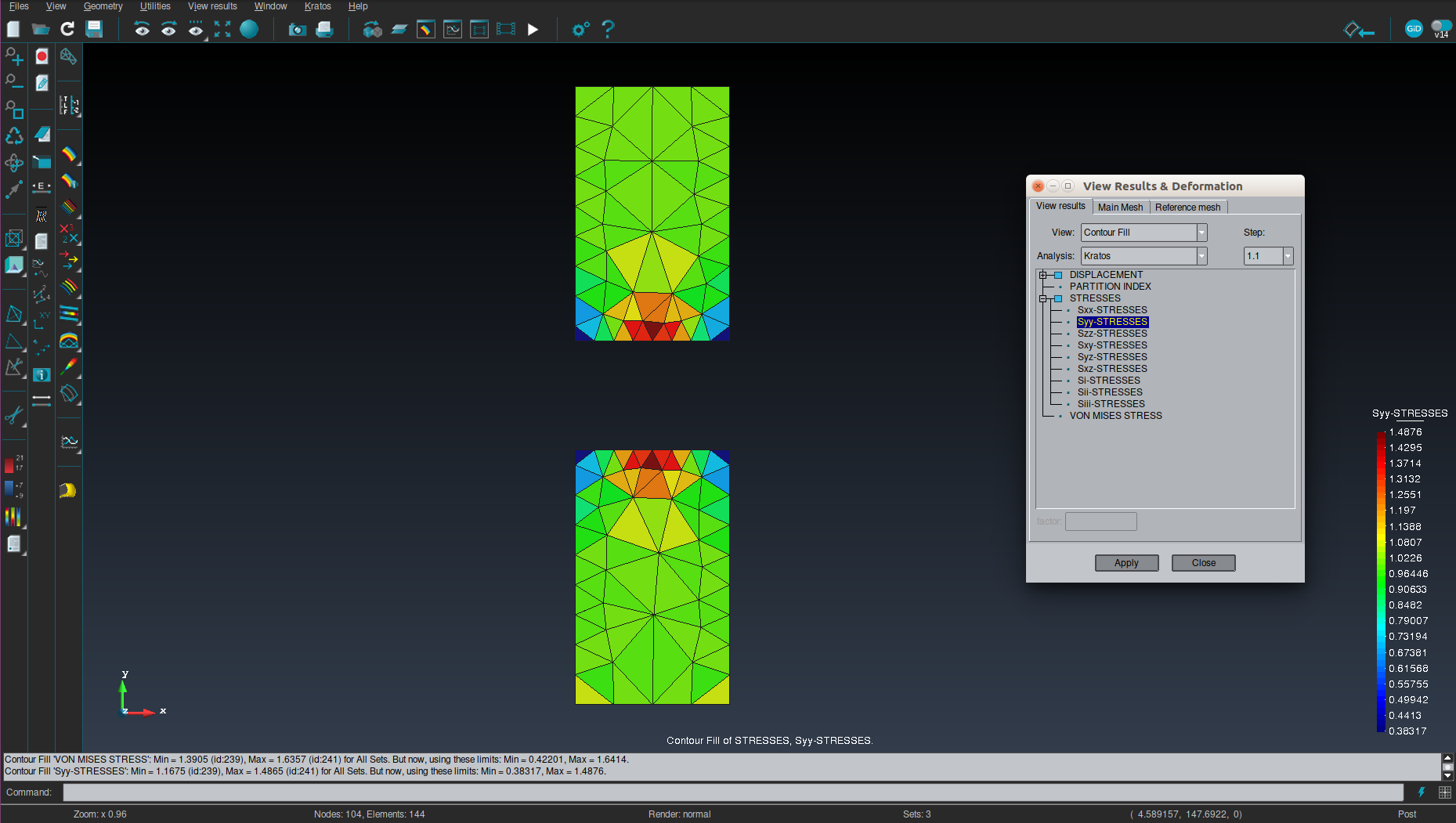
However, this is not what I wanted :) In fact, I thought it was Structure was the main ModelPart that contains everything else (as far as I have seen there was a computing_domain before but it has been removed).
Did you mean that I should create a separate ModelPart, and then add to it those ModelParts that I want output for? I tried to do that with option Add SubModelPart from GiD and it worked for nodes. I created an empty group in GiD and added all surface geometries to it. But when I ask GiD to write elements, which I need for the Gauss Point data, I got the following problem:
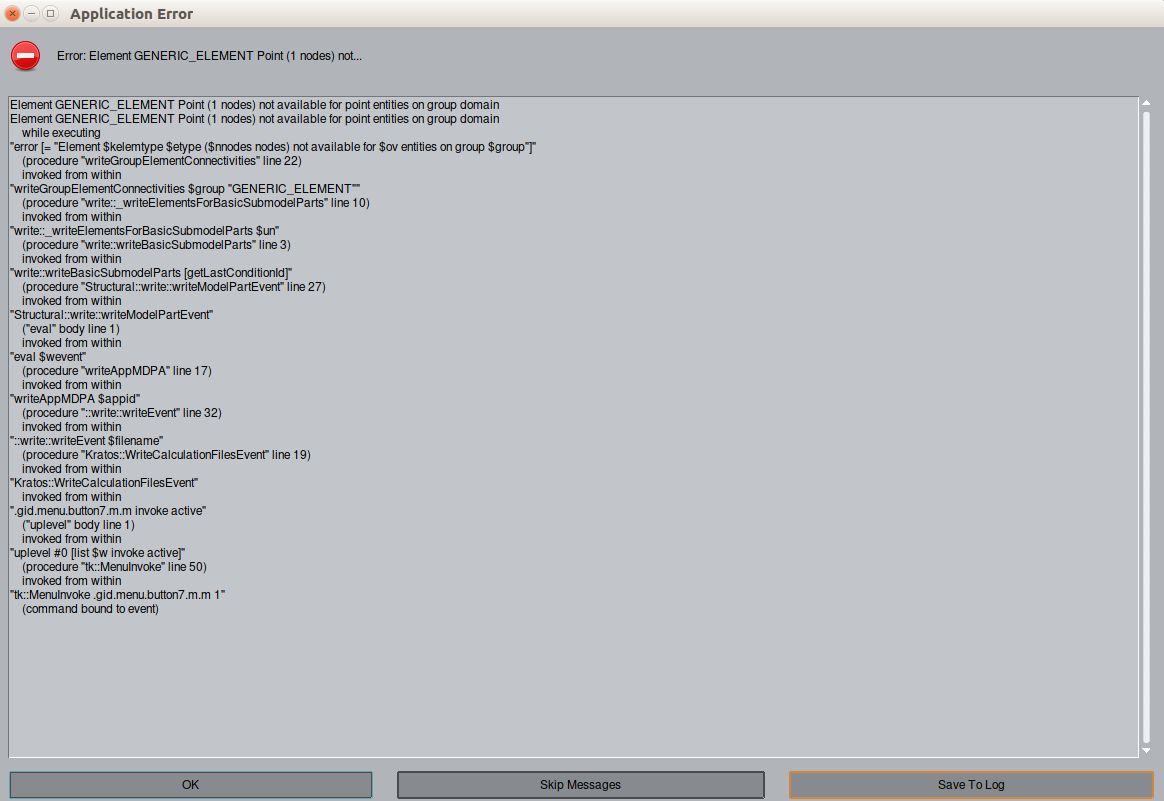
In fact, I believe that this is probably not what you meant.
Maybe I am trying to think too much complicated here, if there is a simple way please let me know :)
Regards
Vladislav
vgudzulic
on 20 May 2020
@vgudzulic unfortunately what you want to do is not possible with the GiD interface (I am quite sure, anyone please correct me if I am wrong)
Using AddSubModelPart will as you wrote only work for nodes. If you select Elements (or Conditions) it will create NEW (BaseClass-) Elements
Since you want everything in one ModelPart (and as discussed above cannot use the MainModelPart) then I think you have to manually create the visualization-ModelPart yourself in Python.
If you want to stick with GiD I see two options:
- You would create a new ModelPart and add the existing elements from the 3 domains to it. This would be the one used for the GiDOutputProcess. This works for sure
~py
visualization_model_part = main_model_part.CreateSubModelPart("visualization_domain")
elem_ids = []
for mp_name in ["name_mp_domain_1", "name_mp_domain_2", "name_mp_domain_3"]:
domain_mp = main_model_part.GetSubModelPart(mp_name)
for elem in domain_mp:
elem_ids.append(elem.Id)
visualization_model_part.AddElements(elem_ids)
~
- You create post-files for each domain and load them together in GiD. I think this can work since you don't have overlapping IDs
philbucher
on 22 May 2020
Hey @philbucher thanks again for your effort! It is really nice of you that you give such a detailed answer.
I tried the two options you proposed, and I was partially successful. I will try to explain what I have found out. I am sorry if this is too long, but I try to be as clear as possible and I also want to document it in case someone else has a similar problem.
_Option number 1_:
if I introduce the code that you posted above in Initialize() function of MainKratos.py script, then gid_output_process complains that there is no ModelPart called "visualization_domain". Of course this happens because this ModelPart doesn't exist at the moment when processes are created.
if I create a "visualization_domain" model part in __init__ function of MainKratos.py script and then GetSubModelPart and add the elements in Initialize(), the GiD complains that there is no mesh written for this results file. It seems that this happens because the "visualization_domain" ModelPart is created before mesh is imported. I'm not sure how it works though.

- this leaves us with possibility to execute this code in either _ModifyInitialProperties()_ or _ModifyInitialGeometry()_ both of which are executed after the .mdpa is read and partitioning is performed, but before the processes are created. In this case, the simulation finished successfully, but there is only one output file even though it was executed using four processes. I get something like this (note that this corresponds to one of the partitions)
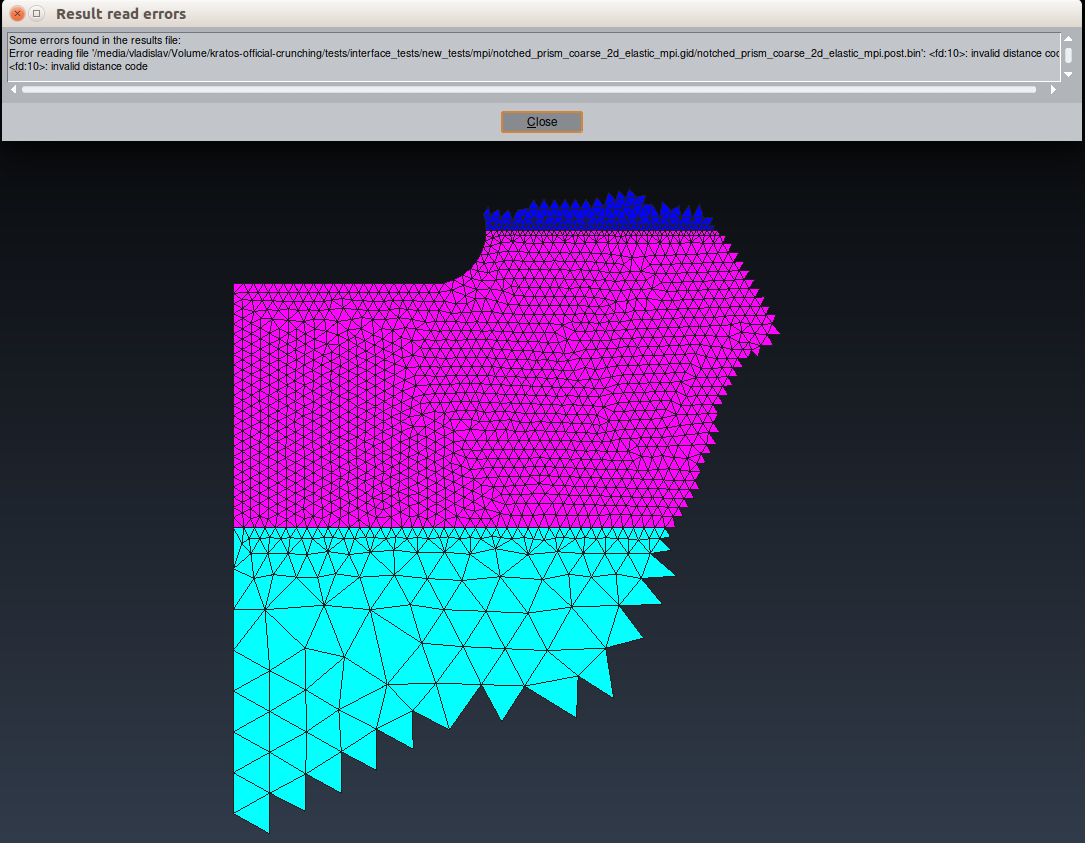
The problem seems to lie in partitioning, because it is done prior to creation of this ModelPart. Probably there is some overwriting going on somewhere. Note, that when executed on single process, this approach works perfectly.
Just for completeness, a correction of a typo in your code: for elem in domain_mp: should be for elem in domain_mp.Elements:
_Option number 2_:
When I initialize multiple gid_output_processes in ProjectParameters.json, one for each ModelPart, I can't load the results into GiD separately but only through .lst file. _In .lst file, only the last gid_output_process files are written._ When I sew results file in the .lst file manually, it works well. So other than having to manually correct the .lst file, this is a good approach.
_Another solution_:
I also found another solution for this particular case. Namely, I managed to get what I wanted by changing:
"WriteConditionsFlag" : "WriteConditions"
to
"WriteConditionsFlag" : "WriteElementsOnly"
while keeping
"model_part_name" : "Structure"
The lines are not written, and there are no problems.
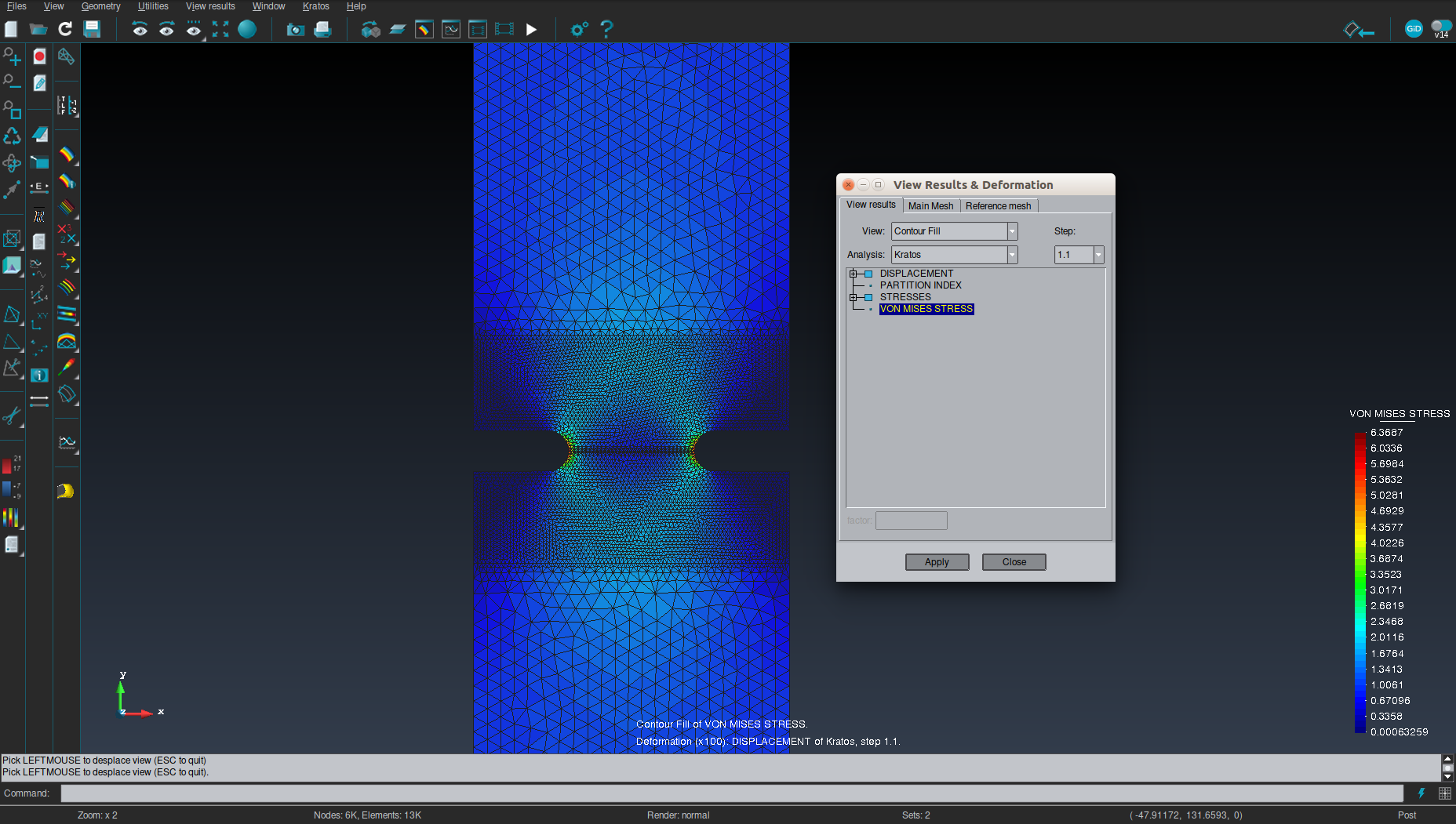
This is not a general solution though. I can imagine that as soon as there are elements of different geometry types within ModelPart, this problem will occur again.
Also, I have tried vtk output process as well. I am familiar with the fact that Paraview does not offer integration points for output, but only a single value per cell. However, I was expecting that when I write variables as "element_data_value_variables", I will get an average value or something similar, but I get an error when trying to read the result files :( Are you familiar with this?
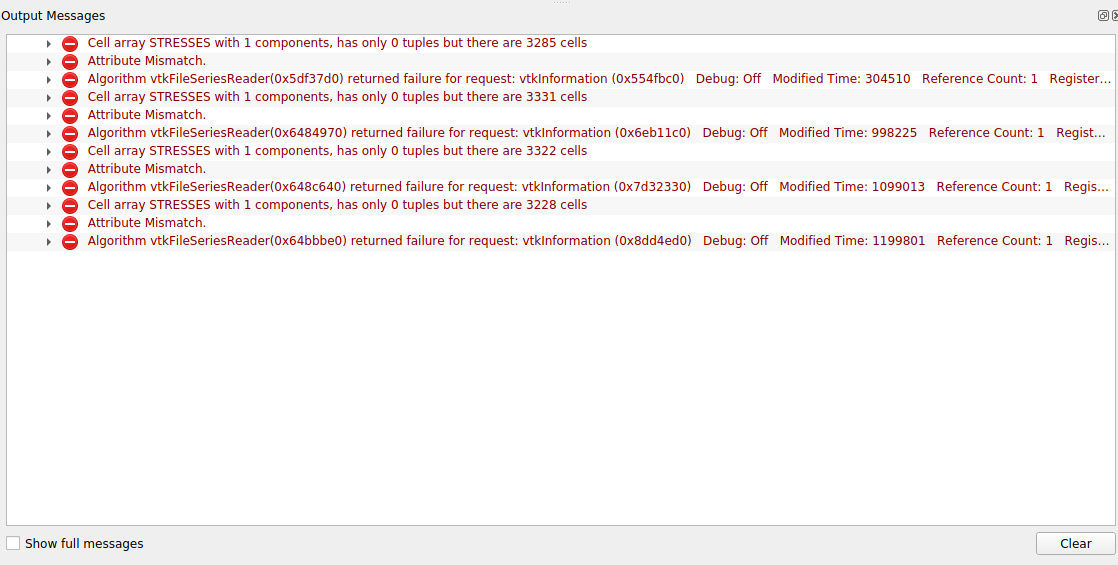
If, however I choose that that:
"STRESSES","VON_MISES_STRESS" are written as "gauss_point_variables_extrapolated_to_nodes" and not "element_data_value_variables" everything works well.
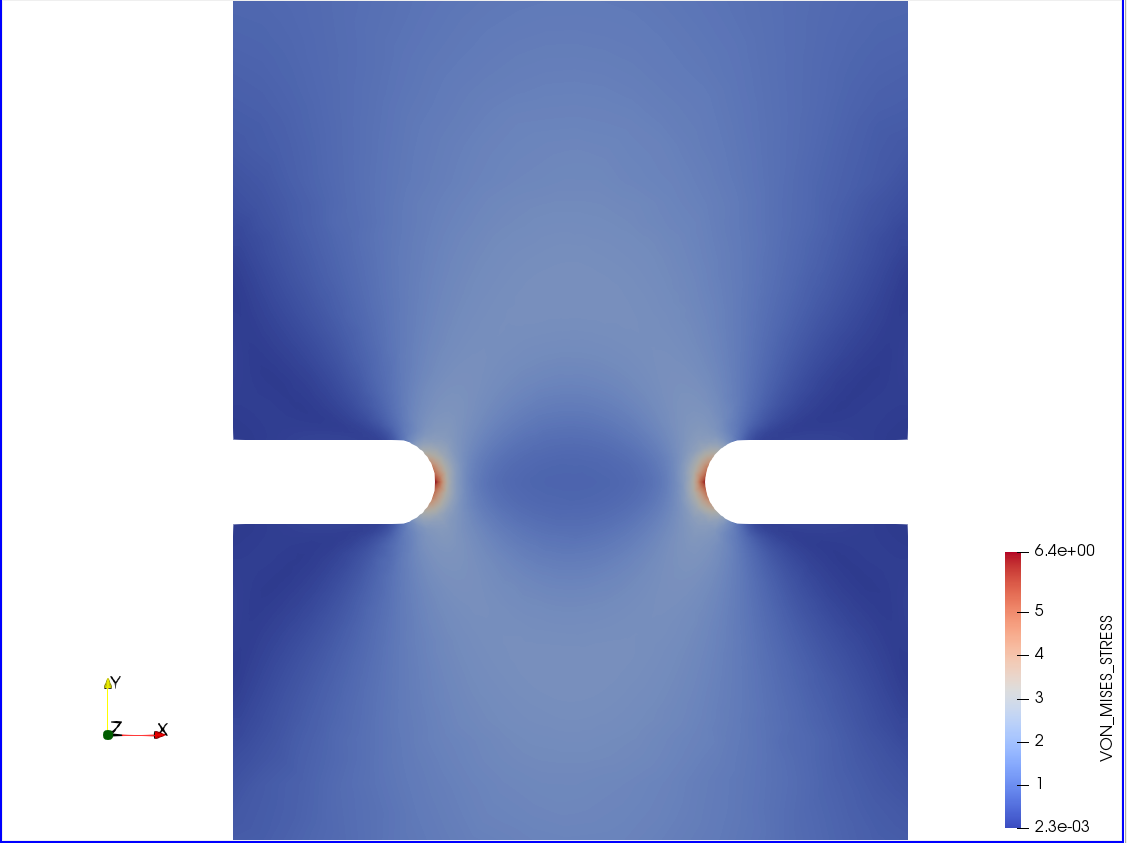
All this being said, I really like the first approach of @philbucher because it seems to be quite flexible. The only open question is how to deal with the partitioning?
Thanks again for your answers!
Regards
Vlad
vgudzulic
on 22 May 2020
hi @vgudzulic
regarding the first approach:
I checked it now, ModifyInitialGeometry should be the correct place to do this. I don't understand why this does not work, I have a suspicion though.
Can you try the following:
~~~py
def ModifyInitialGeometry(self):
super().ModifyInitialGeometry()
visualization_model_part = main_model_part.CreateSubModelPart("visualization_domain")
elem_ids = []
for mp_name in ["name_mp_domain_1", "name_mp_domain_2", "name_mp_domain_3"]:
    domain_mp = main_model_part.GetSubModelPart(mp_name)
    for elem in domain_mp.Elements:
        elem_ids.append(elem.Id)
visualization_model_part.AddElements(elem_ids)

# in mpi construct the internal communication graph
if KratosMultiphysics.IsDistributedRun():
    from KratosMultiphysics.mpi import ParallelFillCommunicator
    ParallelFillCommunicator(self.model["Structure"]).Execute()
~~~
Regarding the VTK:
using element_data_value_variables is the internal storage of the elements (the one you access with element.SetValue()/GetValue() and has nothing to do with Gauss Points.
When printing gauss point results in vtk you need gauss_point_variables_extrapolated_to_nodes or gauss_point_variables_in_elements (see #5392 for an explanation of the difference)
As expected this works fine
philbucher
on 25 May 2020
Hi @philbucher I tried it and it worked well. I got all partitions written in the output file.
In order to write out nodal data, the nodes need to be added to the visualization model part as well. Otherwise nodal data will be empty. The final code that I used is:
def ModifyInitialGeometry(self):
    super().ModifyInitialGeometry()

    main_model_part = model.GetModelPart('Structure')

    visualization_model_part = main_model_part.CreateSubModelPart("visualization_domain")
    elem_ids = []
    node_ids = []
    for mp_name in ["Parts_Solid_Concrete_top", "Parts_Solid_Concrete_bottom", "Parts_Solid_Elastic"]:
        domain_mp = main_model_part.GetSubModelPart(mp_name)
        for elem in domain_mp.Elements:
            elem_ids.append(elem.Id)
        for node in domain_mp.Nodes:
            node_ids.append(node.Id)

    visualization_model_part.AddElements(elem_ids)
    visualization_model_part.AddNodes(node_ids)

    # in mpi construct the internal communication graph
    if KratosMultiphysics.IsDistributedRun():
        from KratosMultiphysics.mpi import ParallelFillCommunicator
        ParallelFillCommunicator(self.model["Structure"]).Execute()
As for the vtk, I was not aware of gauss_point_variables_in_elements. It was not appearing in the default ProjectParameters.json file generated by GiD. This is exactly what I thought element_data_value_variables would be :) Thanks for pointing this out.
As far as I am concerned, my issues are resolved. Thanks again to @philbucher and @pasenau!
vgudzulic
on 26 May 2020
good to hear it worked
just another minor suggestion, add the nodes before the elements, otherwise maybe some other problems might happen
philbucher
on 27 May 2020
Related issues
 Vahid-Galavi
·
4Comments
Vahid-Galavi
·
4Comments
 roigcarlo
·
6Comments
roigcarlo
·
6Comments
 loumalouomega
·
5Comments
loumalouomega
·
5Comments
 najianaslreza
·
7Comments
najianaslreza
·
7Comments
 ipouplana
·
6Comments
ipouplana
·
6Comments