Kratos ParticleMechanics fails when running large problems
I recently run my test examples for large static cantilevers and found them failing - it should not fail since I didn't touch the corresponding constitutive law nor any related conditions within the last two months. After some checks, I found out that it only fails for large problems with relatively more elements, i.e. when I run problems with fewer meshes, it works! Since they are static problems, the time discretization issue is not present. Also, I checked that the same problems occur when OpenMP is deactivated. Therefore, it is not an issue of parallelism.
The same test cases used to work before, e.g. once I validated PR #2387. With the recent code, the nonlinear iteration of that example does not converge and the obtained ratio and absolute norm grow excessively. Please find problem_1.gid attached.
problem_1.gid.zip
Please also find problem_2_fine.gid and problem_2_coarse.gid attached to see that the finer problem is not working while the coarser one is okay.
problem_2_coarse.gid.zip
problem_2_fine.gid.zip
I am guessing that the problem might be either in BuilderandSolver, ConvergenceCriteria or LinearSolver. I asked @loumalouomega and @roigcarlo about this issue and they suggested me to tag @RiccardoRossi and @adityaghantasala in case they can help me with this.
Thank you very much in advance! I would appreciate if anyone can give me any suggestions.
 bodhinandach
All 21 comments
Which convergence criteria do you use?, can you try to use the old ones?
 loumalouomega
on 10 Sep 2018
loumalouomega
on 10 Sep 2018
https://github.com/KratosMultiphysics/Kratos/tree/core/old-conv-criteria Can you this branch core/old-conv-criteria
loumalouomega
on 10 Sep 2018
@loumalouomega I am using residual criteria. I will try to run it again in branch you mentioned.
bodhinandach
on 10 Sep 2018
Take a look at the LinearSolver. Try a direct one and an ireative one and look if there is any difference. If you have very different mesh sizes in your model try to activate "scaling":true in the LinearSolver settings.
 josep-m-carbonell
on 10 Sep 2018
josep-m-carbonell
on 10 Sep 2018
@josep-m-carbonell I am using SuperLU, which is a direct one. Also, the iterative solvers have been tried and all also fail. For the mesh sizes, they are regular and structured.
bodhinandach
on 10 Sep 2018
@bodhinandach Can you try again the branch I created, I reverted the B&S to the previous state
loumalouomega
on 10 Sep 2018
I have recovered an old code where the problems could run and updated the ParticleMechanics, SolidMechanics, ConstitutiveModelsApplication, and ExternalSolverApplication to the most recent one in the following branch: https://github.com/KratosMultiphysics/Kratos/tree/particle/solve-error-solver.
There, I can still run the problems and they converge. Therefore, I am guessing that the problem is not there, but somewhere in the kratos core. @loumalouomega
bodhinandach
on 11 Sep 2018
Just for reference, I checked the RHS Matrix when solving the linear system of equation Ax=b for the first iteration and obtain a different column index (the second column of the printed .mm file).
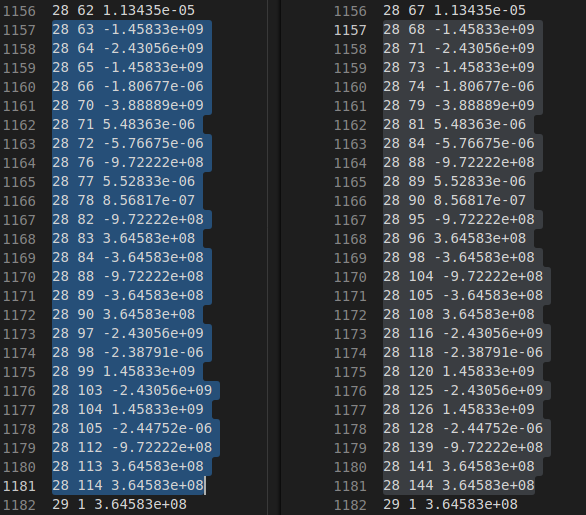
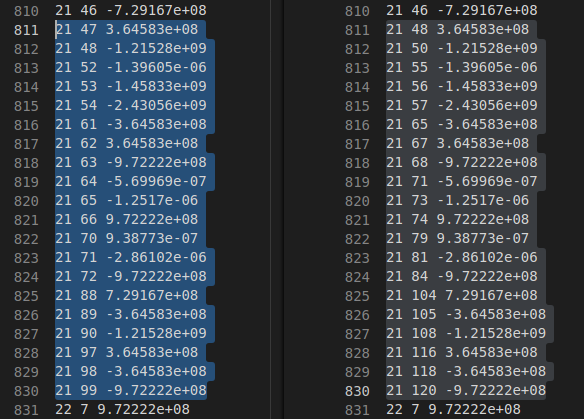
The one highlighted in blue (left) is when the program works and the right one is when the program crashes using a newer kratos core.
bodhinandach
on 11 Sep 2018
@loumalouomega and I have checked that there are some nodes are assigned with an aberrant number of DOF in the new core. Below is the list of node Id(), EquationId(), and the DOF GetVariable(). If you notice that the node number 25 has 6 DOFs assigned (twice each). So perhaps there is a bit of problem in the new BuilderandSolver?
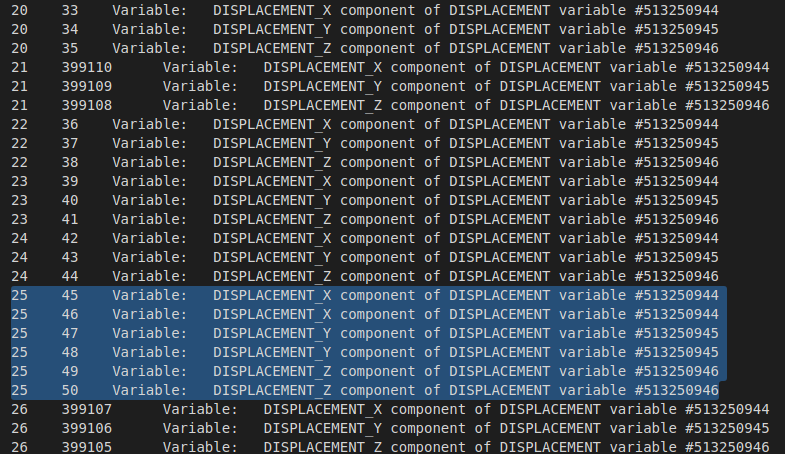
I attached below the complete list (same as above) for the working (using older core) and crashing (using newer core) outputs.
output_txt.zip
Maybe @loumalouomega can explain it better. Many thanks!
bodhinandach
on 11 Sep 2018
The strangest thing is that we already tried yesterday the "old" builder and solver, giving the same error, so I don't know were the error can came from
loumalouomega
on 11 Sep 2018
@RiccardoRossi and @pooyan-dadvand you should check it out this
loumalouomega
on 11 Sep 2018
@bodhinandach one (admittedly quite painful solution) is to compile several states of Kratos since the date you know it worked the last time. I had to do this not too long ago: #2631
I used the following commands to see when PRs were merged and compiled what I thought could be related
~
git log --merges --first-parent master --pretty=format:"%H %<(10,trunc)%an %<(15)%ar %s"
~
To prevent such things from happening again I suggest adding a test for it to the nightly build
Then you can trace the error much better because looking at the nightly build-output will help to figure out when it broke
 philbucher
on 11 Sep 2018
philbucher
on 11 Sep 2018
also referencing @adityaghantasala since it might be related to the B&S
philbucher
on 11 Sep 2018
@philbucher Thanks for the suggestions. I think I might find the source of the problems. I should definitely invest some time to prepare the testings; both the unit and the nightly build tests are still missing in ParticleMechanics.
bodhinandach
on 12 Sep 2018
I have identified the problem for this issue. It's apparently not in the B&S, but the spatial_containers. The MPM method requires a utility which includes the spatial containers to allocate background elements and nodes. There could be a minor problem there. I am consulting and fixing it with @roigcarlo.
Anyway, thanks a lot for all the helps @loumalouomega.
bodhinandach
on 12 Sep 2018
I reopen the issue since the problem is still not yet fixed. I am waiting @roigcarlo coming back from vacation.
bodhinandach
on 17 Sep 2018
Back, I will try to look for this during this week
 roigcarlo
on 1 Oct 2018
roigcarlo
on 1 Oct 2018
Finally some clues (long post incoming...).
After some debugging I have found the following facts:
- Reducing the size of the bins cells increases the change for the problem to converge
- Results for the search of elements are not consistent from one size to other. Moreover, some particles land to zones where apparently there are no elements.
After reviewing the code I think the problem is caused by the interaction of two classes:
- bins_objects_dynamic.h
- binsbased_fast_point_locator.h
The problem? The tolerance
const bool is_found = geom.IsInside(rCoordinates, point_local_coordinates, Tolerance);
Introducing a tolerance in the check of the intersection may cause odd results.
For example, imagine this part of the bins:
|         E|E         |
|       P E|E         |
|         E|E         |
+----------+----------+
Here P is very close to E, in fact imagine that the distance from P to E is less than our tolerance. Hence, the SearchObjectsInCell function will return a list with some elements, E among them. As the Intersection falls inside the tolerance the result will be positive and we will return E as a result.
Imagine what happens if we increase the size of the cell of the bins (just in x, to illustrate):
|            | EE         |
|           P| EE         |
|            | EE         |
+------------+------------+
In this scenario P still should fall inside E due to being in a distance which is lesser than our tolerance, but SearchObjectsInCell does not take into account any tolerance, so the correct element will not even be considered to be a candidate.
In conclusion, right know as this search is being done is just a matter of luck and tolerance whether the correct elements are being found or not.
The recent changes on the bins_objects_dynamic.h made the bins cells much larger than they used to be, specially in cases that use to fit the bins (rectangles, squares, etc).
In conclusion. We had a hidden problem and you had the bad luck (or good) to found a case where this situation is specially hard.
@RiccardoRossi as you did the binbased_fast_point_locator, my proposal if you agree would be add a search function in the bins that is aware of the tolerance, like SearchObjectsInCell with an added tolerance. If you agree I will take care of the changes.
roigcarlo
on 9 Oct 2018
@roigcarlo Thanks for your analysis and explanation. So is there any solution yet to solve this issue? Or is there anything I may be able to help? @RiccardoRossi
bodhinandach
on 15 Oct 2018
ping @roigcarlo @RiccardoRossi
bodhinandach
on 24 Oct 2018
Closing issue as fixed by #3201
bodhinandach
on 26 Oct 2018
Related issues
loumalouomega
·
5Comments
roigcarlo
·
6Comments
 rubenzorrilla
·
4Comments
rubenzorrilla
·
4Comments
 e-dub
·
3Comments
e-dub
·
3Comments
 marcnunezc
·
5Comments
marcnunezc
·
5Comments
Most helpful comment
Finally some clues (long post incoming...).
After some debugging I have found the following facts:
After reviewing the code I think the problem is caused by the interaction of two classes:
The problem? The tolerance
Introducing a tolerance in the check of the intersection may cause odd results.
For example, imagine this part of the bins:
Here P is very close to E, in fact imagine that the distance from P to E is less than our tolerance. Hence, the
SearchObjectsInCellfunction will return a list with some elements, E among them. As the Intersection falls inside the tolerance the result will be positive and we will return E as a result.Imagine what happens if we increase the size of the cell of the bins (just in x, to illustrate):
In this scenario P still should fall inside E due to being in a distance which is lesser than our tolerance, but
SearchObjectsInCelldoes not take into account any tolerance, so the correct element will not even be considered to be a candidate.In conclusion, right know as this search is being done is just a matter of luck and tolerance whether the correct elements are being found or not.
The recent changes on the
bins_objects_dynamic.hmade the bins cells much larger than they used to be, specially in cases that use to fit the bins (rectangles, squares, etc).In conclusion. We had a hidden problem and you had the bad luck (or good) to found a case where this situation is specially hard.
@RiccardoRossi as you did the binbased_fast_point_locator, my proposal if you agree would be add a search function in the bins that is aware of the tolerance, like
SearchObjectsInCellwith an added tolerance. If you agree I will take care of the changes.