Kotlin-native: GUI desktop applications
Desktop GUI applications are somewhat broken, at least for Windows.
I created simple project for cross-platform GUI: https://github.com/msink/klib-ui
Nothing fancy, and it somewhat works, but looks not "themed", like in Win95.
What I did wrong?
What should be - compiled from C example:

How it looks actually - converted to Kotlin/Native:

Cannot test Mac version, on linux looks as expected:

 msink
msink
All 7 comments
Seems problem is described here: https://stackoverflow.com/questions/17978546/how-to-make-window-look-more-modern. Mike, could you please try to implement suggested steps in your apps?
 olonho
on 14 May 2018
olonho
on 14 May 2018
Well, I just downloaded Resource Hacker, opened K/N version, and imported Manifest from C version:
<?xml version="1.0" encoding="UTF-8" standalone="yes"?>
<assembly xmlns="urn:schemas-microsoft-com:asm.v1" manifestVersion="1.0">
<assemblyIdentity
    version="1.0.0.0"
    processorArchitecture="*"
    name="CompanyName.ProductName.YourApplication"
    type="win32"
/>
<description>Your application description here.</description>
<!-- we DO need comctl6 in the static case -->
<dependency>
    <dependentAssembly>
        <assemblyIdentity
            type="win32"
            name="Microsoft.Windows.Common-Controls"
            version="6.0.0.0"
            processorArchitecture="*"
            publicKeyToken="6595b64144ccf1df"
            language="*"
        />
    </dependentAssembly>
</dependency>
<compatibility xmlns="urn:schemas-microsoft-com:compatibility.v1">
    <application>
        <!--The ID below indicates application support for Windows Vista -->
        <supportedOS Id="{e2011457-1546-43c5-a5fe-008deee3d3f0}"/>
        <!--The ID below indicates application support for Windows 7 -->
        <supportedOS Id="{35138b9a-5d96-4fbd-8e2d-a2440225f93a}"/>
    </application>
</compatibility>
</assembly>
And now both versions look identical.
But how to automate this using gradle?
msink
on 14 May 2018
Maybe launch windres like in https://github.com/JetBrains/kotlin-native/blob/f512b3b60af99a8cadb8278f89966eee5c6269b7/samples/tetris/build.bat#L16 from Gradle as an external task.
olonho
on 14 May 2018
Maybe, as temporary workaround.
But in long run it should have direct support in gradle plugin.
msink
on 14 May 2018
And BTW, can someone confirm that https://github.com/msink/klib-ui/releases/download/alpha-3.5-3/libui-hello-osx actually works on OSX?
msink
on 14 May 2018
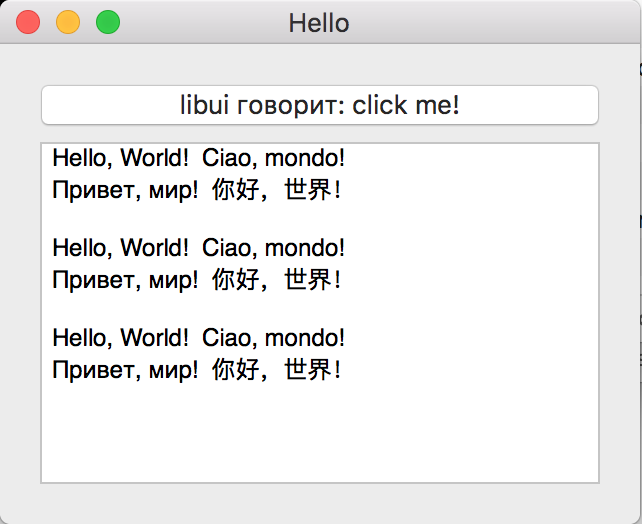
@msink, yes :)
 sbogolepov
on 14 May 2018
sbogolepov
on 14 May 2018
Not sure if adding PE resource manipulations into generic Gradle plugin makes much sense, but adding external tools is generally easy, so shalln't be a big deal.
olonho
on 15 May 2018
Related issues
msink
·
4Comments
 9468305
·
3Comments
9468305
·
3Comments
 ghost
·
4Comments
ghost
·
4Comments
 talanov
·
3Comments
talanov
·
3Comments
 nhachicha
·
4Comments
nhachicha
·
4Comments
Most helpful comment
@msink, yes :)