Kotlin-dsl-samples: Android-Studio import of simple project fails
After creating a new simple Android project and converting it to kotlin-dsl afterwards, an import of this project with Android Studio (or IntelliJ) fails with different errors depending on how it's imported (Gradle, or Android Gradle). I found no way how this can be done without any errors.
Expected Behavior
Importing the project happens without errors and project compiles therefor.
Current Behavior
IntelliJ doesn't recognize the android project and no local.properties file is created with location to the android-sdk
Although I get the message:
Frameworks Detected
Android framework is detected.
Configure
and clicking on Configure results in a dialog saying No Frameworks detected
Android Studio behaves the same when importing with Gradle and not Android Gradle
Android Studio imports the project by creating a new empty build.gradle file without recognizing the existence of the build.gradle.kts and settings file. The project is then not recognized as an android project and build fails again. When deleting the build.gradle file everything works fine again.
Steps to Reproduce (for bugs)
Checkout repo: https://github.com/daberni/gradle-kotlin-dsl-android-failed
Try to import the project with Android Studio (or IntelliJ)
Your Environment
Android Studio 3.2
Intellij 2018.2.4
Kotlin Plugin: 1.3.0-rc-116
 daberni
All 10 comments
Is there any way to fix this?
 IVIanuu
on 18 Nov 2018
IVIanuu
on 18 Nov 2018
After updating the wrapper to Gradle 4.10.2 with ./gradlew wrapper --gradle-version 4.10.2 I was able to import the project as a Gradle project (not an _Android Gradle_ project as that would trigger the build.gradle file bug).
Android Studio 3.2.1
Kotlin plugin version 1.3.0-release-Studio3.2-1
Build #AI-181.5540.7.32.5056338, built on October 8, 2018
JRE: 1.8.0_152-release-1136-b06 x86_64
JVM: OpenJDK 64-Bit Server VM by JetBrains s.r.o
 bamboo
on 20 Nov 2018
bamboo
on 20 Nov 2018
@bamboo where do you get the local.properties file from, when you do not perform an Android Gradle import? I guess this will only get created in an Android context (and one cannot check it in into vcs)
At least using gradle-wrapper 4.10.2 didn't change anything for me
daberni
on 21 Nov 2018
Has there been any progress on this issue? Since I converted one of our projects to the Kotlin DSL none of my co-workers are able to open the project properly. Neither am I when I try to open a fresh clone of the project.
It does work, however, when I make a copy of the whole project folder, so I am assuming that there must be something inside the folder (but not in Git) that makes it work. But I am afraid I don't know where to look - with a quick look at the iml files and the stuff in the .idea folder I did not see any references to Kotlin DSL or kts files... Am I looking in the wrong place?
 DavidMihola
on 17 Jan 2019
DavidMihola
on 17 Jan 2019
@daberni: I think I am able to consistently get this to work (with your example project and with my own project) when I do the following (thanks to this answer to my Stack Overflow Question)
1.) Clone the project
2.) Delete the .idea folder: rm -rf .idea
3.) Open the project in Android Studio
Can you confirm this?
In this case, the only problem is that I _want_ some files in my .idea folder under version control (code style, etc.)...
DavidMihola
on 17 Jan 2019
I was able to make it work with @DavidMihola’s solution, but I had to recreate the Android app configuration afterwards. Other than that and the lost .idea files, everything is fine.
 rcosteira79
on 18 Jan 2019
rcosteira79
on 18 Jan 2019
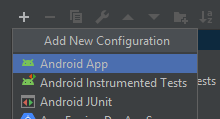
@DavidMihola worked for me. @rcosteira79 is also right, I had to create the "app" configuration manually.
1) Click on "Add Configuration..."
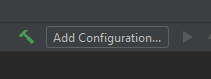
2) Create new Android App configuration
3) Select "app" on module
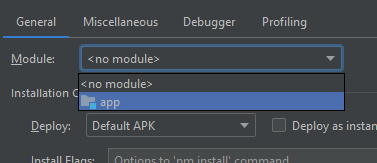
4) OK
 hammerox
on 23 Jan 2019
hammerox
on 23 Jan 2019
Just started testing it again and all the suggested work arounds didn't work as expected too. Android Studio doesn't recognize the project as "Android" project and then fails when trying to configure the android gradle tasks. Either local.properties isn't created or an empty build.gradle is created.
What is working at the moment is an Import with the latest Canary version (3.5 - didn't try 3.4 right now). Although the import overrides everything in the .idea folder you can reset those changes with git reset and then the project is set up correctly.
It is still not comparable with standard groovy style build.gradle files. A simple "open" in Android Studio is enough there to get everything up and running.
Furthermore it SHOULD not make a difference when there are some files in the .idea. It's quite common to commit code style settings and run configurations along with the source code.
daberni
on 27 Jan 2019
Closing as outdated, the Gradle Kotlin DSL 1.0 shipped with Gradle 5.0. The sample project uses Gradle 4.6.
 eskatos
on 25 Apr 2019
eskatos
on 25 Apr 2019
updated the sample project to Gradle 5.1.1, plugins and kotlin to latest version and works now as expected in Android Studio 3.5 Canary 11 👍
daberni
on 25 Apr 2019
Related issues
 jaredsburrows
·
3Comments
jaredsburrows
·
3Comments
 xmlking
·
3Comments
xmlking
·
3Comments
 jmfayard
·
3Comments
jmfayard
·
3Comments
 AlexCzar
·
3Comments
AlexCzar
·
3Comments
 scompt
·
4Comments
scompt
·
4Comments