Kops: `kops validate cluster` always fails with "machine ... has not yet joined cluster for k8s 1.10.x, 1.11.0
- What
kopsversion are you running? The commandkops version, will display
this information.
┬─[fmil@fmil:~/tmp]─[01:55:22 PM]
╰─>$ kops version
Version 1.10.0-alpha.1 (git-7f70266f5)
(but same results on 1.9.0, 1.9.1)
What Kubernetes version are you running?
kubectl versionwill print the
version if a cluster is running or provide the Kubernetes version specified as
akopsflag.What cloud provider are you using?
GCP
- What commands did you run? What is the simplest way to reproduce this issue?
env KOPS_FEATURE_FLAGS=AlphaAllowGCE kops create cluster
--zones=us-central1-a
--state=
--project=$(gcloud config get-value project)
--kubernetes-version=1.11.0
env KOPS_FEATURE_FLAGS=AlphaAllowGCE kops update cluster c1.fmil.k8s.local --yes
kops validate cluster
- What happened after the commands executed?
kops validate cluster never validates successfully.
(above command is with kubernetes 1.11.0, but trying with 1.10.3 is the same.)
Error messages are such:
machine "https://www.googleapis.com/compute/
machine "https://www.googleapis.com/compute/
- What did you expect to happen?
cluster validates successfully, eventually. Typically within 5 minutes this should happen.
I observed, however, that even though the cluster does not validate, it works just fine. I.e. kubectl version works, and every other operation on the cluster that I tried also works.
- Please provide your cluster manifest. Execute
kops get --name my.example.com -o yamlto display your cluster manifest.
You may want to remove your cluster name and other sensitive information.
apiVersion: kops/v1alpha2
kind: Cluster
metadata:
creationTimestamp: 2018-06-20T16:14:34Z
name: c2.fmil.k8s.local
spec:
api:
loadBalancer:
type: Public
authorization:
rbac: {}
channel: stable
cloudProvider: gce
configBase: gs://redacted
etcdClusters:
- etcdMembers:
- instanceGroup: master-us-central1-a
name: a
name: main
- instanceGroup: master-us-central1-a
- etcdMembers:
- instanceGroup: master-us-central1-a
name: a
name: events
iam:
allowContainerRegistry: true
legacy: false
kubernetesApiAccess:
- instanceGroup: master-us-central1-a
- 0.0.0.0/0
kubernetesVersion: 1.11.0
masterPublicName: api.c2.fmil.k8s.local
networking:
kubenet: {}
nonMasqueradeCIDR: redacted
project: redacted
sshAccess: - 0.0.0.0/0
subnets: - name: us-central1
region: us-central1
type: Public
topology:
dns:
type: Public
masters: public
nodes: public
- Please run the commands with most verbose logging by adding the
-v 10flag.
Paste the logs into this report, or in a gist and provide the gist link here.
n/a
- Anything else do we need to know?
n/a
 filmil
All 17 comments
I've experienced the same issue. Details, from my perspective.
- I'm using AWS.
- OS Image has no impact on the problem (e.g debian jessie vs debian stretch)
- Kops versions seem to have no impact on the problem (e.g. 1.9.1 and 1.10-beta.1)
- Kubernetes version 1.11 definitely has this problem, while version 1.10 does not. The fact that 1.10 works for me is different than what the author of this issue has described.
- Kops validate cluster fails with:
machine "i-xxxxxxxxxxxxxxxx" has not yet joined cluster kops rolling-update clusterSUCCEEDS in validating the cluster in-between node rolling.
 dcwangmit01
on 24 Jul 2018
dcwangmit01
on 24 Jul 2018
Same issue here.
Command to create the cluster:
kops create cluster \
--kubernetes-version 1.11.1 \
--dns private \
--dns-zone ZTN3WOKZEP5J \
--topology private \
--state s3://operations.foo.bar \
--networking amazon-vpc-routed-eni \
--vpc vpc-6dbb8b08 \
--master-size t2.medium \
--master-count 3 \
--cloud aws \
--zones=us-east-1b,us-east-1c,us-east-1d,us-east-1e \
--subnets subnet-b7467a8d,subnet-58f5b62f,subnet-4dd0b714,subnet-f4bc35df \
--utility-subnets subnet-b0467a8a,subnet-5ef5b629,subnet-56d0b70f,subnet-9cbc35b7 \
--yes \
edge.foo.bar
Failed validation...
$ kops validate cluster --state s3://operations.foo.bar
Using cluster from kubectl context: kubernetes.foo.bar
Validating cluster kubernetes.edge.aworks.us
INSTANCE GROUPS
NAME ROLE MACHINETYPE MIN MAX SUBNETS
master-us-east-1b Master t2.medium 1 1 us-east-1b
master-us-east-1c Master t2.medium 1 1 us-east-1c
master-us-east-1d Master t2.medium 1 1 us-east-1d
nodes Node t2.medium 2 2 us-east-1b,us-east-1c,us-east-1d,us-east-1e
NODE STATUS
NAME ROLE READY
VALIDATION ERRORS
KIND NAME MESSAGE
Machine i-00c6a0621a5d8cb27 machine "i-00c6a0621a5d8cb27" has not yet joined cluster
Machine i-083789489a702bc52 machine "i-083789489a702bc52" has not yet joined cluster
Machine i-087baaf52f370f95f machine "i-087baaf52f370f95f" has not yet joined cluster
Machine i-0b8fd5008e3e11d58 machine "i-0b8fd5008e3e11d58" has not yet joined cluster
Machine i-0db4c6b21240085fe machine "i-0db4c6b21240085fe" has not yet joined cluster
Validation Failed
But getting the nodes seems to work...
$ kubectl get nodes
NAME STATUS ROLES AGE VERSION
ip-10-3-4-114.ec2.internal Ready node 10m v1.11.1
ip-10-3-4-206.ec2.internal Ready master 12m v1.11.1
ip-10-3-5-127.ec2.internal Ready master 12m v1.11.1
ip-10-3-6-14.ec2.internal Ready node 11m v1.11.1
ip-10-3-6-178.ec2.internal Ready master 12m v1.11.1
Also, why are the master nodes a part of the default namespace instead of kube-system?
 cjbottaro
on 7 Aug 2018
cjbottaro
on 7 Aug 2018
Same here after multiple launch and teardown attempts.
export NAME=example.k8s.local
export KOPS_STATE_STORE=s3://example-state-store
export EDITOR=nano
export KOPS_FEATURE_FLAGS="+DrainAndValidateRollingUpdate"
export REGION="ap-southeast-1"
export ZONES="ap-southeast-1b"
export MASTER_ZONES="ap-southeast-1b"
export NODE_SIZE="t2.medium"
export NODE_COUNT=2
export MASTER_SIZE="m3.medium"
export KUBERNETES_VERSION="1.11.2"
kops create cluster \
--name "${NAME}" \
--cloud aws \
--kubernetes-version ${KUBERNETES_VERSION} \
--node-count ${NODE_COUNT} \
--zones "${ZONES}" \
--master-zones "${MASTER_ZONES}" \
--node-size "${NODE_SIZE}" \
--master-size "${MASTER_SIZE}"
kops update cluster ${NAME} --yes
kubernetes 1.10.6 working fine but 1.11.2 failed
 mnwalker
on 10 Aug 2018
mnwalker
on 10 Aug 2018
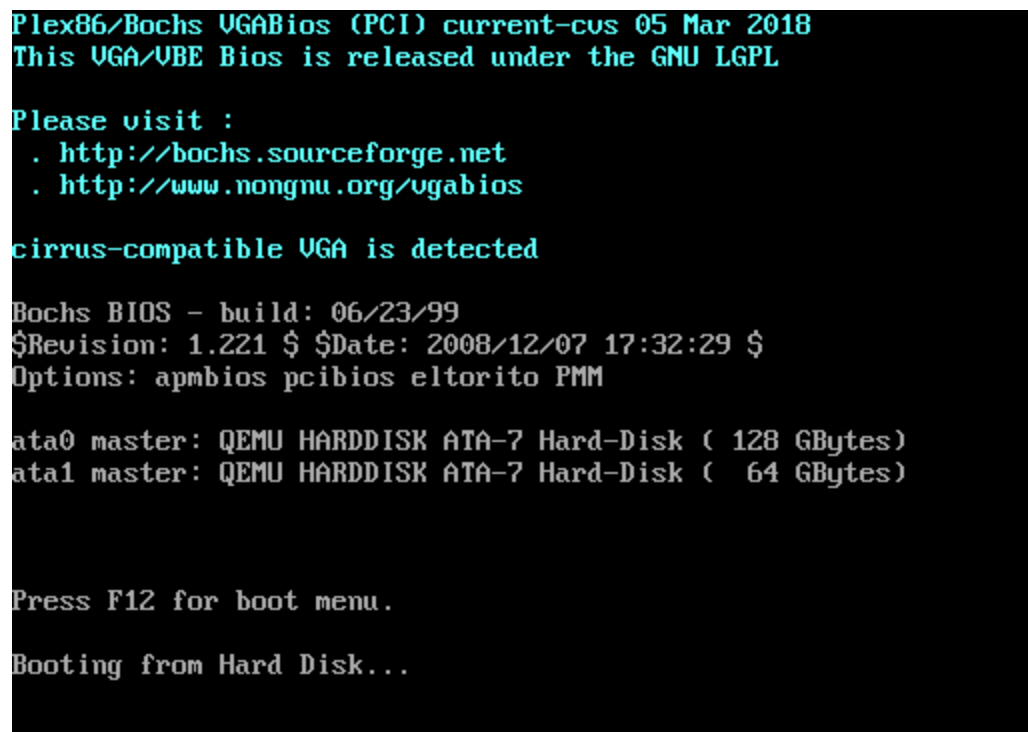
I have the same issue too, only master can be access. The screenshot of instance node report this
 cvaldit
on 19 Aug 2018
cvaldit
on 19 Aug 2018
Issues go stale after 90d of inactivity.
Mark the issue as fresh with /remove-lifecycle stale.
Stale issues rot after an additional 30d of inactivity and eventually close.
If this issue is safe to close now please do so with /close.
Send feedback to sig-testing, kubernetes/test-infra and/or fejta.
/lifecycle stale
 fejta-bot
on 17 Nov 2018
fejta-bot
on 17 Nov 2018
I am currently seeing a similar issue. The issue appeared when I switched to using the amazon-vpc-routed-eni option.
Full command:
kops create cluster \
    --zones us-west-2a \
    --kubernetes-version 1.12.2 \
    --networking amazon-vpc-routed-eni \
    --node-count 3 \
    --node-size m5.large \
    $CLUSTER_NAME
In the kubelet logs on the nodes I see this message:
cni.go:188] Unable to update cni config: No networks found in /etc/cni/net.d/
kubelet.go:2167] Container runtime network not ready: NetworkReady=false reason:NetworkPluginNotReady message:docker: network plugin is not ready: cni config uninitialized
kops version is 1.10.1
Downgrading to Kubernetes 1.10.11 appears to make the issue disappear.
 tmlbl
on 29 Dec 2018
tmlbl
on 29 Dec 2018
Just saw the same issue, but my scenario was different. My environment experienced an AWS outage in one of the availability zones, so a node and a master died and got recreated in that same zone(after the outage got resolved).
Both did not join the cluster after they got recreated(not sure why), just restarted both and they joined the cluster without me doing anything beyond the restart.
Not sure if that issue will persist with the 1.11.7 version that is now available but 1.11.2 is definitely aversion that suffers from that.
 sciffer
on 8 Mar 2019
sciffer
on 8 Mar 2019
I was facing same error, I put weave instead of cni in my kops cmd
 shree007
on 22 Mar 2019
shree007
on 22 Mar 2019
I had the same issue. I later realized that one of my private subnet didn't have a route to NAT Gateway, so the node in that private subnet would always fail to join, once I fixed that, my machine not joining issue went away!!! K8s version 1.11.8
 adnanafik
on 1 Apr 2019
adnanafik
on 1 Apr 2019
Hey All!
I had this issue and what fixed it for me was to hop into Route 53. kops had left the default bootstrap IP (203.0.113.123 in my case) in the api.internal A record for the master node.
As soon as I updated the api.internal A record in Route 53 to point to the Private IP of the master node, the workers started joining the cluster no problem.
 mlapointe22
on 24 Apr 2019
mlapointe22
on 24 Apr 2019
Issues go stale after 90d of inactivity.
Mark the issue as fresh with /remove-lifecycle stale.
Stale issues rot after an additional 30d of inactivity and eventually close.
If this issue is safe to close now please do so with /close.
Send feedback to sig-testing, kubernetes/test-infra and/or fejta.
/lifecycle stale
fejta-bot
on 23 Jul 2019
In my case, I've updated the IAM role of the master node with a new role that probably didn't have enough privileges. After rolling back the role and restarting the instance, it was able to join the cluster within a few mins.
 demisx
on 1 Aug 2019
demisx
on 1 Aug 2019
Stale issues rot after 30d of inactivity.
Mark the issue as fresh with /remove-lifecycle rotten.
Rotten issues close after an additional 30d of inactivity.
If this issue is safe to close now please do so with /close.
Send feedback to sig-testing, kubernetes/test-infra and/or fejta.
/lifecycle rotten
fejta-bot
on 31 Aug 2019
1) What kops version are you running?
~> kops version
Version 1.13.0
2) What Kubernetes version are you running?
~> kubectl version
Client Version: version.Info{Major:"1", Minor:"15", GitVersion:"v1.15.3", GitCommit:"2d3c76f9091b6bec110a5e63777c332469e0cba2", GitTreeState:"clean", BuildDate:"2019-08-19T12:36:28Z", GoVersion:"go1.12.9", Compiler:"gc", Platform:"darwin/amd64"}
Server Version: version.Info{Major:"1", Minor:"11", GitVersion:"v1.11.7", GitCommit:"65ecaf0671341311ce6aea0edab46ee69f65d59e", GitTreeState:"clean", BuildDate:"2019-01-24T19:22:45Z", GoVersion:"go1.10.7", Compiler:"gc", Platform:"linux/amd64"}
3) What cloud provider are you using?
AWS
4) What commands did you run?
Updated the following in my main.tf
k8s_version = "1.11.7"
kubernetes_ami = "kope.io/k8s-1.11-debian-stretch-amd64-hvm-ebs-2018-08-17"
k8s_version = "1.12.0"
kubernetes_ami = "kope.io/k8s-1.12-debian-stretch-amd64-hvm-ebs-2019-08-16"
And ran:
terraform plan
terraform apply
kops rolling-update cluster {{ cluster_name }} --state=s3://{{ state_file }}
kops rolling-update cluster {{ cluster_name }} --state=s3://{{ state_file }} --yes
5) What happened after the commands executed?
The rolling-update successfully terminated the master node it started with but continually returned:
I0918 09:53:53.739922 4996 instancegroups.go:273] Cluster did not pass validation, will try again in "30s" until duration "5m0s" expires: machine REDACTED has not yet joined cluster.
```kops validate cluster non-prod-test.k8s.local --state=s3://fispan-non-prod-infra-state
VALIDATION ERRORS
KIND NAME MESSAGE
Machine REDACTED machine REDACTED has not yet joined cluster
**6) What did you expect to happen?**
I expected that by updating the terraform file and subsequently getting the kops file updated, that the master node would terminate and using our scaling policy re-provision itself. But with the Kubernetes version now showing 1.12.

**7) Please provide your cluster manifest:**
```---
apiVersion: kops/v1alpha2
kind: InstanceGroup
metadata:
  creationTimestamp: 2019-09-18T16:39:38Z
  generation: 1
  labels:
    kops.k8s.io/cluster: REDACTED
  name: REDACTED
spec:
  cloudLabels:
    access: private
    env: non-prod-test
    role: master
    subnet: management
  hooks:
  - manifest: |
      [Unit]
      Description=etcd2 backup environment service

      [Service]
      Type=oneshot
      ExecStart=-/bin/bash -c "echo DOCKER_CONTAINER=\`docker ps --filter label=io.kubernetes.container.name=etcd-container --filter volume=/var/etcd/data --format '{{.ID}}'\` > /tmp/etcd2_container"

      [Install]
      WantedBy=multi-user.target
    name: etcd2-backup-environment.service
  - manifest: "[Unit]\nDescription=etcd2 backup service\n\n[Service]\nType=oneshot\nExecStartPre=-/bin/bash
      -c \"echo DOCKER_CONTAINER=\\`docker ps --filter label=io.kubernetes.container.name=etcd-container
      --filter volume=/var/etcd/data --format '{{.ID}}'\\` > /tmp/etcd2_container\"\nEnvironmentFile=/tmp/etcd2_container\nExecStartPre=-/usr/bin/docker
      pull skyscrapers/etcd2-backup:latest\nExecStart=-/usr/bin/docker run \\\n  --volumes-from
      \\${DOCKER_CONTAINER} \\\n  --name etcd2-backup \\\n  -e ETCD_NODE=REDACTED
      -e K8S_CLUSTER_NAME=non-prod-test.k8s.local -e KOPS_STATE_BUCKET=fispan-non-prod-infra-state
      -e ETCD_DATA_DIR=/var/etcd/data\\\n  skyscrapers/etcd2-backup:latest \nExecStartPost=-/usr/bin/docker
      rm etcd2-backup\nRequires=etcd2-backup-environment.service\n\n[Install]\nWantedBy=multi-user.target\n"
    name: etcd2-backup.service
  - manifest: |
      [Unit]
      Description=etcd2-backup service timer

      [Timer]
      OnBootSec=2min
      OnUnitActiveSec=60min

      [Install]
      WantedBy=timers.target
    name: etcd2-backup.timer
  image: kope.io/k8s-1.12-debian-stretch-amd64-hvm-ebs-2019-08-16
  machineType: t3.medium
  maxSize: 1
  minSize: 1
  nodeLabels:
    type: master
  role: Master
  rootVolumeSize: 15
  subnets:
  - REDACTED
EDIT:
Using a generic ubuntu container, deploying it in the cluster. I was able to ssh into the master node currently missing from the cluster. Turns out kube-apiserver keeps restarting, which from context seems to be the root issue.
Sep 18 23:34:59 ip-172-40-205-238 kubelet[2768]: E0918 23:34:59.996403 2768 pod_workers.go:186] Error syncing pod ddde0c4b85abda7c6e3dbadb46bd8055 ("kube-apiserver-ip-172-40-205-238.ap-southeast-2.compute.internal_kube-system(ddde0c4b85abda7c6e3dbadb46bd8055)"), skipping: failed to "StartContainer" for "kube-apiserver" with CrashLoopBackOff: "Back-off 5m0s restarting failed container=kube-apiserver pod=kube-apiserver-ip-172-40-205-238.ap-southeast-2.compute.internal_kube-system(ddde0c4b85abda7c6e3dbadb46bd8055)"
Sep 18 23:34:59 ip-172-40-205-238 kubelet[2768]: E0918 23:34:59.996544 2768 kubelet.go:2236] node "ip-172-40-205-238.ap-southeast-2.compute.internal" not found
I've seen several articles and questions that cite kubeadm as the problem, but I don't currently have that. I'll post whatever I find here for the record.
 aaronpederson
on 18 Sep 2019
aaronpederson
on 18 Sep 2019
Rotten issues close after 30d of inactivity.
Reopen the issue with /reopen.
Mark the issue as fresh with /remove-lifecycle rotten.
Send feedback to sig-testing, kubernetes/test-infra and/or fejta.
/close
fejta-bot
on 19 Oct 2019
@fejta-bot: Closing this issue.
In response to this:
Rotten issues close after 30d of inactivity.
Reopen the issue with/reopen.
Mark the issue as fresh with/remove-lifecycle rotten.Send feedback to sig-testing, kubernetes/test-infra and/or fejta.
/close
Instructions for interacting with me using PR comments are available here. If you have questions or suggestions related to my behavior, please file an issue against the kubernetes/test-infra repository.
 k8s-ci-robot
on 19 Oct 2019
k8s-ci-robot
on 19 Oct 2019
Check /var/log/syslog on the node. In my case, the api load balancer was set to *.cluster.local
 christianjoun
on 20 May 2020
christianjoun
on 20 May 2020
Related issues
 georgebuckerfield
·
4Comments
georgebuckerfield
·
4Comments
 justinsb
·
4Comments
justinsb
·
4Comments
 chrislovecnm
·
3Comments
chrislovecnm
·
3Comments
 rot26
·
5Comments
rot26
·
5Comments
 joshbranham
·
3Comments
joshbranham
·
3Comments
Most helpful comment
I am currently seeing a similar issue. The issue appeared when I switched to using the
amazon-vpc-routed-enioption.Full command:
In the kubelet logs on the nodes I see this message:
kops version is
1.10.1Downgrading to Kubernetes
1.10.11appears to make the issue disappear.