Konga: Konga redirects to /register instead of /konga/register
This issue a bug related to #357.
The goal is to host Konga at /konga, but Konga redirects to /register instead of /konga/register. I've not customized any configuration for Kong or Konga so both their database configurations are vanilla.
This seems to be a bug that only impacts the HTTP 302 /register redirect when opening Konga on a clean, out of the box install. The developer tools show all Konga requests are going to /konga/ except for the HTTP 302 /register redirect.
I tried accessing Konga two different ways. The first is through ingress and the second is bypassing ingress and using kubectl port-forward.
First attempt, through the Ingress

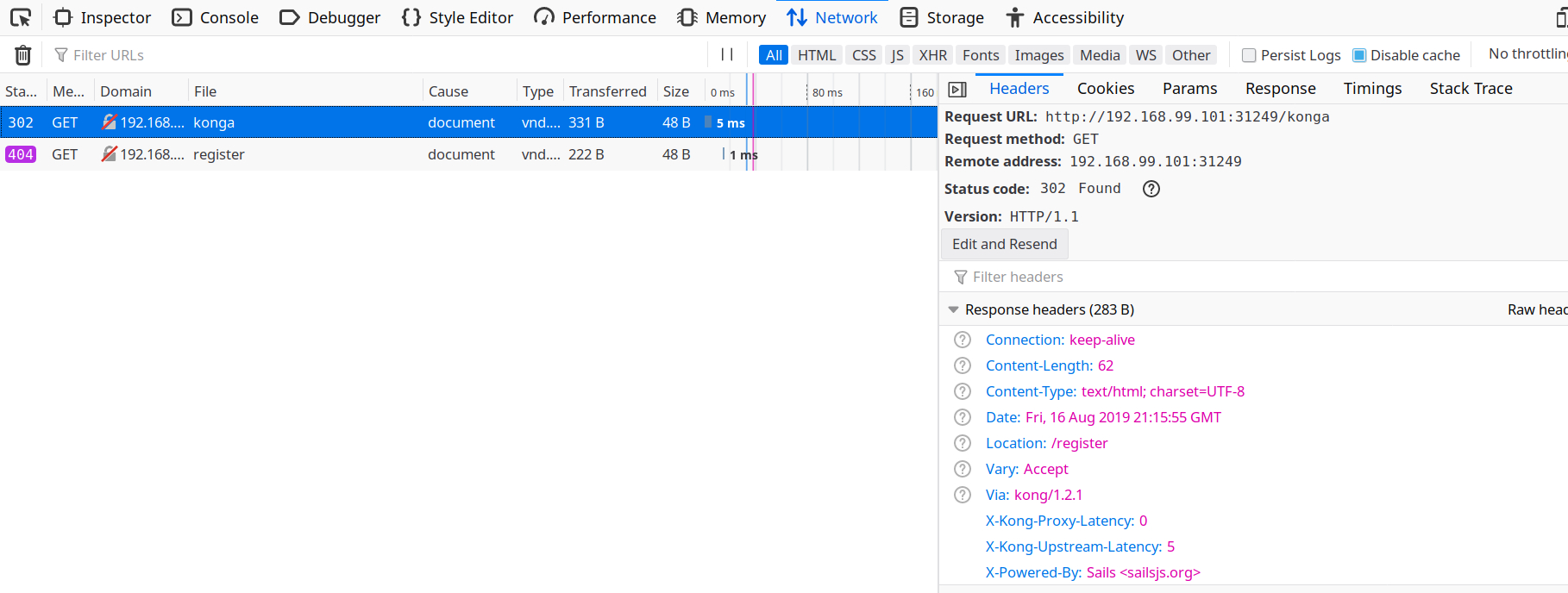
As shown above, Konga sends a HTTP 320 /register to the browser when access my ingress at /konga.
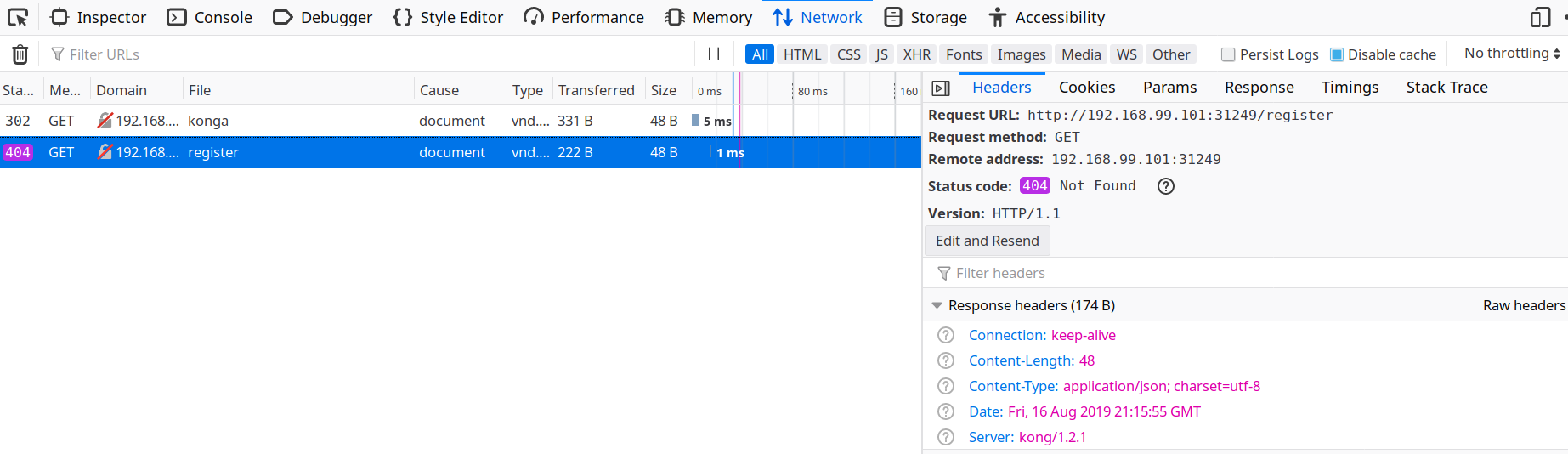
Second attempt, bypassing ingress with kubectl port-forward
To rule out Ingress configuration issues I thought it was a good idea to access Konga directly without involving Kong or k8s Ingress. This revealed Konga is redirecting everything to /konga/ except for the HTTP 302 /register redirect.
First I establish a direct connection to the Konga pod.

Then I accessed Konga directly and as seen below Konga successfully loads /register. This is expected because I'm bypassing my ingress. Keep in mind I left Konga's BASE_URL environment variable set to /konga/ in my deployment file.
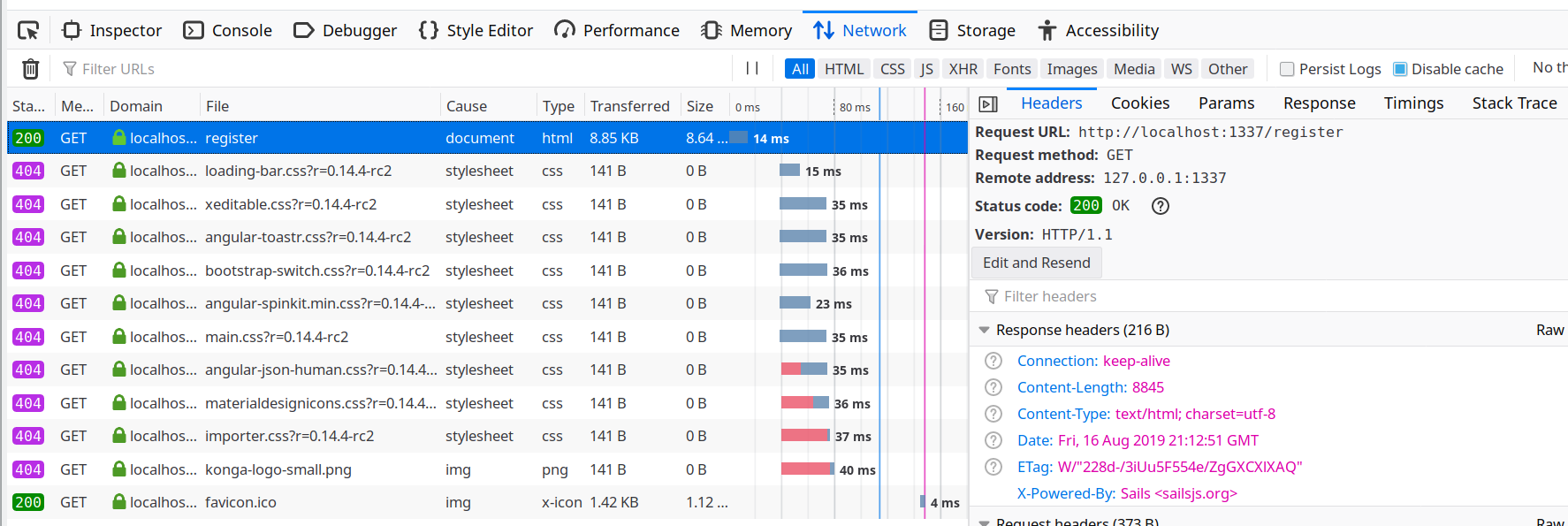
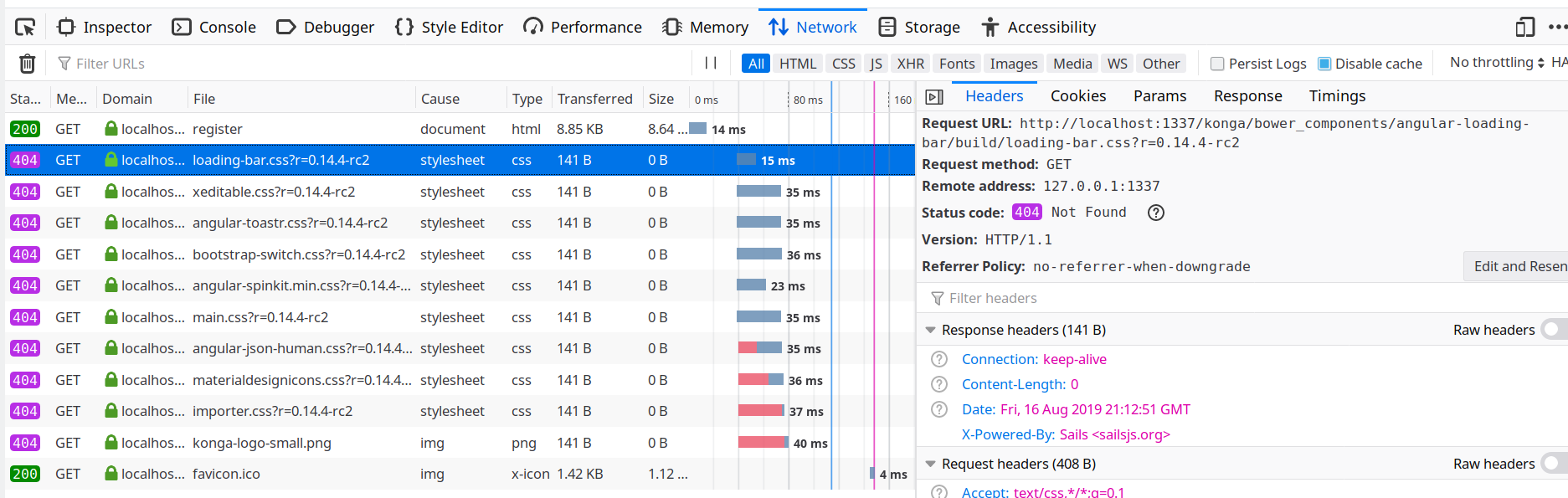
Here is where the bug rears it's ugly head. The web page rendered incorrectly and I immediately knew web assets were not loaded. Sure enough all web assets 404'd except for the /register page itself.
Here's my YAML configuration.
# Source: konga/templates/konga.svc.yaml
kind: Service
apiVersion: v1
metadata:
  name: "konga-konga-svc"
spec:
  ports:
    - name: http
      port: 80
      targetPort: 1337
  selector:
    app: "konga-konga"
    release: "konga"
    chart: "konga-0.1.0"
  type: ClusterIP
---
# Source: konga/templates/konga.deploy.yaml
apiVersion: apps/v1beta1
kind: Deployment
metadata:
  name: "konga-konga"
  labels:
    app: "konga-konga"
    release: "konga"
    chart: "konga-0.1.0"
spec:
  replicas: 1
  selector:
    matchLabels:
      app: "konga-konga"
      release: "konga"
      chart: "konga-0.1.0"
  template:
    metadata:
      labels:
        app: "konga-konga"
        release: "konga"
        chart: "konga-0.1.0"
    spec:
      imagePullSecrets:
        []

      containers:
      - name: konga
        image: "pantsel/konga:next"
        imagePullPolicy: IfNotPresent
        ports:
          - name: http
            containerPort: 1337
            protocol: TCP
        resources:
            {}

        env:

            - name: NODE_ENV
              value: development
            - name: TOKEN_SECRET
              value: 9GbbT5Oa2XaH
            - name: BASE_URL
              value: /konga/
---
# Source: konga/templates/ingress.yaml
apiVersion: extensions/v1beta1
kind: Ingress
metadata:
  name: "konga-konga-ingress"
  annotations:
    nginx.ingress.kubernetes.io/rewrite-target: /
spec:
  rules:

  - http:
      paths:
      - path: /konga
        backend:
          serviceName: "konga-konga-svc"
          servicePort: 80
 reloaded
All 15 comments
@reloaded , The current version of Konga doesn't play well with relative paths.
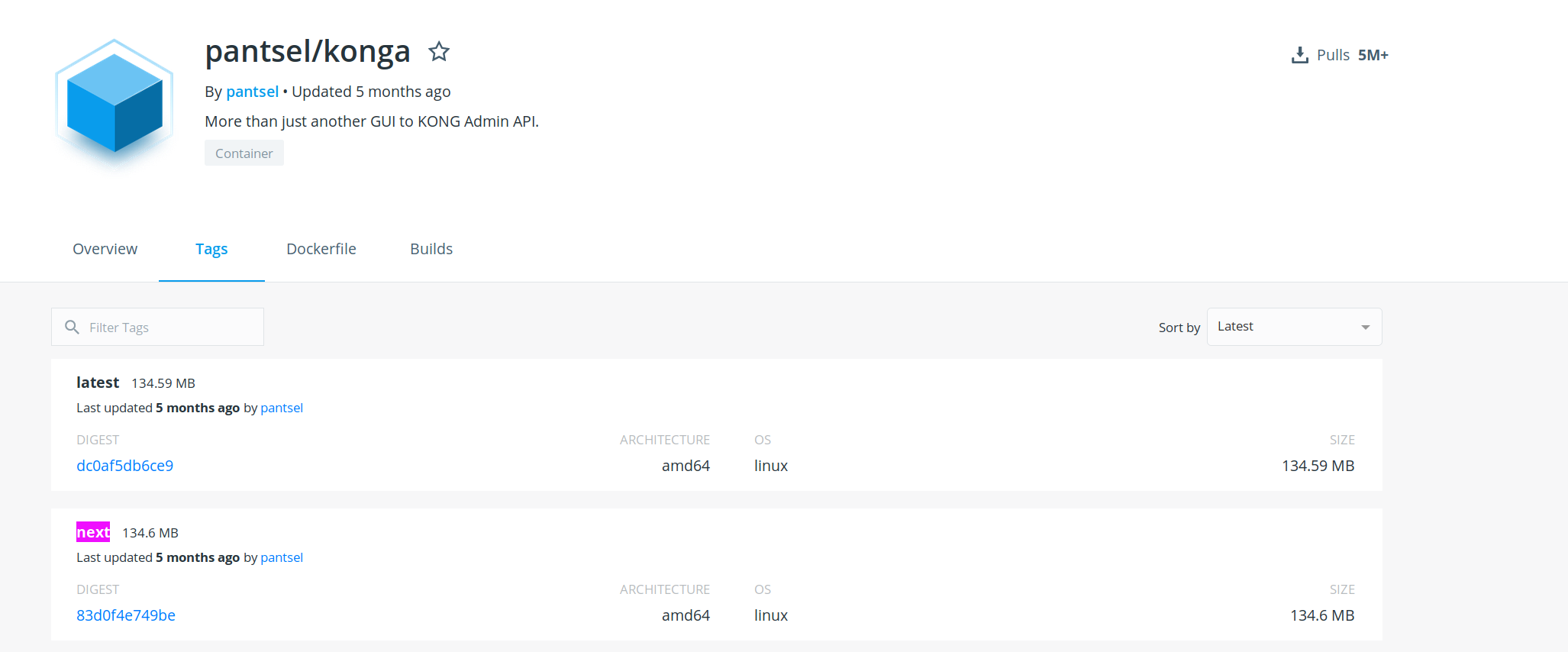
You can instead try the next branch or pantsel/konga:next from docker hub.
Check out the changelog
https://github.com/pantsel/konga/blob/next/CHANGELOG.md
I think that's what you need.
 pantsel
on 19 Aug 2019
pantsel
on 19 Aug 2019
@reloaded , The current version of Konga doesn't play well with relative paths.
You can instead try thenextbranch orpantsel/konga:nextfrom docker hub.Check out the changelog
https://github.com/pantsel/konga/blob/next/CHANGELOG.mdI think that's what you need.
@pantsel You overlooked my kubernetes manifest definitions at the end of the post. I am already referencing "pantsel/konga:next".
This bug is in the "next" branch.
reloaded
on 20 Aug 2019
You're right. Let me see what I can do.
pantsel
on 20 Aug 2019
Thank you for the superb support @pantsel
reloaded
on 20 Aug 2019
@pantsel this still seems to be an issue. I'm referencing pantsel/konga:next and setting the BASE_URL environment variable to /konga/ but it's still redirecting me to /register for a new Konga instance without prior Konga configurations.
reloaded
on 6 Sep 2019
kubectl describe pod kops-konga-deploy-6ccc6dd86c-m2dkj
Name: kops-konga-deploy-6ccc6dd86c-m2dkj
Namespace: etl
Priority: 0
Node: bmk8ngpunode/10.251.96.21
Start Time: Fri, 06 Sep 2019 10:39:35 -0700
Labels: app.kubernetes.io/instance=kops-konga
app.kubernetes.io/name=kops-konga
pod-template-hash=6ccc6dd86c
Annotations: <none>
Status: Running
IP: 10.32.0.9
Controlled By: ReplicaSet/kops-konga-deploy-6ccc6dd86c
Containers:
konga:
Container ID: docker://a2144579b1bee5a684aa61b46c3e2d692f6f2701687f08bbbd17efdd78a70076
Image: pantsel/konga:next
Image ID: docker-pullable://pantsel/konga@sha256:a064b58e44f755acd0bba3bbef068d9edf6af9b5461d336ce00bdb26d35a77d5
Port: 1337/TCP
Host Port: 0/TCP
State: Running
Started: Fri, 06 Sep 2019 10:41:18 -0700
Last State: Terminated
Reason: Completed
Exit Code: 0
Started: Fri, 06 Sep 2019 10:40:26 -0700
Finished: Fri, 06 Sep 2019 10:40:26 -0700
Ready: True
Restart Count: 4
Environment:
DB_ADAPTER: <set to the key 'db-adapter' in secret 'kops-konga-secrets'> Optional: false
DB_HOST: <set to the key 'db-host' in secret 'kops-konga-secrets'> Optional: false
DB_PORT: <set to the key 'db-port' in secret 'kops-konga-secrets'> Optional: false
DB_USER: <set to the key 'db-username' in secret 'kops-konga-secrets'> Optional: false
DB_PASSWORD: <set to the key 'db-password' in secret 'kops-konga-secrets'> Optional: false
BASE_URL: <set to the key 'base-url' in secret 'kops-konga-secrets'> Optional: false
NODE_ENV: <set to the key 'node-env' in secret 'kops-konga-secrets'> Optional: false
TOKEN_SECRET: <set to the key 'token-secret' in secret 'kops-konga-secrets'> Optional: false
Mounts:
/var/run/secrets/kubernetes.io/serviceaccount from default-token-p26z6 (ro)
Conditions:
Type Status
Initialized True
Ready True
ContainersReady True
PodScheduled True
Volumes:
default-token-p26z6:
Type: Secret (a volume populated by a Secret)
SecretName: default-token-p26z6
Optional: false
QoS Class: BestEffort
Node-Selectors: <none>
Tolerations: node.kubernetes.io/not-ready:NoExecute for 300s
node.kubernetes.io/unreachable:NoExecute for 300s
Events:
Type Reason Age From Message
---- ------ ---- ---- -------
Normal Scheduled 5m8s default-scheduler Successfully assigned etl/kops-konga-deploy-6ccc6dd86c-m2dkj to bmk8ngpunode
Normal Pulling 4m18s (x4 over 5m7s) kubelet, bmk8ngpunode Pulling image "pantsel/konga:next"
Normal Pulled 4m18s (x4 over 5m6s) kubelet, bmk8ngpunode Successfully pulled image "pantsel/konga:next"
Normal Created 4m18s (x4 over 5m6s) kubelet, bmk8ngpunode Created container konga
Normal Started 4m17s (x4 over 5m5s) kubelet, bmk8ngpunode Started container konga
Warning BackOff 3m37s (x9 over 5m) kubelet, bmk8ngpunode Back-off restarting failed container
Pod Environment Variables:
BASE_URL=/konga/
DB_PORT=5432
DB_HOST=postgresql-postgresql
HOSTNAME=kops-konga-deploy-6ccc6dd86c-m2dkj
DB_USER=postgres
NODE_ENV=development
DB_PASSWORD=xxxx
DB_ADAPTER=postgres
TOKEN_SECRET=xxxxx
@pantsel Is this related to the fact that the :next docker image hasn't been updated in months even after your recent BASE_URL bug patch?
reloaded
on 7 Sep 2019
@pantsel any movement on this issue?
reloaded
on 23 Sep 2019
@reloaded , I'm terribly sorry for the delayed response.
The branch wasn't updated due to a change on github's integration with 3rd party platforms.
That is something I recently noticed as well.
Anyway, the integration with dockerhub is working again and a new release is out, that includes all fixes and updates from the next branch.
pantsel
on 17 Oct 2019
Hi, I think the issue still exist
 alvindaiyan
on 29 Oct 2019
alvindaiyan
on 29 Oct 2019
Hi @pantsel.
I think that @alvindaiyan is right and this issue is still not fixed.
I've tried the Docker images with tags 0.14.7, next and latest and none of them worked. They all give a 404 error code when using BASE_URL env variable.
If I set the log level to silly and execute inside the container this:
bash-4.4# echo $BASE_URL
/konga/
bash-4.4# wget localhost:1337/konga/
Connecting to localhost:1337 (127.0.0.1:1337)
wget: server returned error: HTTP/1.1 404 Not Found
bash-4.4# wget localhost:1337/
Connecting to localhost:1337 (127.0.0.1:1337)
wget: server returned error: HTTP/1.1 404 Not Found
I 2019-12-03T08:39:44.613393143Z Sending 404 ("Not Found") response
I 2019-12-03T08:39:44.612447920Z Disabling CSRF protection for /konga/register since request has no session.
I 2019-12-03T08:39:44.598342754Z Disabling CSRF protection for / since request has no session.
I 2019-12-03T08:39:40.843727636Z Sending 404 ("Not Found") response
I 2019-12-03T08:39:40.836683866Z Disabling CSRF protection for /konga/ since request has no session.
E 2019-12-03T08:39:17.619950049Z -------------------------------------------------------
E 2019-12-03T08:39:17.619925640Z Port        : 1337
E 2019-12-03T08:39:17.619873427Z Host        : 0.0.0.0
E 2019-12-03T08:39:17.619816573Z Environment : production
I 2019-12-03T08:39:17.619740200Z
E 2019-12-03T08:39:17.619698667Z :: Tue Dec 03 2019 08:39:17 GMT+0000 (Coordinated Universal Time)
E 2019-12-03T08:39:17.619644125Z -------------------------------------------------------
I 2019-12-03T08:39:17.619481242Z
I 2019-12-03T08:39:17.619307438Z To shut down Sails, press <CTRL> + C at any time.
I 2019-12-03T08:39:17.619290175Z To see your app, visit http://0.0.0.0:1337
I 2019-12-03T08:39:17.618783368Z Server lifted in `/app`
I 2019-12-03T08:39:17.618771047Z
I 2019-12-03T08:39:17.618751746Z  ____---___--___---___--___---___--___-__
I 2019-12-03T08:39:17.618745677Z    __---___--___---___--___---___--___
I 2019-12-03T08:39:17.618727224Z                 `--'-------'
I 2019-12-03T08:39:17.618602753Z                 .-'.-==|/_--'
I 2019-12-03T08:39:17.618593929Z                    ,'  |'  \
I 2019-12-03T08:39:17.618501995Z                      / || \
I 2019-12-03T08:39:17.618494376Z                       /|.\
I 2019-12-03T08:39:17.618489459Z    v0.12.14            |\
I 2019-12-03T08:39:17.618481665Z    Sails              <|    .-..-.
I 2019-12-03T08:39:17.618446324Z
I 2019-12-03T08:39:17.618435877Z                .-..-.
I 2019-12-03T08:39:17.618341491Z
I 2019-12-03T08:39:17.615531668Z Restricting access to explicit host: 0.0.0.0
 fgsalomon
on 3 Dec 2019
fgsalomon
on 3 Dec 2019
Any update on this? I'm experiencing the same issues.
 btkelly
on 14 Apr 2020
btkelly
on 14 Apr 2020
Any update on this? I'm experiencing the same issues.
 wangfeng-1
on 16 May 2020
wangfeng-1
on 16 May 2020
Same issue for me.
 chenguang-Steve
on 30 Jul 2020
chenguang-Steve
on 30 Jul 2020
Any update on this? I'm experiencing the same issues.
BASE_URL=/konga/
set service and router in kong to proxy to konga (strip path /konga/)
 zffocussss
on 11 May 2021
zffocussss
on 11 May 2021
Related issues
 li-bit
·
4Comments
li-bit
·
4Comments
 jamelseagraves
·
3Comments
jamelseagraves
·
3Comments
 grillorafael
·
7Comments
grillorafael
·
7Comments
 PichayuthK
·
4Comments
PichayuthK
·
4Comments
 jayeshkulkarni
·
3Comments
jayeshkulkarni
·
3Comments
Most helpful comment
Hi @pantsel.
I think that @alvindaiyan is right and this issue is still not fixed.
I've tried the Docker images with tags
0.14.7,nextandlatestand none of them worked. They all give a 404 error code when usingBASE_URLenv variable.If I set the log level to silly and execute inside the container this: