kong 8443 on docker "Could not get any response"
Hello everyone, i'm getting a terrible problem that is drive me crazy this is my docker-compose.yml
version: "3.2"

networks:
  vendor-php_vendor_default:
    external: true

services:

  kong-database:
    container_name: vendor_kong-database
    image: postgres:11
    restart: always
    networks:
      - vendor-php_vendor_default
    environment:
      POSTGRES_USER: kong
      POSTGRES_DB: kong
    expose:
      - 5432
    healthcheck:
      test: ["CMD", "pg_isready", "-U", "kong"]
      interval: 5s
      timeout: 5s
      retries: 5

  kong-bootstrap:
    container_name: vendor_kong-bootstrap
    image: kong:latest
    command: "kong migrations bootstrap"
    networks:
      - vendor-php_vendor_default
    restart: on-failure
    environment:
      KONG_PG_HOST: kong-database
    links:
      - kong-database
    depends_on:
      - kong-database

  kong-migration:
    container_name: vendor_kong-migration
    image: kong:latest
    command: "kong migrations up"
    networks:
      - vendor-php_vendor_default
    restart: on-failure
    environment:
      KONG_PG_HOST: kong-database
    links:
      - kong-database
    depends_on:
      - kong-database

  kong:
    container_name: vendor_kong
    image: kong:latest
    restart: always
    networks:
      - vendor-php_vendor_default
    links:
      - vendor_user-service:user-service
    environment:
      KONG_PG_HOST: kong-database
      # proxy configs
      KONG_PROXY_LISTEN: 0.0.0.0:8000
      KONG_PROXY_LISTEN_SSL: 0.0.0.0:8443
      KONG_ADMIN_LISTEN: 0.0.0.0:8001
      KONG_ADMIN_LISTEN_SSL: 0.0.0.0:8444
      # logs
      KONG_PROXY_ACCESS_LOG: /dev/stdout
      KONG_ADMIN_ACCESS_LOG: /dev/stdout
      KONG_PROXY_ERROR_LOG: /dev/stderr
      KONG_ADMIN_ERROR_LOG: /dev/stderr
      # ssl config
      KONG_SSL_CERT: /certs/certificate.crt
      KONG_SSL_CERT_KEY: /certs/certificate.key
      KONG_ADMIN_SSL_CERT: /certs/certificate.crt
      KONG_ADMIN_SSL_CERT_KEY: /certs/certificate.key
      KONG_SSL: "on"
    depends_on:
      - kong-migration
      - kong-database
      - vendor_user-service
    healthcheck:
      test: ["CMD", "curl", "-f", "http://kong:8001"]
      interval: 5s
      timeout: 2s
      retries: 15

    ports:
      - 8000:8000
      - 8001:8001
      - 8443:8443
      - 8444:8444
    volumes:
      - ./certs:/certs

  #######################################
  # Elastic: Set up an elastic docker behind Kong
  #######################################
  kong-elastic:
    container_name: vendor_kong-elastic
    image: docker.elastic.co/elasticsearch/elasticsearch:6.5.4
    restart: always
    networks:
      - vendor-php_vendor_default
    environment:
      - "discovery.type=single-node"


  ## micro services

  vendor_user-service:
    container_name: vendor_node-user-service
    external_links:
      - mysql_vendor
    image: node:alpine
    volumes:
      - ./microservices/user-service:/app
    working_dir: /app
    networks:
      - vendor-php_vendor_default
    environment:
      NODE_ENV: development
    ports:
      - 3001:3000
    expose:
      - 3000
    command: npm run dev
And this the request that i'm trying to do.
curl -X POST \
https://localhost:9443/users/oauth2/token \
-H 'Content-Type: application/json' \
-H 'Host: user-service' \
-d '{
"client_id": "CLIENT_ID_11",
"client_secret": "CLIENT_SECRET_11",
"grant_type": "password",
"provision_key": "5iRVB74YVoWKDI7YdIuD9eWSH2iMRR66",
"authenticated_userid": "[email protected]",
"scope": "email"
}'
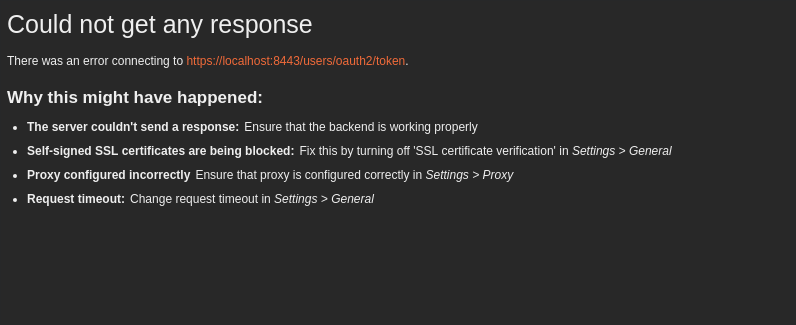
And if i try to do with -k (ignore certificate) i had this error message:
"curl: (35) OpenSSL SSL_connect: SSL_ERROR_SYSCALL in connection to localhost:9443"
On postman with ssl verification disabled:
 jl91
jl91
All 8 comments

this is postman's console log.
jl91
on 10 Jan 2019
Hi, are you able to Kong's logs with your setup? If your request don't make Kong produce any new log entries, chances are that the problem is on the Docker setup, and the problem isn't related with Kong specifically. If you see anything in the logs, they might point you to where the problem is.
 kikito
on 10 Jan 2019
kikito
on 10 Jan 2019
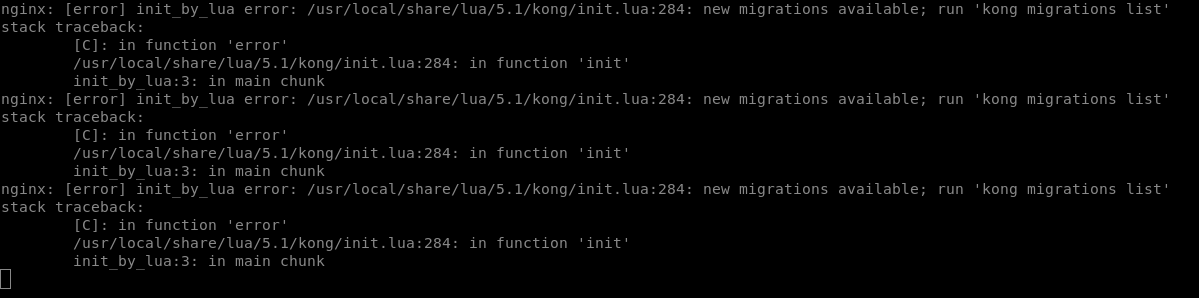
this is the initial docker-logs, and this is just the logs that i have inside kong container
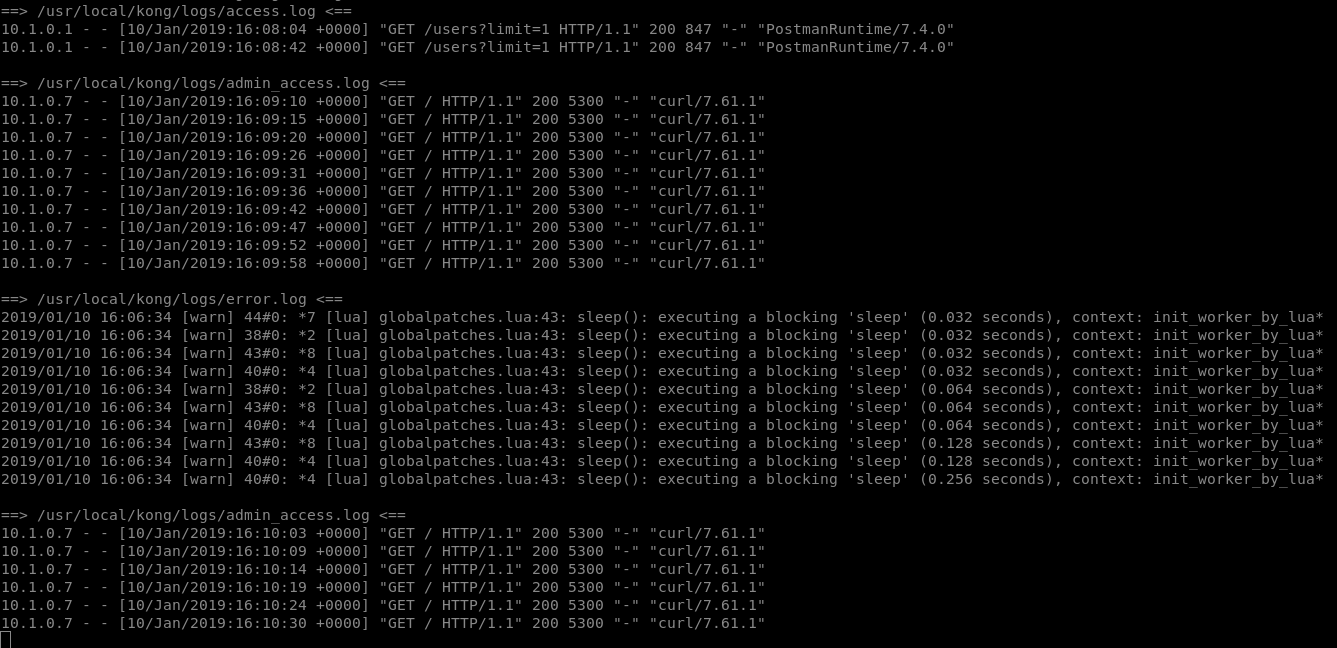
inside container has no logs about 9443 ports
jl91
on 10 Jan 2019
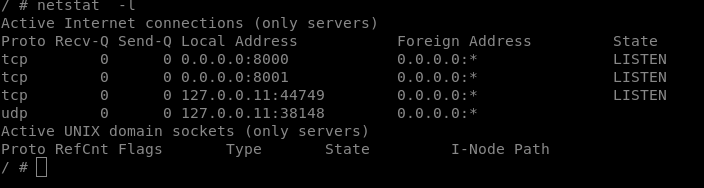
the curious thing is that, inside container when i run netstat -l 8443 is not listed
jl91
on 10 Jan 2019
DONE, the problem was
  KONG_PROXY_LISTEN: 0.0.0.0:8000, 0.0.0.0:8443 ssl
  KONG_ADMIN_LISTEN: 0.0.0.0:8001, 0.0.0.0:8444 ssl
we must set as these syntax do work properly.
jl91
on 10 Jan 2019
Hi @jl91
Can I ask you something?
For the ENV variables of Kong SSL certificates.
Current,y with my setup, I can run Kong with port 8000, but, I couldn't use it with port 8443.
When I access with ip:8443, it returns connection refused. Is it something related to the SSL certificate. If it's, how can I config the certificate properly?
Thank you!
 CatsPlugins
on 24 Feb 2019
CatsPlugins
on 24 Feb 2019
@jl91 thank you! Indeed you have to set 0.0.0.0:8443 ssl under KONG_PROXY_LISTEN, rather than KONG_PROXY_LISTEN_SSL. It worked for me even as I added a local self-signed certificate via Konga's certificates tab.
Seems like KONG_PROXY_LISTEN_SSL isn't used at all?
@CatsPlugins I know it's a bit late but you might want to show us your docker configuration? I recall the original docker-compose.yml does not open up port 8443 so you'll have to add 8443:8443 under ports for Docker to map the HTTPS ports as well.
 gjj
on 31 Mar 2020
gjj
on 31 Mar 2020
DONE, the problem was
  KONG_PROXY_LISTEN: 0.0.0.0:8000, 0.0.0.0:8443 ssl
  KONG_ADMIN_LISTEN: 0.0.0.0:8001, 0.0.0.0:8444 ssl
we must set as these syntax do work properly.
it working for me
 thabot
on 13 Apr 2020
thabot
on 13 Apr 2020
Related issues
 hos7ein
·
3Comments
hos7ein
·
3Comments
 hbagdi
·
3Comments
hbagdi
·
3Comments
 lavoiedn
·
3Comments
lavoiedn
·
3Comments
 rucciva
·
3Comments
rucciva
·
3Comments
 vikaskmr1008
·
3Comments
vikaskmr1008
·
3Comments
Most helpful comment
DONE, the problem was
we must set as these syntax do work properly.