Kong: [OAuth2] no API found with those values
Hello. I'm trying to add OAuth2 to my API's
I have globally added oauth2 plugin. When I access to http://my.ip:8001/plugins/1247e0cf-679c-4093-93bd-59d300181daa
It shows me this:
{
    "created_at": 1511506820000,
    "config": {
        "enable_client_credentials": true,
        "mandatory_scope": false,
        "hide_credentials": false,
        "accept_http_if_already_terminated": true,
        "enable_implicit_grant": false,
        "global_credentials": true,
        "token_expiration": 7200,
        "enable_password_grant": false,
        "anonymous": "",
        "enable_authorization_code": true,
        "provision_key": "function",
        "scopes": [
             "test"
        ]
    },
    "id": "1247e0cf-679c-4093-93bd-59d300181daa",
    "enabled": true,
    "name": "oauth2"
}
Then I have created oauth2 credential to my testing user http://my.ip:8001/consumers/testing_user/oauth2
{
    "total": 1,
    "data": [
        {
            "created_at": 1511507314000,
            "client_id": "testing_client_id",
            "id": "0c589948-2b34-46af-8bfc-178efec53019",
            "redirect_uri": [
                "http://example.com"
            ],
            "name": "Testing_user_application",
            "client_secret": "Yrr9tHsRCvlG9AtaEnZbK6NGYpXSqHkh",
            "consumer_id": "5ebf6b92-373f-4c36-8fe0-ab9846496345"
        }
    ]
}
Then I try to get auth token like this:
curl -X POST \
  http://my.ip:8000/oauth2/token \
  -F grant_type=client_credentials \
  -F client_id=testing_client_id \
  -F client_secret=Yrr9tHsRCvlG9AtaEnZbK6NGYpXSqHkh \
  -F scope=test
And it throws me this error:
{
    "message": "no API found with those values"
}
Did I miss something?
 SuperMasterBlasterLaser
All 11 comments
What's your API definition (without the upstream_url property)?
 subnetmarco
on 26 Nov 2017
subnetmarco
on 26 Nov 2017
@thefosk One of my API has that kind of definition:
{
    "created_at": 1511506315714,
    "strip_uri": true,
    "id": "9333c59e-adec-4699-9161-61a4a023b63c",
    "hosts": [
        "example.com"
    ],
    "name": "Test",
    "http_if_terminated": false,
    "https_only": false,
    "retries": 5,
    "uris": [
        "/api1"
     ],
    "preserve_host": false,
    "upstream_connect_timeout": 60000,
    "upstream_read_timeout": 60000,
    "upstream_send_timeout": 60000,
    "upstream_url": "http://mockbin.org/request/api1"
}
But I have defined OAuth2 gloablly, in order to use one oauth credentials for all apis.
SuperMasterBlasterLaser
on 26 Nov 2017
When calling the /oauth2/* endpoints you still need to match the API, so in this case the URL would be :8000/api1/oauth2/* (and example.com host).
subnetmarco
on 26 Nov 2017
@thefosk As you have written. I made request to this endpoint like this
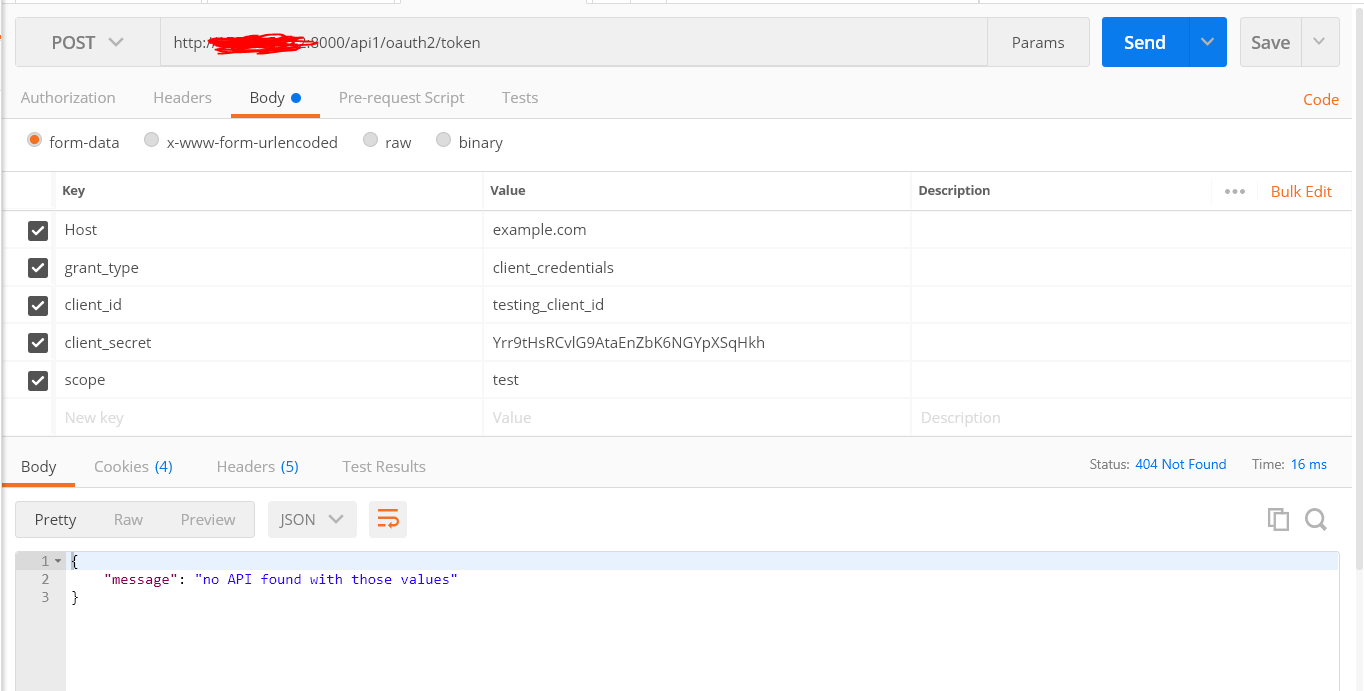
And I still get this error.
SuperMasterBlasterLaser
on 27 Nov 2017
I get this error too.
Restart or add any new api could solve it.
I guess the cache has some problem.
kong v0.10.3
 ICrazyMouse
on 29 Nov 2017
ICrazyMouse
on 29 Nov 2017
@SuperMasterBlasterLaser What version of Kong are you using?
@ICrazyMouse Please retry with Kong 0.11
 thibaultcha
on 1 Dec 2017
thibaultcha
on 1 Dec 2017
@thibaultcha updated to kong-0.11.1 two days ago,worked well up to now.
ICrazyMouse
on 1 Dec 2017
I have last version 0.11.1
As @ICrazyMouse has written before, I had this api that was before adding global oauth plugin. I needed to delete this API and recreate it and then OAuth endpoints started to work.
SuperMasterBlasterLaser
on 1 Dec 2017
I had the same issue with kong 1.x, the response message was "no Route found with those values"
I solved removing the service and adding it again as reported above.
 daton89
on 24 Jan 2019
daton89
on 24 Jan 2019
@daton89 How many proxies do you have on this Kong node and what is your underlying db setup?
 jeremyjpj0916
on 24 Jan 2019
jeremyjpj0916
on 24 Jan 2019
Hi @jeremyjpj0916, i just added a service and a route and then i added the oauth plugin, using a single Kong node, and Postgres as db.
if you suggest me how to export debug data i'm glad to help you
daton89
on 26 Jan 2019
Related issues
 noamelf
·
36Comments
jeremyjpj0916
·
81Comments
jeremyjpj0916
·
65Comments
noamelf
·
36Comments
jeremyjpj0916
·
81Comments
jeremyjpj0916
·
65Comments
 grillorafael
·
42Comments
grillorafael
·
42Comments
 timusketeers
·
36Comments
timusketeers
·
36Comments
Most helpful comment
I have last version 0.11.1
As @ICrazyMouse has written before, I had this api that was before adding global oauth plugin. I needed to delete this API and recreate it and then OAuth endpoints started to work.