kolibri start command errors with options.ini incorrect values
Observed behavior
This issue was reported at the community and I was able to reproduced it on Windows 7.
The errors will display only when you run the kolibri start command at the command prompt.
Expected behavior
Maybe we can handle these errors and append it on the log files.
User-facing consequences
…
Errors and logs
Microsoft Windows [Version 6.1.7601]
Copyright (c) 2009 Microsoft Corporation.  All rights reserved.

C:\Users\IEUser>cd /

C:\>cd Python34

C:\Python34>cd Scripts

C:\Python34\Scripts>kolibri start
Traceback (most recent call last):
  File "C:\Python34\lib\runpy.py", line 170, in _run_module_as_main
    "__main__", mod_spec)
  File "C:\Python34\lib\runpy.py", line 85, in _run_code
    exec(code, run_globals)
  File "C:\Python34\Scripts\kolibri.exe\__main__.py", line 5, in <module>
  File "C:\Python34\lib\site-packages\kolibri\utils\cli.py", line 28, in <module
>
    from . import server
  File "C:\Python34\lib\site-packages\kolibri\utils\server.py", line 17, in <mod
ule>
    from kolibri.core.deviceadmin.utils import schedule_vacuum
  File "C:\Python34\lib\site-packages\kolibri\core\deviceadmin\utils.py", line 1
3, in <module>
    from kolibri.core.tasks.main import scheduler
  File "C:\Python34\lib\site-packages\kolibri\core\tasks\main.py", line 9, in <m
odule>
    from kolibri.core.tasks.queue import Queue
  File "C:\Python34\lib\site-packages\kolibri\core\tasks\queue.py", line 1, in <
module>
    from kolibri.core.tasks.job import Job
  File "C:\Python34\lib\site-packages\kolibri\core\tasks\job.py", line 7, in <mo
dule>
    from kolibri.core.tasks.utils import current_state_tracker
  File "C:\Python34\lib\site-packages\kolibri\core\tasks\utils.py", line 9, in <
module>
    from kolibri.deployment.default.cache import diskcache_cache
  File "C:\Python34\lib\site-packages\kolibri\deployment\default\cache.py", line
 10, in <module>
    cache_options = OPTIONS["Cache"]
  File "C:\Python34\lib\site-packages\kolibri\dist\django\utils\functional.py",
line 238, in inner
    self._setup()
  File "C:\Python34\lib\site-packages\kolibri\dist\django\utils\functional.py",
line 386, in _setup
    self._wrapped = self._setupfunc()
  File "C:\Python34\lib\site-packages\kolibri\utils\conf.py", line 54, in __init
ialize_options
    return read_options_file(KOLIBRI_HOME)
  File "C:\Python34\lib\site-packages\kolibri\utils\options.py", line 240, in re
ad_options_file
    conf = ConfigObj(ini_path, configspec=get_configspec())
  File "C:\Python34\lib\site-packages\kolibri\dist\configobj.py", line 1229, in
__init__
    self._load(infile, configspec)
  File "C:\Python34\lib\site-packages\kolibri\dist\configobj.py", line 1318, in
_load
    raise error
configobj.DuplicateError: Duplicate section name at line 8.

C:\Python34\Scripts>
Steps to reproduce
Copy these values at the options.ini file and run the kolibri start command
[Urls]
[Debug]
[Server]
[Paths]
CONTENT_DIR = D:\KolibriContent
[Deployment]
URL_PATH_PREFIX = /
[Cache]
[Database]
Context
Tell us about your environment, including:
- Kolibri version: 0.13
- Operating system: Windows 7
- Browser
 mrpau-richard
All 11 comments
We tackle this issue during the euro-asia sync-up and came up with a solution to create a placeholder for the options.ini format.
mrpau-richard
on 3 Feb 2020
@mrpau-richard are you saying that both the users in that thread created the same invalid options.ini files?
 indirectlylit
on 3 Feb 2020
indirectlylit
on 3 Feb 2020
In addition to this
The options.ini file with a placeholder format inside, similar to this sample will be automatically added at the kolibri home folder after the Kolibri installation
@mrpau-richard are you saying that both the users in that thread created the same invalid options.ini files?
I'm not sure with the other user @indirectlylit if he/she has also using invalid options.ini file
(I'll try to ask more details about that user at the community issue)
mrpau-richard
on 4 Feb 2020
Is this a windows 7 specific issue?
I'm on Windows 10 and using the options.ini file provided in this issue. I'm seeing the warning described by the user
WARNING Ignoring unknown section in options file C:\Users\IEUser\.kolibri\options.ini under top level: Debug., which does not stop kolibri from running.
but I'm not seeing this error described in this issue: configobj.DuplicateError: Duplicate section name at line 8.
thank you!
 lyw07
on 8 Feb 2020
lyw07
on 8 Feb 2020
Is this a windows 7 specific issue?
I think it is @lyw07 I tested it on Windows 10 and I can't reproduce this configobj.DuplicateError: Duplicate section name at line 8. error. But when I tried to modify the options.ini with invalid drive path (sample K:\KolibriContent) there is another error saying the path does not exist and the Kolibri Windows alert message shows up.
mrpau-richard
on 10 Feb 2020
@mrpau-richard thank you for testing! I got a windows 7 VM and tested today but was unable to reproduce this issue there. This is what I got with the options.ini provided in the issue:
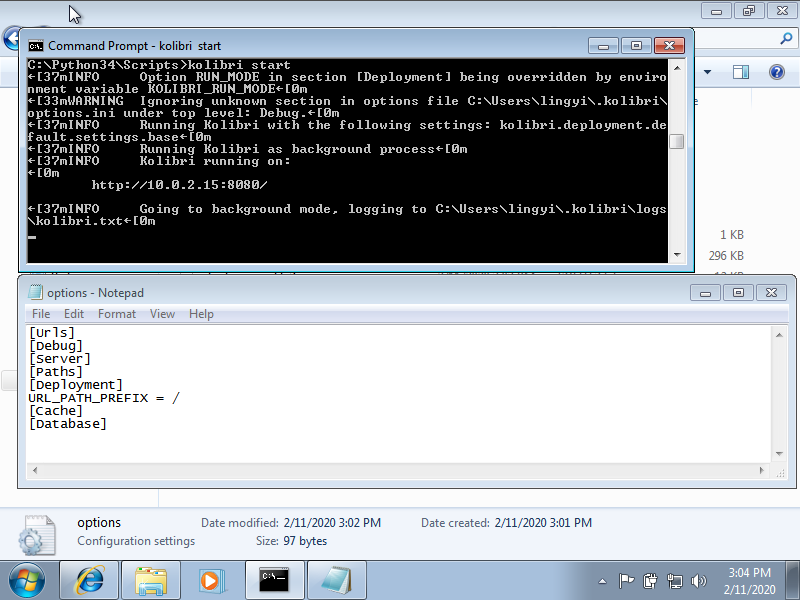
Do you recall if the error message occurred before or after the server started? Are there any steps I'm missing here? Thank you!
(removed CONTENT_DIR = D:\KolibriContent because it was complaining about the invalid path as you mentioned above)
lyw07
on 12 Feb 2020
removing from 0.13.1 milestone because there are still open questions. There might be multiple issues at play here. Seems like clarification is necessary?
indirectlylit
on 12 Feb 2020
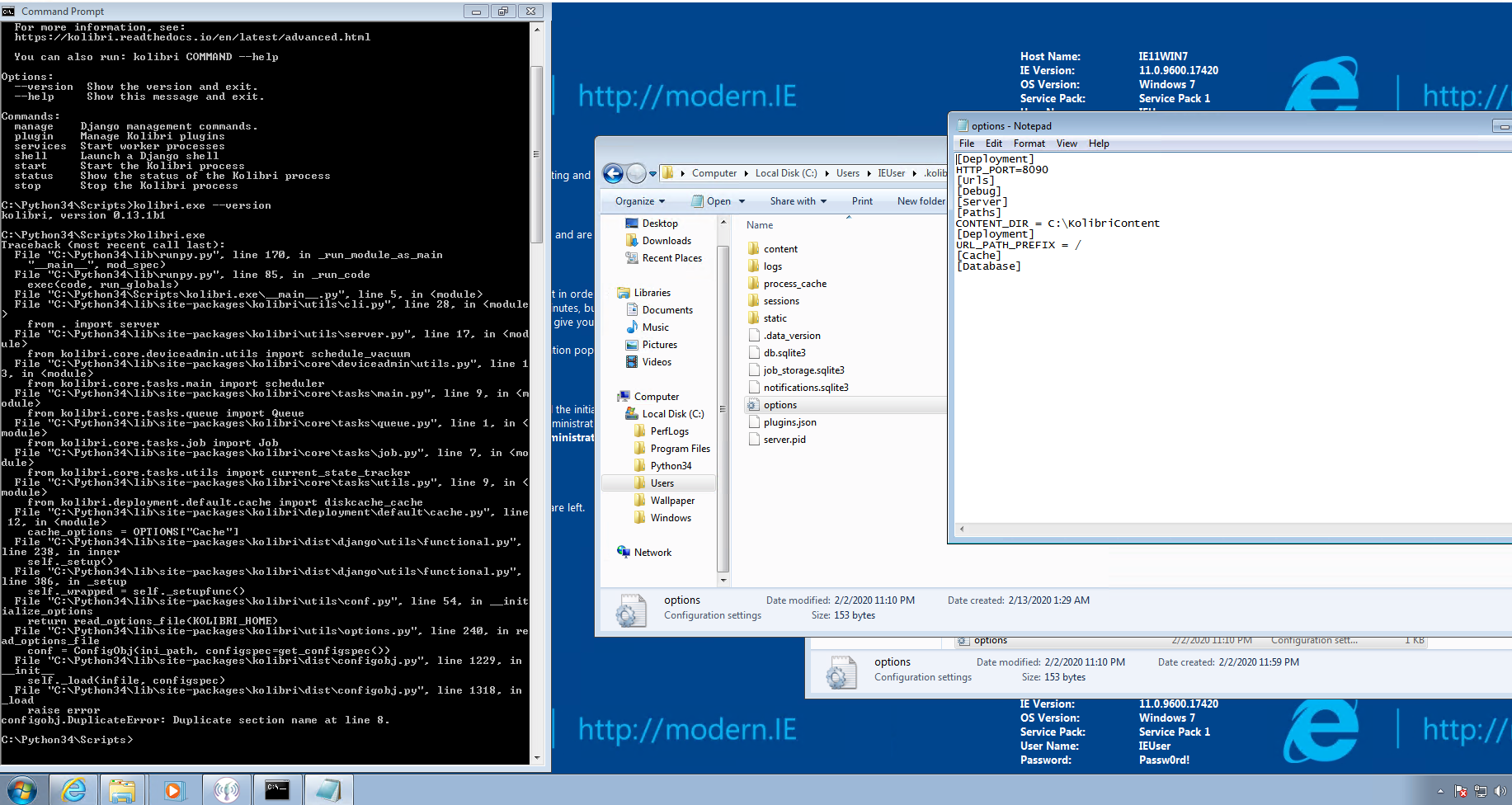
Do you recall if the error message occurred before or after the server started? Are there any steps I'm missing here? Thank you!
@lyw07 I think the cause of this error is that I have existing Deployment value when I copy the user .ini config.
mrpau-richard
on 13 Feb 2020
Seems the issue with configobj.DuplicateError: Duplicate section name at line 8. error is clarified.
It's unclear how the user from the forums got to have this options.ini file... :thinking:
When we first started documenting it on our docs (v0.11), the only 2 sections mentioned were [Deployment] and [Server], so the rest must have came from their own experimentation.
My guess is that this was not the first upgrade they performed, and in previous installs they probably had tried moving the content directory around from one drive to another (hence the line CONTENT_DIR = D:\KolibriContent) and forgot about it in the meantime (happens to me often with other programs :unamused:).
 radinamatic
on 13 Feb 2020
radinamatic
on 13 Feb 2020
Hi @mrpau-richard , thank you for testing! I notice that there are two sections [Deployment] in the options.ini file. Do you mind combining them into one and trying it again? Thank you so much!
Again, thank you both for looking into this. I agree that documentation and the default options.ini file would help a lot for users who haven't set up their customized options.ini file. We now just need to find ways to handle the cases when users have defined their own options.ini file... :)
lyw07
on 13 Feb 2020
Hi @mrpau-richard , thank you for testing! I notice that there are two sections [Deployment] in the options.ini file. Do you mind combining them into one and trying it again?
When I combined those two sections the error will gone and I confirmed that's the cause of configobj.DuplicateError: Duplicate section name at line 8.. I did not notice it during filling this issue, that I have these two [Deployment] sections on my options.ini 😟
mrpau-richard
on 14 Feb 2020
Related issues
radinamatic
·
5Comments
 rtibbles
·
6Comments
indirectlylit
·
3Comments
indirectlylit
·
3Comments
rtibbles
·
6Comments
indirectlylit
·
3Comments
indirectlylit
·
3Comments
 kollivier
·
4Comments
kollivier
·
4Comments