Kolibri: Radio buttons focus order - setup wizard, step 4
Summary
Testing keyboard navigation of the Setup Wizard - in step 4 the first option Self-managed is selected by default, but there is no way to select either of the remaining two by keyboard, because after grabbing the first, the focus next jumps to the Finish button.
System information
- Version:
kolibri-0.6.dev020171007224512-git.pex - Operating system: Ubuntu 17.04
- Browser: Chrome
Screenshots

 radinamatic
All 14 comments
Per the discussion here, it seems like the intended behavior was to use arrows to navigate radio buttons once the top one was focused, similar to a dropdown. Is that not the case?
 DXCanas
on 9 Oct 2017
DXCanas
on 9 Oct 2017
Seems like w3's buttons perform the same way? https://www.w3.org/WAI/tutorials/forms/grouping/
DXCanas
on 9 Oct 2017
Yes, it's unintuitive if you're used to tabbing through everything, but it seems like it is the correct behavior to tab _into_ the radio button group (so the group is a single form element), but to navigate _within_ the group, you have to use the arrow buttons (per the W3) doc. Also see https://stackoverflow.com/questions/14322564/can-you-tab-through-all-radio-buttons#14322755
 jonboiser
on 9 Oct 2017
jonboiser
on 9 Oct 2017
@DXCanas Just went through onboarding again and found something weird.
On Chrome, when you enter Step 4 for the first time, then press DOWN, the radio button goes from Option 1 straight to Option 3. Clicking DOWN again goes to Option 1, then it works as normal:
Times pressed DOWN
- Start at Option 1
- Option 3
- Option 1
- Option 2
- Option 3
jonboiser
on 9 Oct 2017
@DXCanas @jonboiser Thanks, I see you guys are way ahead of me! :+1:
I was carried away by trying to use the Tab key, but the discussion in the SO makes sense. However I can confirm that the down-arrow press jumps from Option 1 to Option 3 as noted by @jonboiser. The latest ARIA Practices doc indicate the following:
- When a radio group receives focus:
- If a radio button is checked, focus is set on the checked button.
- If none of the radio buttons are checked, focus is set on the first radio button in the group.
- Space: checks the focused radio button if it is not already checked.
- Right Arrow and Down Arrow: move focus to the next radio button in the group, uncheck the previously focused button, and check the newly focused button. If focus is on the last button, focus moves to the first button.
- Left Arrow and Up Arrow: move focus to the previous radio button in the group, uncheck the previously focused button, and check the newly focused button. If focus is on the first button, focus moves to the last button.
So I'm going to rename the title for this issue to reflect what actually needs to be fixed, that is the focus order when navigating between the radio buttons with arrow keys. :slightly_smiling_face:
radinamatic
on 10 Oct 2017
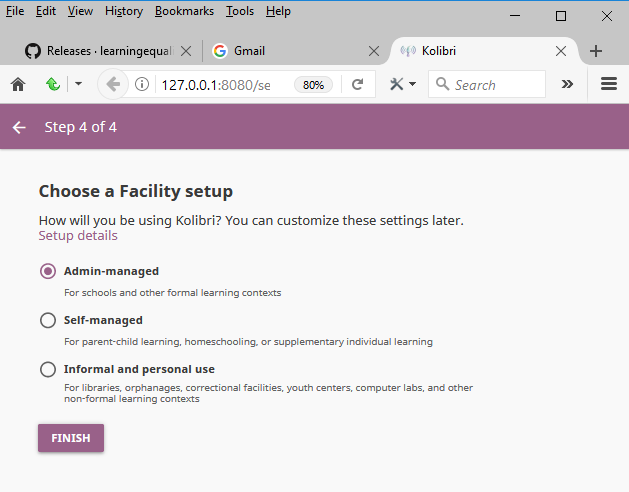
Testing the build from this PR, and the focus grab/order of the radio buttons with the arrow keys now seems OK in Chrome, but not yet in Firefox... :confused:
What seems to be happening in FF is that focus between radio buttons can still be moved with the Tab key, but without visual indication (no outline), and arrow keys do nothing. So once user enters the step 4, the Option 1 radio button is selected by default. When Tab key is pressed appears the outline, and the user should be now able to move among the rest of the radio button options with the arrow keys, but that is does not seem to happen. If, however, the Tab key is pressed again, visually nothing seems to happen, but the focus does shift to the Option 2, because if the Space bar is pressed, Option 2 radio button does become selected.
Another thing that I missed previously while testing this step, is that the Setup details link: a) does not seem like a link since it's not underlined, and b) is somehow skipped and cannot receive focus at all - when Shift+Tab is pressed, focus jumps from the radio button to the "Go back to previous step" arrow in the top left.
radinamatic
on 19 Oct 2017
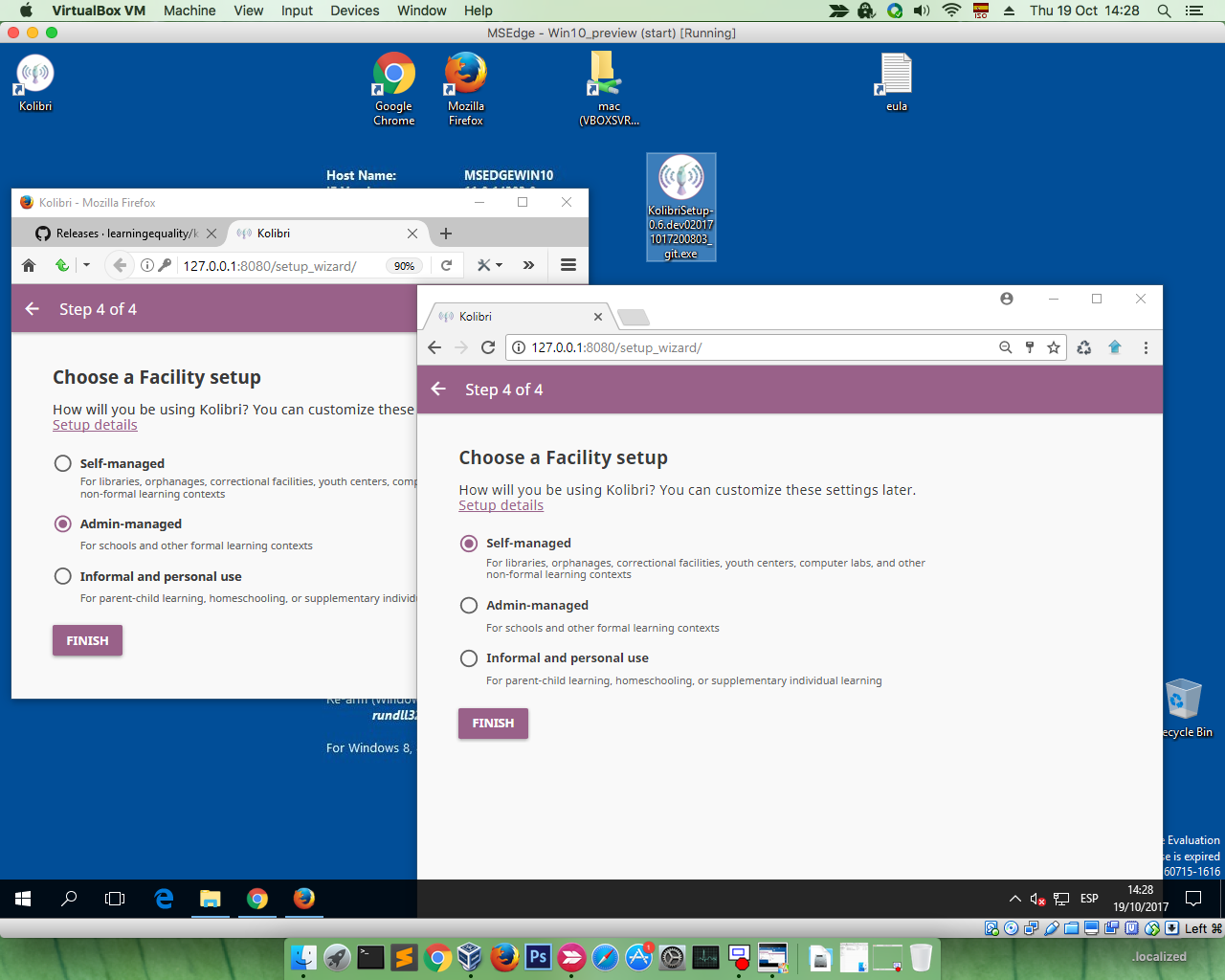
Testing the the build from this PR, and I see that the focus/underline for Setup details link is correct. I'm unsure if this one is more recent, and therefore there is no issue, or there's some regression going on... :thinking:
The order of options changed ("Admin-managed" first, "Self-managed" second) too, compared to the original issue, did you change that in between?
radinamatic
on 19 Oct 2017
the focus/underline for Setup details link is correct
intentionally changed here: https://github.com/learningequality/kolibri/pull/2376
The order of options changed ("Admin-managed" first, "Self-managed" second) too, compared to the original issue, did you change that in between?
intentionally changed here: https://github.com/learningequality/kolibri/pull/2301
 indirectlylit
on 19 Oct 2017
indirectlylit
on 19 Oct 2017
actually sorry, self-managed should be first. Wonder if that regressed.
indirectlylit
on 19 Oct 2017
A lot of this radio focus inconsistency is due to differences in keyboard handling for radios in browsers, along with issues with the k-radio-button. So in order to address this, there will have to be changes made to the k-radio-button.
 christianmemije
on 19 Oct 2017
christianmemije
on 19 Oct 2017
@indirectlylit The second shot was probably from the installer built with your onboarding styling PR merged, and the first one is not.
@christianmemije Ping me in when you start working on k-radio-button so I can pitch in with testing.
radinamatic
on 19 Oct 2017
I'll put this in 0.7 but i'm going to un-assign it so we don't start work on it immediately
indirectlylit
on 19 Oct 2017
OK. So It looks like we've got a couple issues wrapped in here:
- [ ] Can't reach details link with keyboard
- [ ] Firefox experience isn't consistent with chrome's
DXCanas
on 1 Dec 2017
some of this has been addressed by the PR above, and there's another open issue here: https://github.com/learningequality/kolibri/issues/2249
Let's open a new issue if necessary, and close this one since the scope is a bit wide-ranging.
indirectlylit
on 1 Dec 2017
Related issues
 jtamiace
·
5Comments
radinamatic
·
4Comments
jtamiace
·
5Comments
radinamatic
·
4Comments
 kollivier
·
4Comments
indirectlylit
·
3Comments
kollivier
·
4Comments
indirectlylit
·
3Comments
 mrpau-julius
·
4Comments
mrpau-julius
·
4Comments