Kolibri: [windows] Deleting channel does not delete ContentMetadata DB from filesystem
In reporting #1813, it was found that deleting a channel on the UI deletes the Channel Metadata object (temporarily), but not the sqlite3 db file on the filesystem. So when the server is restarted, the supposedly-deleted channel reappears.
Per @laurenlichtman 's report, it may be that in Windows, the python.exe process is locking the file from deletion or modification.
 jonboiser
All 13 comments
+1 for that hypotheses @jonboiser.
Here is the scenario: I imported a channel from a local USB drive, and then I wanted to delete the KOLIBRI_DATA folder from the USB drive, so I can test exporting channels, and got this:
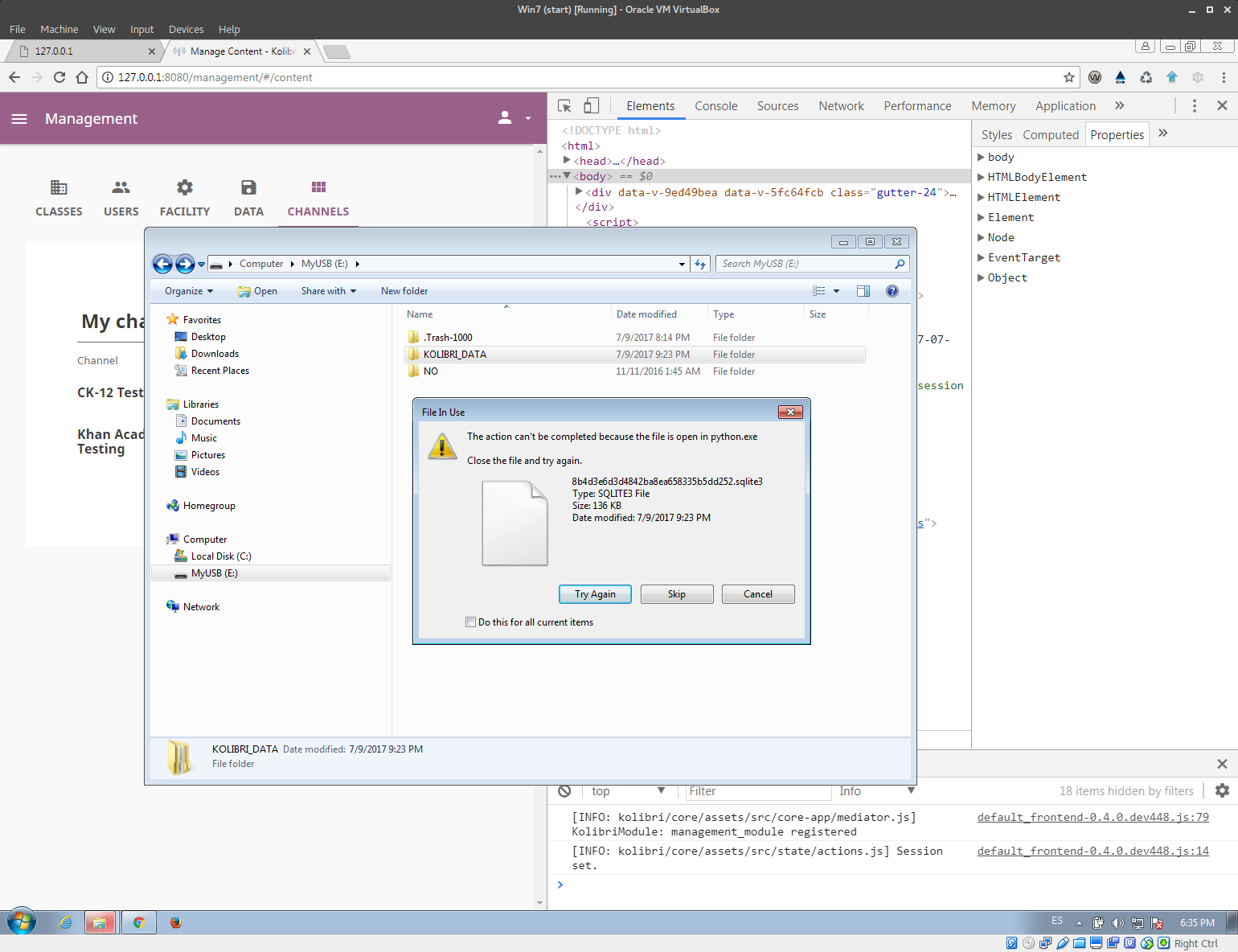
So python.exe process locks not only DBs inside ./kolibri/content/ folder, but also those on local drives from where the import function was performed.
 radinamatic
on 11 Jul 2017
radinamatic
on 11 Jul 2017
@radinamatic Having the server lock up files on a USB sounds like that might be a bug too. Are the files locked up even _after_ the import is over?
@aronasorman I did a quick search and saw some talk about using os.chmod to give permissions to delete. Does that sound reasonable?
jonboiser
on 11 Jul 2017
@jonboiser Yes, that screenshot is AFTER the import was finished (you can see the channels displayed behind the Explorer window).
radinamatic
on 11 Jul 2017
Still extant on v0.5.0-beta2: delete channel, it disappears from the UI, stop & restart the server, reload the Content page, channels are still there.
radinamatic
on 12 Jul 2017
@aronasorman @ivanistheone looks like we have had reports that DB files are still locked on the filesystem after import has completed. ^^
 rtibbles
on 31 Jul 2017
rtibbles
on 31 Jul 2017
However, it also looks like we are using os.remove about which @aronasorman gave us dire warnings: https://github.com/learningequality/kolibri/blob/release-v0.5.x/kolibri/content/api.py#L52 so it is possible that simply switching this for shutil.rmtree may be sufficient.
rtibbles
on 31 Jul 2017
After some initial testing, I can confirm that choosing remove channel from the Kolibri UI on windows, doesn't delete neither the files in storage nor the content db: https://github.com/ivanistheone/windows-testing/blob/master/debug_log_1.txt#L52
Looking into import from USB device locking now...
 ivanistheone
on 1 Aug 2017
ivanistheone
on 1 Aug 2017
Currently we do not delete any files from storage, as checking that files are not used across channels is too intensive, so this is expected behaviour.
Deletion of the content database is what we are aiming for.
rtibbles
on 1 Aug 2017
Confirmed USB device cannot be removed after import: https://github.com/ivanistheone/windows-testing/blob/master/debug_log_2.txt#L77
Will start looking into code now, with an eye for shutilsification.
ivanistheone
on 1 Aug 2017
For the deletion issue, which of the following messages gets displayed?
        if self.delete_content_db_file(pk):
            response_msg = 'Channel {} removed from device'.format(pk)
        else:
            response_msg = 'Channel {} removed, but no content database was found'.format(pk)
 jamalex
on 2 Aug 2017
jamalex
on 2 Aug 2017
@jamalex On Windows, we go into the else because this exception is thrown:
INFO 2017-08-03 17:05:27,467 api OSError occured [Error 32] The process cannot access the file because it is being used by another process: u'C:\\Users\\IEUser\\.kolibri\\content\\databases\\8ca4d9403d4d5d938b4aa498a24c8177.sqlite3'
I'm callingit quits for today. Tomorrow I might setup a dev enviroment on Windows because otherwise my debug-iteration is too slow (20 mins).
I've thrown everything at it today, and that <expletive> db file is still locked (only on Windows)! Works great on Mac.
I've done everything I can from the django process to close the DB connection, but it seems that neither of these work:
- closing the specific connection to the content DB
https://github.com/learningequality/kolibri/compare/develop...ivanistheone:bugfix/1818#diff-7def35e64d458ec55c3b953c13824d05R56 - closing all connections https://github.com/learningequality/kolibri/compare/develop...ivanistheone:bugfix/1818#diff-7def35e64d458ec55c3b953c13824d05R61
I'm starting to think that one of the Task Worker Threads is the culprit. Not the main one. Why would they be accessing the DBs though? Is it because annotation.update_channel_metadata_cache gets called form another thread? That will be the first thing to investigate tmrw morning. Or maybe something else accesses the content DB?
Why does this happen on Windows only and not on mac?
ivanistheone
on 4 Aug 2017
One thing to check:
- Is it the final remaining one after deleting all others that gets locked, or
- Is it the one that's currently activated and being used from the browser (when you go to Learn)?
If you restart the server process and go directly to the content management page, without passing through Learn, is it still locked?
I'm starting to think that one of the Task Worker Threads is the culprit.
Does it only happen if you've done a content transfer? I think that's the only time the workers actually do anything at the moment.
jamalex
on 4 Aug 2017
Should have been fixed in #1945
rtibbles
on 7 Aug 2017
Related issues
jonboiser
·
5Comments
jonboiser
·
5Comments
radinamatic
·
5Comments
radinamatic
·
4Comments
 indirectlylit
·
5Comments
indirectlylit
·
5Comments