Koalas: Databricks dataframe numpy implementation
Hi,
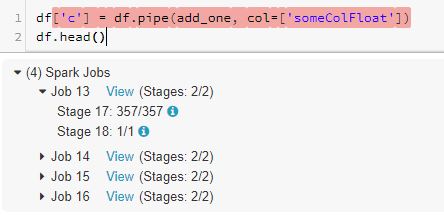
I am trying to to apply a basic numpy function on a koalas dataframe column. However, I keep getting the following error.
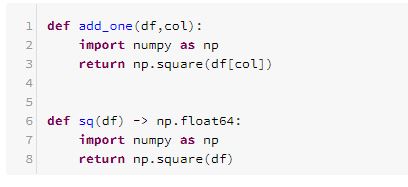
Here is what I have attempted so far:
1) read csv from Azure data lake using koalas
2) check dataframe is valid and not empty
3) check column is a float value and not an object
4) try both applymap and pipe as outlined in the docs
5) read.csv using spark and convert to Series using ks.Series('csvName') failed
6) sq is a Series func which i was hoping would work
is there a way to convert Dataframe to Series?
7) the final goal is to be able to use Scipy stats models on data.
Thank you and love this tool. Hopefully I am missing something obvious.

 wshBak
All 8 comments
5.5 Conda Beta (includes Apache Spark 2.4.3, Scala 2.11)
The following are installed locally on databricks notebook (not on the cluster)
dbutils.library.installPyPI("pandas", version='0.24.2')
dbutils.library.installPyPI("numpy", version='1.17.2')
dbutils.library.installPyPI("seaborn", version='0.9.0')
dbutils.library.installPyPI("scikit-learn", version='0.21.3')
dbutils.library.installPyPI("plotly", version=' 3.10')
dbutils.library.installPyPI("koalas", version='0.18.0')
wshBak
on 20 Sep 2019
thanks. I tried this. the second function above sq(df) is a Series function.
Unfortunately my data is in a dataframe once koalas reads it. I need a dataframe to series function for the apply() to work. Or a way to read the data in as a series from the csv and then use the function.
Series has a to_frame function. But Dataframe does not have an equivalent to_series function.
Also, my data is time series. So it would help to have access to it's timeseries module if the dataframe could be converted.
wshBak
on 20 Sep 2019
Sorry I removed my comment by mistake which was:
Have you tried
Series.apply?
 harupy
on 20 Sep 2019
harupy
on 20 Sep 2019
Is this what you want to do?
from databricks import koalas as ks  # 0.18.0
import numpy as np  # 1.16.2


def numpy_squre(col) -> np.float64:
  return np.square(col)


def sq(df, col) -> np.float64:
  return df[col].apply(numpy_squre)


kdf = ks.DataFrame({
  'x': [0, 1, 2],
})

kdf.pipe(sq, col='x')

########## output ##########

0    0.0
1    1.0
2    4.0
Name: x, dtype: float64
Hi, this worked! Thank you.
Can you please explain the logic behind why we need to write 2 'type hint' Series functions to implement a basic np.square function on a Dataframe?
Also, the data set I am working with is 40GB and converting it to Pandas Series and then to Koalas Series is not a feasible option. Is there a way I can minimize writing twice the code to implement external library functions on a Dataframe using Series apply ?
Thank you for the workaround!
wshBak
on 20 Sep 2019
Seems like pipe works without type hint. The code above can be shortened as
def numpy_squre(col) -> np.float64:
  return np.square(col)

kdf = ks.DataFrame({'x': [0, 1, 2]})
kdf.pipe(lambda df, col: df[col].apply(numpy_squre), col='x')
I used the same logic when I saw your first solution! Thanks!
wshBak
on 20 Sep 2019
Thanks for reporting this @wishcsdev and providing the solution @harupy
 HyukjinKwon
on 22 Sep 2019
HyukjinKwon
on 22 Sep 2019
Related issues
 mks2192
·
4Comments
mks2192
·
4Comments
 rodneyjoyce
·
4Comments
rodneyjoyce
·
4Comments
 ThiagoCM
·
3Comments
ThiagoCM
·
3Comments
 akhilanandbv003
·
5Comments
akhilanandbv003
·
5Comments
 brookewenig
·
5Comments
brookewenig
·
5Comments
Most helpful comment
Is this what you want to do?