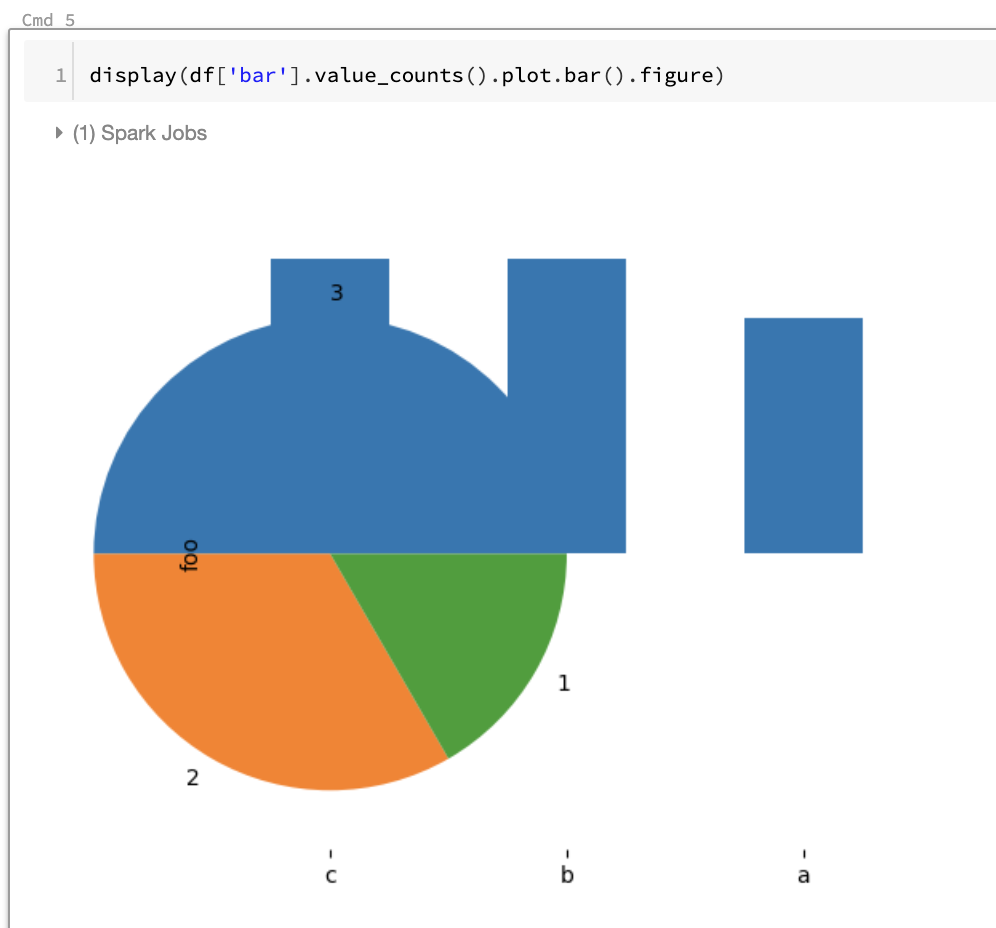
When I plot a DataFrame, then in a separate cell plot again, the first plot is not cleared.
I think the plots should be auto-cleared (e.g. plt.clf()).

 brookewenig
All 11 comments
@brookewenig
I failed to reproduce this issue. Did I miss something?
Environment
- Databricks Community Edition
- Runtime version: 6.0 beta
- koalas version: 0.17.0
- notebook: click here

 harupy
on 14 Sep 2019
harupy
on 14 Sep 2019
I digged into how display of 6.0 betaon Databricks works with the code below.
# print the source code of `display`
import inspect
lines = inspect.getsource(display)
print(lines)
The output says:
...

elif type(input).__module__ == 'matplotlib.figure' and type(input).__name__ == 'Figure':
    _format = 'png'
    extension = '.' + _format
    figureFile = NamedTemporaryFile(delete=False, suffix = extension)
    input.savefig(figureFile, format = _format, transparent = True)
    figureFile.close()
    # for pandasDF.plot to work well, need to close the figure, otherwise the same figure
    # will continued to be use across calls to pandasDF.plot.
    mpl.pyplot.close(input)
    self.figures.append(figureFile.name)
...
The full output is included in this notebook.
harupy
on 14 Sep 2019
I also checked display of 5.5 conda beta (which I think is older than 6.0 beta)
...

elif type(input).__module__ == 'matplotlib.figure' and type(input).__name__ == 'Figure':
    _format = 'png'
    extension = '.' + _format
    figureFile = NamedTemporaryFile(delete=False, suffix = extension)
    input.savefig(figureFile, format = _format, transparent = True)
    self.figure = figureFile.name
    figureFile.close()

...
As you can see, display of 6.0 beta has a couple of new lines to prevent this issue.
harupy
on 14 Sep 2019
I can reproduce almost the same result as @brookewenig on 5.5 conda beta.
harupy
on 14 Sep 2019
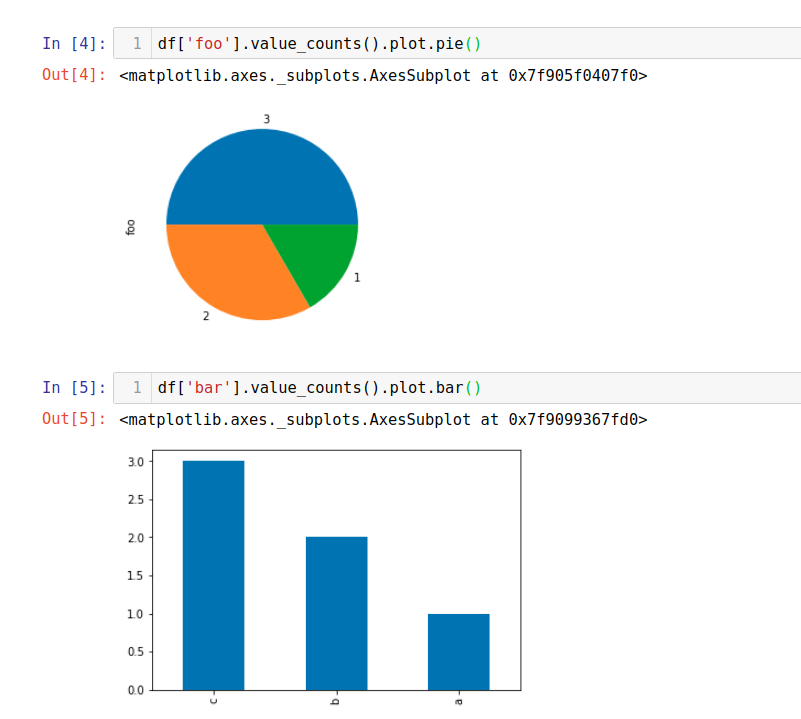
This issue doesn't happen on Jupyter (notebook).
harupy
on 14 Sep 2019
@harupy Thanks for the investigation!
Sounds like it's related to how the display function handles matplotlib.
Does that mean it happens even with pandas DataFrame?
 ueshin
on 14 Sep 2019
ueshin
on 14 Sep 2019
Yes, plots interfere even with pandas DF.
harupy
on 15 Sep 2019
Found why plots on different cells don't interfere on Juypter.
By default, the inline backend used in the IPython Notebook will close all
matplotlib figures automatically after each cell is run. This means that
plots in different cells won't interfere. Sometimes, you may want to make
a plot in one cell and then refine it in later cells.
harupy
on 15 Sep 2019
Quick workaround on Databricks runtime older than 6.0 is
import matplotlib.pyplot as plt

# call plt.close("all") after each cell is run
get_ipython().events.register('post_run_cell', lambda: plt.close('all'))
Ref.
https://ipython.readthedocs.io/en/stable/config/callbacks.html#ipython-events
Notebook
harupy
on 15 Sep 2019
Perfect analysis @harupy! Thank you so much.
 HyukjinKwon
on 16 Sep 2019
HyukjinKwon
on 16 Sep 2019
@brookewenig, I think workaround was provided properly and seems not an issue in koalas. Please let me know if you think further action is required for this ticket.
HyukjinKwon
on 16 Sep 2019
Related issues
 rodneyjoyce
·
4Comments
brookewenig
·
5Comments
rodneyjoyce
·
4Comments
brookewenig
·
5Comments
 akhilanandbv003
·
5Comments
ueshin
·
4Comments
akhilanandbv003
·
5Comments
ueshin
·
4Comments
 timhughes
·
3Comments
timhughes
·
3Comments